
1. Киришүү
Сатып алганыңыз үчүн рахматasing the RHM K666 Karaoke Machine. This portable system is designed to deliver powerful and clear sound with rich, deep bass, perfect for various occasions including home entertainment, parties, weddings, picnics, and outdoor activities. It features two wireless microphones, a long-lasting rechargeable battery, and multiple connectivity options. This manual will guide you through the setup, operation, maintenance, and troubleshooting of your new karaoke machine.
2. Пакеттин мазмуну
Пакетиңизде бардык буюмдар бар экенин текшериңиз:
- 1 x RHM K666 Karaoke Machine
- 2 x зымсыз колго кармалуучу микрофондор
- 1 х кубат адаптери
- 1 x заряддоо кабели (USB)
- 1 х AUX кабели
- 1 x User Manual

Image: The RHM K666 Karaoke Machine along with its included accessories: two wireless microphones, power adapter, charging cable, AUX cable, and user manual.
3. Продукт бүтүп калдыview
3.1 Негизги түзүлүштүн өзгөчөлүктөрү
The RHM K666 is a compact yet powerful karaoke machine. Its dimensions are approximately 13.86 x 7.87 x 6.89 inches, making it highly portable with a sturdy built-in handle. It features 2x15W tweeters and a 30W subwoofer for clear, loud sound and deep bass. A DSP chip ensures full-range surround stereo sound.

Сүрөт: алдыңкы view of the RHM K666 Karaoke Machine with a smartphone placed in the integrated holder, showcasing анын компакттуу дизайны.

Image: An exploded diagram illustrating the internal components of the RHM K666, highlighting the 15W tweeters and 30W subwoofer for high-quality stereo sound.
Видео: Бүттүview of the RHM K666 Karaoke Machine, highlighting its clear sound quality and various features.
3.2 Зымсыз микрофон
The system includes two wireless microphones made of metal material. Each microphone features controls for speaker volume, microphone volume, echo effect, and voice enhancement, allowing for convenient adjustments without needing to access the main unit. They are equipped with a 400mAh rechargeable battery, providing up to 6 hours of use.

Сүрөт: жакын план view of the two wireless microphones, showing their control buttons for volume, echo, and voice enhancement, along with an LED display.
3.3 Байланыш параметрлери
The RHM K666 supports multiple connection methods:
- Bluetooth: Смартфондорго, планшеттерге жана башка Bluetooth иштетилген түзмөктөргө зымсыз туташуу үчүн.
- 3.5mm AUX In: Аудио булактарына зымдуу туташуу үчүн.
- USB Drive: For playing music directly from a USB storage device.
- PC: Компьютерге туташуу үчүн.
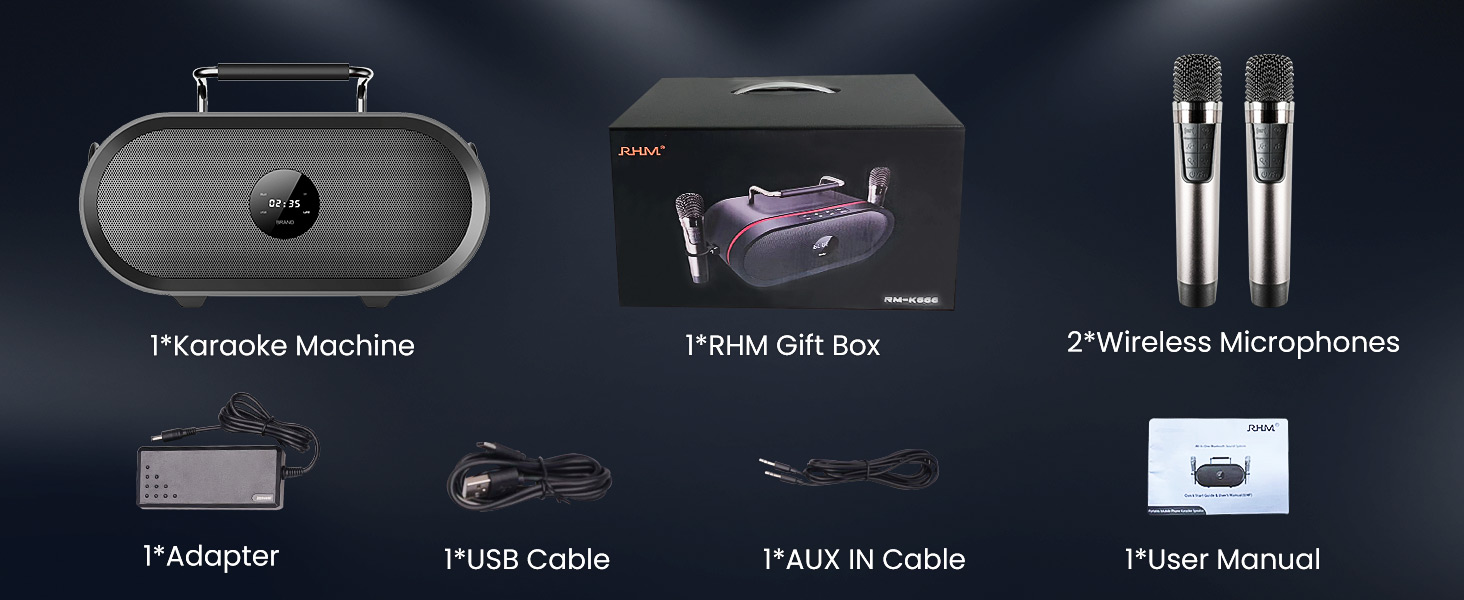
Image: A graphic illustrating the various connectivity options of the RHM K666 Karaoke Machine, including Bluetooth, AUX, USB, and PC.
4. Орнотуу
4.1 Алгачкы заряддоо
Before first use, fully charge the karaoke machine and both wireless microphones. The main unit's 4400mAh battery takes approximately 3 hours to fully charge and provides up to 8 hours of playtime. The microphones' 400mAh batteries last up to 6 hours.
4.2 Күйгүзүү/өчүрүү
- To power on the main unit, press and hold the power button on the top panel.
- To power on the microphones, press and hold the power button on each microphone.
- To power off, repeat the process for both the main unit and microphones.
4.3 Микрофонду жупташтыруу
The microphones are typically pre-synced with the speaker. If re-pairing is needed:
- Динамик өчүрүлгөнүн текшериңиз.
- Turn off one of the microphones.
- Hold the music decrease button and the power button on the remaining microphone to switch it between Mic 1 and Mic 2. Confirm one is Mic 1 and the other is Mic 2.
- With both microphones on, hold the music decrease button and the power button on both microphones simultaneously. The icons on both mics will flash.
- While the mic icons are still blinking (for approximately 20 seconds), turn on the speaker.
- The icons on both microphones will stop blinking after successful pairing. If not, please try to re-sync again.
Video: This video demonstrates the process of re-syncing the RHM K666 wireless microphones with the main speaker unit, providing a solution if the microphones are not working correctly.
4.4 Connecting Audio Source
- Bluetooth: Activate Bluetooth on your device and select "RM-K666" from the available devices list.
- AUX кирүүсү: Connect one end of the 3.5mm AUX cable to your audio source and the other end to the "AUDIO IN" port on the back of the karaoke machine.
- USB Drive: Insert a USB drive containing music files into the USB port on the back of the machine.
- PC: Connect the machine to your PC using a compatible cable.
5. Иштөө нускамалары
5.1 Basic Controls (Main Unit)
The top panel of the RHM K666 features intuitive controls:
- Көлөм +/-: Adjusts the overall speaker volume.
- Мурунку/Кийинки трек: Skips to the previous or next song.
- Ойнотуу/тындыруу: Музыка ойнотууну көзөмөлдөйт.
- Режим (M): Switches between input modes (Bluetooth, AUX, USB, PC).
- Power/Bluetooth (BT): Powers the unit on/off and activates Bluetooth pairing mode.
5.2 Микрофонду башкаруу
Each wireless microphone offers the following controls:
- Speaker Volume +/-: Adjusts the main speaker's volume directly from the microphone.
- Микрофондун үнү +/-: Adjusts the microphone's output volume.
- Эхо эффектиси: Cycles through different echo levels (up to 5 levels) or turns it off.
- Үндү жакшыртуу: Activates special voice effects.
- Power/Function (U/Fn): Powers the microphone on/off and may switch between functions.
Video: A demonstration of the echo effect feature on the RHM K666 Karaoke Machine's wireless microphones, showing how to adjust the echo levels.
5.3 Телефон/планшет кармагычын колдонуу
The integrated handle on the top of the unit doubles as a convenient stand for your smartphone or tablet, allowing you to easily view lyrics or control music while performing.
Image: The RHM K666 Karaoke Machine with a smartphone securely placed in the built-in holder on top of the unit, ready for use.
6. Техникалык тейлөө
- Keep the unit and microphones clean by wiping with a soft, dry cloth.
- Аппаратты экстремалдык температурага, тике күн нуруна же нымдуулукка дуушар кылуудан алыс болуңуз.
- Колдонулбаганда салкын, кургак жерде сактаңыз.
- Агрегатты өз алдынча бөлүүгө же оңдоого аракет кылбаңыз. Жардам алуу үчүн кардарларды колдоо бөлүмүнө кайрылыңыз.
7. Кыйынчылыктарды
| Көйгөй | Чечим |
|---|---|
| Динамиктен үн жок |
|
| Микрофондор иштебейт |
|
| Bluetooth байланышы көйгөйлөрү |
|
Video: A detailed guide on troubleshooting microphone issues, specifically addressing scenarios where the RHM K666 wireless microphones may not be functioning as expected.
8. Техникалык шарттар
| Өзгөчөлүк | Деталь |
|---|---|
| Модел | K666 |
| Чыгуу күчү | 55W (2x15W tweeters + 30W subwoofer) |
| Frequency Response | 35Гц - 20КГц |
| Электрдик импеданс | 4Ω |
| Power Specification | 15V 4ADC adaptor (110-240V, 50/60Hz) |
| Battery (Main Unit) | 4400mAh кайра заряддалуучу литий батарейка |
| Playtime (Main Unit) | 8 саатка чейин |
| Battery (Microphones) | 400mAh кайра заряддалуучу батарея |
| Playtime (Microphones) | 6 саатка чейин |
| Өлчөмдөр | 13.86 x 7.87 x 6.89 дюйм |
| Салмагы | 11.13 фунт |
| Байланыш | Bluetooth, 3.5mm AUX In, USB, PC |
9. Кепилдик жана колдоо
For warranty information and customer support, please refer to the contact details provided in your product packaging or visit the official RHM webсайт. Кепилдик дооматтары үчүн сатып алуу дүмүрчөгүңүздү сактаңыз.