
1. Киришүү
The Lepro PR902103-US Smart Table Lamp offers versatile lighting solutions for your home. This LED touch lamp features RGB color changing capabilities, tunable warm to cool white light, and dimmable brightness. It is designed for seamless integration with smart home ecosystems, supporting both Amazon Alexa and Google Assistant for voice control, as well as control via a dedicated mobile application. This manual provides comprehensive instructions for setup, operation, and maintenance.

Figure 1: Lepro Smart Table Lamp showcasing its app control interface.
2. Кутуда эмне бар
Таңгактын ичинде бардык компоненттер бар экенин текшериңиз:
- 1 x Lepro Smart Table Lamp (Model: PR902103-US)
- 1 x 4.9 ft USB Cable
- 1 х кубат адаптери
- 1 х Колдонуучунун колдонмосу (бул документ)
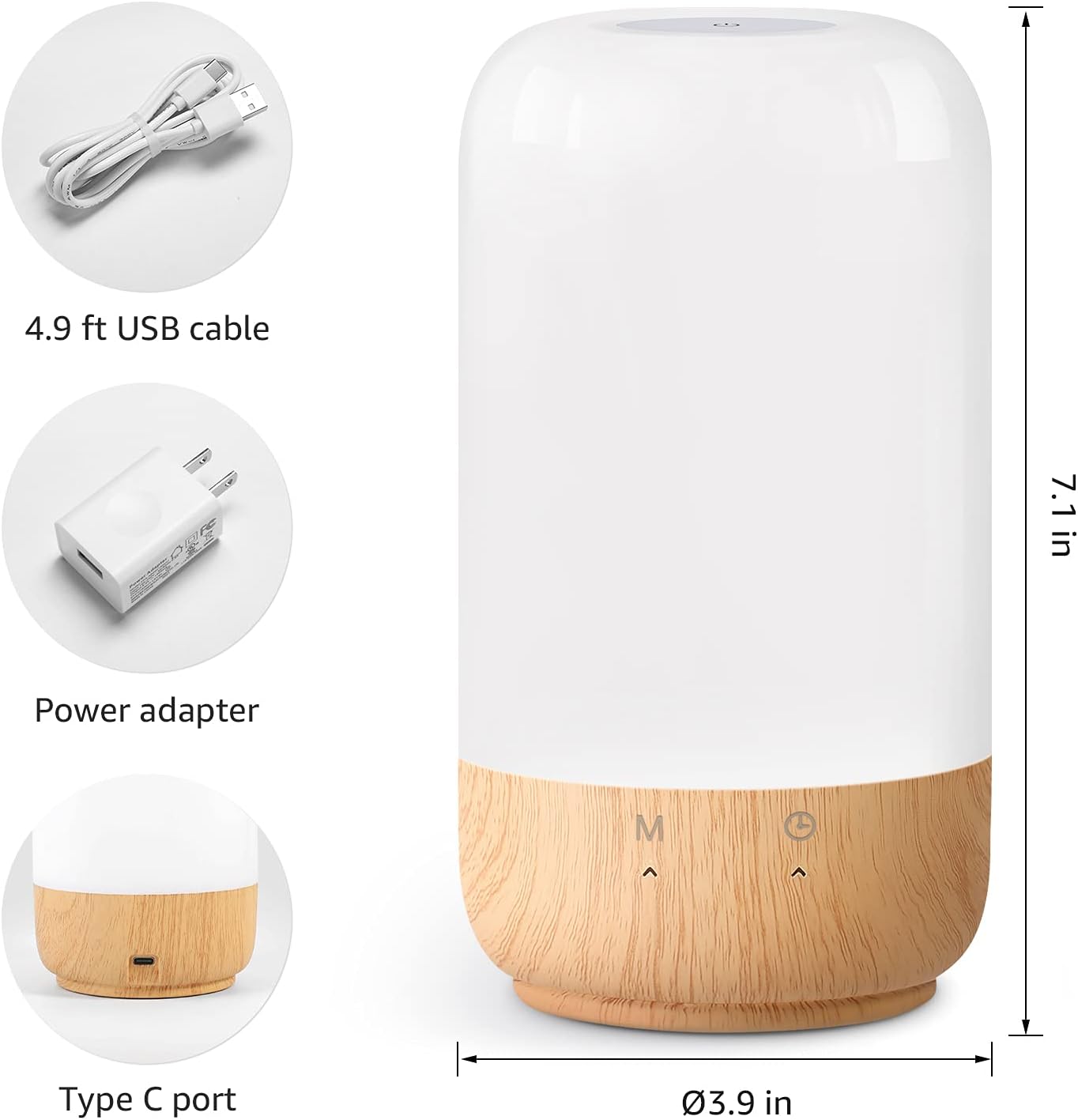
2-сүрөт: Кошулган компоненттер жана продуктунун өлчөмдөрү.
3. Орнотуу
Follow these steps to set up your Lepro Smart Table Lamp:
- Кубат туташуу: Берилген USB кабелин lamp's Type-C port and the power adapter. Plug the power adapter into a standard wall outlet. The lamp жарык кылат.
- Колдонмону жүктөө: Download the 'Lepro LampUX' app from your mobile device's App Store (iOS) or Google Play Store (Android).
- Каттоо эсеби: Open the 'Lepro LampUX' app and register a new account or log in if you already have one.
- Түзмөктү жупташтыруу:
- Колдонмодо "Түзмөк кошуу" баскычын же "+" сүрөтчөсүн таптаңыз.
- Select 'Table Lamp' from the lighting category.
- l камсыз кылууamp is powered on. Long press the timer button on the lamp's base for at least 5 seconds until the indicator light blinks rapidly.
- Колдонмодо индикатордун жарыгы тез-тез күйүп-өчүп жатканын текшерип, улантыңыз.
- Select your 2.4 GHz Wi-Fi network and enter the password. (Note: The lamp only supports 2.4 GHz Wi-Fi networks. If your router is 5 GHz, please set it to 2.4 GHz during setup.)
- The app will begin adding the device. Once successfully added, you can rename your lamp оңой идентификациялоо үчүн.
Video 1: Detailed steps on how to set up your Lepro Smart Lamp мобилдик тиркемени колдонуу.
4. Иштөө нускамалары
Лепро акылдуу стол Лamp can be controlled via touch, the mobile app, or voice commands.
4.1. Башкаруу элементтерине тийүү
- Күйгүзүү/өчүрүү: Short press the power button (marked 'M') on the lampнегизи.
- Жарыктыкты жөндөө: Slide your finger along the left side of the lamp's base to adjust brightness.
- Түс өзгөртүү (RGB): Slide your finger along the right side of the lamp's base to cycle through RGB colors.
- Режим которуу: Short press the timer button (clock icon) to switch between white light modes (warm white, cool white) and RGB color mode.
4.2. Mobile App Controls
The 'Lepro LampUX' app provides comprehensive control over your lamp:
- Brightness & Color Temperature: Adjust the brightness level and select color temperatures from 2700K (warm white) to 5700K (cool white).
- RGB түс тандоо: Колдонмодогу түс дөңгөлөгүн колдонуп, 16 миллион түстүн ичинен тандаңыз.
- Сахналар: Select from pre-set scenes like 'Night', 'Read', 'Meeting', 'Leisure', or customize your own scenes with specific colors and effects.
- Timer & Wake-up: l үчүн графиктерди коюуamp to turn on/off automatically. Utilize the 'Sunrise Simulation' feature to gradually increase light for a gentle wake-up.

Figure 3: Mobile application interface for controlling lamp орнотуулар.

4-сүрөт: lamp's timer and wake-up functions in use.
4.3. Үн менен башкаруу
Лепро акылдуу стол Лamp is compatible with Amazon Alexa and Google Assistant. To enable voice control:
- Сиздин l камсыз кылууamp is successfully paired with the 'Lepro LampUX' app.
- Amazon Alexa же Google Home колдонмосун ачыңыз.
- "Өндүмдөр жана оюндар" (Alexa) же "Google менен иштейт" (Google Башкы бет) бөлүмүнө өтүңүз.
- Издөө and enable the 'Lepro LampUX' skill/service.
- Link your 'Lepro LampUX' account with your Alexa/Google account.
- Байланышкандан кийин, сиз төмөнкү сыяктуу үн буйруктарын колдоно аласыз:
- "Алекса, күйгүз [L]amp аты]."
- "Окей Google, кой [Lamp Name] ак жылуу."
- "Alexa, өзгөрт [Лamp Аты] көккө."
- "Hey Google, dim [Lamp аты] 50% чейин."

Figure 5: Voice control integration with Amazon Alexa.
Video 2: Demonstration of the Lepro Smart Table Lamp working with Alexa and Google Home.
5. Техникалык тейлөө
To ensure the longevity and optimal performance of your Lepro Smart Table Lamp, please follow these maintenance guidelines:
- Тазалоо: Тазалоодон мурун электрди өчүрүңүз. л сүртүү үчүн жумшак, кургак чүпүрөктү колдонуңузamp's surface. Avoid using abrasive cleaners, solvents, or harsh chemicals, as these may damage the finish or electronic components.
- Сактагыч: Эгерде лamp узак убакыт бою, ал таза жана кургак болушу керек. Аны күн нурунан жана экстремалдык температурадан алыс салкын, кургак жерде сактаңыз.
- Колдонуу: Колдонуу lamp камкордук менен. Аны түшүрүүдөн же катуу таасирлерден сактаныңыз.
6. Кыйынчылыктарды
If you encounter issues with your Lepro Smart Table Lamp, төмөнкү жалпы көйгөйлөрдү жана чечимдерди караңыз:
| Көйгөй | Мүмкүн себеп | Чечим |
|---|---|---|
| Lamp күйбөйт. | Электр энергиясы жок. | Кубат адаптери розеткага бекем сайылганын текшериңизamp жана дубалдагы розетканы. Розетканын иштеп турганын текшериңиз. |
| Wi-Fi'га туташпай жатат. | Incorrect Wi-Fi band (5 GHz). Туура эмес сырсөз. Wi-Fi сигналы начар. | Ensure your Wi-Fi network is 2.4 GHz. Verify the Wi-Fi password. Move the lamp closer to your router. |
| Үн башкаруу иштебейт. | Skill not enabled/linked. Incorrect device name. | Ensure the 'Lepro LampUX' skill is enabled and linked in your Alexa/Google Home app. Use the exact device name configured in the app. |
| Lamp жооп бербейт. | Убактылуу программалык ката. | lamp from the power outlet for 10 seconds, then plug it back in to perform a soft reset. |
7. Техникалык шарттар
| Өзгөчөлүк | Деталь |
|---|---|
| Бренд | Лепро |
| Модель номери | PR902103-US |
| Продукциянын өлчөмдөрү | 3.9"D x 3.9"W x 7.1"H |
| Элемент Салмагы | 1.19 фунт |
| Материал | Пластик, жыгач |
| Жарык булагы түрү | LED |
| Ватtage | 7 ватт |
| Жарыктык | 350 Lumen |
| Ачык түс | RGB + CCT (Tunable White 2700-5700K) |
| Башкаруу ыкмасы | App, Touch, Voice (Alexa, Google Assistant) |
| Байланыш | 2.4 ГГц WiFi гана |
| Ички/тышкы колдонуу | Indoor |
8. Кепилдик жана колдоо
Lepro products are designed and manufactured to the highest quality standards. For warranty information and technical support, please refer to the contact details provided on the product packaging or visit the official Lepro webсайт. Сатып алуу квитанциясын кепилдик дооматтары үчүн сатып алуунун далили катары сактаңыз.