
Segotep GM1250W
Segotep GM1250W ATX 3.0 Gaming Power Supply User Manual
Model: GM1250W | Brand: Segotep
1. Киришүү
Thank you for choosing the Segotep GM1250W ATX 3.0 Gaming Power Supply. This fully modular power supply is designed to provide stable and efficient power for high-performance gaming systems, featuring 80 PLUS Gold certification, PCIe 5.0 readiness, and advanced cooling technologies.
Негизги өзгөчөлүктөрү:
- ATX 3.0 жана PCIe 5.0 даяр: Supports up to 200% total power excursion and 300% GPU power excursion, ensuring compatibility with the latest graphics cards like NVIDIA 4000 series.
- 80 PLUS Алтын тастыкталган: Achieves 91.8% ultra-high power efficiency at typical loads, reducing energy consumption and heat generation.
- 140мм гидротехникалык подшипник желдеткичи: Features a durable hydraulic bearing spindle for significantly reduced operating noise and an extended lifespan of up to 100,000 hours.
- Fully Modular Cable Design: Allows for cleaner cable management and improved airflow by using only the necessary cables.
- AI Cooler Technology: Intelligent fan speed adjustment for near-silent operation below 40% Thermal Design Power (TDP) and optimized cooling at higher loads.
- DC-to-DC Conversion: Resonant LLC topology with DC-to-DC conversion provides clean, consistent power and reduces coil whine.
2. Коопсуздук маалыматы
Please read and understand all safety instructions before installing or operating the power supply. Failure to do so may result in injury or damage to the product or other components.
- Орнотуу: Always ensure all other computer components are correctly installed before installing the power supply.
- Кабелдик байланыштар: Verify that all power supply cables are securely and stably fixed to their respective components. Loose connections can cause system instability or damage.
- Вентиляция: Ensure adequate airflow around the power supply to prevent overheating. Do not block the fan or ventilation openings.
- Кубат булагы: Кубат булагын туура вольттогу жерге туташтырылган электр розеткасына гана туташтырыңызtage as specified on the unit.
- Нымдуулук: Электр булагына суу же ашыкча нымдуулук тийгизбеңиз.
- Демонтаж: Электр менен камсыздоо блогун ачпаңыз. Жогорку томtages ичинде бар жана колдонуучу тейлей турган бөлүктөр жок. Аппаратты ачуу кепилдикти жокко чыгарат.
The Segotep GM1250W includes full guardian circuit protections to keep your hardware safe, including Over Voltage Protection (OVP), Over Current Protection (OCP), Over Power Protection (OPP), Short Circuit Protection (SCP), Over Temperature Protection (OTP), and Under Voltage Protection (UVP).
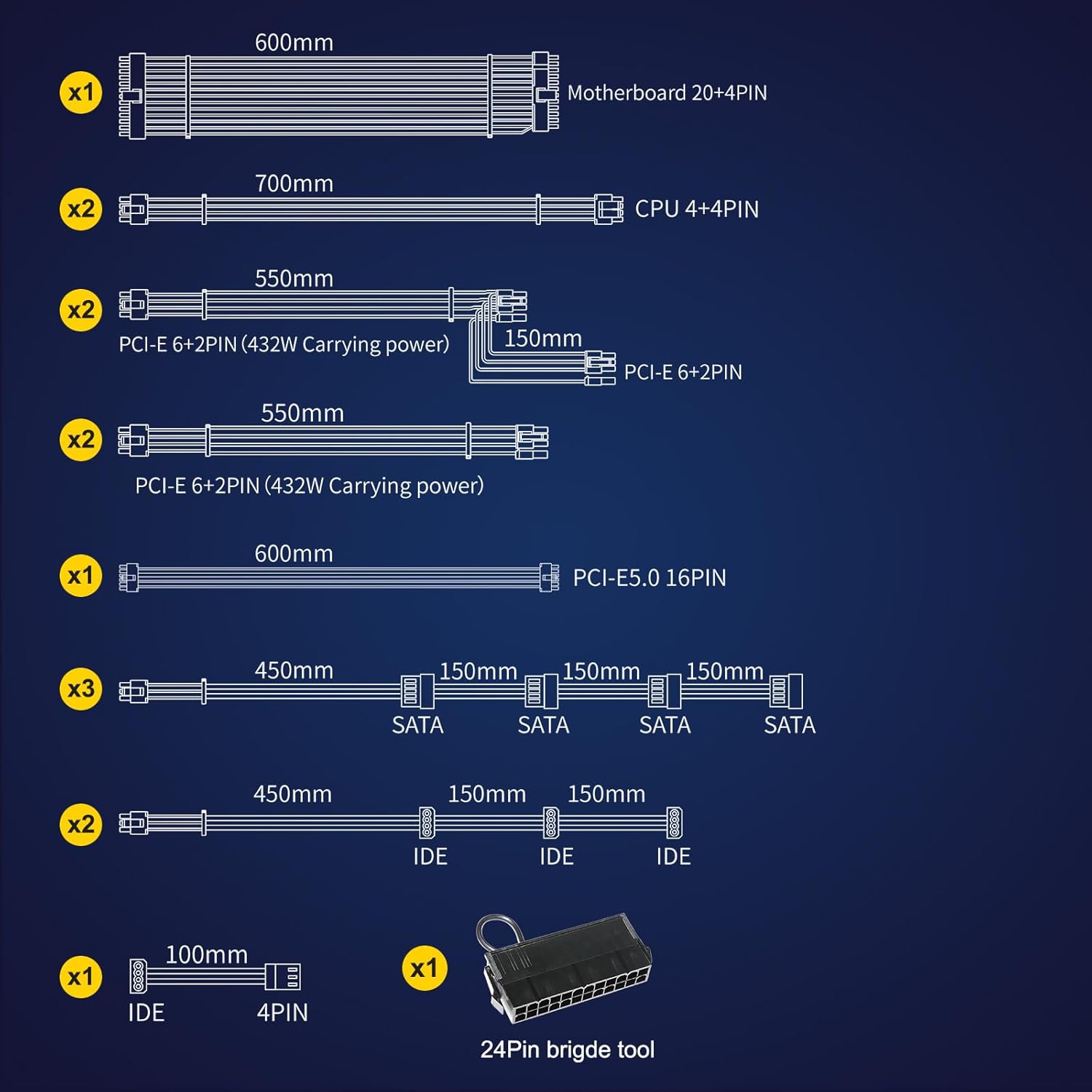
Figure 2.1: Comprehensive Safety Protections
3. Орнотуу жана орнотуу
The Segotep GM1250W features a fully modular design, allowing you to connect only the cables required for your system, which helps reduce clutter and improve airflow within your PC case.
3.1 Кутудан чыгаруу жана компоненттер
Upon unboxing, you will find the power supply unit, a power cord, and a set of modular cables. Ensure all components are present and undamaged.

Figure 3.1: Segotep GM1250W Power Supply and Box

Figure 3.2: Included Modular Cables and 24-Pin Bridge Tool
3.2 Орнотуу кадамдары
- PSU орнотуу: Secure the power supply unit into the designated PSU bay in your computer case using the provided screws.
- Негизги кубаттуулукту туташтыруу: Connect the 20+4 pin ATX motherboard cable to your motherboard.
- CPU кубатын туташтыруу: Connect the 4+4 pin CPU power cable(s) to the CPU power connector(s) on your motherboard.
- Connect PCIe Power (Graphics Cards):
- For traditional graphics cards, use the 6+2 pin PCIe cables. The PSU provides multiple 6+2 pin PCIe connectors.
- For NVIDIA RTX 40 series and newer GPUs requiring high power, use the dedicated 12VHPWR (PCIe 5.0 16-pin) cable. This connector can deliver up to 600W of power.

Figure 3.3: PCIe 5.0 12VHPWR Connection
- Connect SATA/IDE Devices: Connect SATA power cables to your SSDs, HDDs, or optical drives. Use IDE (Molex) cables for older peripherals or fan hubs if needed.
- Кабелдик башкаруу: Utilize the fully modular design to route cables efficiently, improving airflow and aesthetics.
- Күйгүзүү: Once all connections are secure, connect the AC power cord to the PSU and a wall outlet. Flip the power switch on the PSU to the 'ON' position.
3.3 Продукт бүттүview

Figure 3.4: ATX 3.0 & PCIe 5.0 Ready Features

Figure 3.5: 140mm Hydraulic Bearing Fan

Figure 3.6: 80 PLUS Gold Efficiency
3.4 Расмий продукт Video
Video 3.1: Official Segotep GM1250W Show Video. This video provides a visual overview of the power supply unit and its features.
4. Иштөө нускамалары
4.1 AI Cooler Technology
The Segotep GM1250W incorporates original AI Cooler technology for intelligent fan speed management. This feature optimizes cooling performance while minimizing noise:
- Low Load Operation: When the Thermal Design Power (TDP) is below 40%, the fan automatically adjusts its speed to operate completely below 800 RPM, ensuring near-silent operation.
- High Load Operation: When TDP exceeds 40%, the fan speed automatically adjusts to a range of 800-1500 RPM to maintain optimal temperature control for critical components. This keeps the power supply cooler while generating less noise compared to traditional fan controls.
5. Техникалык тейлөө
Proper maintenance ensures the longevity and optimal performance of your Segotep GM1250W Power Supply.
- Тазалоо: Regularly clean the exterior of the power supply and its fan grille to prevent dust buildup. Use a can of compressed air to gently clear dust from the fan blades and internal components. Ensure the power supply is turned off and unplugged before cleaning.
- Экологиялык шарттар: Operate the power supply in a well-ventilated area with stable temperature and humidity. Avoid extreme temperatures or dusty environments.
- Кабелдик текшерүү: Periodically check all modular cable connections to ensure they remain secure and free from damage.
6. Кыйынчылыктарды
If you encounter issues with your Segotep GM1250W Power Supply, refer to the following common troubleshooting steps:
- Кубат жок / Система иштебей жатат:
- Ensure the AC power cord is securely plugged into both the power supply and a working wall outlet.
- PSU артындагы кубат которгучу "ON" абалында экенин текшериңиз.
- Check all modular cable connections (20+4 pin ATX, CPU, PCIe, SATA) to ensure they are firmly seated at both the PSU and component ends.
- Дубалдагы розеткада кубат бар экенин ырастоо үчүн башка аспап менен сынап көрүңүз.
- Системанын туруксуздугу / Кокус өчүрүүлөр:
- Ensure all cables are securely connected. Loose connections are a common cause of instability.
- Verify that your system's power requirements do not exceed the 1250W capacity of the PSU. While the PSU can handle power excursions, sustained overload can cause issues.
- Компоненттердин, анын ичинде PSUнун ашыкча ысып кетүүсүнө жол бербөө үчүн, компьютериңиздин корпусунда туура вентиляцияны текшериңиз.
- Fan Not Spinning (at low load):
- The AI Cooler technology may keep the fan off or at very low RPMs under low system load for silent operation. This is normal behavior. The fan will spin up as the load increases.
- адаттан тыш үндөр:
- Эч кандай кабель вентилятордун линияларына тоскоол болбогонун текшериңиз.
- If coil whine is present, it is often a characteristic of high-performance power supplies and typically does not indicate a fault. The DC-to-DC conversion in this PSU is designed to minimize it.
If issues persist after following these steps, please contact Segotep customer support for further assistance.
7. Техникалык шарттар
| Өзгөчөлүк | Спецификация |
|---|---|
| Бренд | Сеготеп |
| Модел | GM1250W |
| Чыгуу Wattage | 1250 Ватт |
| Форма фактору | ATX |
| Энергия менен жабдуунун дизайны | Толук модулдук |
| Натыйжалуулуктун сертификациясы | 80 PLUS Gold |
| Муздатуу ыкмасы | Аба (140 мм гидравликалык подшипник желдеткичи) |
| Шайкеш түзмөктөр | Персоналдык компьютер |
| Туташтыргычтын түрлөрү | 2×CPU 8pin, 6×PCIe 8pin, 6×SATA, 1×PCIe 5.0 16pin (12VHPWR) |
| Туташтыргычтардын саны | 14 (various types) |
| Продукциянын өлчөмдөрү (L x W x Y) | 14.37 x 5.31 x 8.39 дюйм |
| Салмагы | 8.56 фунт |
| Дата биринчи жеткиликтүү | 11-январь, 2021-жыл |
8. Кепилдик жана колдоо
Segotep products are known for their quality and reliability. Based on customer feedback, Segotep generally offers a strong warranty and responsive customer support for their power supplies.
For specific warranty terms and conditions, please refer to the official documentation included with your product or visit the official Segotep webсайт. Кепилдик дооматтар үчүн сатып алганыңыздын далилин сактаңыз.
8.1 Кошумча ресурстар
- Колдонуучунун колдонмосу (PDF): For a downloadable version of the user manual, please refer to the official product page or the provided link: Segotep GM1250W User Manual PDF
- Segotep Official Store: Explore other Segotep products and find more support information at the official store: Segotep Amazon Store
Ask a question about this manual
Ask about setup, troubleshooting, compatibility, parts, safety, or missing instructions. Manuals+ will review the question and use this page’s manual context to help answer it.