Introduction
The Konftel CAM 10 is a professional USB webcam designed for high-quality video conferencing and streaming. It features 1080p Full HD resolution, dual microphones for clear audio, and a built-in privacy screen for enhanced security. This manual provides detailed instructions for setting up, operating, maintaining, and troubleshooting your Konftel CAM 10 Webкамера

Сүрөт 1: Алдыңкы view of the Konftel CAM 10 Webкамера
Кутуда эмне бар
Сураныч, пакеттин мазмунун текшерип, бардык буюмдар бар экенин текшериңиз:
- Konftel CAM 10 Webcam (with integrated USB cable)

Figure 2: Integrated USB 2.0 cable for connection.
Жайгашуу
Follow these steps to set up your Konftel CAM 10 Webкамера:
Жайгашкан жери: жайгаштырыңыз webcam on top of your monitor, laptop screen, or a tripod. The integrated mount allows for flexible placement.

3-сүрөт: The webcam features a standard tripod thread for versatile mounting options.
Компьютерге туташуу: Plug the integrated USB cable from the Konftel CAM 10 into an available USB 2.0 port on your computer. The webcam is plug-and-play, meaning it does not require additional driver installation for most operating systems (Windows, macOS, Linux).
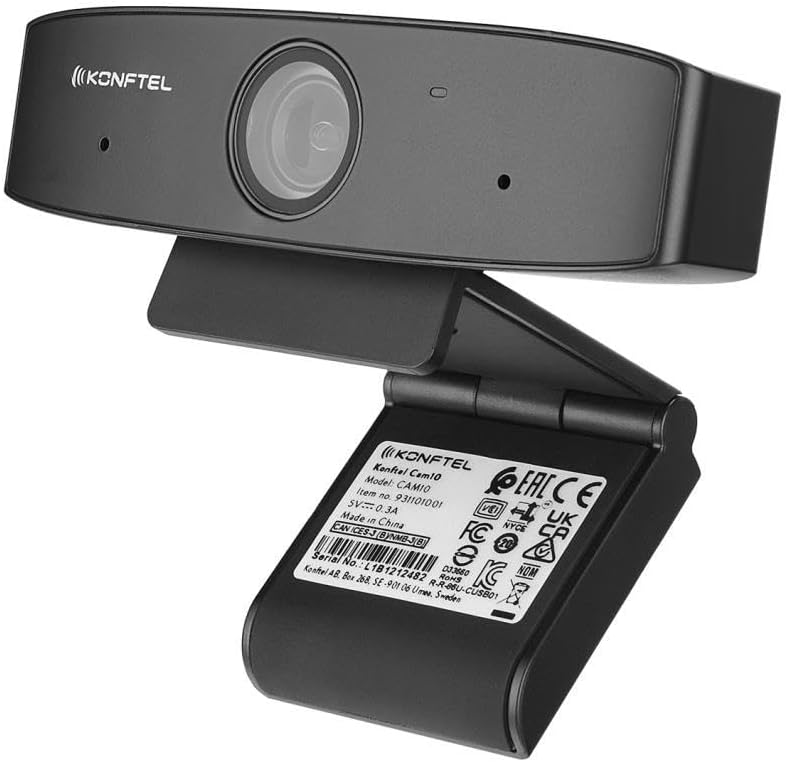
4-сүрөт: Арткы view displaying product information and USB cable connection point.
Программалык камсыздоону таануу: Сиздин компьютер автоматтык түрдө аныкташы керек webcam. You can verify this in your operating system's device manager or sound/video settings. For video conferencing applications (e.g., Zoom, Microsoft Teams, Google Meet), select "Konftel CAM 10" as your preferred camera and microphone device.
Иштөө нускамалары
The Konftel CAM 10 is designed for ease of use. Here are key operational aspects:
Видеонун сапаты: The webcam supports 1080p Full HD video resolution, providing clear and sharp images for your calls and recordings. Ensure your video conferencing software is set to the highest available resolution for optimal performance.
Аудио: Equipped with dual microphones, the CAM 10 captures clear audio, reducing background noise. Position the webcam appropriately to ensure your voice is picked up effectively.
Privacy Screen: The Konftel CAM 10 features a built-in mechanical privacy screen. To activate or deactivate the privacy screen, slide the small tab located above the lens. This physically blocks the camera lens, ensuring your privacy when the webкамера колдонулбайт.

5-сүрөт: Каптал view highlighting the integrated privacy slider for the camera lens.
Индикатор жарыгы: An LED indicator light on the webcam will illuminate when the camera is active and in use by an application.
Техникалык тейлөө
To ensure the longevity and optimal performance of your Konftel CAM 10 Webкамераны тейлөө үчүн, төмөнкү техникалык тейлөө көрсөтмөлөрүн аткарыңыз:
- Тазалоо: Use a soft, dry, lint-free cloth to clean the camera lens and body. For stubborn smudges on the lens, a slightly dampened microfiber cloth can be used, followed by a dry one. Avoid using harsh chemicals, solvents, or abrasive cleaners.
- Сактагыч: Колдонулбаган учурда, дүкөндү сактаңыз webкамераны таза, кургак жерде, өтө жогорку температурадан жана түз күн нурунан алыс сактаңыз.
- Кабельге кам көрүү: Do not bend or crimp the USB cable excessively. Always grasp the plug, not the cable, when disconnecting from your computer.
Проблемаларды чечүү
If you encounter issues with your Konftel CAM 10 Webкамера, төмөнкү кеңири таралган көйгөйлөргө жана чечимдерге кайрылыңыз:
| Көйгөй | Мүмкүн болгон себеп / Чечим |
|---|---|
| No video output / Camera not detected |
|
| No audio input / Microphone not working |
|
| Видеонун сапаты начар |
|
Техникалык шарттар
| Өзгөчөлүк | Деталь |
|---|---|
| Модель номери | 931101001 |
| Video Resolution | 1080p толук HD |
| Байланыш | USB 2.0 |
| Микрофондор | Кош микрофондор |
| Купуялык функциясы | Built-in privacy screen |
| Монтаждоо | Integrated clip/stand, Thread for tripod mount |
| Продукциянын өлчөмдөрү | 1.21 x 4.65 x 1.46 дюйм |
| Элемент Салмагы | 5.8 унция |
| Өндүрүүчү | KONFTEL |
| Биринчи жеткиликтүү күн | 15-февраль, 2021-жыл |
Кепилдик жана колдоо
For warranty information and technical support, please refer to the official Konftel webсайтка же кардарларды тейлөөгө кайрылыңыз. Сатып алуу квитанциясын кепилдик дооматтары үчүн сатып алуунун далили катары сактаңыз.
For further assistance, you may visit the Konftel support page or contact their customer service directly. Please have your product model number (931101001) and serial number ready when contacting support.