
Introduction
This manual provides detailed instructions for the safe and effective use of your HealthSmart Digital Touchless Infrared Thermometer. Designed for both adults and children, this device offers clinically accurate temperature readings without physical contact, making it ideal for quick and hygienic measurements. It can measure forehead, object, and ambient (air) temperatures.

Figure 1: HealthSmart Digital Touchless Infrared Thermometer, front view.
Маанилүү коопсуздук маалыматы
- Read all instructions carefully before using the thermometer.
- This thermometer is intended for household use only. It is not a substitute for professional medical advice.
- Аппаратты балдар жана үй жаныбарлары жетпеген жерде сактаңыз.
- Термометрди сууга же башка суюктуктарга салбаңыз.
- Аппаратты жерге түшүрүүдөн же катуу таасирлерден сактаныңыз.
- Термометрди өз алдынча бөлүктөргө бөлүүгө же оңдоого аракет кылбаңыз.
- Диеталык кошулмаларга байланыштуу билдирүүлөр FDA тарабынан бааланган эмес жана диагноз коюу, дарылоо, айыктыруу же кандайдыр бир ооруну же ден соолуктун абалын алдын алуу үчүн арналган эмес.
Продукт бүттүview
Familiarize yourself with the components and display indicators of your thermometer.
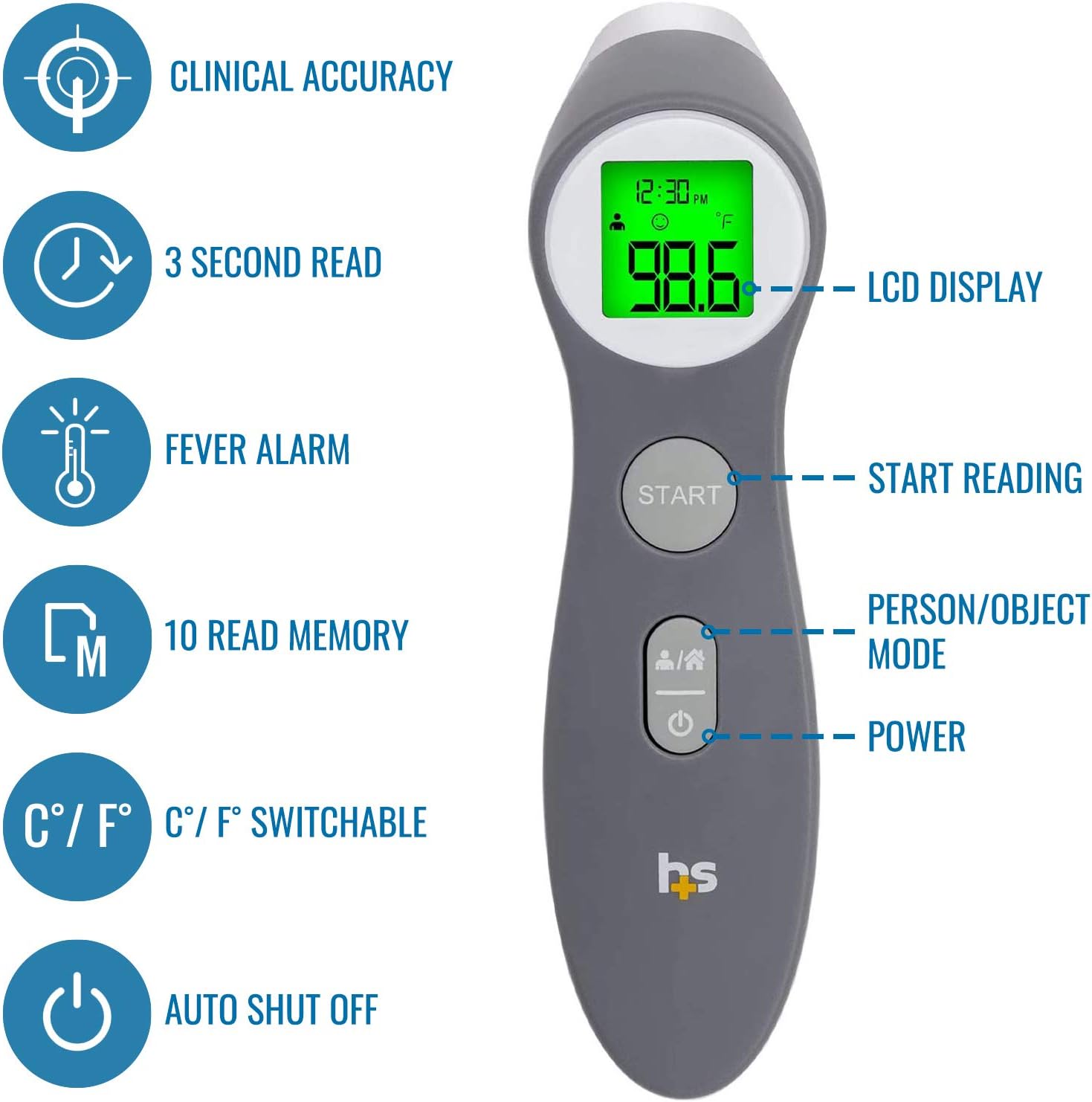
Figure 2: Key features of the thermometer, including LCD display, start button, person/object mode button, and power button.

3-сүрөт: Детальдуу view of the informative LCD display, showing mode, date/time, battery level, memory, Celsius/Fahrenheit indicator, and temperature reading.
Жайгашуу
1. Батареяны орнотуу
The thermometer requires two AAA batteries (included). Open the battery compartment cover located at the back of the handle, insert the batteries according to the polarity indicators, and close the cover securely.
2. Initial Settings (Time, Date, Year)
Upon first use or after battery replacement, the thermometer may prompt you to set the time, date, and year. Follow the on-screen instructions to adjust these settings. This feature helps in tracking temperature readings over time.
3. Fahrenheit/Celsius Selection
The thermometer allows you to switch between Fahrenheit (°F) and Celsius (°C) units. Refer to the device's specific button or menu option (often a dedicated button or a combination of buttons) to toggle between these units as per your preference.
Иштөө нускамалары
1. Measuring Body Temperature (Forehead)
- Ensure the thermometer is in body measurement mode (indicated by a person icon on the display). If not, press the "Person/Object Mode" button to switch.
- Position the thermometer approximately 1 to 3 inches (2.5 to 7.5 cm) from the center of the forehead.
- басыңыз START баскычы.
- Hold steady until you hear a beep, indicating the measurement is complete. The temperature will be displayed on the screen.
- The screen backlight will change color to indicate temperature status:
- Жашыл: Normal temperature (under 99.1°F / 37.3°C)
- Ачык күрөң: Low fever (under 100°F / 37.8°C)
- Кызыл: High fever (above 100°F / 37.8°C)

Figure 4: Proper technique for measuring forehead temperature on a child.

Figure 5: Visual representation of the three-color indicator for temperature readings: Green (Normal), Orange (Low Fever), and Red (High Fever).
2. Measuring Object or Air Temperature
- Press the "Person/Object Mode" button to switch to object measurement mode (indicated by a house icon on the display).
- Point the thermometer at the object or air space you wish to measure.
- басыңыз START баскычы.
- The temperature will be displayed. This mode is useful for checking the temperature of baby bottles or bathwater.
3. Эстутумду кайра чакыруу
The thermometer stores up to 10 previous readings. To access these, press the memory button (if available, or refer to specific instructions for your model) to cycle through stored temperatures, including the date and time of measurement. This helps monitor temperature trends.
Техникалык тейлөө
1. Тазалоо
To ensure accurate readings and hygiene, clean the thermometer regularly. The manufacturer recommends Колду гана жуу for the device. Use a soft cloth lightly dampened with alcohol or a mild disinfectant to wipe the probe and the body of the thermometer. Do not use abrasive cleaners or immerse the device in water.
2. Сактоо
Store the thermometer in a cool, dry place, away from direct sunlight and extreme temperatures. Keep it in its original packaging or a protective case when not in use to prevent damage.
Проблемаларды чечүү
- Эч кандай кубат/дисплей маселеси: Батареянын орнотулганын текшерип, батареялардын түгөнүп калбаганын текшериңиз. Зарыл болсо, жаңы AAA батареялары менен алмаштырыңыз.
- Туура эмес окуулар:
- Ensure the thermometer is held at the correct distance (1-3 inches) from the forehead.
- Verify the correct measurement mode (body/object) is selected.
- Clean the sensor lens gently with a cotton swab moistened with alcohol.
- Эгерде термометр башка чөйрөдө болсо, аны бөлмө температурасына кеминде 30 мүнөт көндүрүңүз.
- Ката билдирүүлөрү: If an error code appears, refer to the specific error code section in the full instruction manual (if provided with the product) or contact customer support.
Техникалык шарттар
| Өзгөчөлүк | Деталь |
|---|---|
| Продукциянын өлчөмдөрү | 1.73 x 1.61 x 6.02 дюйм; 4.66 унция |
| Элемент моделинин номери | 18-555-000 |
| Батареялар | 2 AAA батарейка талап кылынат (кошулган) |
| Өндүрүүчү | HealthSmart |
| Өзгөчө өзгөчөлүк | Жогорку тактык |
| Жаш аралыгы (сүрөттөө) | бойго жеткен |
| Камтылган компоненттер | Термометр |
| Сырткы материал | Пластик |
| Дисплей түрү | Санарип |
| Байланыш технологиясы | Инфракызыл |
| Продукцияга кам көрүү боюнча нускамалар | Колду гана жуу |

Figure 6: Physical dimensions of the thermometer.
Кепилдик жана колдоо
The HealthSmart Digital Touchless Infrared Thermometer includes a 1 жылдык чектелген кепилдик. For warranty claims, technical support, or further assistance, please refer to the contact information provided in the product packaging or visit the official HealthSmart webсайт.