
iRobot m601220
iRobot Braava Jet m6 (6012) Ultimate Robot Mob колдонуучусунун колдонмосу
Модел: m601220
1. Киришүү
The iRobot Braava Jet m6 is an advanced robotic mop designed to clean hard floors efficiently. It utilizes Precision Jet Spray and Smart Mapping technology to navigate and clean multiple rooms and larger spaces, tackling sticky messes and kitchen grease. This manual provides essential information for setting up, operating, maintaining, and troubleshooting your Braava Jet m6 robot mop.

1.1-сүрөт: The Braava Jet m6 robot mop demonstrating its Precision Jet Spray feature, alongside a smartphone showing the iRobot Home App interface. This illustrates the robot's primary function and its connectivity.
2. Коопсуздук боюнча маанилүү маалымат
Before using your Braava Jet m6, please read all safety instructions carefully. Failure to follow these instructions may result in electric shock, fire, or serious injury.
- Ensure the charging dock is placed on a level surface and away from heat sources or direct sunlight.
- Do not use the robot mop on wet surfaces or in areas with standing water.
- Only use the cleaning solution provided or recommended by iRobot. Other solutions may damage the robot or leave residue.
- Чачты, кенен кийимдерди, манжаларды жана дененин бардык бөлүктөрүн тешиктерден жана кыймылдуу бөлүктөрдөн алыс кармаңыз.
- Do not operate the robot in rooms where an infant or child is sleeping.
- Regularly inspect the power cord for damage. If damaged, do not use and contact iRobot customer service.
- Бул шайман физикалык, сезүү же акыл-эс жөндөмү начар же тажрыйбасы жана билими жок адамдар (анын ичинде балдар) үчүн, эгерде алардын коопсуздугуна жооптуу адам тарабынан көзөмөлсүз же шайманды колдонуу боюнча көрсөтмө болбосо, колдонууга арналбайт.

2.1-сүрөт: iRobot emphasizes user privacy and data security, ensuring that your home's mapping data is protected with high standards of encryption.
3. Кутуда эмне бар
Your iRobot Braava Jet m6 package should contain the following components:
- 1 Braava jet® m6 Robot Mop
- 1 Кубаттоочу док
- 1 North American Line Cord
- Cleaning Solution (starter bottle)
- Mop Pads (disposable wet and dry pads)
4. Орнотуу колдонмосу
4.1. Charging Dock Placement and Initial Charge
Place the charging dock against a wall in an open, uncluttered area. Ensure there is at least 1.5 feet (0.5 meters) of clear space on either side of the dock and 4 feet (1.2 meters) in front of it. Connect the line cord to the charging dock and plug it into a wall outlet. Place your Braava Jet m6 onto the charging dock. The light ring around the CLEAN button will pulse white to indicate it is charging. Allow the robot to charge for at least 3 hours before its first use.

4.1-сүрөт: The Braava Jet m6 robot mop intelligently navigates back to its charging dock to recharge, ensuring it's always ready for the next cleaning cycle.
4.2. Connecting to the iRobot Home App
For full functionality and smart features, download the iRobot Home App from your device's app store. Follow the in-app instructions to connect your Braava Jet m6 to your home Wi-Fi network. The app allows you to schedule cleanings, view Smart Maps, set Keep Out Zones, and receive cleaning recommendations.
4.3. Installing Mop Pads
The Braava Jet m6 uses specific pads for wet mopping and dry sweeping. Slide the desired pad into the slot on the underside of the robot until it clicks into place. The robot automatically detects the pad type and adjusts its cleaning mode accordingly.

4.2-сүрөт: An assortment of Braava Jet mop pads, including wet and dry options, along with the recommended cleaning solution. The robot identifies the pad type to select the appropriate cleaning mode.
4.4. Резервуарды толтуруу
To wet mop, open the tank lid located on top of the robot. Fill the tank with water and a small amount of iRobot Braava Jet Hard Floor Cleaning Solution. Do not overfill. Close the lid securely. For dry sweeping, the tank does not need to be filled.
5. Operating Your Braava Jet m6
5.1. Cleaning Modes: Wet Mopping and Dry Sweeping
The Braava Jet m6 offers two primary cleaning modes based on the installed pad:
- Нымдуу сүртүү: Uses Precision Jet Spray and a wet mopping pad to tackle sticky messes and grime. Ideal for hard floors like hardwood, tile, and stone.
- Dry Sweeping: Uses a dry sweeping pad with electrostatic force to capture dirt, dust, and pet hair. Suitable for daily maintenance.

5.1-сүрөт: The Braava Jet m6 robot mop effectively cleans various hard floor surfaces, including tile, hardwood, and stone, adapting its cleaning method to the floor type.

5.2-сүрөт: The Braava Jet m6 utilizing a dry sweeping pad, which employs electrostatic force to efficiently capture dirt, dust, and pet hair from hard floors.
5.2. Precision Jet Spray
The Precision Jet Spray loosens dirt and sticky messes. The robot is designed to spray only in front of itself, avoiding furniture, rugs, and walls. For optimal results, ensure the area is clear of obstacles.

5.3-сүрөт: The Braava Jet m6 robot mop deploying its Precision Jet Spray to loosen and break up sticky messes and kitchen grease on a tiled floor.
5.3. Акылдуу карта түзүү жана навигация
Using vSLAM navigation, the m6 learns the layout of your home and builds personal Smart Maps. This enables it to expertly clean and navigate in neat, efficient rows. You can view and customize these maps in the iRobot Home App.

5.4-сүрөт: The Braava Jet m6 robot mop demonstrating its Smart Mapping capability, learning and mapping the layout of your home to clean where and when you desire.
5.4. Keep Out Zones
With Smart Mapping, you can define "Keep Out Zones" in the app to prevent the robot from entering specific areas, such as pet bowls, delicate items, or areas with loose cables. This provides added control over your cleaning preferences.

5.5-сүрөт: The Braava Jet m6 robot mop respecting a user-defined 'Keep Out Zone', allowing for precise control over cleaning areas and avoiding sensitive spots.
5.5. Recharge and Resume
If the robot's battery runs low during a cleaning cycle, it will automatically return to its charging dock, recharge, and then resume cleaning exactly where it left off to complete the job.
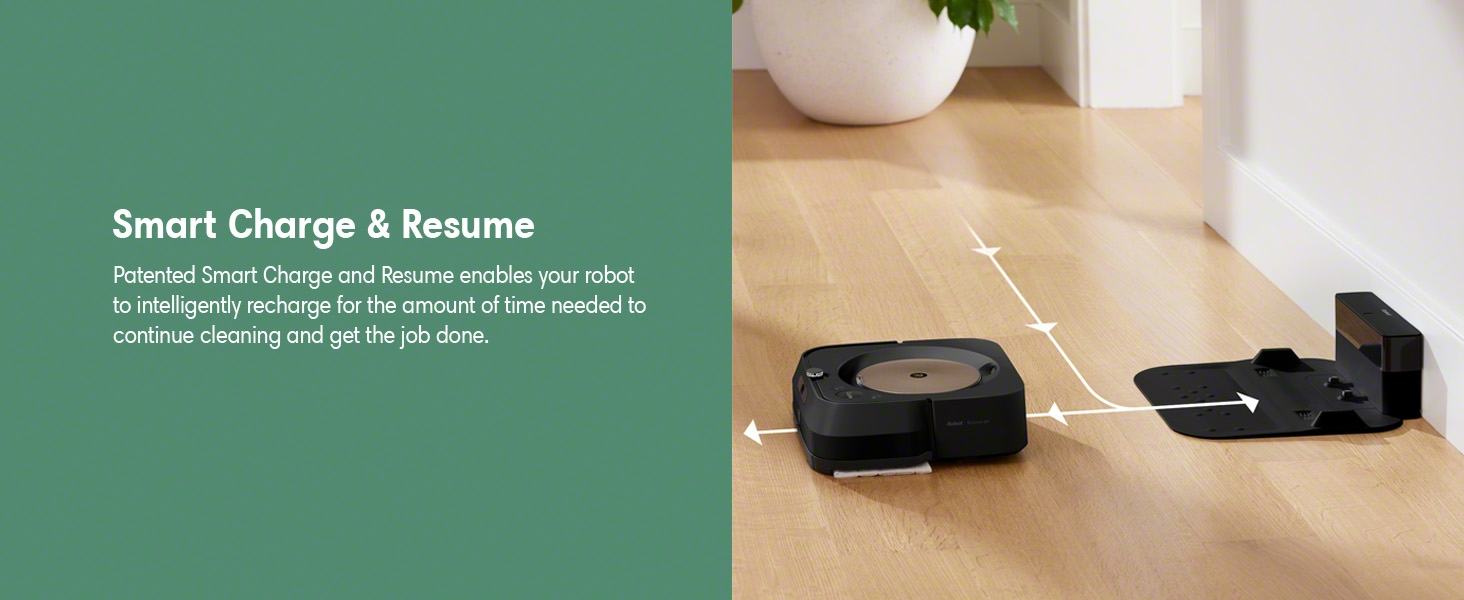
5.6-сүрөт: The Braava Jet m6 robot mop's Smart Charge & Resume feature, allowing it to intelligently recharge and continue cleaning until the task is complete.
5.6. Imprint Link Technology
The Braava Jet m6 can work with select Roomba robot vacuums using Imprint Link Technology. This allows the Roomba to vacuum first, and then the Braava Jet m6 will automatically begin mopping, creating a seamless two-step cleaning process.

5.7-сүрөт: The Braava Jet m6 robot mop syncing with a Roomba robot vacuum, demonstrating the Imprint Link Technology for an automated vacuum-then-mop cleaning sequence.
5.7. Үн жардамчысын интеграциялоо
The Braava Jet m6 is compatible with Amazon Alexa and Google Assistant. You can start, stop, or send the robot to specific areas for cleaning using simple voice commands, such as "Alexa, tell Braava to mop in front of the kitchen table."
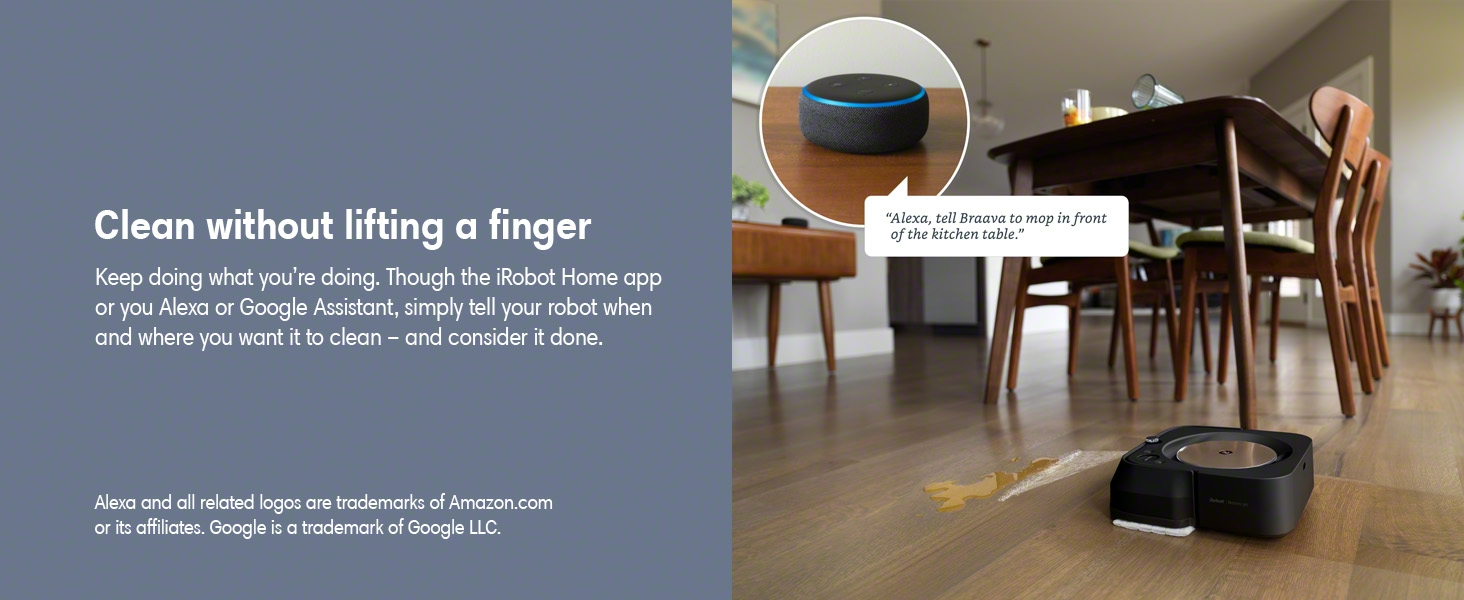
5.8-сүрөт: The Braava Jet m6 robot mop can be controlled hands-free using voice commands through Amazon Alexa or Google Assistant, allowing users to initiate cleaning tasks effortlessly.
5.8. Personalized Schedules and Software Updates
The robot learns your cleaning habits and can suggest personalized schedules through the iRobot Home App. It also receives over-the-air software updates, ensuring it continuously improves its performance and features.

5.9-сүрөт: The iRobot Home App providing personalized cleaning recommendations for the Braava Jet m6 robot mop, adapting to user habits and environmental factors like pollen season.
6. Техникалык тейлөө
Regular maintenance is crucial for the optimal performance and longevity of your Braava Jet m6.
6.1. Cleaning the Robot
- Сенсорлор: Wipe the cliff sensors and floor tracking sensor with a clean, dry cloth regularly.
- Дөңгөлөктөр: Check the drive wheels for debris (hair, lint) and clean as needed.
- Заряддоо байланыштары: Clean the charging contacts on both the robot and the dock with a dry cloth.
6.2. Mop Pad Care
- Disposable Pads: Eject used disposable pads directly into the trash by pressing the pad eject button. Do not reuse.
- Көп жолу колдонулуучу жабдыктар: If using reusable pads, remove them after each cleaning cycle and wash them according to the instructions provided with the pads. Allow them to air dry completely before reuse.

6.1-сүрөт: The Braava Jet m6 allows for easy, hands-free ejection of used mop pads directly into a trash receptacle with the push of a button.
6.3. Бактарды тазалоо
Periodically rinse the tank with clean water to prevent buildup. Do not use soap or other cleaning agents inside the tank unless specifically instructed by iRobot. Ensure the tank is completely dry before refilling or storing.
7. Кыйынчылыктарды
This section addresses common issues you might encounter with your Braava Jet m6.
| Көйгөй | Мүмкүн себеп | Чечим |
|---|---|---|
| Робот заряддалбай жатат | Loose power cord, dirty charging contacts, battery issue. | Ensure power cord is securely plugged in. Clean charging contacts on robot and dock. If issue persists, contact customer support. |
| "Fill Tank" error despite full tank | Float sensor stuck, lid not properly closed. | Gently shake the tank to free the float. Ensure the tank lid is securely closed and clicked into place. |
| Робот бат-баттан тыгылып калат | Obstacles, uneven surfaces, or "Keep Out Zones" not set. | Clear the cleaning area of small obstacles. Use the iRobot Home App to define "Keep Out Zones" for problematic areas like rugs or furniture. |
| Полдо сызыктарды калтырат | Incorrect cleaning solution, dirty pad, excessive solution. | Ensure you are using only iRobot Braava Jet Hard Floor Cleaning Solution or plain water. Use a clean pad. Adjust the amount of solution sprayed via the app settings if available. |
| Navigation issues / spinning in circles | Dirty sensors, wheel issues, software glitch. | Clean all sensors. Check wheels for debris or damage. Restart the robot. If persistent, a factory reset via the app or contacting support may be necessary. |
8. Техникалык шарттар
| Өзгөчөлүк | Деталь |
|---|---|
| Бренд | iRobot |
| Модель аты | Braava M6 |
| Модель номери | m601220 |
| Түс | Кара |
| Продукциянын өлчөмдөрү (L x W x Y) | 10.6" x 10" x 3.5" |
| Элемент Салмагы | 6.6 фунт |
| Батареянын иштөө мөөнөтү | 120 мүнөт |
| Power Source | Батарея менен иштейт |
| Башкаруу ыкмасы | Үн, колдонмо |
| Шайкеш түзмөктөр | Amazon Echo, Google Home, Smartphones, Tablets, iPhone |
| Өзгөчөлүктөр | Edge Cleaning, Room-By-Room Navigation, Scheduling, Selective Room Cleaning, Smart Mapping, Wet/Dry |
9. Кепилдик жана колдоо
For warranty information, please refer to the official iRobot Warranty Document (PDF). This document outlines the terms and conditions of your product's warranty.
For additional support, frequently asked questions, or to contact customer service, please visit the official iRobot website or refer to the iRobot Home App.

9.1-сүрөт: iRobot's commitment to product authenticity and customer investment protection, advising purchase from authorized resellers and use of authentic parts for warranty validity.
Ask a question about this manual
Ask about setup, troubleshooting, compatibility, parts, safety, or missing instructions. Manuals+ will review the question and use this page’s manual context to help answer it.