
1. Киришүү
Thank you for choosing the HOCO ES40 Genial TWS Bluetooth Wireless Headset. This manual provides detailed instructions for the proper use, setup, and maintenance of your new wireless earbuds. Please read this manual thoroughly before using the product to ensure optimal performance and longevity. This headset is designed for use with various Bluetooth-enabled devices, including mobile phones.
2. Продукт бүтүп калдыview
The HOCO ES40 headset consists of two wireless earbuds and a portable charging case. Familiarize yourself with the components for ease of use.
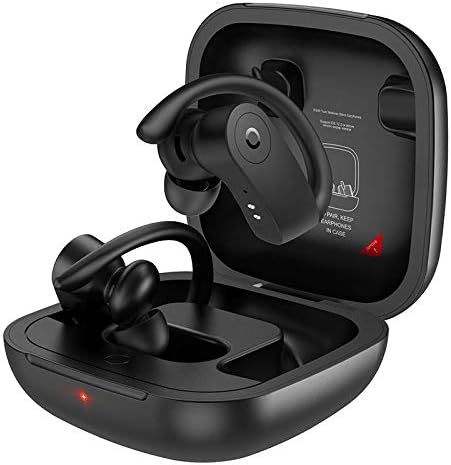
Image 2.1: HOCO ES40 earbuds placed inside their open charging case, showing the ear hook design and charging indicators.

Сүрөт 2.2: Жакын план view of a single HOCO ES40 earbud, highlighting the ergonomic ear hook and the control button area.
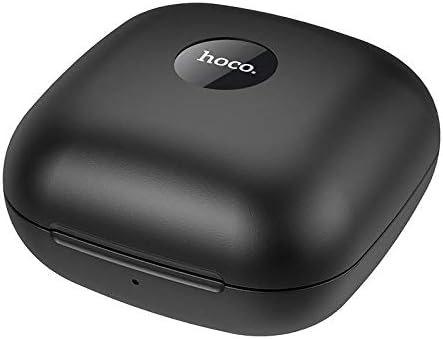
Image 2.3: The HOCO ES40 charging case in a closed position, displaying the 'hoco.' brand logo on the top surface.
3. Пакеттин мазмуну
Upon opening your HOCO ES40 package, please verify that all the following items are included:
- HOCO ES40 TWS Bluetooth Wireless Earbuds (Left and Right)
- Зымсыз кубаттоо кутусу
- USB Charging Cable (typically included with such devices)
- Колдонуучунун Колдонмосу (бул документ)
4. Орнотуу
4.1. Гарнитураны заряддоо
Before initial use, it is recommended to fully charge both the charging case and the earbuds.
- Ишти заряддоо: Connect the USB charging cable to the charging port on the case and to a suitable USB power source. The charging indicator on the case will illuminate to show charging status. The charging case takes approximately 2 hours to fully charge.
- Кулакчындарды заряддоо: Place the earbuds into their respective slots in the charging case. Ensure they are correctly seated. The earbuds will begin charging automatically. The headset charging time is approximately 1 hour.
4.2. Bluetooth Жупташтыруу
Follow these steps to pair your HOCO ES40 headset with your device:
- Күйгүзүү: Заряддоо кутусун ачып, эки кулакчынды алып салыңыз. Алар автоматтык түрдө күйүп, жупташтыруу режимине кирет.
- Bluetooth иштетүү: On your smartphone or other Bluetooth-enabled device, navigate to the Bluetooth settings and ensure Bluetooth is turned on.
- Түзмөктү тандоо: In the list of available Bluetooth devices, locate and select "HOCO ES40".
- Жупташтыруу ырастоо: Once selected, your device should confirm that the headset is connected. You may hear an audible confirmation from the earbuds.

Image 4.1: A smartphone screen showing the Bluetooth settings with "HOCO ES40" listed as a connected device, next to the open charging case with earbuds.
The headset uses Bluetooth V5.0 for a stable and efficient connection.
5. Иштөө нускамалары
Once paired, you can control various functions of your HOCO ES40 headset.
5.1. Күйгүзүү/өчүрүү
- Күйгүзүү: Кулакчындар заряддоо кутусунан чыгарылганда автоматтык түрдө күйөт.
- Өчүрүү: Кулакчындарды кайра заряддоо кутусуна салыңыз. Алар автоматтык түрдө ажыратылып, өчүрүлөт.
5.2. Музыканы ойнотуу
The earbuds feature touch-sensitive controls for music management:
- Ойнотуу/тындыруу: Кулакчындарды бир жолу таптаңыз.
- Кийинки трек: Оң кулакчынды эки жолу таптаңыз.
- Мурунку трек: Сол кулакчынга эки жолу басыңыз.
5.3. Чалууларды башкаруу
Manage your phone calls directly from the earbuds:
- Чалууга жооп берүү/аяктоо: Tap either earbud once during an incoming call or an active call.
- Чакырууну четке кагуу: Кирүүчү чалуу учурунда кулакчындардын бирин болжол менен 2 секунд басып туруңуз.
6. Техникалык тейлөө
Proper care and maintenance will extend the life of your HOCO ES40 headset.
- Тазалоо: Кулакчындарды жана кубаттоочу кутучаны тазалоо үчүн жумшак, кургак, мамыксыз чүпүрөктү колдонуңуз. Абразивдүү материалдарды же катуу химиялык заттарды колдонуудан алыс болуңуз.
- Сактагыч: Колдонулбаганда, кулакчындарды чаңдан жана бузулуудан коргоо үчүн кубаттоочу кутуга салып сактаңыз. Күн нурунан жана экстремалдык температурадан алыс салкын, кургак жерде сактаңыз.
- Батареяга кам көрүү: To maintain battery health, avoid fully discharging the batteries frequently. Charge the device regularly, even if not used for extended periods.
- Суу таасири: Кулакчындар суу өткөрбөйт. Сууга, жамгырга же ашыкча нымдуулукка дуушар болбоңуз.
7. Кыйынчылыктарды
If you encounter issues with your HOCO ES40 headset, refer to the following common solutions:
- Кулакчындар бири-бири менен жупташпайт: Place both earbuds back into the charging case, close the lid, wait a few seconds, then open the lid and remove them again. This often resets their connection.
- Кулакчындар түзмөккө туташпай жатат: Ensure Bluetooth is enabled on your device. Forget the "HOCO ES40" from your device's Bluetooth list and attempt to pair again. Ensure the earbuds are charged.
- Бир кулакчындан үн чыкпайт: Check if both earbuds are charged. Try placing them back in the case and reconnecting.
- Заряддоо маселелери: Кубаттоочу кабелдин корпуска жана кубат булагына бекем туташтырылганын текшериңиз. Башка USB портун же кубат адаптерин колдонуп көрүңүз. Кулакчындардын жана корпустун ичиндеги кубаттоочу контакттарды тазалаңыз.
- Төмөн үн: Adjust the volume on both your connected device and the earbuds (if volume control is available via touch, though not explicitly stated for this model).
8. Техникалык шарттар
Below are the technical specifications for the HOCO ES40 Genial TWS Bluetooth Wireless Headset:
| Өзгөчөлүк | Спецификация |
|---|---|
| Bluetooth спецификациясы | Bluetooth V5.0 JL6936D |
| Гарнитуранын Батарея сыйымдуулугу | 50mAh (single headset) |
| Заряддоо корпусунун батареясынын сыйымдуулугу | 400mAh |
| Гарнитураны заряддоо убактысы | Болжол менен 1 саат |
| Заряддоо корпусунун заряддоо убактысы | Болжол менен 2 саат |
| Talk / Music Time | 5 саат |
| Күтүү убактысы | 200 саат |
| Өлчөмдөрү (корпус) | 78 * 78 * 46 мм |
| Салмагы (жалпы) | 109г |
| Weight (Single Headset) | 10г |
| Түс | Кара |
| Наушник форма фактору | Кулакта |
| Байланыш технологиясы | Зымсыз |
| Шайкеш түзмөктөр | Уюлдук телефондор |
| Материал | Пластик |
9. Кепилдик жана колдоо
The HOCO ES40 Genial TWS Bluetooth Wireless Headset comes with a standard manufacturer's warranty. For specific warranty terms and conditions, please refer to the warranty card included in your product packaging or visit the official HOCO website. For technical support, troubleshooting assistance beyond this manual, or warranty claims, please contact your retailer or the HOCO customer service department.