
1. Киришүү
This manual provides detailed instructions for the safe and efficient use of your Hoco HC3 Bounce Sports Wireless Speaker. Please read this manual thoroughly before operating the device and retain it for future reference. The Hoco HC3 is a versatile portable speaker supporting Bluetooth, FM radio, TF card, USB, AUX, and TWS modes.

Figure 1: Hoco HC3 Bounce Sports Wireless Speaker. This image displays the speaker in a vertical orientation, showcasing its black mesh grille, the 'hoco' logo at the bottom right, and a braided carrying strap attached to the top left side. The control buttons are visible on the side panel.
2. Пакеттин мазмуну
Кутудан чыгарылганда бардык буюмдар бар экенин текшериңиз:
- Hoco HC3 Bounce Sports Wireless Speaker
- USB заряддоо кабели
- Колдонуучунун Колдонмосу (бул документ)
- AUX Audio Cable (if included with your model)
3. Продукт бүтүп калдыview
3.1 Динамиктин компоненттери

Figure 2: Rear panel of the Hoco HC3 speaker. This image highlights the various input ports and control buttons located on the back of the speaker. Visible elements include the power switch, USB port, TF card slot, AUX input, and LED indicator.
Familiarize yourself with the speaker's controls and ports:
- Кубат баскычы: Long press to power on/off. Short press to switch modes.
- Ойнотуу/тындыруу баскычы: Аудиону ойнотуу же тындыруу. Чалууларга жооп берүү/аяктоо.
- Үндү катуулатуу / Кийинки трек баскычы: Кийинки трекке кыска басыңыз, үнүн жогорулатуу үчүн узакка басыңыз.
- Үндү азайтуу / Мурунку трек баскычы: Мурунку трек үчүн кыска басыңыз, үнүн азайтуу үчүн көпкө басыңыз.
- Режим баскычы (M): Short press to cycle through Bluetooth, FM, TF card, USB, and AUX modes.
- USB порт: USB дискти ойнотуу үчүн.
- TF карта уячасы: TF (MicroSD) картасын ойнотуу үчүн.
- AUX киргизүү: Зымдуу аудио туташуу үчүн 3.5 мм уяча.
- Заряддоо порту: Динамикти кубаттоо үчүн Micro USB порту.
- LED көрсөткүчү: Displays charging status and operating mode.
3.2 Негизги өзгөчөлүктөрү
- Bluetooth V5.0: Туруктуу жана натыйжалуу зымсыз байланышты камсыз кылат.
- Бир нече ойнотуу режимдери: Supports Bluetooth, FM radio, TF card, USB drive, and AUX input.
- Чыныгы зымсыз стерео (TWS): Allows two HC3 speakers to connect wirelessly for a stereo sound experience.
- Батареянын узак иштөө мөөнөтү: 2400mAh battery capacity offers up to 5 hours of music playback.
- Кош сүйлөөчүлөр: Equipped with two 45mm speaker units, each with 5W power output.
- Компакт жана көчмө: Dimensions of 202*60*60mm and weight of 561g for easy transport.
4. Орнотуу
4.1 Динамикти заряддоо
- Берилген USB заряддоо кабелин динамиктин заряддоо портуна туташтырыңыз.
- Connect the other end of the USB cable to a 5V USB power adapter (not included) or a computer's USB port.
- The LED indicator will illuminate to show charging status. It typically takes about 3 hours for a full charge.
- Once fully charged, the LED indicator will change or turn off (refer to specific LED behavior in the troubleshooting section if unsure).
Эскертүү: Батареянын иштөө мөөнөтүн оптималдаштыруу үчүн, биринчи жолу колдонуудан мурун динамикти толугу менен кубаттаңыз.
4.2 Күйгүзүү/өчүрүү
- Күйгүзүү үчүн: Long press the Power button until you hear an audible prompt and the LED indicator lights up.
- Өчүрүү үчүн: Long press the Power button again until you hear an audible prompt and the LED indicator turns off.
5. Иштөө нускамалары
5.1 Bluetooth жупташтыруу
- Ensure the speaker is powered on and in Bluetooth mode (the LED indicator will typically flash blue, indicating it's ready for pairing). If not, short press the Mode (M) button to switch to Bluetooth mode.
- Мобилдик түзмөгүңүздө (смартфон, планшет, компьютер) Bluetooth функциясын иштетиңиз.
- Издөө available Bluetooth devices. You should see "HC3" or "Hoco HC3" in the list.
- Select "HC3" to connect. Once paired, the speaker will emit an audible confirmation, and the LED indicator will stop flashing and remain solid blue.
- Эми сиз түзмөгүңүздөн аудиону динамик аркылуу ойной аласыз.
Эскертүү: Эгерде түзмөктүн Bluetooth функциясы активдүү болсо жана анын диапазонунда болсо, динамик күйгүзүлгөндө акыркы жупташтырылган түзмөккө автоматтык түрдө кайра туташууга аракет кылат.
5.2 FM радио режими
- Динамикти иштетүү.
- Short press the Mode (M) button repeatedly until you enter FM radio mode.
- To auto-scan and save available FM stations, short press the Play/Pause button. The speaker will scan and store stations.
- Use the Volume Up / Next Track and Volume Down / Previous Track buttons to navigate between saved stations.
5.3 TF картасы / USB ойнотуу
- Динамикти иштетүү.
- Insert a TF (MicroSD) card into the TF card slot or a USB flash drive into the USB port.
- The speaker should automatically switch to TF card or USB mode and begin playing audio files. If not, short press the Mode (M) button to select the correct mode.
- Use the Play/Pause, Volume Up / Next Track, and Volume Down / Previous Track buttons to control playback.
Note: Ensure your TF card or USB drive contains compatible audio files (e.g., MP3 format).
5.4 AUX режими
- Динамикти иштетүү.
- Connect one end of a 3.5mm audio cable (if included) to the speaker's AUX input port.
- Аудио кабелдин экинчи учун тышкы түзмөгүңүздүн (мисалы, MP3 ойноткуч, компьютер) аудио чыгаруу уячасына туташтырыңыз.
- The speaker should automatically switch to AUX mode. If not, short press the Mode (M) button to select AUX mode.
- Control playback from your external device. Volume can be adjusted on both the speaker and the external device.
5.5 TWS (чыныгы зымсыз стерео) функциясы
The TWS function allows you to pair two Hoco HC3 speakers together for a true stereo sound experience.
- Ensure both HC3 speakers are powered off.
- Power on both speakers simultaneously. They should both enter Bluetooth pairing mode.
- On бир of the speakers (this will become the primary speaker), long press the Mode (M) button or a dedicated TWS button (if present, otherwise try the Play/Pause button for 3-5 seconds) until you hear a pairing tone. The speakers will attempt to connect to each other.
- Once successfully paired, you will hear a confirmation tone, and one speaker's LED will indicate it's the primary (e.g., flashing slowly), while the other's LED will be solid.
- Эми, мобилдик түзмөгүңүздү туташтырыңыз баштапкы speaker via Bluetooth as described in section 5.1.
- Аудио эми эки динамиктен тең стерео режиминде ойнотулат.
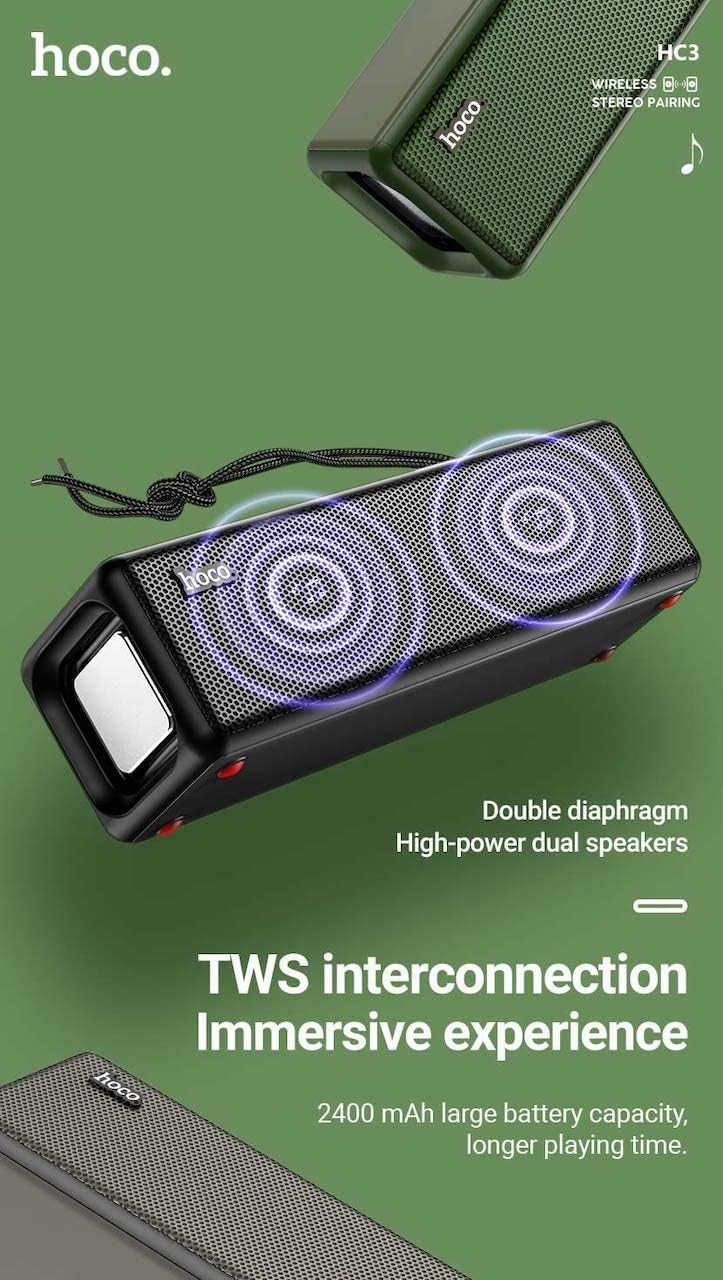
Figure 3: TWS Interconnection. This image illustrates the concept of two Hoco HC3 speakers wirelessly connected to provide a stereo audio experience, highlighting the dual speaker setup and the 2400 mAh battery capacity.
5.6 Чалууларды башкаруу
Bluetooth аркылуу смартфонго туташканда:
- Чакырууга жооп берүү: Play/Pause баскычын кыска басыңыз.
- Чакырууну аяктоо: Чалуу учурунда Play/Pause баскычын кыска басыңыз.
- Чакырууну четке кагуу: Кирүүчү чалуу шыңгыраганда Ойнотуу/Тыным баскычын көпкө басып туруңуз.
- Акыркы номерди кайра терүү: Play/Pause баскычын эки жолу басыңыз.
6. Техникалык тейлөө
- Тазалоо: Use a soft, dry cloth to clean the speaker's surface. Do not use abrasive cleaners, alcohol, or other chemical solvents.
- Сактагыч: Динамикти түз күн нурунан жана өтө температурадан алыс салкын, кургак жерде сактаңыз.
- Батареяга кам көрүү: To prolong battery life, charge the speaker regularly, even if not in use for extended periods (e.g., once every 3 months). Avoid fully discharging the battery frequently.
- Суу каршылык: While designed for sports, avoid submerging the speaker in water. Refer to product specifications for any IP rating.
- Таасирден качуу: Protect the speaker from drops and strong impacts.
7. Кыйынчылыктарды
If you encounter issues with your Hoco HC3 speaker, refer to the following table for common problems and solutions:
| Көйгөй | Мүмкүн себеп | Чечим |
|---|---|---|
| Динамик күйбөйт. | Батарея аз. | Динамикти кеминде 30 мүнөткө заряддаңыз. |
| Bluetooth аркылуу жупташтыруу мүмкүн эмес. | түзмөктө Bluetooth иштетилген эмес; динамик жупташтыруу режиминде эмес; аппараттан өтө алыс. | Ensure Bluetooth is on, speaker is in pairing mode (flashing blue LED), and devices are within 10 meters. Forget "HC3" on your device and try pairing again. |
| Үн жок. | Үн өтө төмөн; туура эмес режим тандалган; түзмөк аудио ойнобой жатат. | Increase volume on both speaker and connected device. Verify correct mode (Bluetooth, AUX, TF, USB). Ensure audio is playing on the source device. |
| FM радиосун кабыл алуу начар. | Алсыз сигнал; экологиялык кийлигишүү. | Move the speaker to a location with better reception. Re-scan for stations. |
| TF картасы/USB ойнотуусу иштебей жатат. | Card/drive not inserted correctly; incompatible file форматтоо; бузулган files. | Ensure card/drive is fully inserted. Check file formats (MP3 recommended). Try another card/drive. |
| TWS жупташтыруу ишке ашпай калды. | Динамиктер TWS жупташтыруу режиминде эмес; бири-биринен өтө алыс. | Ensure both speakers are powered on and in TWS pairing mode. Keep them close during pairing. Refer to section 5.5. |
8. Техникалык шарттар
| Өзгөчөлүк | Деталь |
|---|---|
| Модел | HC3 |
| Өлчөмдөр | 202 x 60 x 60 мм |
| Салмагы | 561 г |
| Bluetooth версиясы | V5.0 (Chip: JLAC6928B) |
| Батарея сыйымдуулугу | 2400mAh |
| Заряддоо убактысы | Болжол менен 3 саат |
| Сүйлөшүү/Музыка убактысы | 5 саатка чейин |
| Динамик бирдиги | 45мм * 2 |
| Динамиктин кубаттуулугу | 5 Вт * 2 |
| Байланыш режимдери | Bluetooth, FM, TF card, USB, AUX, TWS |
| Аудио чыгаруу режими | Курчап |
| Өндүрүүчү | Hoco |
| Келип чыккан өлкө | Кытай |
9. Кепилдик жана колдоо
Hoco products are manufactured to high quality standards. For information regarding warranty coverage, please refer to the warranty card included with your purchase or contact your local Hoco distributor or retailer. Keep your proof of purchase for any warranty claims.
For technical support or further assistance, please visit the official Hoco website or contact their customer service department. Contact details are typically available on the product packaging or the official webсайт.