
1. Киришүү
This manual provides detailed instructions for the assembly, operation, and maintenance of your ProMounts Universal Floor TV Stand Swivel, model ATMSS6401-X2. This stand is designed to securely hold most 37-72 inch televisions weighing up to 110 lbs (50 kg) and features a ±25° swivel function and an adjustable AV shelf. Please read these instructions thoroughly before beginning assembly to ensure safe and correct installation.
2. Коопсуздук маалыматы
- Бардык нускамаларды окуңуз: Ensure you understand all assembly and safety instructions before installation. If you have any questions, contact customer service.
- Салмак сыйымдуулугу: 110 фунттан (50 кг) ашпаңыз. Бул чектен ашып кетүү олуттуу жаракат алууга же мүлккө зыян келтирүүгө алып келиши мүмкүн.
- TV өлчөмү: Бул стенд 37 жана 72 дюймдук телевизорлор менен шайкеш келет.
- VESA шайкештиги: Ensure your TV's VESA pattern is within the range of 200x200mm to 600x400mm.
- Куралдар: Use appropriate tools for assembly. Do not overtighten screws.
- Жайгашкан жери: Install the TV stand on a stable, level surface. Avoid placing it in high-traffic areas where it could be easily bumped.
- Балдар: Балдарды чогултуу жайынан алыс кармаңыз. Майда бөлүктөр муунуп калуу коркунучун жаратышы мүмкүн.
3. Пакеттин мазмуну
Please verify that all components are present and undamaged before proceeding with assembly. If any parts are missing or damaged, do not attempt to assemble the stand and contact customer service.
- Негизги колдоо тилкеси
- Негизги табак
- Tempered Glass AV Shelf
- Сыналгы орнотуу кронштейндери (сол жана оң)
- Mount Plate
- Feet for Base
- Hardware Kit (various screws, washers, spacers)
- Assembly Tools (e.g., Allen wrench, small wrench)

Сүрөт 1: Бүттүview of the ProMounts Universal Floor TV Stand.
4. Орнотуу жана монтаждоо нускамалары
Follow these steps carefully for proper assembly. It is recommended to have a second person assist with lifting and positioning the TV.

Image 2: Simple Installation Steps.
- Attach Feet to Base: Secure the four feet to the bottom of the base plate using the provided screws. Ensure they are tightened for stability.
- Assemble Main Column and Base: Connect the main support column to the base plate. Use the designated screws and ensure a firm connection.
- Install Tempered Glass AV Shelf: Position the tempered glass AV shelf at your desired height on the main support column. Hand-screw the shelf to the support bracket and stand. The shelf is height-adjustable to accommodate various media devices.
- Attach Mount Plate to Stand: Secure the TV mount plate to the top of the main support column using the provided hardware.
- Сыналгыга кашааларды бекитүү: Carefully place your TV face down on a soft, clean surface. Attach the TV mounting brackets to the back of your television using the appropriate screws, washers, and spacers from the hardware kit. Ensure the brackets are centered and securely fastened to your TV's VESA mounting holes.
- Hang TV on Mount Plate: With assistance, carefully lift your TV and hook the attached mounting brackets onto the mount plate on the stand. Ensure the TV is securely seated and locked into place.
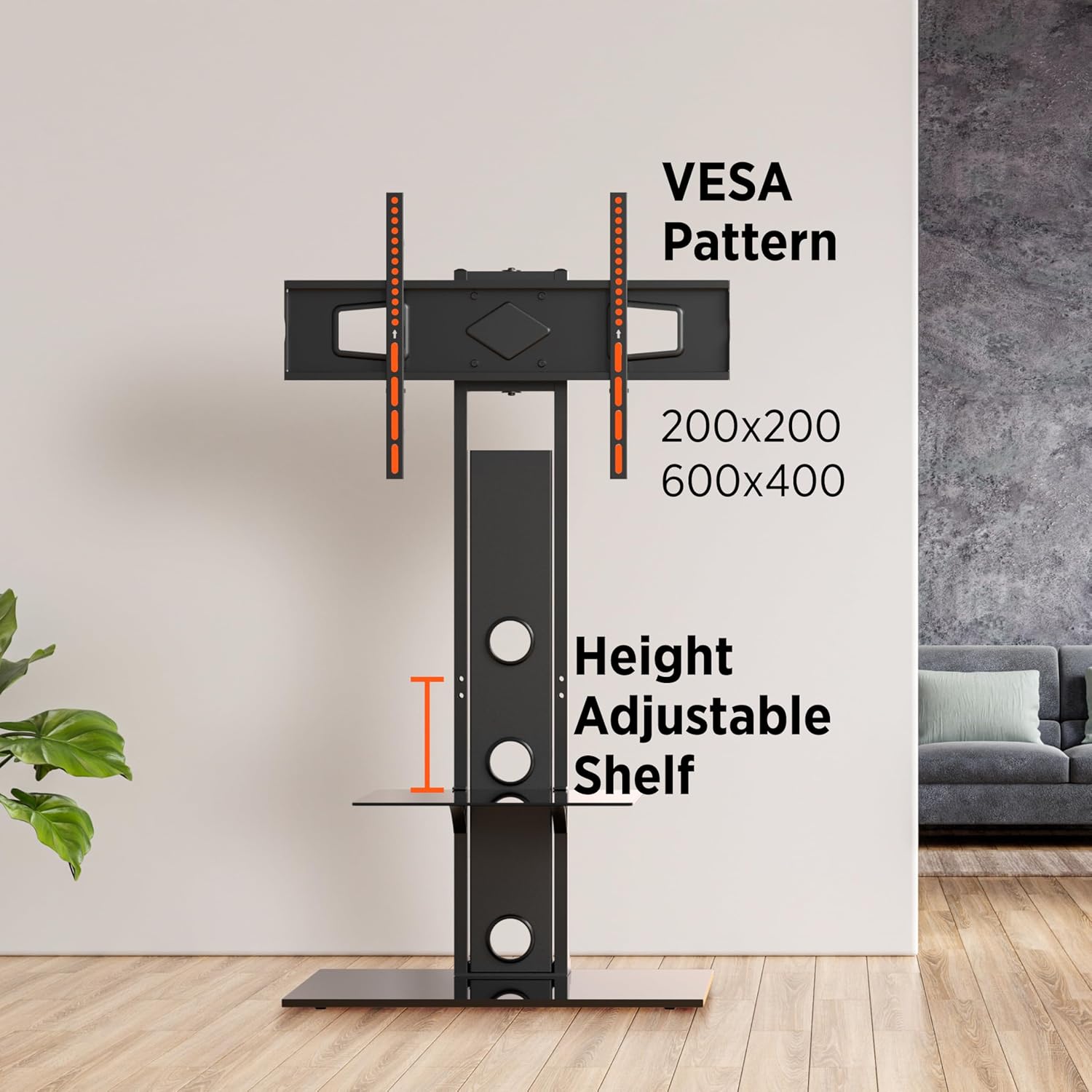
Image 3: VESA Pattern and Adjustable Shelf.
5. Иштөө нускамалары
5.1 Айлануу функциясы
The ProMounts Universal Floor TV Stand features a ±25° swivel capability. This allows you to adjust the viewing angle of your television to suit different seating positions within the room. To swivel the TV, gently grasp the sides of the television and rotate it to the desired angle. Avoid forcing the movement beyond its designed range.

Image 4: Swivel Range Demonstration.
5.2 Adjustable AV Shelf
The tempered glass AV shelf can be adjusted in height along the main support column. To adjust the shelf, loosen the securing screws, reposition the shelf to the desired height, and then firmly retighten the screws. This shelf is suitable for holding media players, streaming devices, or gaming consoles.
5.3 Кабелди башкаруу
The stand includes a cable management system to help organize and conceal cables. Route your TV and device cables through the designated openings in the main support column. This helps maintain a tidy appearance and prevents cable clutter.

Сүрөт 5: Негизги өзгөчөлүктөр бүттүview.
6. Техникалык тейлөө
- Тазалоо: Use a soft, dry cloth to clean the stand. For glass surfaces, a mild glass cleaner can be used. Avoid abrasive cleaners or solvents that may damage the finish.
- Аппараттык камсыздоону текшерүү: Мезгил-мезгили менен бардык бурамалар менен байланыштарды текшерип туруңуз, алар бекем жана бекем бойдон калууда. Керек болсо кайра тартыңыз.
- Текшерүү: Regularly inspect the stand for any signs of wear, damage, or instability. If any issues are found, discontinue use and contact customer service.
7. Кыйынчылыктарды
- Стенд титиреп турат: Ensure all screws are securely tightened, especially those connecting the main column to the base and the feet to the base. Verify the stand is on a level surface.
- ТВ деңгээл эмес: Check that the TV mounting brackets are installed evenly on the back of your TV. Some brackets may offer minor leveling adjustments.
- Cannot attach TV to brackets: Confirm your TV's VESA pattern matches the stand's compatibility (200x200mm to 600x400mm). Ensure you are using the correct screws and spacers for your TV model.
- AV shelf is loose: Ensure the hand-screws securing the AV shelf are fully tightened.
8. Техникалык шарттар
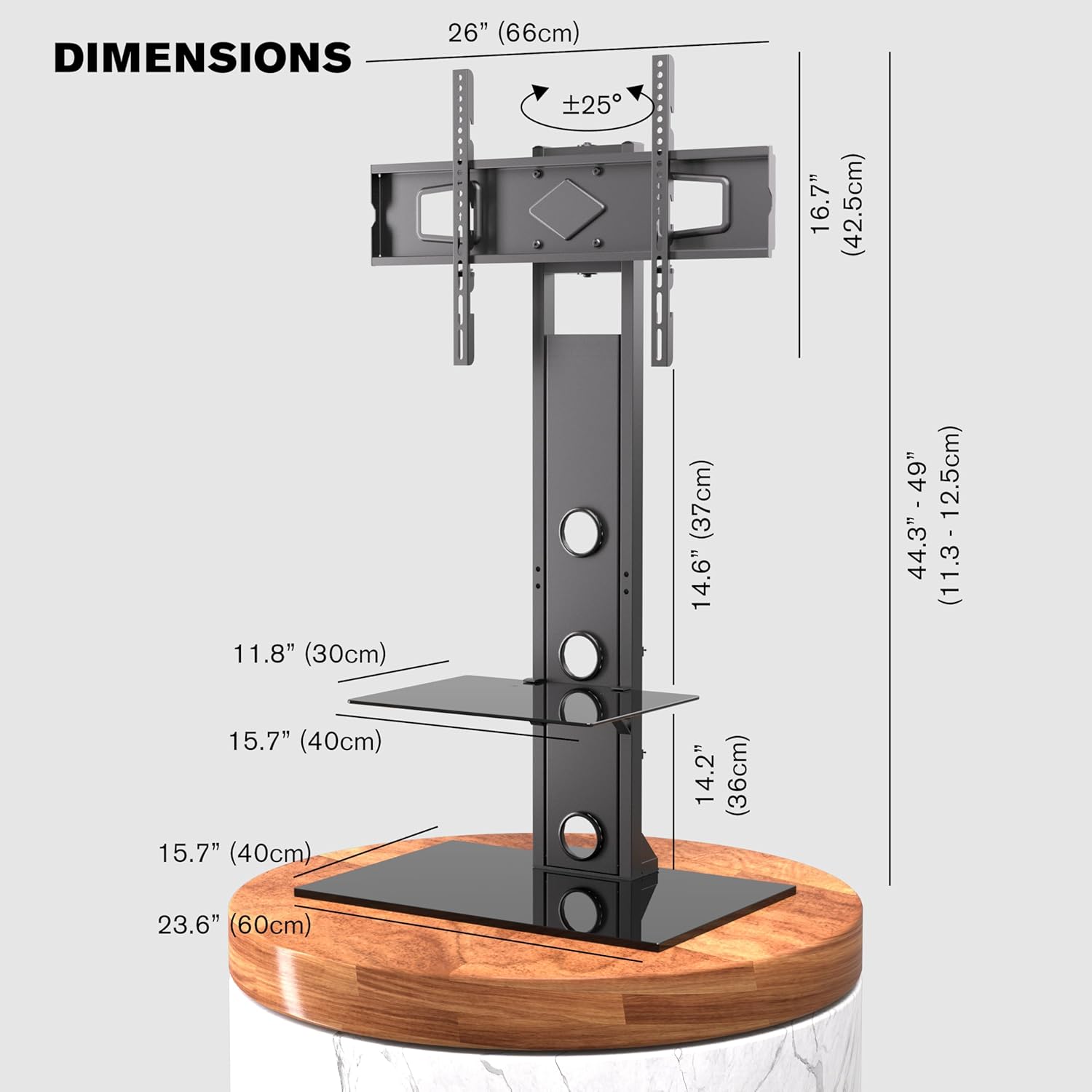
Сүрөт 6: Продукциянын өлчөмдөрү.
| Өзгөчөлүк | Спецификация |
|---|---|
| Модель номери | ATMSS6401-X2 |
| Туура келген сыналгы өлчөмдөрү | 37 - 72 дюйм |
| Максималдуу Салмак сыйымдуулугу | 110 фунт (50 кг) |
| VESA шайкештиги | 200x200ммден 600x400ммге чейин |
| Swivel Angle | ±25 градус |
| Материал | Эритме болот, чыңдалган айнек |
| Продукциянын өлчөмдөрү (L x W x Y) | 25.9 x 15.7 x 44.3-49 inches (Adjustable Height) |
| AV текче өлчөмдөрү | 15.7" x 11.8" |
| Base Shelf Dimensions | 23.6" x 15.7" |
| Түс | Кара |
9. Кепилдик жана колдоо
This ProMounts product comes with a Чектелген Өмүр бою Кепилдик. This warranty covers defects in materials and workmanship under normal use. For warranty claims or technical assistance, please contact ProMounts customer service. Our local customer service team is available to assist you with any questions or issues you may encounter.
For further support, please visit the official ProMounts webсайтка же сатып алууда берилген байланыш маалыматына кайрылыңыз.