
1. Киришүү
Сатып алганыңыз үчүн рахматasing the ANXONIT Cylinder X2 Mini Projector. This manual provides essential information for the safe and efficient operation of your device. Please read it thoroughly before use and retain it for future reference.

Image 1.1: The ANXONIT Cylinder X2 Mini Projector, a compact device designed for portability and ease of use.
Пакеттин мазмуну
- ANXONIT Cylinder X2 Mini Projector
- Алыстан башкаруу
- Кубаттуу адаптер
- USB кабели
- User Manual

Image 1.2: Included accessories with the ANXONIT Cylinder X2 Mini Projector.
2. Орнотуу
2.1 Күйгүзүү
- Кубат адаптерин проектордун кубат киргизүү портуна туташтырыңыз.
- Кубат адаптерин электр розеткасына сайыңыз.
- Press and hold the power button on the projector or remote control for a few seconds until the device powers on.
2.2 Placement and Focus Adjustment
Проекторду туруктуу, тегиз бетке коюңуз. Оптималдуу үчүн viewing, position the projector perpendicular to the projection surface. Adjust the focus wheel located on the side of the projector until the image appears clear and sharp.

Image 2.1: The compact design of the projector allows for easy portability.
2.3 Тармакка туташуу (Wi-Fi)
- Башкы экрандан "Орнотууларга" өтүңүз.
- "Wi-Fi" тандап, аны күйгүзүңүз.
- Тизмеден каалаган Wi-Fi тармагын тандаңыз.
- Enter the network password using the on-screen keyboard and confirm.
3. Иштөө нускамалары
3.1 Android 8.1 интерфейсинде навигациялоо
The projector runs on Android 8.1, providing access to various applications. Use the remote control to navigate through menus, select apps, and input text. The interface is similar to a standard Android tablet or smartphone.

Image 3.1: The Android 8.1 operating system interface on the projector.
3.2 Тиркемелерди колдонуу
Pre-installed applications like YouTube and Netflix are available. You can download additional applications from the Google Play Store after connecting to Wi-Fi.
3.3 Зымсыз дисплей (Экранды чагылдыруу)
The projector supports AirPlay for iOS devices and Miracast for Android devices, allowing you to mirror your smartphone or tablet screen wirelessly.
- Мобилдик түзмөгүңүз да, проекторуңуз да бир Wi-Fi тармагына туташкандыгын текшериңиз.
- On the projector, select the 'AirPlay' or 'Miracast' application.
- On your mobile device, activate screen mirroring (e.g., 'Screen Mirroring' on iOS, 'Cast' on Android) and select the projector from the list of available devices.

Image 3.2: Wireless screen mirroring in action.
3.4 Bluetooth байланышы
Connect Bluetooth speakers or headphones for enhanced audio experience.
- "Орнотууларга" өтүп, "Bluetooth" тандаңыз.
- Turn on Bluetooth and scan for devices.
- Жупташтыруу үчүн тизмеден каалаган Bluetooth түзмөгүңүздү тандаңыз.
4. Техникалык тейлөө
4.1 Cleaning the Projector Lens
Use a soft, lint-free cloth specifically designed for optical lenses to gently wipe the projector lens. Avoid using abrasive materials or chemical cleaners, as these can damage the lens coating.
4.2 Жалпы тазалоо
Wipe the exterior of the projector with a soft, dry cloth. Do not use liquid cleaners directly on the device. Ensure ventilation ports are free from dust and obstructions.
4.3 Батареяга кам көрүү
The projector includes a built-in 4400mAh Lithium-Ion battery. For optimal battery life, avoid fully discharging the battery frequently and store the projector in a cool, dry place when not in use for extended periods.

Image 4.1: The projector features a 4400mAh built-in lithium battery.
5. Кыйынчылыктарды
| Көйгөй | Мүмкүн себеп | Чечим |
|---|---|---|
| Сүрөт чагылдырылган жок | Projector not powered on; Lens cap on; Input source not selected. | Ensure power is connected and unit is on; Remove lens cap; Verify correct input source. |
| бүдөмүк сүрөт | Фокус туураланган эмес; Проектор экрандан өтө алыс/жакын. | Adjust the focus wheel; Reposition the projector. |
| Wi-Fi байланышы жок | Incorrect password; Out of range; Router issue. | Re-enter password; Move closer to router; Restart router. |
| Bluetooth түзмөгү туташпайт | Түзмөк жупташтыруу режиминде эмес; байланыш диапазонунан тышкары; тоскоолдук. | Ensure Bluetooth device is in pairing mode; Move devices closer; Restart both devices. |
| Apps (e.g., Netflix) not working | Poor internet connection; App requires update; App data corrupted. | Check Wi-Fi stability; Update the app via Google Play Store; Clear app cache/data in settings. |
6. Техникалык шарттар
| Өзгөчөлүк | Деталь |
|---|---|
| Бренд | АНКСОНИТ |
| Модель номери | Цилиндр X2 |
| Дисплей технологиясы | DLP |
| Display Resolution | 854 x 480 пиксель |
| Жарыктык | 100 ANSI челинин |
| Көрүнүүчү экран диагоналы | 120 дюймга / 305 смге чейин |
| Операция системасы | Android 8.1 |
| Байланыш | USB2.0, Bluetooth 4.0, 802.11 ac/b/g/n Wi-Fi |
| Өзгөчөлүктөр | Internet Built-In, Pico, Short Throw, Stereo Speakers |
| Батарея | 4400mAh литий-ион (кошулган) |
| Элемент Салмагы | 10.6 унция |
| Продукциянын өлчөмдөрү | 4.33 x 2.36 x 2.36 дюйм |
| Сертификаттар | CE, FCC, ROHS |
7. Кепилдик жана колдоо
7.1 Кепилдик маалыматы
Please refer to the warranty card included in your product packaging for detailed warranty terms and conditions. Keep your proof of purchase for warranty claims.
7.2 Кардарларды колдоо
For technical assistance, troubleshooting, or service inquiries, please contact ANXONIT customer support through the contact information provided on the official ANXONIT webсайт же сатып алуу платформаңыз.
8. Кошумча маалымат
8.1 Diffuse Reflection Technology
The ANXONIT Cylinder X2 utilizes diffuse reflection technology, which projects light indirectly onto the screen. This method is designed to be gentler on the eyes compared to direct light emission from traditional displays, potentially reducing eye strain during prolonged viewing.
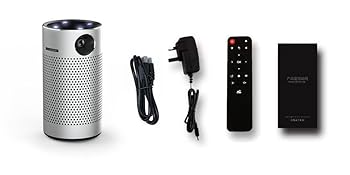
Image 8.1: Diffuse Reflection technology for eye comfort.
8.2 Advanced DLP Technology
This projector incorporates advanced DLP (Digital Light Processing) technology, which contributes to clear and vibrant image reproduction. DLP technology is known for its high contrast and color accuracy.

Image 8.2: Enhanced color reproduction with Advanced DLP Technology.
8.3 Колдонуу сценарийлери
The portable design and built-in battery make the Cylinder X2 suitable for various environments, including home theater setups, outdoor movie nights, and presentations.

Image 8.3: The projector is suitable for outdoor movie experiences.