
1. Коопсуздук боюнча маанилүү маалымат
Бул шайманды иштетүүдөн мурун бардык коопсуздук көрсөтмөлөрүн окуп чыгып, түшүнүп алыңыз. Бул көрсөтмөлөрдү аткарбоо электр тогуна урунууга, өрткө же олуттуу жаракат алууга алып келиши мүмкүн.
- Always plug the dehumidifier into a grounded 3-prong outlet.
- Электр шнурунун же сайгычтын бузулушу менен аппаратты иштетпеңиз.
- Аба агымынын жетиштүү болушу үчүн, түзмөктүн айланасында жетиштүү боштук бар экенине ынаныңыз.
- Аба кирүүчү же чыгуучу жерлерди жаап албаңыз.
- Do not use the dehumidifier near flammable gases or combustible materials.
- This appliance uses R-32 refrigerant. Servicing should only be performed by qualified personnel.
- Иштеп жаткан учурда балдарды жана үй жаныбарларын аппараттан алыс кармаңыз.
- Тазалоодон же техникалык тейлөөдөн мурун ар дайым розеткадан ажыратыңыз.
2. Продукт бүтүп калдыview
The BLACK+DECKER BD50MWSA is a high-efficiency portable dehumidifier designed to reduce humidity in large spaces up to 4500 sq. ft. (2012 DOE standard) or 650 sq. ft. (2019 DOE standard). It features a removable water bucket and includes a drain hose for continuous operation.
Негизги өзгөчөлүктөрү:
- Жогорку натыйжалуулугу: Extracts up to 50 pints of water per 24 hours.
- Портативдик дизайн: Equipped with casters and recessed handles for easy movement.
- Ыңгайлуу суу алып салуу: Features a detachable 12.68-pint bucket and a 1.64 ft. drain hose for continuous drainage.
- Энергияны үнөмдүү: UL Certified and uses environmentally friendly R-32 refrigerant.
- Коопсуздук өзгөчөлүктөрү: Automatic overflow shutoff protection with built-in indicator light and audible alert.
- Колдонууга оңой башкаруу каражаттары: Үстү жагына орнотулган, жөнгө салынуучу нымдуулук көрсөткүчү жана LED санарип дисплейи бар электрондук башкаруу панели.

3. Орнотуу
3.1 Таңгактан чыгаруу жана алгачкы жайгаштыруу
- Кургаткычты анын таңгагынан кылдаттык менен алып салыңыз.
- Place the unit upright on a level, stable surface.
- Allow the unit to stand upright for at least 24 hours before plugging it in. This allows the refrigerant to settle, ensuring optimal performance and preventing damage.
3.2 Позициялоо
- Абанын туура айлануусу үчүн аппараттын айланасында кеминде 8 дюйм (20 см) боштук бар экенин текшериңиз.
- Avoid placing the unit near heat sources, windows, or doors that are frequently opened.
- The unit is portable with built-in casters and recessed handles for easy relocation.

4. Иштөө нускамалары
4.1 Башкаруу панелинин үстүнөview
The dehumidifier features a top-mounted electronic control panel with an LED digital display for easy operation.
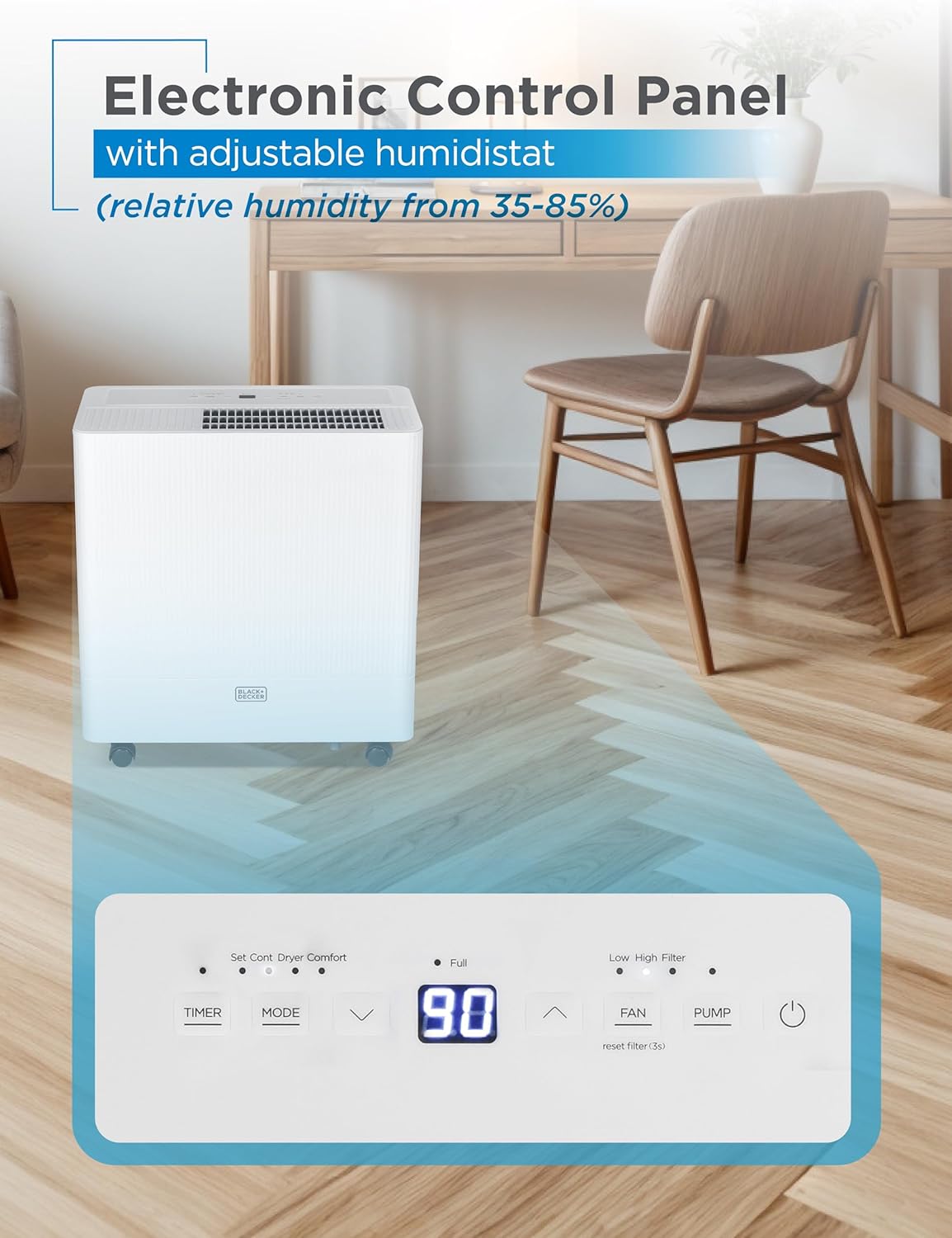
4.2 Негизги операция
- Күйгүзүү/өчүрүү: басыңыз Күч аппаратты күйгүзүү же өчүрүү үчүн баскыч.
- Режим тандоо: колдонуу Mode button to cycle through available operating modes (e.g., Dehumidify, Continuous, Comfort).
- Нымдуулук жөндөөсү: колдонуу Өйдө/Төмөн arrows to adjust the desired humidity level (35-85% relative humidity). The unit will operate until this level is reached, then cycle off.
- желдеткич ылдамдыгы: басыңыз Fan Speed төмөнкү жана жогорку желдеткич ылдамдыгын тандоо үчүн баскычы.
- Таймер: Set a timer for automatic shut-off (0-24 hours).
5. Water Removal & Drainage
The dehumidifier offers two methods for water removal: manual emptying of the bucket or continuous drainage via a hose.
5.1 Manual Bucket Emptying
- When the 12.68-pint water bucket is full, the unit will automatically shut off, an indicator light will illuminate, and an audible alert will sound.
- Carefully pull out the bucket from the front of the unit using the recessed handle.
- Чогулган сууну раковинага же дренажга төгүңүз.
- Бош чаканы ордуна чыкылдаган үн чыкканча кайра блокко жылдырыңыз. Блок кайрадан иштей баштайт.

5.2 Үзгүлтүксүз дренаж
- For continuous operation without emptying the bucket, attach the included 1.64 ft. drain hose to the drainage outlet at the back of the unit.
- Ensure the hose is positioned correctly and without any kinks to allow for unobstructed water flow.
- Direct the other end of the hose to a suitable drain (e.g., floor drain, utility sink).

Видео 5.1: Бүттүview of the BD50MWSA 50 Pint Portable Dehumidifier, demonstrating its features and operation.
6. Техникалык тейлөө
6.1 Фильтрди тазалоо
Regular cleaning of the air filter is essential for maintaining the dehumidifier's efficiency and lifespan.
- Тазалоодон мурун нымдандыргычты өчүрүп, сууруп алыңыз.
- Locate the washable filter at the back of the unit.
- Фильтрди акырын тартып чыгарыңыз.
- Чыпканы жылуу, самындуу суу менен жууңуз. Кылдаттык менен жууп, кайра салаардан мурун аны толугу менен кургатуу керек.
- Кургак чыпканы кайра блокко салыңыз.

6.2 Сактоо
If storing the unit for an extended period, ensure the water bucket is empty and the unit is clean and dry. Store in an upright position in a cool, dry place.
7. Кыйынчылыктарды
Эгерде сизде нымдандыргычта көйгөйлөр пайда болсо, төмөнкү жалпы көйгөйлөрдү жана чечимдерди караңыз:
- Түзмөк күйбөй жатат: Check if the unit is properly plugged into a grounded outlet. Ensure the water bucket is correctly inserted and not full.
- Суу чогултууга болбойт: Verify that the humidity setting is lower than the current room humidity. Check if the air filter is clean and not blocked. Ensure the room temperature is within the operating range (above 41°F / 5°C).
- "Full" Indicator On, But Bucket Not Full: Ensure the water bucket is fully and correctly seated in the unit. Check the float switch for any obstructions.
- Fluctuating Humidity Readings: It is normal for the display to show fluctuating numbers as the unit adjusts to the current room humidity.
- Unit Not Defrosting Automatically: This may indicate an issue with the condenser. Contact customer support for assistance.
- Дренаж көйгөйлөрү: If using continuous drainage, ensure the hose is positioned correctly without kinks and that the drain is not clogged.
Эгерде көйгөйлөр чечилбесе, байланыш маалыматын алуу үчүн Кепилдик жана колдоо бөлүмүн караңыз.
8. Техникалык шарттар
| Бренд | BLACK+DECKER |
| Модель аты | BD50MWSA |
| Камтуу аймагы | Up to 4500 Sq. Ft. (2012 DOE) / 650 Sq. Ft. (2019 DOE) |
| нымдуулуктун күч жөндөмдүүлүгү | Күнүнө 50 Пинт |
| Суу резервуарынын көлөмү | 12.68 Pints |
| Продукциянын өлчөмдөрү | 9.92"D x 18.8"W x 20"H |
| Элемент Салмагы | 42.1 фунт |
| Түс | Ак |
| Материал | Пластик |
| Тtage | 115 вольт |
| Ватtage | 515 ватт |
| Иштөө режими | Үзгүлтүксүз |
| Өзгөчө өзгөчөлүк | Portable |
| UPC | 810064691461 |
9. Кепилдик жана колдоо
9.1 Продукциянын кепилдиги
This BLACK+DECKER dehumidifier comes with a 1-year warranty covering labor and parts for manufacturing defects only.
9.2 Кардарларды колдоо
For any questions, technical assistance, or warranty claims, please contact BLACK+DECKER customer support. Refer to your product packaging or the official BLACK+DECKER webакыркы байланыш маалыматы үчүн сайт.