
1. Продукт бүтүп калдыview
This manual provides essential information for the proper setup, operation, and maintenance of the Cuifati 16-Channel USB Controlled Opto-Isolated Relay Module. This device is designed for simple ON/OFF switching of electrical equipment, making it suitable for various applications including robotics and home automation projects.

1-сүрөт: жогорудан ылдыйга view of the Cuifati 16-Channel USB Controlled Opto-Isolated Relay Module, showing the 16 blue relays, USB port, and terminal blocks.
2. Негизги өзгөчөлүктөрү
The Cuifati 16-Channel USB Controlled Opto-Isolated Relay Module offers the following features:
- 16 SPDT Relays: Equipped with sixteen Single-Pole Double-Throw (SPDT) relays for versatile switching applications.
- USB башкаруу: Designed for control via a USB interface, allowing integration with various computer systems.
- Opto-Isolated Design: Features opto-isolation to protect the control circuit from high-voltage relay circuits, enhancing safety and reliability.
- LED көрсөткүчтөрү: Includes an LED power indicator and individual LEDs for each relay output, providing clear status feedback.
- Жогорку жүк кубаттуулугу: Each relay supports a maximum load of 10A at 250V AC or 10A at 30V DC.
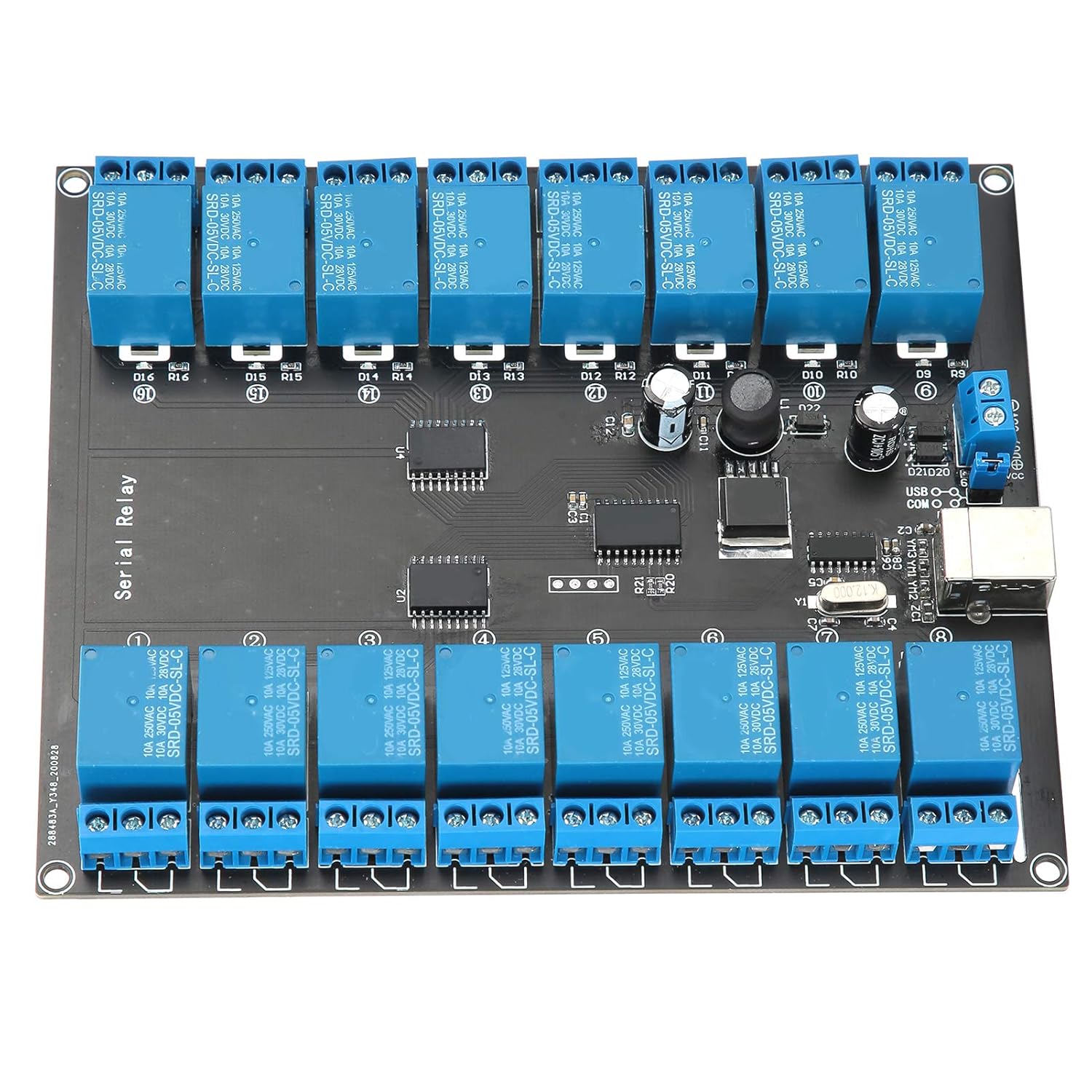
Сүрөт 2: Жакын пландан view highlighting the USB controlled, opto-isolated nature of the board with its 16 SPDT relays.
3. Орнотуу нускамалары
Follow these steps to set up your Cuifati Relay Module:
- Кубат менен камсыздоого туташуу: Connect a DC power supply within the range of 7V to 38V to the designated power input terminals on the module. Ensure correct polarity.
- USB туташуу: Connect the module to your computer using a standard USB cable. The USB port is located on the side of the board.
- Драйверди орнотуу (зарыл болсо): Depending on your operating system, you may need to install specific drivers for the USB interface. Refer to your operating system's documentation or the manufacturer's website for driver availability.
- Туташуу жүктөө: Connect the electrical equipment you wish to control to the relay terminal blocks. Each relay has three terminals: Common (COM), Normally Open (NO), and Normally Closed (NC). Refer to the circuit diagram for your specific application.

3-сүрөт: Бурчтуу view of the module, illustrating the USB port and power input terminals for connection.
4. Модулду иштетүү
Once the module is set up, you can operate it via your computer:
- Программалык камсыздоону көзөмөлдөө: The module is controlled via USB. You will need to use compatible software or develop custom code to send commands to the module and activate/deactivate the relays. This manual does not provide specific software or programming instructions.
- LED көрсөткүчтөрү: Observe the LED indicators for operational status. The power LED indicates that the module is receiving power. Each relay has an associated LED that illuminates when the relay is activated.
- Relay Switching: When a relay is activated, its contacts will switch from their default state (Normally Closed to Common) to the activated state (Normally Open to Common).

4-сүрөт: деталдуу жогорудан ылдыйга view of the relay module, showing the layout of relays, control chips, and connection points.
5. Техникалык тейлөө
To ensure the longevity and reliable operation of your relay module, consider the following maintenance guidelines:
- Тазалыкты сактоо: Regularly clean the module with a soft, dry cloth to remove dust and debris. Avoid using liquid cleaners.
- Нымдуулуктан качыңыз: Protect the module from moisture and extreme temperatures. Operate it in a dry environment.
- Туура иштетүү: Handle the module with care to prevent physical damage to components or connections.
- Байланыштарды текшерүү: Periodically check all power and load connections to ensure they are secure.
6. Кыйынчылыктарды
If you encounter issues with your Cuifati Relay Module, consider the following troubleshooting steps:
- No Power Indicator LED:
- Check the power supply connection and ensure it is within the 7V-38V DC range.
- Электр менен камсыздоонун туура иштеп жатканын текшериңиз.
- Relays Not Activating:
- Ensure the module is properly connected via USB to your computer.
- Confirm that the necessary drivers are installed and recognized by your operating system.
- Verify that your control software or code is sending the correct commands to the module.
- Check the load connections to the relay terminals.
- Module Not Recognized by Computer:
- Компьютериңиздеги башка USB портун колдонуп көрүңүз.
- Башка USB кабелин колдонуңуз.
- Reinstall or update the USB drivers for the module.
- Жалпы операция: Note that this manual does not include specific software or programming instructions for controlling the module. Users are expected to source or develop their own control interface.
7. Техникалык шарттар
| Өзгөчөлүк | Спецификация |
|---|---|
| Модель номери | Cuifatiu0cks8mzpe1290 |
| Релелердин саны | 16 |
| Реле түрү | SPDT (Бир уюлдуу кош ыргытуу) |
| Control Interface | USB |
| Изоляция | Опто-обочолонгон |
| Max Load per Relay | 10A / 250V AC, 10A / 30V DC |
| Электр камсыздоо | 7V - 38V туруктуу ток |
| Көрсөткүчтөр | Power LED, 16 Relay Status LEDs, USB LED |
| Өлчөмдөрү (L x W x Y) | Approximately 1 x 1 x 1 cm (Product dimensions from source: 1 x 1 x 1 cm) |
| Салмагы | Болжол менен 392 грамм |
| Өндүрүүчү | Cuifati |
| Келип чыккан өлкө | Кытай |

5-сүрөт: Төмөнкү view of the Printed Circuit Board (PCB) for the relay module.
8. Кепилдик жана колдоо
For warranty information and technical support, please refer to the documentation provided at the time of purchase or contact the seller/manufacturer directly. This manual does not include specific warranty terms or support contact details.