
1. Киришүү
This manual provides instructions for the installation, setup, and operation of the Layfuz Tuya WiFi M515EGWT Intelligent Pull Bead Curtain Motor. This device is designed to automate bead-chain roller blinds, allowing control via a mobile application or voice commands through compatible smart home assistants.
2. Продукт бүтүп калдыview
The Layfuz M515EGWT motor offers convenient automation for your curtains. It integrates with the Tuya Smart App for remote control and supports voice commands via Amazon Alexa and Google Home. Key features include:
- Мобилдик тиркемени башкаруу: Manage your curtains from anywhere using the Tuya Smart App.
- Үн менен башкаруу: Колсуз иштөө үчүн Amazon Alexa жана Google Home менен шайкеш келет.
- Убакыт функциясы: Schedule curtain opening and closing times to suit your daily routine.
- Adjustable Travel Limits: Set custom upper, lower, and intermediate stop positions.
- Direct Current Power Supply: Ensures safe and reliable operation.

2.1-сүрөт: Layfuz M515EGWT motor with compatible bead chain types. The motor is designed to work with various bead chain sizes and materials, including 2mm, 4mm, 6mm, 4.5*6mm, 4.5*12mm, metal chain, beaded, and 3.2mm chains.
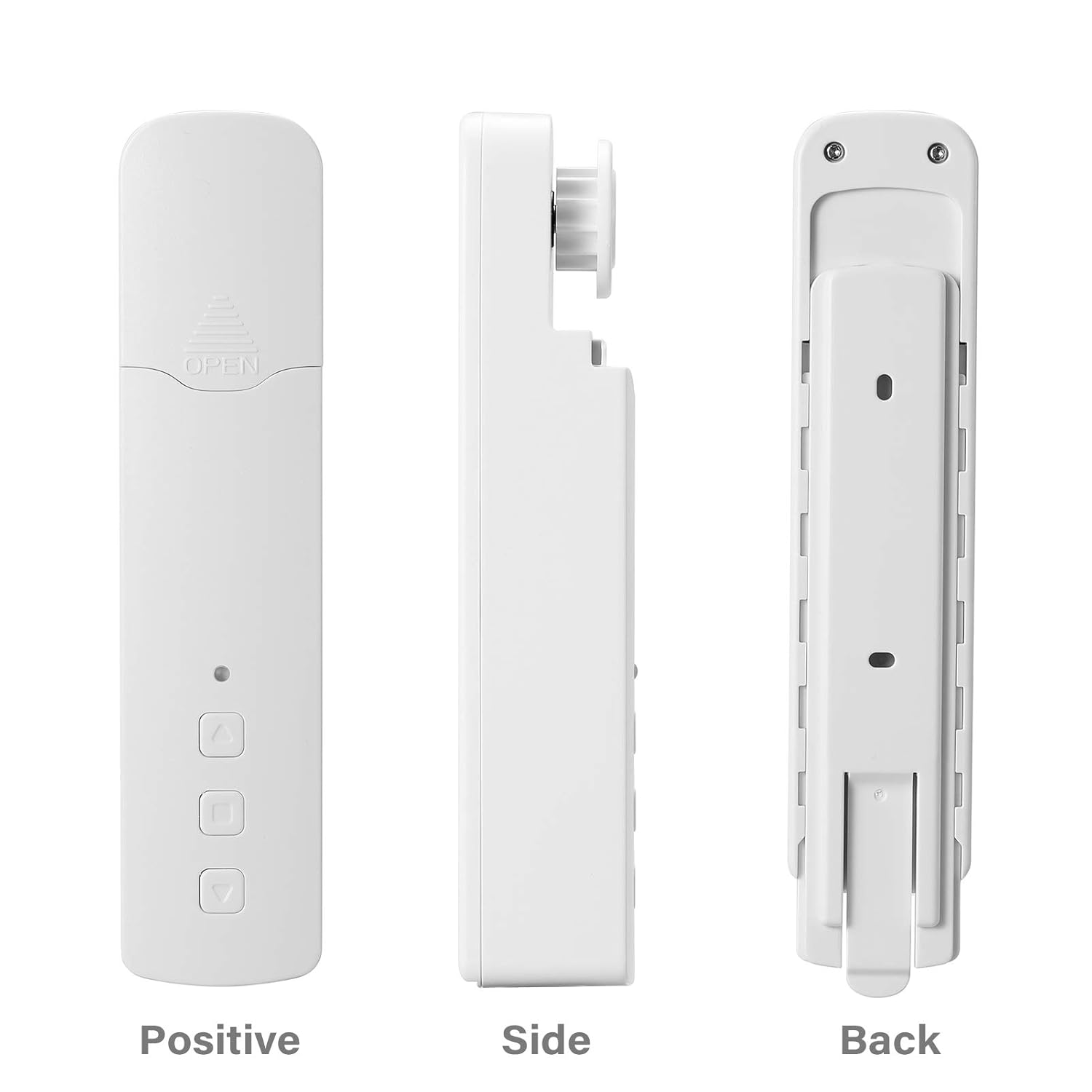
2.2-сүрөт: Башка views of the Layfuz M515EGWT motor, showing its positive (front), side, and back profiles. The front includes an indicator light and control buttons, while the back features mounting points.

2.3-сүрөт: The motor is suitable for various curtain types, including Venetian blinds, vertical blinds, honeycomb shades, triple shades, roller shades, and zebra shades, provided they use a compatible bead chain mechanism.

2.4-сүрөт: This image highlights the motor's control buttons: Up, Stop, and Down. It also shows the Set button and the charging port. Compatibility logos for Amazon Alexa, Google Home, and Tuya Smart are visible, indicating smart home integration.
3. Пакеттин мазмуну
Пакетте бардык буюмдар бар экенин текшериңиз:
- 1 x Curtain Motor (M515EGWT)
- 1 x Power Adapter (EU, UK, USA, or AU type, optional based on region)
- 1 x User Manual
4. Техникалык шарттар
| Өзгөчөлүк | Спецификация |
|---|---|
| Бренд | Layfuz |
| Модель номери | M515EGWT |
| Материал | ABS |
| Түс | Ак |
| Rated Voltage | 5V DC |
| Номиналдуу кубаттуулук | 6.0 Вт |
| Номиналдуу момент | 0.45 Нм |
| Айлануу ылдамдыгы | 30rpm |
| Иштөө температурасы | -20℃ ~ +65℃ |
| Built-in Receiving Frequency | 915 МГц, 2.4 ГГц |
| Продукциянын өлчөмдөрү | 22 x 18.5 x 4 см |
| Элемент Салмагы | 640 г |
| Келип чыккан өлкө | Кытай |
5. Орнотуу
Follow these steps to install the curtain motor. Refer to Figure 5.1 for visual guidance.

5.1-сүрөт: Comprehensive guide for the Layfuz M515EGWT motor, detailing its appearance, step-by-step installation, Tuya Smart App connection process, and instructions for setting and deleting travel limits.
5.1 Product Installation Steps (Refer to '2 Product install' in Figure 5.1)
- Fix the Wall Panel: Secure the mounting panel to the wall at the desired location for the motor.
- Мотор орнотуу: Slide the motor onto the fixed wall panel until it clicks into place.
- Insert the Bead Chain: Carefully place the curtain's bead chain into the motor's drive wheel. Ensure it is seated correctly.
- Close Wheel Cover: Close the wheel cover and tighten the curtain bead chain to prevent slippage.

5.2-сүрөт: The motor features fast switching capability for different drive gears, making it applicable to multiple models of bead chains. Ensure the correct gear is installed for your curtain's bead chain type.
6. Орнотуу
After physical installation, proceed with the smart app setup and limit settings. Refer to '3 Instructions for use' and '3.2 Limit Setting' in Figure 5.1.
6.1 Add Tuya Smart App (Refer to '3.1 Add Tuya Smart App' in Figure 5.1)
- Колдонмону жүктөп алуу: Download the Tuya Smart App from your mobile phone's app store (Google Play or Apple App Store).
- Катталуу/Кирүү: Колдонмону ачып, жаңы аккаунт түзүңүз же бар аккаунт менен кириңиз.
- Түзмөк кошуу: Click '+' or 'Add Device' in the app. The indicator light on the motor should be flashing red. If not, press and hold the 'Set' key for 3-5 seconds until it flashes rapidly.
- Түзмөктүн түрүн тандоо: Choose 'Manual Add' or 'Auto Scan'. For manual, select 'Curtain Motor'.
- Wi-Fi'га туташуу: Enter your 2.4GHz Wi-Fi network name and password. Ensure your phone is connected to the same 2.4GHz Wi-Fi network.
- Жупташтыруу: Колдонмо түзмөктү издеп, туташат. Туташтырылгандан кийин, түзмөктүн атын өзгөртө аласыз.
6.2 Limit Setting (Refer to '3.2 Limit Setting' in Figure 5.1)
Setting the upper and lower travel limits is crucial for proper operation. You must set these limits before setting any middle limits.
- Жогорку чекти коюу: Press the 'Set' key once. The indicator light will flash red. Use the 'Up' key to move the curtain to the desired upper limit. Press the 'Set' key again to confirm. The indicator light will flash red three times, indicating the upper limit is set.
- Төмөнкү чекти коюу: Press the 'Set' key once. The indicator light will flash red. Use the 'Down' key to move the curtain to the desired lower limit. Press the 'Set' key again to confirm. The indicator light will flash red three times, indicating the lower limit is set.
6.3 Middle Limit Setting (Refer to '3.3 Middle Limit Setting' in Figure 5.1)
You can set an intermediate stop point for your curtain.
- Initiate Middle Limit Setting: Press the 'Set' key once. The indicator light will flash red.
- Каалаган кызмат ордуна жылдыруу: Use the 'Up' or 'Down' keys to move the curtain to the desired middle stop position.
- Confirm Middle Limit: Press the 'Set' key again. The indicator light will flash red three times, confirming the middle limit is set.
6.4 Delete Middle Limit (Refer to '3.4 Delete Middle Limit' in Figure 5.1)
To remove a previously set middle limit:
- Initiate Deletion: Press the 'Set' key once. The indicator light will flash red.
- Confirm Deletion: Press and hold the 'Set' key for 5 seconds. The indicator light will flash red, release, and then flash red three times, indicating the middle limit has been deleted.
7. Операция
The Layfuz M515EGWT motor can be operated via its physical buttons, the Tuya Smart App, or voice commands.
7.1 Manual Control (Device Buttons)
- Өйдө баскычы: Moves the curtain upwards.
- Төмөн баскычы: Moves the curtain downwards.
- Токтотуу баскычы: Stops the curtain at its current position.
- Орнотуу баскычы: Used for pairing and setting travel limits (as described in Section 6).
7.2 Tuya Smart App Control
Once the motor is successfully paired with the Tuya Smart App (Section 6.1), you can:
- Open/Close Curtains: Use the virtual buttons in the app to fully open or close the curtains.
- Позицияны тууралоо: Precisely control the curtain's position by sliding a bar or setting a percentage.
- Графиктерди коюу: Utilize the timing function to create automated schedules for opening and closing curtains at specific times.
- Алыстан башкаруу: Operate your curtains from any location with internet access.
7.3 Үн менен башкаруу
The motor is compatible with Amazon Alexa and Google Home. After linking your Tuya Smart account to your voice assistant, you can use commands such as:
- "Алекса, көшөгөнү ач."
- "Эй, Google, көшөгөнү жап."
- "Алекса, көшөгөнү 50%га коюп кой."
8. Техникалык тейлөө
To ensure the longevity and optimal performance of your Layfuz M515EGWT motor, follow these maintenance guidelines:
- Тазалоо: Wipe the motor's exterior with a soft, dry cloth. Do not use abrasive cleaners or immerse the device in water.
- Кубат туташуу: Ensure the power adapter and cable are securely connected and free from damage. Disconnect power before cleaning or performing any maintenance.
- Bead Chain Inspection: Periodically check the curtain's bead chain for wear, damage, or obstructions that could hinder motor operation. Ensure the chain is properly seated in the motor's drive wheel.
- Экологиялык шарттар: Operate the motor within the specified temperature range (-20℃ to +65℃) and avoid excessive humidity.
9. Кыйынчылыктарды
If you encounter issues with your Layfuz M515EGWT motor, refer to the following common problems and solutions:
- Мотор жооп бербейт:
- Check if the power adapter is securely connected and the motor is receiving power.
- Электр розеткасынын иштешин текшериңиз.
- Verify that the bead chain is correctly installed and not jammed.
- Difficulty Connecting to Tuya App:
- Ensure your mobile phone is connected to a 2.4GHz Wi-Fi network. The motor does not support 5GHz Wi-Fi.
- Confirm that the motor's indicator light is flashing rapidly during pairing mode. If not, press and hold the 'Set' button for 3-5 seconds.
- Wi-Fi сырсөзүңүздүн тактыгын текшериңиз.
- Move the motor closer to your Wi-Fi router to improve signal strength.
- Wi-Fi роутериңизди өчүрүп-күйгүзүп, жупташтыруу процессин кайра аракет кылып көрүңүз.
- Curtain Not Moving to Correct Limits:
- Re-calibrate the upper and lower travel limits as described in Section 6.2.
- Ensure the bead chain is not slipping or obstructed.
- Үн менен башкаруу иштебей жатат:
- Verify that your Tuya Smart account is correctly linked to your Amazon Alexa or Google Home app.
- Интернет байланышыңызды текшериңиз.
- Ensure the device name in the Tuya app is recognized by your voice assistant.
10. Коопсуздук маалыматы
Төмөнкү коопсуздук чараларын окуп чыгып, аткарыңыз:
- Бул аппарат имараттын ичинде гана колдонуу үчүн.
- Do not expose the motor to water, moisture, or extreme temperatures.
- Ensure the power adapter and cable are not damaged. Do not use if damaged.
- Аппаратты балдар жана үй жаныбарлары жетпеген жерде сактаңыз.
- Do not attempt to disassemble or repair the motor yourself. Contact qualified personnel for service.
- Ensure the curtain's bead chain is installed correctly and securely to prevent accidents.
11. Кепилдик жана колдоо
Кепилдик маалыматы жана техникалык колдоо үчүн, сатып алуу учурунда берилген документтерди караңыз же сатуучуга кайрылыңыз. Сатып алганыңыздын далили катары сатып алуу дүмүрчөгүңүздү сактаңыз.