
1. Киришүү
Thank you for choosing the Bluenin HWS-918 Bluetooth 5.0 Neckband Wireless Headphones. This manual provides essential information for setting up, operating, and maintaining your device. Please read it carefully to ensure optimal performance and longevity of your headphones.
The Bluenin HWS-918 features Bluetooth 5.0 connectivity, retractable earbuds, CVC 8.0 noise-cancelling microphone, and a comfortable neckband design, making it suitable for various activities including sports and daily use.
2. Продукт бүтүп калдыview
2.1 Пакеттин мазмуну
- Bluenin HWS-918 Neckband Wireless Headphones
- USB заряддоо кабели
- Кулак учтары (S, M, L өлчөмдөрү)
- User Manual
2.2 Кулакчындын компоненттери
Familiarize yourself with the main components and controls of your Bluenin HWS-918 headphones.

Сүрөт: бүттүview of the Bluenin HWS-918 neckband headphones, showing the general design and location of controls.
- Моюн боосу: Houses battery, control buttons, and electronics.
- Жыйналып алынуучу кулакчындар: In-ear design with automatic retraction.
- Башкаруу баскычтары: Power, Volume Up/Down, Play/Pause/Multi-function, Retract.
- Микрофон: Built-in CVC 8.0 noise-cancelling microphone for calls.
- USB кубаттоо порту: Ички батареяны кайра заряддоо үчүн.
- LED көрсөткүчү: Кубат, жупташтыруу жана кубаттоо абалын көрсөтөт.
3. Орнотуу
3.1 Наушниктерди заряддоо
Before first use, fully charge the headphones. Connect the USB charging cable to the headphone's charging port and to a USB power source (e.g., computer, wall adapter). The LED indicator will show charging status.
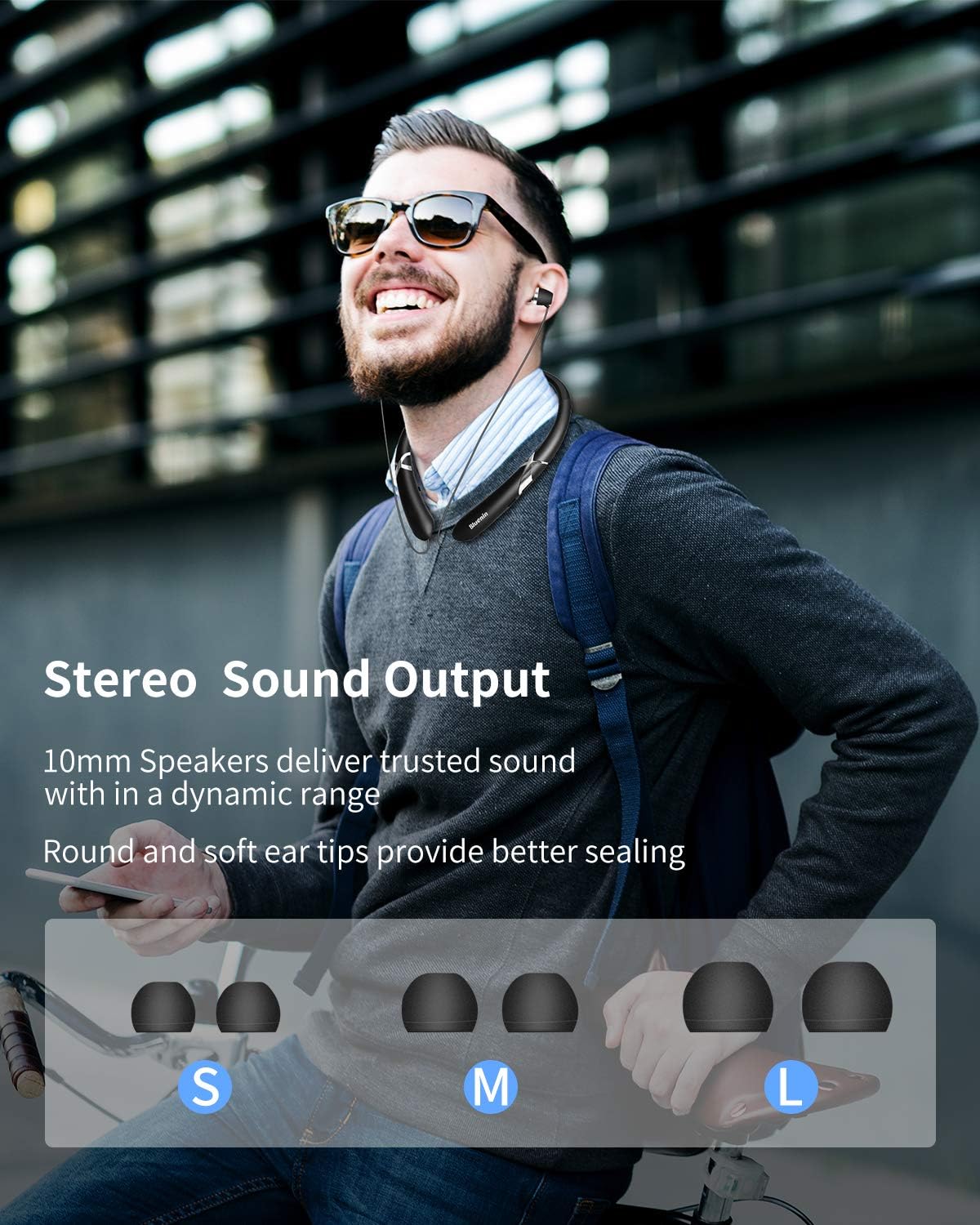
Image: The Bluenin HWS-918 headphones with an overlay showing a battery icon and text indicating 15 hours of playing time and 500 hours of standby time from a 180mAh battery.
- A full charge provides approximately 14 hours of music playback or 16 hours of talk time.
- Standby time is up to 500 hours.
- Батареянын абалы болушу мүмкүн viewed on your connected Bluetooth device (if supported).
3.2 Bluetooth жупташтыруу
Гарнитураңызды түзмөккө туташтыруу үчүн:

Image: The Bluenin HWS-918 headphones with graphics emphasizing Bluetooth 5.0, an integrated Qualcomm CSR chip, a wireless range of up to 33 feet, and the capability to connect to two devices simultaneously.
- Наушниктердин заряддалганын жана өчүрүлгөнүн текшериңиз.
- Жупташтыруу режимин көрсөткөн LED индикатору кезектешип кызыл жана көк түстө күйүп-өчкөнгө чейин Кубат баскычын басып туруңуз.
- Түзмөгүңүздө (смартфон, планшет, компьютер) Bluetooth иштетип, жеткиликтүү түзмөктөрдү издеңиз.
- Select "Bluenin HWS-918" from the list of found devices.
- Туташтырылгандан кийин, LED индикатору акырындык менен көк болуп жанат.
- Кулакчындар бир эле учурда эки түзмөккө туташа алат.
4. Иштөө нускамалары
4.1 Күйгүзүү/өчүрүү
- Күйгүзүү: Кубат баскычын 3 секунд басып, кармап туруңуз. LED көк түстө күйүп-өчөт.
- Өчүрүү: Press and hold the Power button for 3 seconds. The LED will flash red and then turn off.
4.2 Музыканы ойнотуу
- Ойнотуу/тындыруу: Көп функциялуу баскычты бир жолу басыңыз.
- Көлөмү: "+" баскычын басыңыз.
- Үнүн азайтуу: "-" баскычын басыңыз.
- Кийинки трек: "+" баскычын басып, кармап туруңуз.
- Мурунку трек: "-" баскычын басып, кармап туруңуз.
4.3 Чакыруу функциялары

Image: The Bluenin HWS-918 headphones are depicted with a smartphone displaying an incoming call interface. An icon illustrates the vibrating reminder feature, and a separate image shows a mute button, indicating the ability to easily cut off the microphone.
- Чалууга жооп берүү/аяктоо: Көп функциялуу баскычты бир жолу басыңыз.
- Чакырууну четке кагуу: Көп функциялуу баскычты 2 секунд басып туруңуз.
- Акыркы номерди кайра терүү: Көп функциялуу баскычты эки жолу басыңыз.
- Микрофондун үнүн басуу: Press the dedicated Mute button during a call.
- Call Vibration Alert: The headphones will vibrate to notify you of an incoming call.
4.4 Retractable Earbuds
The Bluenin HWS-918 features automatic retractable earbuds for tangle-free storage.

Image: The Bluenin HWS-918 neckband headphones are shown with hands demonstrating the automatic retraction of the earbud wires. Arrows indicate the movement of the wires, highlighting the one-button control for tangle-free storage.
- To extend the earbuds, gently pull them out to the desired length.
- To retract, press the dedicated Retract button on the neckband. The earbuds will automatically retract into the neckband.
- Avoid forcing the earbuds or wires, as this may cause damage. The wires are designed for over 5000 retractions.
4.5 Наушник тагынуу
The ergonomic neckband design ensures comfortable wear throughout the day.

Image: A person wearing the Bluenin HWS-918 headphones, demonstrating the stereo sound output from 10mm speakers. Below, different sizes of ear tips (Small, Medium, Large) are displayed, indicating options for a better seal and comfort.
- Place the neckband around your neck, ensuring a comfortable fit.
- Select the appropriate ear tip size (S, M, L) for a secure and comfortable fit that also optimizes sound quality.
- The headphones are sweatproof, making them suitable for sports and exercise.
5. Техникалык тейлөө
5.1 Тазалоо
- Наушниктерди жумшак, кургак чүпүрөк менен сүртүңүз.
- For ear tips, remove them and clean with a mild soap solution, then rinse and dry thoroughly before reattaching.
- Абразивдүү тазалагычтарды колдонбоңуз же наушниктерди сууга салбаңыз.
5.2 Сактоо
- Наушниктерди салкын, кургак жерде күндүн тике тийген нурунан жана экстремалдык температурадан алыс сактаңыз.
- Ensure earbuds are fully retracted before storing to prevent wire damage.
5.3 Сууга туруктуулук
The headphones are water resistant, suitable for sweat and light splashes. They are not designed for submersion in water.
6. Кыйынчылыктарды
| Көйгөй | Мүмкүн себеп | Чечим |
|---|---|---|
| Кулакчындар күйбөйт | Батарея аз | Наушниктерди толук заряддаңыз. |
| Түзмөк менен жупташтыруу мүмкүн эмес | Headphones not in pairing mode; Bluetooth off on device; Device too far | Ensure headphones are in pairing mode (flashing red/blue). Turn on Bluetooth on your device. Move device closer to headphones (within 33ft). |
| Үн жок | Үн өтө төмөн; Туташкан эмес; Туура эмес аудио чыгышы тандалды | Increase volume on headphones and device. Ensure headphones are connected. Check device's audio output settings. |
| Чалуу сапаты начар | Weak signal; Microphone obstructed | Move closer to your connected device. Ensure microphone is not covered. |
| Earbuds do not retract | Mechanism jammed; Retract button not pressed | Ensure no obstruction. Press the retract button firmly. Do not force the wires. |
7. Техникалык шарттар
| Өзгөчөлүк | Спецификация |
|---|---|
| Модель аты | HWS-918 |
| Бренд | Bluenin |
| Байланыш технологиясы | Зымсыз (Bluetooth 5.0) |
| Bluetooth чип | CSR8645 |
| Форма фактору | In Ear (Retractable) |
| Микрофон | CVC 8.0 Noise-Cancelling |
| Батареянын иштөө мөөнөтү (Музыка) | 14 саатка чейин |
| Батареянын иштөө мөөнөтү (баяндашуу) | 16 саатка чейин |
| Күтүү убактысы | 500 саатка чейин |
| Заряддоо порту | USB |
| Сууга туруктуулук деңгээли | Сууга чыдамдуу (терге чыдамдуу) |
| Материал | Пластик |
| Түс | Matte Black |
| Шайкеш түзмөктөр | Smartphones, Laptops, Tablets, Computers |
| Башкаруу ыкмасы | Баскычтар |
8. Кепилдик жана колдоо
Every Bluenin product includes a 45-day money-back guarantee and a one-year warranty from the date of purchase.
For technical support, warranty claims, or further assistance, please refer to the contact information provided with your purchase or visit the official Bluenin webсайт.