
Introduction
This manual provides comprehensive instructions for the safe and effective use of your BlissLights Sky Lite 2.0 RGB LED Laser Star Projector. Please read this manual thoroughly before operating the device and retain it for future reference.
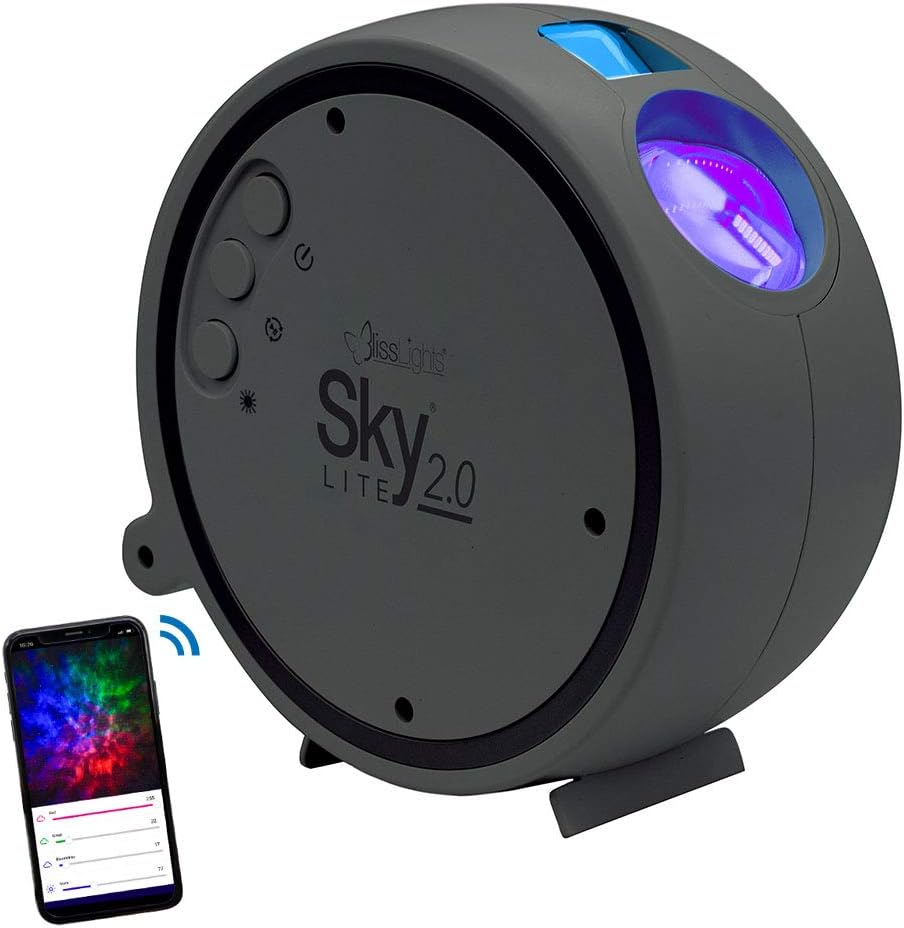
Image: The BlissLights Sky Lite 2.0 projector, a compact gray device, shown alongside a smartphone illustrating its app control interface. The projector features control buttons on its side and projects light from its front lens.
Жайгашуу
1. Таңгактан чыгаруу жана текшерүү
- Бардык компоненттерди таңгактан кылдаттык менен алып салыңыз.
- Inspect the device and included accessories for any signs of damage. If any damage is found, do not use the product and contact customer support.
- Ensure all components are present: Sky Lite 2.0 projector, AC Power Adapter.
2. Жайгаштыруу
Optimal placement is crucial for achieving the desired projection effect. Consider the following:
- For a wider projection spread, place the projector further away from the projection surface (e.g., floor or low surface, angled upwards).
- Avoid placing the projector where the laser beam could directly shine into eyes.
- Проектор туруктуу, тегиз жерде турганын текшериңиз.

Image: A dining table set for two, surrounded by walls and ceiling illuminated with a dynamic, colorful nebula and scattered stars from the Sky Lite 2.0 projector, demonstrating its atmospheric effect.
3. Power Connection
- Connect the AC power adapter to the projector's power input port.
- Plug the AC power adapter into a standard electrical outlet (100-240V AC, 50/60 Hz).
- Түзмөк автоматтык түрдө күйөт же күтүү режимине өтөт.
4. Колдонмону жүктөп алуу жана Bluetooth туташуу
For full control and customization, download the official BlissLights app.
- Издөө "BlissLights" in your device's app store (iOS or Android).
- Колдонмону жүктөп алып, орнотуңуз.
- Open the app and follow the on-screen instructions to pair your Sky Lite 2.0 via Bluetooth. Ensure Bluetooth is enabled on your mobile device.
- The app does not require location or storage data for operation.

Image: A hand holding a smartphone displaying the BlissLights app. The app interface shows controls for multicolor cloud effects, a timer function, and options to customize light shows, demonstrating the device's smart capabilities.
Операция
1. Түзмөктү башкаруу элементтери
The Sky Lite 2.0 features simple button controls on the unit:
- Кубат баскычы: Аппаратты күйгүзөт же өчүрөт.
- Cycle Effects Button: Cycles through various light effects and color combinations.
- Жарык баскычы: Adjusts the projection brightness.
- Айлантуу баскычы: Starts or stops the rotating motion of the nebula.
2. App Control Features
The BlissLights app provides enhanced control and customization options:
- Эффект режимдери: Select from a variety of preset light effects for stars and nebula.
- Түс ыңгайлаштыруу: Create and save your own unique color combinations using the RGB cloud feature.
- Жарыктыкты жөндөө: Fine-tune the brightness levels of both stars and nebula.
- Rotation Control: Start or stop the rotation of the nebula. Note that rotation speed is not adjustable.
- Таймер функциясы: Ыңгайлуулук үчүн автоматтык түрдө өчүрүү таймерин коюңуз.

Image: A gaming room featuring a high-back gaming chair, desk with computer, and wall art, all bathed in the immersive galaxy projection from the Sky Lite 2.0, highlighting its use in creating an ambient environment.
Техникалык тейлөө
1. Тазалоо
- Тазалоодон мурун аппараттын розеткадан ажыратылганын текшериңиз.
- Проектордун сыртын сүртүү үчүн жумшак, кургак чүпүрөктү колдонуңуз.
- Do not use abrasive cleaners, solvents, or harsh chemicals, as these may damage the finish or optical components.
- Gently clean the projection lens with a microfiber cloth if dust or smudges affect projection quality.
2. Сактоо
- Колдонулбаганда, проекторду салкын, кургак жерде, тике күн нурунан жана экстремалдык температурадан алыс сактаңыз.
- Keep the device in its original packaging or a protective case to prevent dust accumulation and damage.
Проблемаларды чечүү
If you encounter issues with your Sky Lite 2.0, refer to the following common problems and solutions:
| Көйгөй | Мүмкүн себеп | Чечим |
|---|---|---|
| Түзмөк күйбөйт. | Электр кубаты жок, адаптер бузук же түзмөк бузук. |
|
| App cannot connect to the projector. | Bluetooth is off, projector is out of range, or app issue. |
|
| Проекция күңүрт же бүдөмүк. | Incorrect placement, ambient light, or dirty lens. |
|
| Nebula rotation speed is not adjustable. | This is a design characteristic of the product. | The Sky Lite 2.0 does not offer adjustable rotation speed for the nebula effect. You can only toggle rotation on or off. |
| Specific colors are missing from the nebula. | Color selection in app or device limitations. | When certain colors are deselected in the app, those areas will not be illuminated by the nebula. The remaining colors will not expand to fill the entire projection area. |
Техникалык шарттар
The following are the technical specifications for the BlissLights Sky Lite 2.0:
- Модель номери: 900-00057_А
- Бренд: BlissLights
- Түсү: Blue (Stars), RGB (Nebula)
- Форма: Тегерек
- Материал: Glass (Shade), ABS Plastic (Housing)
- Бүткөн түрү: Лакталган
- Жарык булагы түрү: Жарык чыгаруучу диод (LED)
- Кубат булагы: Электр зымдары
- Кубат киргизүү: 100-240V AC, 50/60 Гц, 0.2А
- USB кубаттуулугу: 5V === 2А
- Ватtage: 5 ватт
- Тtage: 120 вольт (AC)
- Максималдуу туура келген жарык булагы Wattage: 100 Ватт
- Элемент Салмагы: 1.1 фунт (болжол менен 0.5 кг)
- Продукциянын өлчөмдөрү: 6.25" L x 2.75" В x 6.25" Ж (15.88 см L x 6.99 см В x 15.88 см H)
- Корндун узундугу: 5 фут / 1.5 м
- Операция: Үй ичинде гана колдонуу
- Лазердик классификация: 2-класс
- Проекциялык камтуу:
- Laser: 30x30 ft
- Nebula: 15x15 ft
- Өзгөчөлүктөр: App Control, Blue Laser, Bluetooth, RGB Cloud, Dimmable, Adjustable Light Direction, Push Button Switch Style
- Камтылган компоненттер: AC кубат адаптери
- Сертификаттар: UL тизмеленген

Image: A technical diagram illustrating the dimensions (6.5 inches / 16.51 cm in height and width, 2.5 inches / 6.35 cm in depth) and key specifications of the Sky Lite 2.0 projector, including power input, operation, and projection coverage.

Image: A visual representation of the Sky Lite 2.0's features, highlighting its moving stars and nebula, multicolor cloud, adjustable brightness, tilting base, app control, customizable effect modes, and USB power with plug adapter.
Кепилдик жана колдоо
Кепилдик маалымат
Specific warranty details for the BlissLights Sky Lite 2.0 are provided by the manufacturer. Please refer to the product packaging or the official BlissLights webакыркы кепилдик саясаты жана каттоо маалымат үчүн сайт.
Кардарларды колдоо
For technical assistance, troubleshooting beyond this manual, or warranty claims, please contact BlissLights customer support. Contact information can typically be found on the manufacturer's webсайт же продукт таңгак.
You can also visit the official BlissLights store on Amazon for additional product information and support resources: BlissLights Amazon Store