
1. Киришүү
Сатып алганыңыз үчүн рахматasing the Trevi CMP 588 DAB Portable Stereo System. This manual provides essential information for the safe and correct operation of your device. Please read it thoroughly before use and retain it for future reference.
The Trevi CMP 588 DAB is a versatile portable stereo system featuring DAB/DAB+ and FM radio with RDS, a CD/MP3 player, USB input, AUX-in, Bluetooth connectivity, and a headphone jack, all designed for an enhanced audio experience.
2. Коопсуздук маалыматы
- Кубат булагы: Көрсөтүлгөн кубат адаптерин же батарейкаларды гана колдонуңуз. Көлөмүн текшериңизtage бирдиктин талаптарына жооп берет.
- Суу жана ным: Do not expose the unit to rain, moisture, or immerse it in water. Avoid placing objects filled with liquids, such as vases, on the unit.
- Вентиляция: Адекваттуу вентиляцияны камсыз кылыңыз. Вентиляция тешиктерин жаап албаңыз.
- Жылуулук: Аппаратты радиаторлор, жылуулук регистрлери, мештер же башка аппараттар (анын ичинде) сыяктуу жылуулук булактарынан алыс кармаңыз. ampкөтөргүчтөр) жылуулукту пайда кылуучу.
- Тазалоо: Тазалоодон мурун түзмөктү розеткадан сууруп алыңыз. Жумшак, кургак чүпүрөктү колдонуңуз. Суюк же аэрозоль тазалоочу каражаттарды колдонбоңуз.
- Тейлөө: Бул продуктту өзүңүз тейлөөгө аракет кылбаңыз. Бардык тейлөөнү квалификациялуу тейлөө кызматкерлерине тапшырыңыз.
- CD ойноткуч: Эч качан лазер нуруна түз карабаңыз.
3. Пакеттин мазмуну
Бардык буюмдар бар экенин жана жакшы абалда экендигин текшериңиз:
- Trevi CMP 588 DAB Portable Stereo System
- AC кубат кабели
- Алыстан башкаруу
- Колдонуучунун Колдонмосу (бул документ)
4. Продукциянын өзгөчөлүктөрү
- DAB/DAB+ and FM Radio with RDS
- High Readability Dot Matrix Display
- CD Player (supports CD-DA, MP3)
- USB Input for MP3 Playback
- AUX-in for external audio devices
- Bluetooth байланышы
- Наушник уясы
- Ташуу туткасы менен портативдик дизайн
- Алыстан башкаруу камтылган
5. Башкаруу элементтери жана байланыштар

Сүрөт 1: Алдыңкы view of the Trevi CMP 588 DAB, showing speakers, display, and main controls.
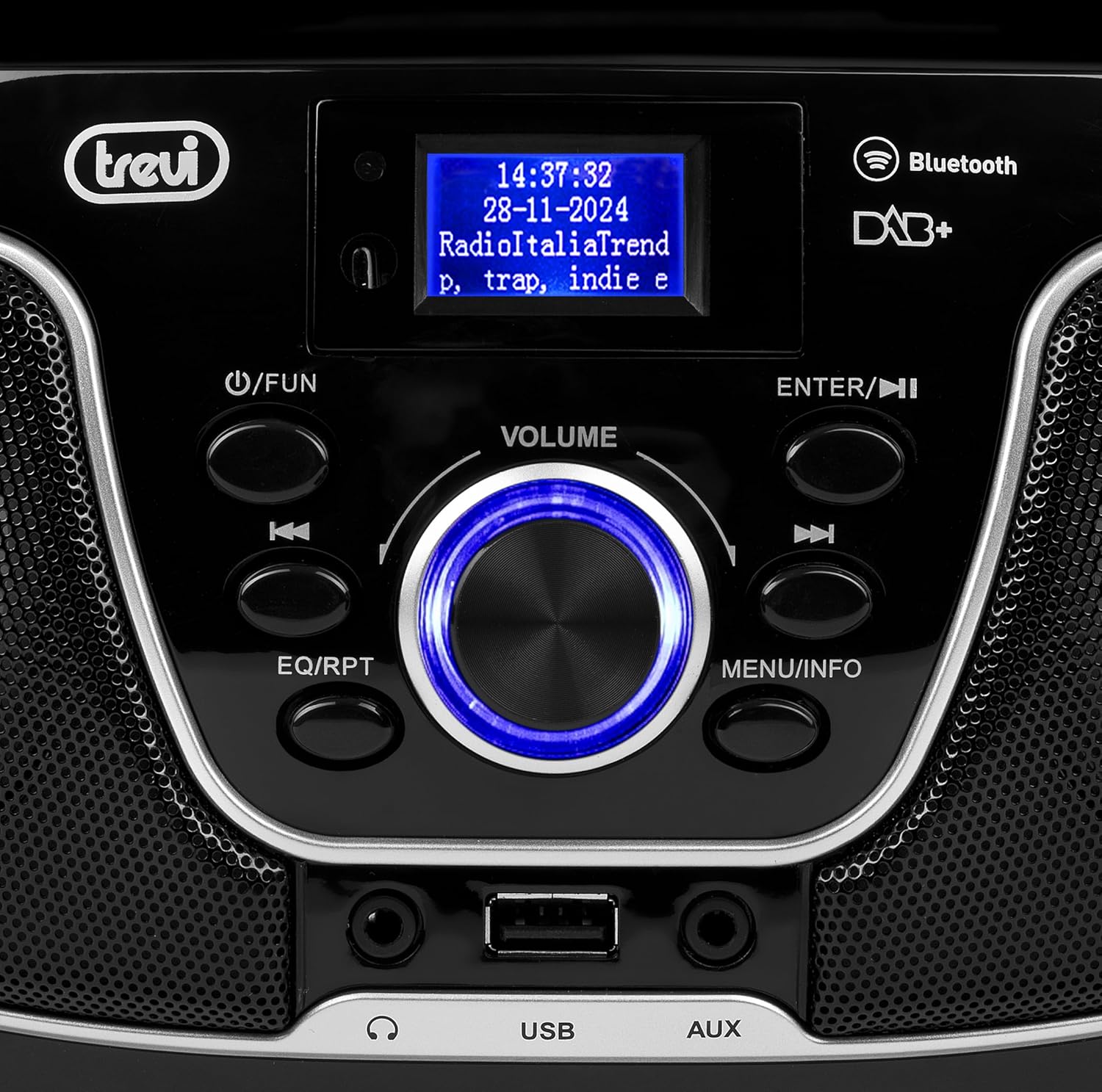
2-сүрөт: Детальдуу view of the control panel, including power, function, volume knob, and navigation buttons.
Алдыңкы панелдин башкаруу элементтери:
- POWER / FUN button: Press to turn on/off, press to switch functions (CD/USB/DAB/FM/Bluetooth/AUX).
- VOLUME туткасы: Rotate to adjust volume. Press to confirm selections.
- ENTER / ►►I button: Confirm selection / Skip to next track/station.
- I▼▼ / EQ/RPT button: Skip to previous track/station / Equalizer settings / Repeat mode.
- MENU / INFO button: Access menu / Display information.
- USB порт: Connect USB storage devices for MP3 playback.
- AUX уячасы: Тышкы аудио түзмөктөрдү туташтыруу.
- Гарнитура уячасы: Жеке угуу үчүн гарнитураны туташтырыңыз.

3-сүрөт: Арткы view of the Trevi CMP 588 DAB, showing the power input and telescopic antenna.
Арткы панелдин туташуулары:
- AC кубаттуулугун киргизүү: Берилген AC кубат кабелин туташтырыңыз.
- Телескопиялык антенна: Оптималдуу радио кабыл алуу үчүн кеңейтүү.

Figure 4: Remote control for the Trevi CMP 588 DAB, showing various function buttons.
Алыстан башкаруу функциялары:
- ЖАНЫМДА БОЛ: Күйгүзүү/өчүрүү.
- FUNC: Switch between modes (CD, USB, DAB, FM, Bluetooth, AUX).
- Үнсүз: Аудионун үнүн басуу/ачуу.
- RPT: Ойнотуу режимин кайталаңыз.
- СКАН: Auto scan for radio stations.
- F+/CH+, F-/CH-: Navigate folders/channels.
- EQ: Эквалайзер орнотуулары.
- PLAY/PAUSE (►II): Ойнотуу/тындыруу.
- PREV/TUN- (▼▼): Previous track/tune down.
- NEXT/TUN+ (►►): Next track/tune up.
- STOP (■): Ойнотууну токтотуу.
- МЕНЮ: Менюга кирүү.
- МААЛЫМАТ: Маалыматты көрсөтүү.
- ПРОГ: Program tracks/stations.
- VOL+ / VOL-: Үндү тууралоо.
6. Орнотуу
6.1 Кубат туташтыруу
- AC кубаттуулугу: Connect the supplied AC power cable to the AC power input on the rear of the unit, then plug the other end into a wall outlet.
- Battery Operation (Optional): For portable use, insert 6 x C-size batteries (not included) into the battery compartment on the bottom of the unit. Ensure correct polarity.
6.2 Баштапкы күйгүзүү
басыңыз POWER / FUN бирдиктин баскычы же ЖАНЫМДА БОЛ button on the remote control to turn on the system. The display will light up.
6.3 Setting Up the Antenna
For optimal radio reception, fully extend the telescopic antenna located at the rear of the unit. Adjust its position for the best signal.
7. Иштөө нускамалары
7.1 DAB/DAB+ радиосунун иштеши
- басыңыз POWER / FUN button repeatedly until "DAB" mode is selected.
- The unit will automatically scan for available DAB/DAB+ stations on first use. To perform a manual scan, press the МЕНЮ button, navigate to "Full Scan" and press ENTER.
- Скандоо аяктагандан кийин, колдонуңуз ▼▼ or ►► buttons to browse through the available stations. Press ENTER бекет тандоо.
- басыңыз INFO button to cycle through different information displays (e.g., program type, signal strength, time).
7.2 FM радиосунун иштеши
- басыңыз POWER / FUN button repeatedly until "FM" mode is selected.
- To auto-scan and store stations, press the SCAN button on the remote. The unit will scan and save strong signals.
- Кол менен жөндөө үчүн, баскычын басып кармап туруңуз ▼▼ or ►► buttons to search for the next available station. Press briefly to fine-tune the frequency.
- The RDS function will display station information (if available).
7.3 CD/MP3 ойнотуу

5-сүрөт: Жогорку view of the Trevi CMP 588 DAB with the CD compartment open, ready for disc insertion.
- CD бөлүктүн капкагын ачыңыз.
- Place a CD (CD-DA or MP3 CD) onto the spindle with the label side facing up.
- CD бөлүктүн капкагын жабыңыз.
- басыңыз POWER / FUN баскычын "CD" режими тандалганга чейин кайталаңыз.
- The unit will read the disc. Press PLAY/PAUSE (►II) ойнотууну баштоо үчүн.
- Колдонуу ▼▼ or ►► to skip tracks. Press and hold to fast forward/rewind.
- Басыңыз STOP (■) ойнотууну токтотуу үчүн.
7.4 USB ойнотуу
- MP3 камтыган USB флэш-дискти салыңыз fileUSB портуна киргизиңиз.
- басыңыз POWER / FUN button repeatedly until "USB" mode is selected.
- Түзмөк автоматтык түрдө MP3ти аныктап, ойнотууну баштайт files.
- Колдонуу ▼▼ or ►► тректерди өткөрүп жиберүү.
7.5 Bluetooth жупташтыруу жана ойнотуу
- басыңыз POWER / FUN button repeatedly until "Bluetooth" mode is selected. The display will show "BT" or "PAIRING".
- Мобилдик түзмөгүңүздө Bluetooth'ду иштетиңиз (смартфон, планшет ж.б.).
- Издөө available devices and select "TREVI CMP 588 DAB" from the list.
- Once paired, you can play audio from your device through the stereo system.
- Use the controls on your mobile device or the stereo system to manage playback.
7.6 AUX-кирүү операциясы
- Connect an external audio device (e.g., MP3 player, smartphone) to the AUX-in jack using a 3.5mm audio cable (not included).
- басыңыз POWER / FUN баскычын "AUX" режими тандалганга чейин кайталаңыз.
- Play audio from your connected device. The volume can be controlled via both the stereo system and the external device.
8. Техникалык тейлөө
8.1 Агрегатты тазалоо
Wipe the exterior of the unit with a soft, dry cloth. Do not use abrasive cleaners, waxes, or solvents as they may damage the finish. Ensure the unit is unplugged before cleaning.
8.2 CD объективине кам көрүү
If the CD player experiences reading errors, the lens may be dirty. Use a commercially available CD lens cleaner to clean the lens. Do not touch the lens with your fingers.
8.3 Сактоо
If the unit will not be used for an extended period, remove the batteries (if applicable) and unplug the power cable. Store the unit in a cool, dry place away from direct sunlight and extreme temperatures.
9. Кыйынчылыктарды
| Көйгөй | Мүмкүн себеп | Чечим |
|---|---|---|
| Күч жок | Электр кабели туташкан эмес; Батареялар түгөндү же туура эмес орнотулган. | Электр кабелинин туташуусун текшериңиз; Батареяларды алмаштырыңыз же полярдуулуктун тууралыгын текшериңиз. |
| Үн жок | Үн өтө төмөн; Үнсүз функция активдүү; Туура эмес булак тандалды. | Increase volume; Deactivate mute; Select correct function (CD, USB, DAB, FM, BT, AUX). |
| Радио кабыл алуу начар | Антенна туура эмес узартылган же жайгаштырылган; Сигнал аймагы алсыз. | Телескопиялык антеннаны толугу менен сунуп, тууралаңыз; Түзмөктү башка жерге жылдырып көрүңүз. |
| CD/USB ойнотулбай жатат | Disc dirty/scratched; Incorrect file format on USB; USB drive not properly inserted. | Clean or replace disc; Ensure MP3 format for USB; Reinsert USB drive. |
| Bluetooth жупташтырылган жок | Device too far; Bluetooth not enabled on source device; Unit not in pairing mode. | Move devices closer; Enable Bluetooth on source device; Ensure unit is in Bluetooth mode and searching. |
10. Техникалык шарттар
- Модел: CM 588 DAB
- Кубат булагы: AC 230V ~ 50Hz or 6 x C-size batteries (not included)
- Энергияны керектөө: 15 Ватт
- Динамик түрү: Stereo (2 speakers)
- Байланыш: Bluetooth, USB, AUX-ин
- Колдоого алынган аудио форматтары: CD audio (CD-DA), MP3
- Радио жыштыктары: DAB/DAB+, FM with RDS
- Өлчөмдөрү (L x W x Y): 50 x 50 x 28 см (болжол менен)
- Салмагы: 1.5 килограмм (болжол менен)
- Түсү: Кара
11. Кепилдик жана колдоо
This product is covered by a standard manufacturer's warranty. Please refer to the warranty card included in your package for specific terms and conditions, including the warranty period and coverage details.
For technical support, service, or warranty claims, please contact your retailer or the official Trevi customer service. Contact information can typically be found on the Trevi webсайтында же продуктунун таңгагында.
Please retain your proof of purchase (receipt) for any warranty-related inquiries.