
1. Киришүү
Сатып алганыңыз үчүн рахматasing the YUNYODA Digital Projection Alarm Clock. This device combines a digital alarm clock with FM radio, time projection, and a USB charging port. Please read this manual carefully to ensure proper setup and operation of your new alarm clock.
2. Пакеттин мазмуну
Сураныч, пакетте төмөнкү нерселерди текшериңиз:
- 1 x YUNYODA Digital Projection Alarm Clock
- 1 х USB кабелинин
- 1 x Button Cell Battery (pre-installed for backup)
- 1 х Колдонуучунун колдонмосу (бул документ)

Image: Package contents showing the alarm clock, USB cable, and user manual.
3. Продукт бүтүп калдыview
The YUNYODA Digital Projection Alarm Clock features a large, curved LED display and a rotatable projector. It is designed for ease of use and clear visibility.

Сүрөт: алдыңкы view of the alarm clock with its digital display and active time projection.
Негизги өзгөчөлүктөрү:
- 7-inch Curved LED Display: Provides clear time readability from multiple angles.
- Жөнгө салынуучу дисплей жарыктыгы: Four levels of brightness to suit your preference.
- Кош ойготкучтар: Ар кандай графиктер үчүн эки көз карандысыз ойготкучту коюңуз.
- Чырым Function: Allows for an additional 9 minutes of sleep.
- FM радиосу: Digital FM radio with a frequency range of 76-108 MHz and 15 preset stations.
- 180° Adjustable Time Projection: Projects the time onto a wall or ceiling.
- USB кубаттоо порту: Conveniently charge your mobile devices (USB adapter not included).
- 12/24 саат форматы: Select your preferred time display format.
- Батареянын камдык көчүрмөсү: Maintains time settings during power outages (button cell battery included).

Image: Product dimensions and feature icons for the alarm clock.
4. Орнотуу
4.1 Кубат туташтыруу
- Connect the provided USB power cable to the DC 5V input port on the back of the alarm clock.
- USB кабелинин экинчи учун стандарттуу USB кубат адаптерине (кошулмада жок), андан кийин розеткага сайыңыз.
- The display will light up, indicating the clock is powered on. The pre-installed button cell battery provides backup power for time settings during power interruptions.
4.2 Баштапкы убакытты орнотуу
Upon first power-up or after a prolonged power loss, you may need to set the current time.
- басып, кармап туруңуз УБАКЫТТЫ ОРНОТУУ button (location may vary, typically on the top or back) until the hour digits begin to flash.
- колдонуу +/- buttons (or similar UP/DOWN buttons) to adjust the hour.
- Басыңыз УБАКЫТТЫ ОРНОТУУ Саатты ырастоо жана мүнөттү жөндөө үчүн кайра басыңыз.
- колдонуу +/- мүнөттөрдү тууралоо үчүн баскычтар.
- Басыңыз УБАКЫТТЫ ОРНОТУУ Мүнөттөрдү ырастоо жана убакытты коюу режиминен чыгуу үчүн дагы бир жолу басыңыз.
4.3 12/24 Hour Format Selection
12 сааттык (AM/PM) жана 24 сааттык форматтардын ортосунда которулуу үчүн:
- Кадимки убакытты көрсөтүү режиминде турганда, баскычын басыңыз 12/24H баскычы (же УБАКЫТТЫ ОРНОТУУ button briefly after initial setup) to toggle between the two formats.
5. Иштөө нускамалары
5.1 Сигнализацияны жөндөө (кош сигнализация)
This clock supports two independent alarms (Alarm 1 and Alarm 2).

Image: Visual representation of setting two distinct alarms for different activities.
- басыңыз 1-ДАБЛ button once. The alarm hour digits will flash.
- колдонуу +/- каалаган ойготкуч саатын тууралоо үчүн баскычтарды басыңыз.
- Басыңыз 1-ДАБЛ Саатты ырастоо жана мүнөттү жөндөө үчүн кайра басыңыз.
- колдонуу +/- каалаган ойготкуч мүнөттөрүн тууралоо үчүн баскычтарды басыңыз.
- Басыңыз 1-ДАБЛ one more time to confirm the minutes and activate Alarm 1. An alarm icon (e.g., '1') will appear on the display.
- Процессти колдонуп кайталаңыз 2-ДАБЛ button to set the second alarm.
5.2 Тындыруу функциясы
Ойготкуч чыкканда чоң баскычты басыңыз СОЮЗ button (usually on top) to temporarily silence the alarm for 9 minutes. The alarm will sound again after 9 minutes. To turn off the alarm completely, press any other button.

Image: Demonstrating the snooze function with a person waking up.
5.3 FM радиосунун иштеши
The alarm clock includes an FM radio with automatic scanning and preset station memory.

Image: Display showing FM radio frequency range and preset capabilities.
- Күйгүзүү/өчүрүү: басыңыз FM баскычы (же РАДИО button) to turn the radio on or off.
- Auto Scan & Save: басып, кармап туруңуз FM button for a few seconds. The radio will automatically scan for available stations and save them to presets (up to 15 stations).
- Түнкү станциялар: баскычын кыскача басыңыз +/- buttons to manually tune to the next available station.
- Алдын ала орнотууларды тандоо: басыңыз MEM Сакталган алдын ала коюлган станцияларды карап чыгуу үчүн баскычын басыңыз.
- Үндү тууралоо: колдонуу VOL +/- радионун үнүн жөндөө үчүн баскычтар.
5.4 Time Projection Function
The clock can project the time onto a wall or ceiling for easy viewing.

Image: Alarm clock projecting time onto a wall, highlighting the 180° rotation and optimal projection distance.
- Жандыруу/өчүрүү: басыңыз ПРОЕКТОР button (or a dedicated projection button) to turn the projection on or off.
- Бурчту тууралоо: The projector lens can be rotated up to 180 degrees (-90° to 90°) to direct the time display to your desired surface (wall or ceiling).
- Фокусту тууралоо: Проекцияланган сүрөттү курчутуу үчүн фокустук шакекчени проектордун линзасынын айланасында айландырыңыз.
- Оптималдуу аралык: For best clarity, the optimal projection distance is between 2 to 3 meters (6.5 to 9.8 feet).
5.5 Дисплейдин жарыктыгын жөндөө
The main LED display has multiple brightness levels.

Image: Comparison of the alarm clock display at three different brightness levels.
- басыңыз DIMMER button (or a dedicated brightness button) repeatedly to cycle through the available brightness levels (e.g., Bright, Medium, Dim, Off).
5.6 USB кубаттоо порту
A USB charging port is located on the back of the unit for charging external devices.
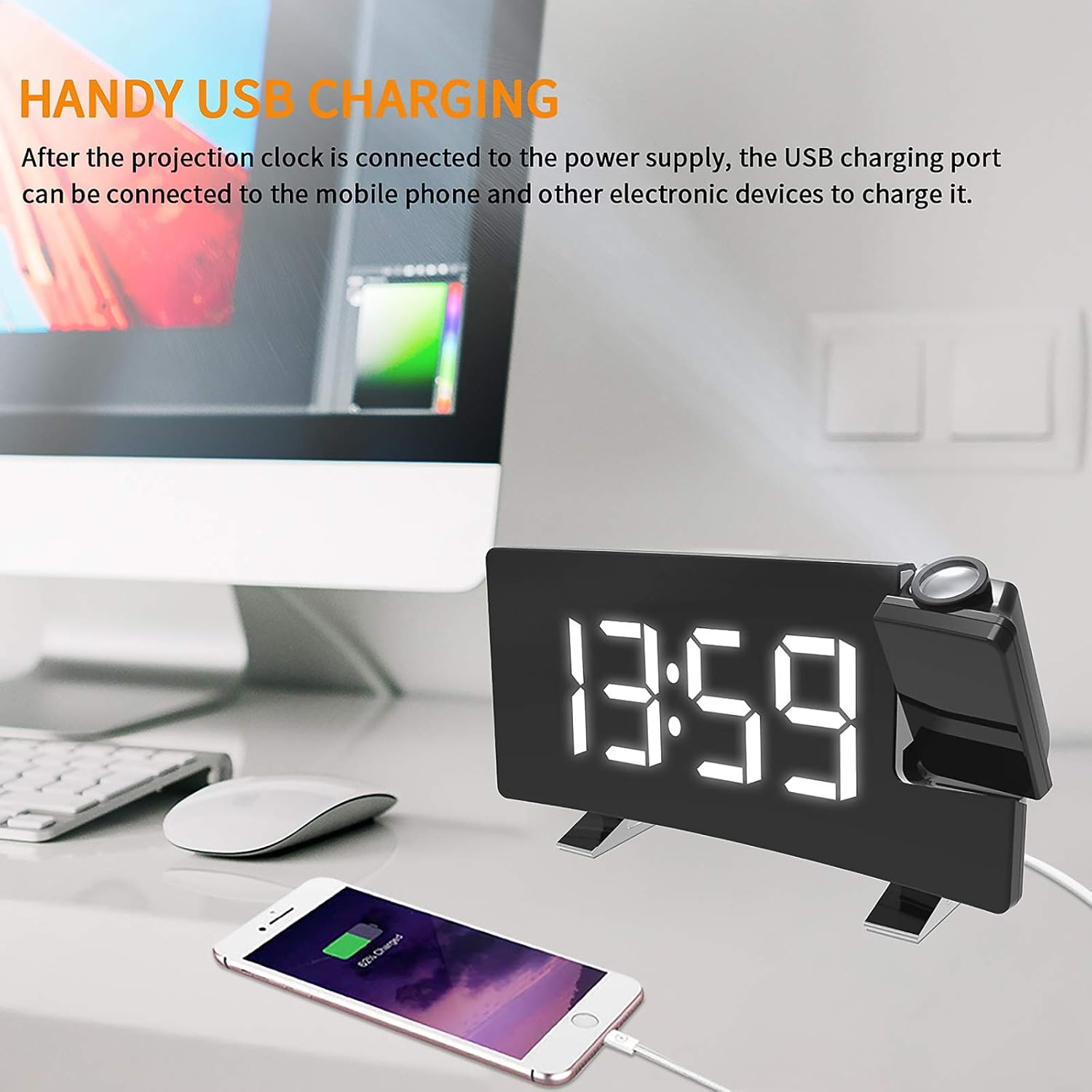
Image: A smartphone being charged via the alarm clock's USB port.
- Connect your mobile phone or other USB-powered device to the USB output port using its charging cable.
- The clock must be connected to a power source for the USB charging port to function.
6. Техникалык тейлөө
- Тазалоо: Саатты жумшак, кургак чүпүрөк менен сүртүңүз. Абразивдүү тазалагычтарды же эриткичтерди колдонбоңуз.
- Жайгашкан жери: Саатты туруктуу, тегиз жерге, күн нуру түз тийбеген, жылуулук булактарынан жана нымдуулуктан алыс коюңуз.
- Батареяны алмаштыруу: If the backup battery needs replacement, open the battery compartment on the bottom of the unit and replace the button cell battery with a new one of the same type.
7. Кыйынчылыктарды
| Көйгөй | Мүмкүн себеп | Чечим |
|---|---|---|
| Сааттын дисплейи бош. | Электр энергиясы жок. | Ensure the USB cable is securely connected to both the clock and a working power adapter/outlet. |
| Ойготкуч угулбайт. | Ойготкуч иштетилген эмес же үнү өтө төмөн. | Verify the alarm icon is displayed. Check alarm volume settings. |
| Болжолдонгон убакыт бүдөмүк. | Focus not adjusted or projection distance too far/close. | Rotate the focus ring on the projector lens. Adjust the clock's distance from the projection surface (optimal 2-3 meters). |
| FM радиосун кабыл алуу начар. | Сигнал алсыз же антенна узартылган эмес. | Extend the FM antenna fully. Try repositioning the clock for better reception. |
| USB кубаттоо иштебей жатат. | Clock not powered or cable issue. | Ensure the clock is connected to main power. Try a different USB cable or device. |
8. Техникалык шарттар
- Бренд: YUNYODA
- Модель номери: 0L2311DW0618XF0
- Түсү: Ак
- Өлчөмдөрү (L x W x Y): 20 x 10 x 6 см (7.1 x 3.6 x 1.8 дюйм)
- Салмагы: 342 г (12.0 унция)
- Материал: Акрилонитрил бутадиен стирол (ABS)
- Кубат киргизүү: DC 5V (USB кабели аркылуу)
- Камдык батарея: 1 x Button Cell Battery (included)
- Дисплей түрү: Digital LED
- FM Frequency колому: 76 - 108 МГц
- Проекциялык аралык: Optimal 2 - 3 meters
9. Кепилдик жана колдоо
For warranty information or technical support, please refer to the retailer where you purchased the product or contact YUNYODA customer service through their official channels. Please retain your proof of purchase for warranty claims.