
1. Киришүү
Thank you for choosing the Borofone JR-BE34 Wireless TWS Bluetooth Earphones. This manual provides essential instructions for setting up, operating, and maintaining your earphones to ensure optimal performance and longevity. Please read this manual thoroughly before use.
2. Пакеттин мазмуну
The Borofone JR-BE34 package typically includes:
- Borofone JR-BE34 Wireless TWS Bluetooth Earphones (Left and Right)
- Заряддоо кутусу
- Заряддоо кабели
- Колдонуучунун Колдонмосу (бул документ)

Image 1: The retail packaging for the Borofone JR-BE34 earphones. The image shows a white box with product branding and an illustration of the earphones and charging case.
3. Продукт бүтүп калдыview
The Borofone JR-BE34 earphones feature a compact design with a portable charging case. The earphones are designed for comfortable in-ear fit and provide touch controls for various functions.

Image 2: Borofone JR-BE34 Earphones in their charging case. The image shows the two white earbuds resting inside an open white charging case, with a small green indicator light visible on the front of the case.
Each earphone is equipped with a touch-sensitive area for controlling music playback and calls. The charging case protects the earphones and recharges them on the go.
4. Орнотуу
4.1 Наушникти жана капты заряддоо
Биринчи колдонуудан мурун, наушникти жана кубаттоочу кутучаны толук заряддаңыз.
- Кулакчындарды заряддоо кутусуна салыңыз. Алардын туура отурганын текшериңиз.
- Заряддоо кабелин корпустагы заряддоо портуна жана USB кубат булагына туташтырыңыз.
- The indicator light on the charging case will show charging status. Once fully charged, the indicator light may change color or turn off.
A full charge provides approximately 3 hours of talk/music time for the earphones, and the charging case has a 350mAh battery capacity.
4.2 Bluetooth жупташтыруу
To connect your Borofone JR-BE34 earphones to your device:
- Кулакчындардын заряддалганын текшериңиз.
- Заряддоо кутучасын ачыңыз. Кулакчындар автоматтык түрдө жупташтыруу режимине өтөт.
- Мобилдик түзмөгүңүздө Bluetooth жөндөөлөрүнө өтүп, Bluetooth'ту иштетиңиз.
- Издөө available devices. You should see "BOROFONE BE34" in the list.
- Select "BOROFONE BE34" to connect. A confirmation sound or message may indicate successful pairing.
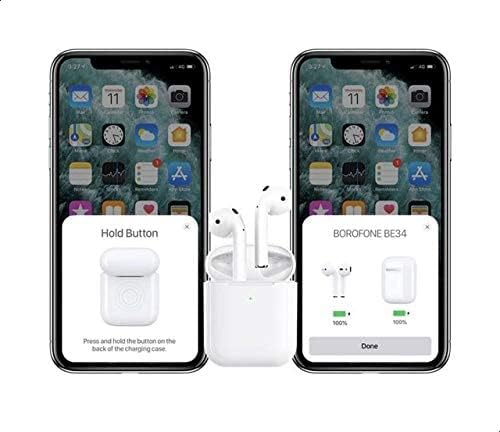
Image 3: Illustration of the pairing process. The image shows two smartphones. The left phone displays instructions to "Hold Button" on the charging case. The right phone shows a pop-up window indicating "BOROFONE BE34" with battery levels for both the case and the earphones, confirming successful connection.
For Apple devices, a pop-up window may appear on your screen to facilitate quick pairing and display battery levels.
5. Иштөө нускамалары
5.1 Күйгүзүү/өчүрүү
- Күйгүзүү: Заряддоо кутучасын ачсаңыз, наушник автоматтык түрдө күйөт.
- Өчүрүү: Кулакчындарды кайра кубаттоочу кутуга салып, капкагын жабыңыз. Алар автоматтык түрдө өчүп, кубаттала баштайт.
5.2 Музыканы ойнотуу
Use the touch controls on either earphone:
- Ойнотуу/тындыруу: Наушникти бир жолу таптаңыз.
- Кийинки трек: Оң наушникти эки жолу таптаңыз.
- Мурунку трек: Сол наушникти эки жолу таптаңыз.
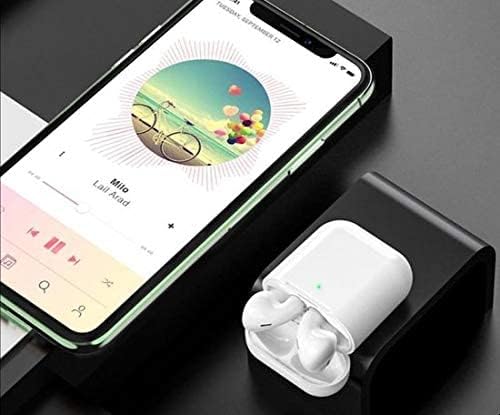
Image 4: The Borofone JR-BE34 earphones in their open charging case, positioned next to a smartphone displaying a music playback interface. This illustrates the earphones ready for use with a connected device.
5.3 Чалууларды башкаруу
Manage phone calls using the touch controls:
- Чалууга жооп берүү/аяктоо: Наушникти бир жолу таптаңыз.
- Чакырууну четке кагуу: Press and hold on either earphone for approximately 2 seconds.
5.4 Үн жардамчысы
Triple tap on either earphone to activate your device's voice assistant (e.g., Siri, Google Assistant).
6. Техникалык тейлөө
6.1 Тазалоо
- Наушниктерди жана заряддоо кутусун жумшак, кургак, түксүз чүпүрөк менен дайыма тазалап туруңуз.
- Абразивдүү тазалагычтарды, спиртти же химиялык спрейлерди колдонбоңуз.
- Ensure charging contacts on both earphones and case are clean and free of debris.
6.2 Сактоо
- Колдонулбаганда, кулакчындарды коргоо жана кубаттоо үчүн кубаттоо кутусуна сактаңыз.
- Avoid exposing the earphones to extreme temperatures, humidity, or dust.
7. Кыйынчылыктарды
| Көйгөй | Мүмкүн чечим |
|---|---|
| Кулакчындар күйбөй жатат | Ensure earphones and charging case are fully charged. Place earphones in case, close lid, then open again. |
| Кулакчын жупташкан жок |
|
| Бир гана кулакчын иштейт |
|
| Үн сапаты начар |
|
8. Техникалык шарттар
| Өзгөчөлүк | Деталь |
|---|---|
| Модел | JR-BE34 |
| Bluetooth версиясы | 5.0 |
| Bluetooth чип | Jerry AC6936D |
| Заряддоо корпусунун батареясынын сыйымдуулугу | 350mAh |
| Кулакчын Батарейканын кубаттуулугу | 30 мАч (ар бир кулакчын) |
| Сүйлөшүү/Музыка убактысы | Болжол менен 3 саат |
| Күтүү убактысы | Болжол менен 200 саат |
| Байланыш | Зымсыз (Bluetooth) |
| Түс | Ак |
| Өлчөмдөр (Продукт) | 3.6 x 9.6 x 9.6 см |
| Салмагы (Продукт) | 136 г |
9. Кепилдик жана колдоо
Borofone products are designed for reliability and performance. For warranty information, please refer to the warranty card included with your purchase or contact your local retailer. For technical support or inquiries, please visit the official Borofone webсайтка же кардарларды тейлөөгө кайрылыңыз.
10. Коопсуздук маалыматы
- Кулакчындарды же кубаттоочу кутучаны бөлүктөргө бөлбөңүз же өзгөртпөңүз.
- Суу жана ашыкча нымдуулуктан алыс болуңуз.
- Укуунун бузулушуна жол бербөө үчүн жогорку үн деңгээлинин узакка созулушунан качыңыз.
- Продукцияны жергиликтүү эрежелерге ылайык таштаңыз.