
Twotrees BLU-5
Twotrees BLU-5 3D Printer User Manual
Model: BLU-5 | Brand: Twotrees
1. Продукт бүтүп калдыview
The Twotrees BLU-5 is an FDM (Fused Deposition Modeling) 3D printer designed for users seeking a large build volume and user-friendly features. It features auto-leveling capabilities and a removable build surface plate, making it suitable for a wide range of printing projects. This manual provides essential information for the safe and effective operation and maintenance of your BLU-5 3D printer.
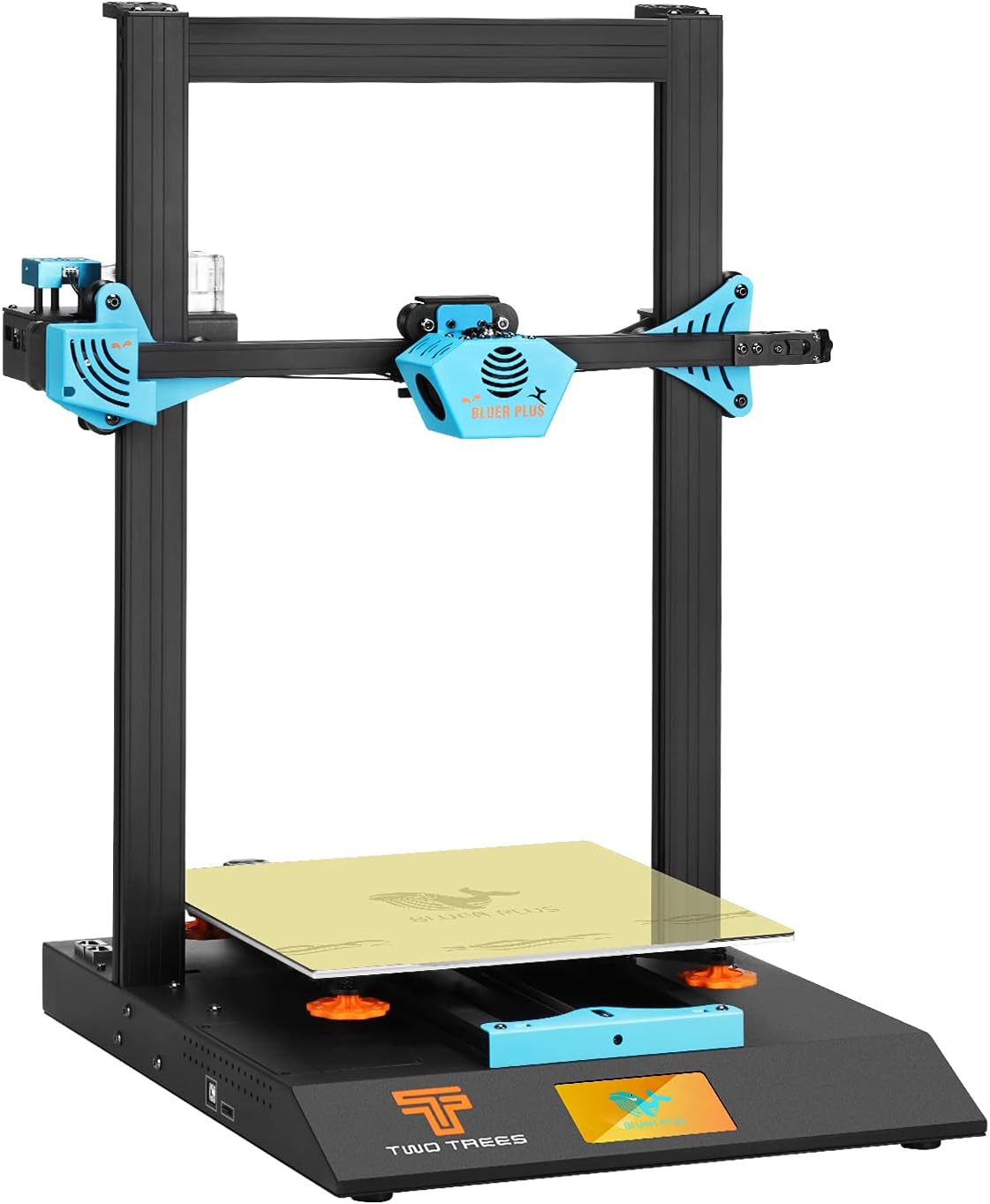
Figure 1: Fully assembled Twotrees BLU-5 3D Printer.
2. Негизги өзгөчөлүктөрү
- Large Print Size: Offers a maximum print size of 300x300x400mm, accommodating various model dimensions.
- Ыкчам чогултуу: Designed for easy setup, requiring only 6 screws to complete the printer frame installation.
- Жөнөкөй зымдар: Utilizes CAT7 network cables for data transfer, simplifying the wiring process with just two cable connections.
- Control Box Skylight Design: Provides convenient visibility of the motherboard's operating status and facilitates easy replacement of the stepper driver.
- Removable Build Surface Plate: Features a PEI Magnetic Steel Film build plate for easy print removal and improved adhesion.
- Adaptive Pulley System: Patented design that automatically adjusts and fits the aluminum profile, reducing pulley shaking and improving printing accuracy.
- 4.3-inch Touch Screen LCD Display: Intuitive interface for controlling printer functions.

Figure 2: Dimensions of the Twotrees BLU-5 3D Printer, highlighting the 300x300x400mm build volume.

Сүрөт 3: Жакын пландан view of the adaptive pulley system, designed for stable movement and improved print accuracy.

Figure 4: The convenient detachable main control box, allowing easy access to the motherboard.

Figure 5: The PEI Magnetic Steel Film build plate, providing excellent adhesion and easy removal of printed models.
3. Коопсуздук маалыматы
Please read and understand all safety warnings before operating the Twotrees BLU-5 3D Printer. Failure to do so may result in injury or damage to the printer.
- Жогорку температура эскертүүсү: Key components such as the hotbed and extrusion head generate high temperatures during operation. Avoid direct contact to prevent scalding.
- Жогорку Voltage Эскертүү: The 3D printer has a high-voltage power interface (220VAC / 110VAC). Exercise extreme caution to avoid electric shock.
- Өрт коркунучу: Components like the hotbed and extrusion head have relatively high power. Ensure all terminals are firmly connected to prevent sparks due to loose wiring, which could lead to a fire.
- Көзөмөлсүз операция: To ensure safety, avoid leaving the printer operating unattended for extended periods.
- Кыймылдуу бөлүктөр: The 3D printer contains mechanical moving parts. Keep hands and other body parts away from moving components during operation to avoid mechanical injury.
4. Орнотуу колдонмосу
The Twotrees BLU-5 is designed for quick and easy assembly. Follow these steps to set up your printer:
- Пакеттен чыгаруу: Бардык компоненттерди таңгактан кылдаттык менен алып салыңыз. Таңгактоо тизмесинде көрсөтүлгөн бардык бөлүктөрдүн бар экендигин текшериңиз.
- Рамка монтажы: Attach the gantry frame to the base unit using the provided 6 screws. Ensure all connections are secure.
- Зымдар: Connect the main components using the CAT7 network cables. Plug in the two network cables to complete the primary wiring.
- Filament Holder Installation: Assemble and attach the filament spool holder to the designated location, typically at the top or side of the printer.
- Кубат туташуу: Connect the power cable to the printer and then to a suitable power outlet. Ensure the correct voltage setting (220V/110V) is selected if applicable.
- Баштапкы күйгүзүү: Turn on the printer using the main power switch. The 4.3-inch touch screen display should illuminate.

Figure 6: Included components and tools for the Twotrees BLU-5 3D Printer assembly.
5. Иштөө нускамалары
This section covers the basic steps for operating your Twotrees BLU-5 3D Printer.
5.1. Жүктөө Filament
- Жип катушкасын жип кармагычка коюңуз.
- Feed the filament through the filament sensor and into the extruder.
- On the touch screen, navigate to the "Load Filament" or "Extrude" option.
- Wait for the nozzle to heat up to the appropriate temperature for your filament type (e.g., 200-220°C for PLA).
- Once heated, the extruder will pull the filament through until it emerges from the nozzle.
5.2. Auto-Leveling the Print Bed
The BLU-5 features an auto-leveling function for precise bed calibration.
- Ensure the print bed is clean and free of debris.
- On the touch screen, select the "Leveling" or "Auto-Level" option.
- The printer will automatically probe multiple points on the print bed to create a mesh for compensation.
- Once complete, the printer is ready for printing.
5.3. Басып чыгарууну баштоо
- Prepare your 3D model using slicing software (e.g., Cura, Repetier-Host) and save it as a Gcode file onto an SD card.
- SD картаны принтердин SD карта уячасына салыңыз.
- On the touch screen, navigate to "Print" or "Files" and select your desired Gcode file.
- Confirm the print settings and start the print. Monitor the first layer to ensure proper adhesion.
Видео 1: Бүттүview of the Twotrees BLU-5 3D Printer's features and operational aspects, including the touch screen interface and internal components.
6. Техникалык тейлөө
Үзгүлтүксүз техникалык тейлөө 3D принтериңиздин узак мөөнөттүү иштешин жана оптималдуу иштешин камсыз кылат.
- Guide Rail Lubrication: Lubricate and maintain the guide rails regularly to ensure smooth movement of the print head and bed.
- Соплолорду тазалоо: Periodically clean the nozzle to prevent clogs and ensure consistent extrusion.
- Build Plate Maintenance: Clean the PEI magnetic steel film build plate after each print. For stubborn residues, use isopropyl alcohol.
- Программалык камсыздоонун жаңыртуулары: Check the official Twotrees webпринтердин иштешин жакшыртуу жана жаңы функцияларды кошуу үчүн жеткиликтүү болгон микропрограммалык камсыздоонун жаңыртуулары үчүн сайт.
7. Кыйынчылыктарды
This section provides solutions to common issues you might encounter with your BLU-5 3D printer. If the problem persists, please contact technical support.
| Ката коду | Description | Мүмкүн болгон себеп жана чечим |
|---|---|---|
| Err1 | Hotbed exceeds maximum temperature limit. | Check if the hotbed thermistor is short-circuited. |
| Err2 | Nozzle exceeds maximum temperature limit. | Check if the nozzle thermistor is short-circuited. |
| Err3 | Hotbed exceeds minimum temperature limit. | Check if the hotbed thermistor is disconnected. |
| Err4 | Nozzle exceeds minimum temperature limit. | Check if the nozzle thermistor is disconnected. |
| Err5 | Print head fails to heat up. | If the print head does not reach the set temperature difference within the set time, an error will be reported. Check configuration file settings or ensure power supply is sufficient. |
| Err6 | Hotbed fails to heat up. | If the hotbed does not reach the corresponding temperature within the set time, an error will be reported. Check configuration file settings or ensure power supply is sufficient. |
| Err7 | Thermal runaway. | When the temperature rises to the target temperature, if the current temperature fluctuates greatly within the set time, an error will be reported. Check if the thermistor is normal or if the PID value is appropriate. |
8. Техникалык шарттар
| Өзгөчөлүк | Деталь |
|---|---|
| Модел | BLU-5 |
| Продукциянын өлчөмдөрү | 20.07 x 20.47 x 25.43 inches (L510xW520xH646mm) |
| Элемент Салмагы | 27.6 pounds (12.5 KG) |
| Сопло өлчөмү | 0.4мм |
| Print Size (Max) | 300x300x400мм |
| Басып чыгаруунун тактыгы | ±0.1мм |
| Катмардын калыңдыгы | 0.1-0.4мм |
| XY Axis Positioning Accuracy | 0.01мм |
| Z Axis Positioning Accuracy | 0.004мм |
| Басып чыгаруу ылдамдыгы | 20-200мм/с |
| Machine Speed | 10-300мм/с |
| Heating Bed Power | 260W/24V |
| Heating Rod Power | 50W/24V |
| Электр камсыздоо | 220V/110V 240W |
| Extrusion Head Temperature (Highest) | 260°C |
| Hot Bed Temperature (Highest) | 100°C |
| Printing Material (1.75mm) | PLA/ABS/PETG/Wood etc. |
| Басып чыгаруу ыкмасы | SD card / online printing |
| Дисплей | 4.3" Color Touch Screen |
| Software Format | STL, OBJ, JPG |
| Басып чыгаруу File Формат | Gcode |
| Операциялык системанын шайкештиги | Windows, MAC |
| Колдоо программасы | Repetier-Host, Cura |
| Басып чыгаруу платформасы | Hot bed (with 3M hot bed sticker) and Spring steel PEI membrane |
| Колдоого алынган тилдер | Chinese, English, French, Spanish, German, Korean, Russian |
9. Кепилдик жана колдоо
Twotrees provides technical support for the BLU-5 3D Printer. If you encounter any issues or have questions regarding operation or maintenance, please contact the seller or manufacturer directly.
For the most up-to-date warranty information, please refer to the documentation provided with your purchase or contact Twotrees customer service.
Ask a question about this manual
Ask about setup, troubleshooting, compatibility, parts, safety, or missing instructions. Manuals+ will review the question and use this page’s manual context to help answer it.