
Easytry123 RM-C15G, RM-C15G-1H, HD-52Z575, HD-61Z585, HD-61Z575, RM-C18G, AV-35850, HD527BP7, HD52FA97, AV-32F702, AV-32F802
User Manual for Easytry123 Replacement Remote Control
Models: RM-C15G, RM-C15G-1H, HD-52Z575, HD-61Z585, HD-61Z575, RM-C18G, AV-35850, HD527BP7, HD52FA97, AV-32F702, AV-32F802
Introduction
This user manual provides comprehensive instructions for the Easytry123 Replacement Remote Control, designed for various JVC LCD HDTV and TV models. Please ensure your original remote matches the appearance of this replacement remote for full compatibility. This manual covers setup, operation, maintenance, and troubleshooting to help you maximize your remote's functionality.
Продукт бүттүview
The Easytry123 Replacement Remote Control is an infrared (IR) device designed to operate compatible JVC televisions. It features a standard layout with dedicated buttons for power, channel, volume, input selection, and various playback controls.

This image displays the Easytry123 replacement remote control from an angled perspective, highlighting its ergonomic design and the arrangement of all primary function buttons, including numerical keys, navigation, volume, and channel controls.
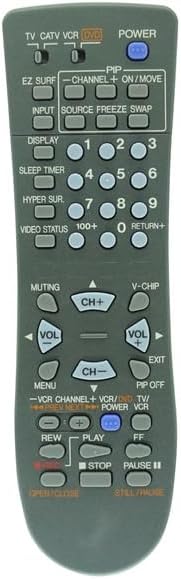
Бул сүрөт түздөн-түз алды менен камсыз кылат view of the Easytry123 replacement remote control, offering a clear look at each button and its label, essential for identifying specific functions like power, input, channel, and volume.
Жайгашуу
Батарея орнотуу
The remote control requires two (2) AA batteries for operation. Follow these steps to install the batteries:
- Пульттун артындагы батарея отсегин табыңыз.
- Батареянын капкагын ачуу үчүн кулпуну басып, ылдый жылдырыңыз.
- Оң (+) жана терс (-) терминалдары бөлүмдүн ичиндеги белгилер менен туура дал келишин камсыз кылып, эки АА батарейканы салыңыз.
- Батареянын капкагын бекем чыккыча ордуна жылдырыңыз.
Эскертүү: Ар дайым эки батареяны тең бир убакта алмаштырыңыз. Эски жана жаңы батареяларды, же ар кандай типтеги батареяларды аралаштырбаңыз. Эгерде пульт көпкө чейин колдонулбаса, батареяларды алып салыңыз.
Иштөө нускамалары
Point the remote control directly at the infrared sensor on your JVC television. Ensure there are no obstructions between the remote and the TV.
Негизги функциялар
- КҮЧ: Телевизорду күйгүзүү же өчүрүү үчүн басыңыз.
- КИРҮҮ: Cycles through available input sources (e.g., TV, AV, HDMI).
- CH+ / CH-: Каналды өйдө же ылдый өзгөртөт.
- VOL+ / VOL-: Үнүн көбөйтөт же азайтат.
- ҮЧҮН: Телевизордун үнүн өчүрөт же үнүн чыгарат.
- Numerical Buttons (0-9): Канал номерлерин түз киргизиңиз.
- RETURN+: Мурунку каналга кайтат.
Өркүндөтүлгөн функциялар
- МЕНЮ: Accesses the TV's on-screen menu. Use navigation buttons (if present) to move through options.
- КӨРСӨТҮҮ: Shows current channel information or other on-screen display data.
- УЙКУ ТАЙМЕРИ: Телевизордун автоматтык түрдө өчүрүлүшү үчүн таймерди орнотот.
- EZ SURF: (Functionality may vary by TV model)
- PIP / ON/MOVE / SOURCE / FREEZE / SWAP: These buttons are typically for Picture-in-Picture functions. Their exact operation depends on your TV's capabilities. Refer to your TV's original manual for detailed use of these features.
- V-CHIP: Accesses V-Chip parental control settings.
- VCR/DVD/TV Controls: Buttons like PLAY, STOP, PAUSE, REW, FF, OPEN/CLOSE are for controlling connected VCRs or DVD players if your TV supports integrated control or if the remote is programmed for such devices.
Кароо жана тейлөө
- Тазалоо: Пультту жумшак, кургак чүпүрөк менен сүртүңүз. Суюк тазалоочу каражаттарды же абразивдүү материалдарды колдонбоңуз.
- Сактагыч: Пультту күн нурунан жана экстремалдык температурадан алыс, салкын, кургак жерде сактаңыз.
- Батареянын иштөө мөөнөтү: Пульттун реакциясы жайлап же туруксуз болуп калса, батареяларды алмаштырыңыз.
- Тамчылардан качуу: Пультту ички компоненттерге зыян келтириши мүмкүн болгон физикалык соккулардан жана кулап түшүүлөрдөн коргоңуз.
Проблемаларды чечүү
| Көйгөй | Мүмкүн болгон себеп / Чечим |
|---|---|
| Пульт иштебей жатат. |
|
| Кээ бир баскычтар иштебейт. |
|
| TV responds intermittently. |
|
Техникалык шарттар
- Бренд: Easytry123
- Шайкеш түзмөктөр: JVC LCD HDTV TV models (RM-C15G, RM-C15G-1H, HD-52Z575, HD-61Z585, HD-61Z575, RM-C18G, AV-35850, HD527BP7, HD52FA97, AV-32F702, AV-32F802)
- Байланыш технологиясы: Инфракызыл (IR)
- Кубат булагы: 2 x AA батарейкалар (киргизилген эмес)
- Өзгөчө өзгөчөлүгү: Ergonomic, Replacement remote
- Колдоого алынган түзмөктөрдүн максималдуу саны: 1 (Телевидение)
Колдоо маалыматы
For further assistance or inquiries regarding your Easytry123 Replacement Remote Control, please contact the manufacturer or seller directly through your purchase platform. Ensure you have your product details and model numbers ready when seeking support.
Өндүрүүчү: Easytry123
Биринчи жеткиликтүү болгон күнү: 10-декабрь, 2019-жыл
Ask a question about this manual
Ask about setup, troubleshooting, compatibility, parts, safety, or missing instructions. Manuals+ will review the question and use this page’s manual context to help answer it.