
1. Продукт бүтүп калдыview
This Easytry123 replacement remote control is designed to function with various JVC Color TV and Television models. It provides essential control functions for your television, allowing you to manage power, channels, volume, and other features. This remote is an infrared (IR) replacement and may not offer all advanced functions present on your original equipment manufacturer (OEM) remote.
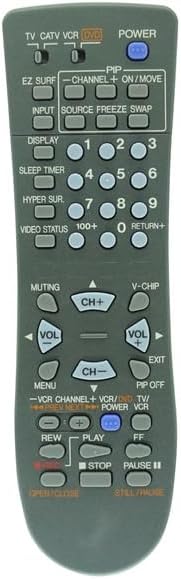
Сүрөт 1.1: Алдыңкы view алмаштыруучу пульттун бардык баскычтары жана алардын этикеткалары көрсөтүлөт.
2. Орнотуу: Батареяны орнотуу
The remote control requires two (2) AA batteries for operation. Ensure correct polarity when inserting the batteries.
- Пульттун артындагы батарея отсегин табыңыз.
- Батарея бөлүмүнүн капкагын ачуу үчүн ылдый же жебе менен көрсөтүлгөн багытта жылдырыңыз.
- Insert two new AA batteries, matching the positive (+) and negative (-) terminals as indicated inside the compartment.
- Батарея бөлүкчөсүнүн капкагын бекем чыккыча ордуна жылдырыңыз.
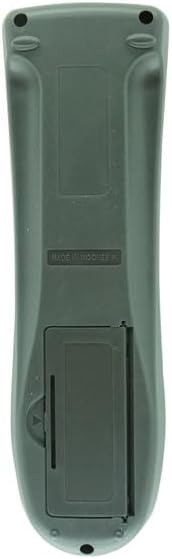
Сүрөт 2.1: Артка view батарея бөлүмүн көрсөтүп турган алыстан башкаруу пультунун сүрөтү.
3. Иштөө нускамалары
Point the remote control directly at the infrared receiver on your JVC television. Ensure there are no obstructions between the remote and the TV.
Негизги функциялар:
- КҮЧ: Телевизорду күйгүзөт же өчүрөт.
- САНДЫК ТҮЙМӨЛӨР (0-9): Түздөн-түз каналдарды тандоо.
- CH+ / CH-: Changes channels sequentially up or down.
- VOL+ / VOL-: Үн деңгээлин жогорулатат же төмөндөтөт.
- ҮЧҮН: Телевизордун үнүн өчүрөт же ачат.
- INPUT / SOURCE: Cycles through available input sources (e.g., TV, AV, HDMI).
- МЕНЮ: Телевизордун негизги менюсуна кирүүгө мүмкүндүк берет.
- ARROW BUTTONS (Up, Down, Left, Right): Меню параметрлери боюнча чабыттоо.
- ENTER / OK: Менюдагы тандоону ырастайт.
- ЧЫГУУ: Учурдагы менюдан же экрандагы дисплейден чыгат.
- КӨРСӨТҮҮ: Shows current channel information or time.
- УЙКУ ТАЙМЕРИ: Телевизордун автоматтык түрдө өчүшү үчүн таймерди коёт.
VCR/DVD Control (if applicable):
Some buttons may be labeled for VCR or DVD control. These functions are typically used when the remote is set to control a connected VCR or DVD player, often through a mode button (e.g., TV/VCR, TV/DVD). Refer to your television's original manual for specific device control setup.
- PLAY, STOP, PAUSE, REW, FF: Standard playback controls for connected VCR/DVD devices.
4. Техникалык тейлөө
Туура тейлөө пультуңуздун узак жана ишенимдүү иштешин камсыз кылат.
- Батареяны алмаштыруу: Пульттун реакциясы жайлап калса же иштебей калса, батареяларды алмаштырыңыз. Ар дайым эки батареяны тең бир убакта жаңылары менен алмаштырыңыз. Эски жана жаңы батареяларды же ар кандай типтеги батареяларды аралаштырбаңыз.
- Тазалоо: Пультту жумшак, кургак чүпүрөк менен сүртүңүз. Өтө кир болсо, бир аз сүртүңүзampen the cloth with water or a mild, non-abrasive cleaner. Avoid using harsh chemicals or excessive moisture.
- Сактагыч: Store the remote in a cool, dry place away from direct sunlight and extreme temperatures. If the remote will not be used for an extended period, remove the batteries to prevent leakage.
5. Кыйынчылыктарды
If you experience issues with your remote control, try the following steps:
- Пульт иштебейт:
- Батареялар туура полярдуулук менен туура салынганын текшериңиз.
- Батареяларды жаңыларына алмаштырыңыз.
- Алыстан башкаруу куралы менен сыналгынын инфракызыл сенсорунун ортосунда эч кандай тоскоолдуктар жок экенин текшериңиз.
- Confirm you are pointing the remote directly at the TV.
- Specific buttons not responding:
- Some advanced functions or device-specific buttons (e.g., VCR/DVD controls) may require the TV to be in a specific mode or may not be fully supported by this replacement remote.
- Clean the remote control, especially around the unresponsive buttons, to ensure no debris is interfering.
- Пульт үзгүлтүккө учурап иштейт:
- Бул көбүнчө батареянын кубаттуулугу аз экенин билдирет. Батареяларды алмаштырыңыз.
- Пульттун инфракызыл эмитенти таза жана тоскоолдуксуз экенин текшериңиз.
If problems persist after following these steps, the remote may be incompatible with your specific TV model or may require further assistance. Please verify your TV model against the listed compatible models.
6. Техникалык шарттар
- Продукт түрү: Инфракызыл (IR) алмаштыруучу алыстан башкаруу
- Кубат булагы: 2 x AA батарейкалар (киргизилген эмес)
- Шайкеш түзмөктөр: JVC Color TV and Television models (AV-16N8, AV-20020, AV-20021, AV-2049S, AV-2050, AV-2051, AV-2051S, AV-2059S, AV-2060, AV-20808)
- Өзгөчөлүктөр: Эргономикалык дизайн, тизмеленген моделдер үчүн түздөн-түз алмаштыруу функциясы.
7. Кепилдик жана колдоо
As a replacement product, this remote control is intended to replicate the basic functions of your original remote. For specific warranty information or support inquiries, please refer to the seller's policies or contact the seller directly. It is recommended to confirm compatibility with your specific TV model before purchase.