
Introduction
Сатып алганыңыз үчүн рахматasing the MEGAWISE Digital Kitchen Scale K28H. This scale is designed for precise measurement of ingredients for baking, cooking, and meal preparation. It features a high-precision sensor, multiple unit conversions, a tare function, and an easy-to-read backlit display. Please read this manual thoroughly before use to ensure proper operation and maintenance.
Коопсуздук маалыматы
- Place the scale on a hard, flat, and stable surface for accurate measurements.
- Таразаны күчтүү электромагниттик талаалардын же титиреген жабдуулардын жанына койбоңуз.
- Do not immerse the scale in water or other liquids. Wipe clean with a damp кездеме.
- Do not overload the scale beyond its maximum capacity of 15kg (33lb) to prevent damage.
- Балдар жетпеген жерде сактаңыз.
- Эгерде тараза узак убакыт бою колдонулбаса, акып кетпеш үчүн батарейкаларды алып салыңыз.
Продукт өзгөчөлүктөрү
- Жогорку тактык: Measures from 1g up to 15kg (0.1oz to 33lb) with 1g accuracy.
- Бир нече бирдиктер: Easily switch between g, oz, lb:oz, ml (milk/water), and fl.oz.
- Арткы жарык дисплей: Clear LCD screen with bright backlight for easy reading.
- Тара функциясы: Subtracts the weight of containers for net measurements.
- Кубат параметрлери: Supports both traditional AAA batteries and USB-C charging.
- Автоматтык өчүрүү: Saves power by automatically turning off when idle.
- Туруктуу дизайн: Crystal tempered glass panel for easy cleaning and durability.

Сүрөт: бүттүview of the scale's key features, including high accuracy, low battery alarm, tare function, overload alarm, maximum capacity of 15kg, and 5 unit conversions.
Пакеттин мазмуну
- 1 x MEGAWISE Digital Kitchen Scale K28H
- 2 x AAA Батареялар (кошулган)
- 1 x USB заряддоо кабели
- 1 х Колдонуучунун колдонмосу (бул документ)
Жайгашуу
1. Электр камсыздоо
The scale can be powered by two AAA batteries or via USB-C charging.
- Батарея орнотуу: Open the battery compartment on the underside of the scale. Insert 2 AAA batteries, ensuring correct polarity (+/-).
- USB заряддоо: Connect the provided USB-C cable to the scale's charging port and to a compatible USB power source (e.g., wall adapter, computer USB port). The scale can operate while charging.

Image: The underside of the scale illustrating the battery compartment and the USB charging port, demonstrating the two power supply options.
2. Жайгаштыруу
Place the scale on a hard, flat, and level surface to ensure accurate readings. Uneven surfaces can affect precision.
Иштөө нускамалары
1. Күйгүзүү/өчүрүү
- Press the "ON/OFF" button to turn the scale on. The display will show "0" when ready.
- Press and hold the "ON/OFF" button to turn the scale off. The scale will also automatically shut off after a period of inactivity to conserve power.
2. Бирдикти конверсиялоо
Press the "UNIT" button to cycle through the available measurement units: grams (g), ounces (oz), pounds:ounces (lb:oz), milliliters for water (ml), and fluid ounces for water (fl.oz).

Image: The scale's display illustrating the five available measurement units: grams, kilograms, pounds and ounces, fluid ounces, and milliliters.
3. Tare Function
The tare function allows you to subtract the weight of a container or previously added ingredients, enabling you to measure subsequent items accurately.
- Таразага бош контейнерди коюңуз.
- Press the "TARE" button. The display will reset to "0".
- Add ingredients to the container. The display will show only the net weight of the ingredients.
- Repeat the tare process as needed for multiple ingredients.
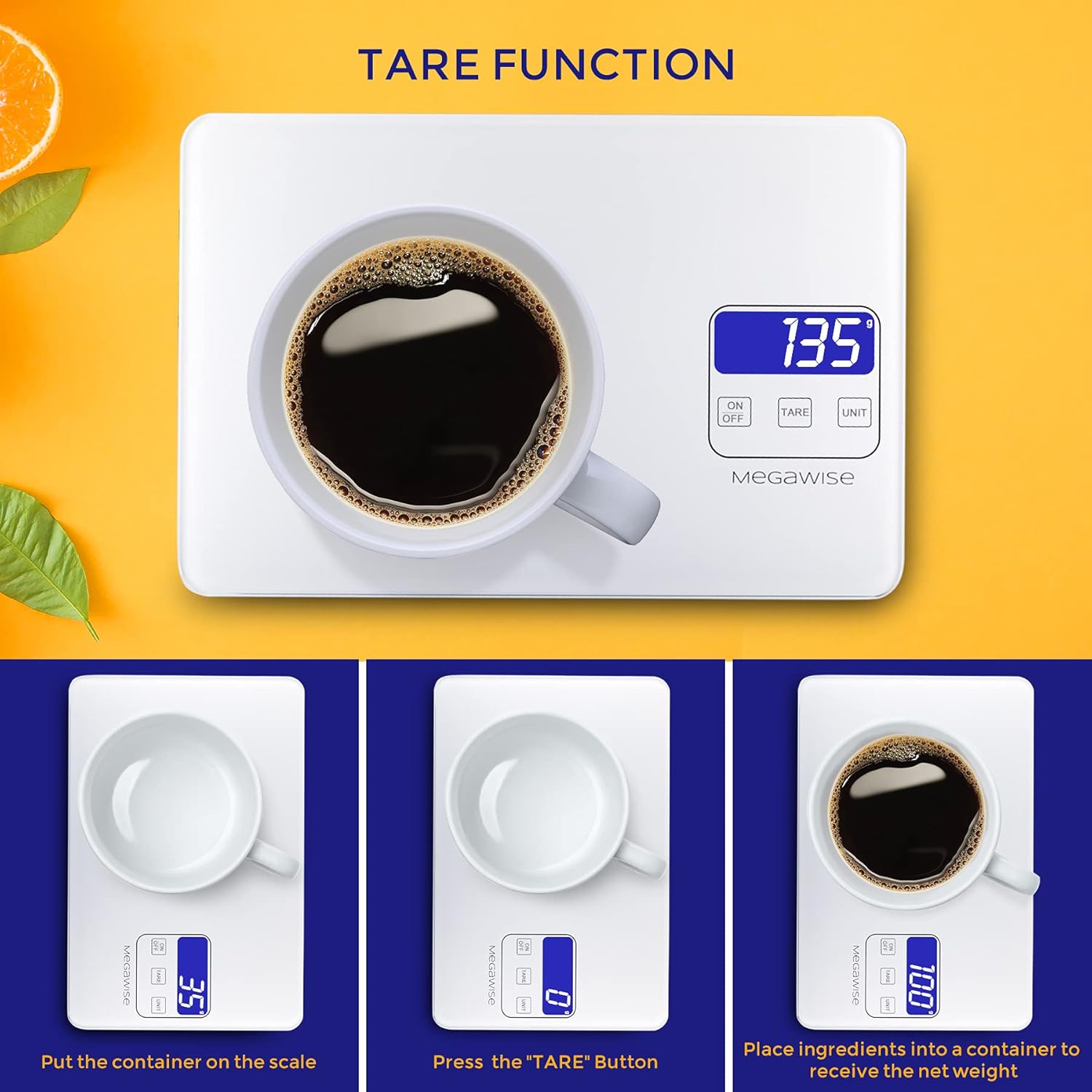
Image: A visual guide demonstrating the tare function, showing an empty cup being placed on the scale, the display zeroing out after pressing TARE, and then the net weight of coffee being measured.
4. Таразага тартуучу буюмдар
After powering on and selecting the desired unit (and taring if necessary), place the item(s) to be weighed directly onto the center of the scale platform. The weight will be displayed instantly.

Image: A bowl of fruit being weighed on the scale, demonstrating its high accuracy for various ingredients.
5. Overload Indication
If the display shows "EEEE" or a similar error message, the scale is overloaded. Remove items immediately to prevent damage.
6. Батарейканын көрсөткүчү төмөн
When the battery symbol appears on the display, it indicates that the batteries are low and need to be replaced or recharged via the USB-C port.
Техникалык тейлөө
- Тазалоо: The tempered glass surface is easy to clean. Wipe the scale with a soft, damp кездеме. Абразивдүү тазалагычтарды колдонбоңуз же таразаны сууга салбаңыз.
- Сактагыч: Store the scale in a cool, dry place. Avoid extreme temperatures and humidity.
- Калибрлөө: The scale is factory calibrated and generally does not require user calibration. If you suspect inaccuracies, ensure it is on a level surface and check battery levels.

Image: A hand cleaning the tempered glass surface of the scale, highlighting its easy-to-clean and durable design.
Проблемаларды чечүү
| Көйгөй | Мүмкүн себеп | Чечим |
|---|---|---|
| Масштаб күйбөйт. | Low or dead batteries; incorrect battery installation; no USB power. | Replace batteries or ensure they are installed correctly. Connect to a USB power source. |
| Туура эмес окуулар. | Uneven surface; scale overloaded; external vibrations; low battery. | Place on a flat, stable surface. Do not exceed 15kg. Avoid vibrations. Replace/recharge batteries. |
| "EEEE" or Overload message. | Weight exceeds maximum capacity (15kg). | Remove items immediately. Do not exceed maximum weight. |
| Display shows "Lo" or battery symbol. | Батареянын кубаттуулугу төмөн. | Replace the AAA batteries or connect the scale to a USB power source for charging. |
Техникалык шарттар
| Өзгөчөлүк | Деталь |
|---|---|
| Бренд | MEGAWISE |
| Модел | K28H |
| Салмагы Limit | 15 кг (33 фунт) |
| Окуу тактыгы | 1 грамм (0.1 унция) |
| Өлчөө бирдиктери | g, oz, lb:oz, ml (water), fl.oz (water) |
| Дисплей түрү | Арткы жарык менен LCD |
| Материал | Температуралуу айнек |
| Power Source | 2 AAA batteries (included) or USB-C charging |
| Продукциянын өлчөмдөрү | 9.5 x 0.7 x 6.3 дюйм |
| Элемент Салмагы | 1.39 фунт |
Расмий продукт Videos
MEGAWISE Kitchen Scales Overview
Видео: Бүттүview of the MEGAWISE Kitchen Scale, demonstrating its use in various kitchen scenarios like baking and meal preparation, highlighting its features and ease of use.
MegaWise Rechargeable Digital Kitchen Food Scale Features
Video: This video showcases the key features of the MegaWise Rechargeable Digital Kitchen Food Scale, including its precision, multiple unit options, and rechargeable capability.
Кепилдик жана колдоо
MEGAWISE provides customer support and warranty coverage for this product. For assistance, troubleshooting beyond this manual, or warranty claims, please refer to the contact information provided with your purchase or visit the official MEGAWISE webсайт.
Эскертүү: Продукциянын мүнөздөмөлөрү жана функциялары алдын ала эскертүүсүз өзгөртүлүшү мүмкүн.