
1. Киришүү
The Magewell Ultra Encode SDI (Model 53050) is a versatile live stream encoder designed for professional AV applications. It supports high-quality H.264, H.265 (HEVC), and NDI|HX encoding, along with multiple streaming protocols. This manual provides detailed instructions for setting up, operating, maintaining, and troubleshooting your Ultra Encode SDI device.
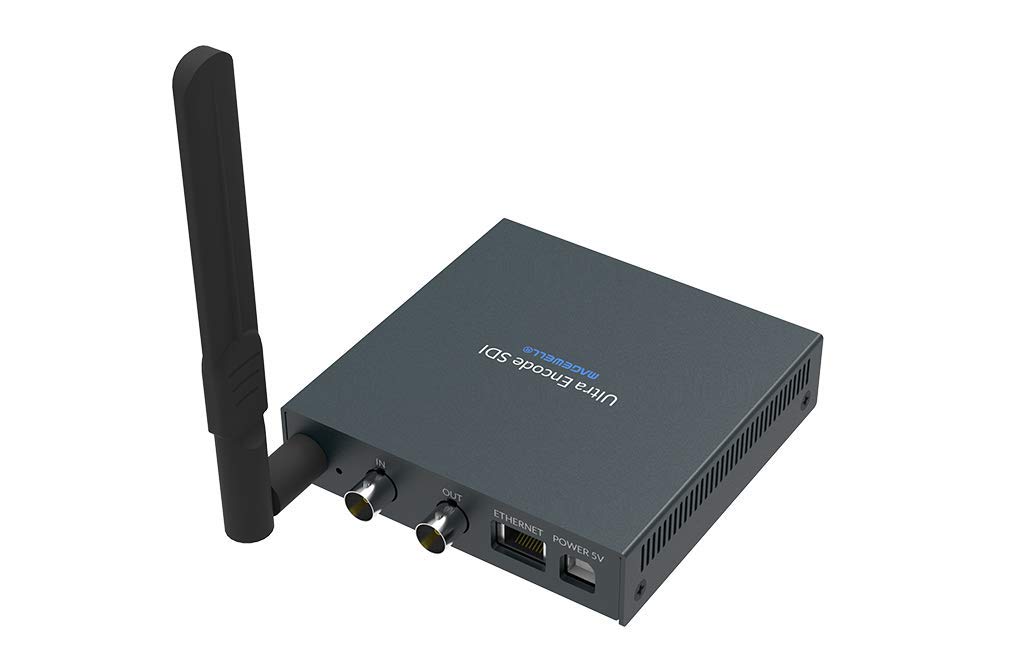
Figure 1.1: Magewell Ultra Encode SDI (Model 53050) device.
2. Пакеттин мазмуну
Please verify that all items listed below are included in your package. If any items are missing or damaged, contact your vendor or Magewell support.
- Magewell Ultra Encode SDI (Model 53050) Unit
- Power Adapter (with regional plugs)
- USB 2.0 Type B cable
- Wi-Fi антеннасы
- T-каша
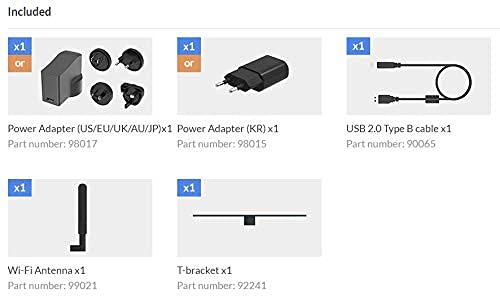
Figure 2.1: Included accessories with the Ultra Encode SDI.
3. Продукт бүтүп калдыview
The Ultra Encode SDI features various ports and indicators for connectivity and status monitoring. Familiarize yourself with these components before setup.
3.1 Front/Side Panel

Figure 3.1: Front/Side panel with audio ports, status LEDs, and USB port.
- LINE OUT: 3.5 мм аудио чыгаруу.
- САПАР: 3.5 мм аудио киргизүү.
- PWR LED: Күч көрсөткүчү.
- IN LED: Input signal status.
- LIVE LED: Streaming status.
- ETH LED: Ethernet connection status.
- Wi-Fi LED: Wi-Fi байланыш абалы.
- OPTION: USB port for optional accessories or configuration.
3.2 Арткы панель

Figure 3.2: Rear panel with video, network, and power connections.
- IN (SDI): SDI/3G video input.
- OUT (SDI): SDI/3G loop-through output.
- ЭТЕРНЕТ: Зымдуу тармакка туташуу үчүн RJ45 порту.
- POWER 5V: Кубат киргизүү порту.
3.3 Порт диаграммасы

Figure 3.3: Comprehensive port and indicator diagram.
4. Орнотуу
Follow these steps to set up your Magewell Ultra Encode SDI device.
4.1 Физикалык байланыштар
- Туташуу кубаты: Берилген кубат адаптерин туташтырыңыз КУЧ 5V port on the rear panel and then into a power outlet. The Жек Строу менен LED on the front panel should illuminate.
- Connect Video Input: Connect your SDI/3G video source to the IN (SDI) port on the rear panel. If you need to loop the signal through, connect a cable from the OUT (SDI) port to your monitoring device.
- Аудио туташтыруу (кошумча): If using analog audio, connect your audio source to the LINE IN port and your audio monitoring device to the LINE OUT порт.
- Тармакка туташуу:
- текст: Тармак роутериңизден же коммутаторуңуздан Ethernet кабелин туташтырыңыз Ethernet port on the rear panel. The ETH LED жаркырашы керек.
- Зымсыз: Screw the provided Wi-Fi antenna onto the antenna socket. You will configure the Wi-Fi connection via the web интерфейс. The Wi-Fi LED will indicate connection status.
4.2 Баштапкы конфигурация (Web Интерфейс)
The Ultra Encode SDI is configured via a web-негизделген интерфейс. Ага жетүү үчүн:
- Ensure your computer is on the same network as the Ultra Encode SDI.
- Use a network scanning tool or check your router's connected devices list to find the IP address of the Ultra Encode SDI. Alternatively, some devices may have a default IP or a discovery tool.
- ачуу а web браузерди ачып, дарек тилкесине түзмөктүн IP дарегин киргизиңиз.
- Log in using the default credentials (refer to the device's quick start guide or Magewell documentation for default username and password).
- From web interface, you can configure network settings (including Wi-Fi), video/audio input parameters, encoding settings, and streaming destinations.
5. Иштөө нускамалары
The Ultra Encode SDI offers flexible encoding and streaming capabilities.
5.1 Коддоо орнотуулары
- The device supports H.264 and H.265 (HEVC) video encoding. Select the desired codec and adjust parameters such as bitrate (up to 16Mbps), resolution, and frame rate via the web интерфейс.
- Audio encoding options are also available for optimal quality and compatibility.
5.2 Streaming Protocols
The Ultra Encode SDI supports various streaming protocols:
- RTMP/RTMPS: Commonly used for live streaming to platforms like YouTube, Facebook, and Twitch. Configure the server URL and stream key in the web интерфейс.
- HLS: HTTP Live Streaming for adaptive bitrate delivery.
- SRT: Secure Reliable Transport protocol for low-latency, high-quality video transport over unreliable networks.
- NDI|HX: NewTek's NDI|HX encoding for IP production workflows. Enable and configure NDI|HX output in the web интерфейс.
5.3 Configurable Presets
The device includes configurable presets for easy streaming to popular platforms:
- Access the presets section in the web интерфейс.
- Select a platform (e.g., Facebook, Twitch, YouTube) and enter your stream key or login details as prompted.
- Activate the preset to begin streaming.
6. Техникалык тейлөө
Proper maintenance ensures the longevity and optimal performance of your Ultra Encode SDI.
- Тазалоо: Түзмөктүн сыртын тазалоо үчүн жумшак, кургак чүпүрөктү колдонуңуз. Суюк тазалоочу каражаттарды же абразивдүү материалдарды колдонбоңуз.
- Вентиляция: Ашыкча ысып кетпеши үчүн, түзмөк жакшы желдетилген жерге коюлганын текшериңиз. Желдетүүчү тешиктерди жаппаңыз.
- Программалык камсыздоонун жаңыртуулары: Periodically check the Magewell official website for firmware updates. Updating the firmware can provide new features, performance improvements, and bug fixes. Follow the instructions provided by Magewell for safe firmware updates.
- Сактагыч: Узак мөөнөткө колдонулбаганда, аспапты кургак, салкын жерде, тике күндүн нурунан жана өтө температурадан алыс сактаңыз.
7. Кыйынчылыктарды
Бул бөлүм сиз кабылышы мүмкүн болгон жалпы көйгөйлөрдү карайт.
- Кубат жок:
- Кубат адаптери аспапка жана иштеген электр розеткасына бекем туташып турганын текшериңиз.
- Verify the power adapter is the correct one supplied with the device.
- No Video Input:
- Check the SDI cable connection between the source and the device's IN (SDI) порт.
- Confirm the video source is active and outputting a compatible SDI signal.
- текшерүү IN LED абалы.
- Тармак туташуусу жок:
- For wired connection, ensure the Ethernet cable is properly connected and the ETH LED is active.
- For Wi-Fi, ensure the antenna is attached, and Wi-Fi settings are correctly configured in the web interface. Check the Wi-Fi Светодиоддор.
- Verify your network router is functioning correctly.
- Кирүү мүмкүн эмес Web Интерфейс:
- Ensure your computer is on the same network as the encoder.
- Verify the IP address of the encoder.
- Браузериңиздин кэшин тазалап көрүңүз же башка браузерди колдонуп көрүңүз.
- Streaming Issues (Buffering, Disconnections):
- Интернет байланышыңыздын ылдамдыгын жана туруктуулугун текшериңиз.
- Reduce the encoding bitrate in the web interface if your network bandwidth is limited.
- Verify streaming server URL and stream key are correct.
- текшерүү LIVE LED абалы.
For further assistance, refer to the Magewell support webсайтка же алардын техникалык колдоо тобуна кайрылыңыз.
8. Техникалык шарттар
| Өзгөчөлүк | Спецификация |
|---|---|
| Бренд | Magewell |
| Модел | 53050 |
| Продукциянын өлчөмдөрү | 10.5 x 10.6 x 2.5 см |
| Элемент Салмагы | 596 г (0.6 килограмм) |
| Видео киргизүү | SDI/3G Input |
| Video Output | SDI/3G Loop |
| Аудио киргизүү | Line-In (3.5mm) |
| Аудио чыгаруу | Line-Out (3.5mm) |
| Коддоо форматтары | H.264, H.265 (HEVC), NDI|HX |
| Макс бит ылдамдыгы | 16 Мбит/сек чейин |
| Streaming Protocols | RTMP, RTMPS, HLS, SRT |
| Network Connectivity | Ethernet (RJ45), Wi-Fi (802.11ac) |
| Электр камсыздоо | 12 вольт (ток) |
| Шайкеш түзмөктөр | Laptop (for configuration) |
| Өзгөчөлүктөр | Wireless connectivity, Configurable presets for streaming platforms |
9. Кепилдик жана колдоо
For information regarding product warranty, technical support, and service, please refer to the official Magewell website or contact your authorized Magewell dealer. Keep your purchase receipt as proof of purchase for warranty claims.
Magewell Official Webсайт: www.magewell.com