
1. Продукт бүтүп калдыview
This document provides detailed instructions for the CooSpo Replacement USB Charger Cable (Model: PC-0310-62). This cable is specifically designed to charge compatible CooSpo heart rate monitor armbands and other specified devices. Please read this manual thoroughly before use to ensure proper and safe operation.
2. Продукциянын өзгөчөлүктөрү
- Атайын дизайн: Specifically engineered as a replacement charger cable for CooSpo HW706, HW702A, and HW807 heart rate monitor armbands.
- Ыңгайлуу заряддоо: Facilitates easy and convenient charging for your compatible devices, suitable for both home and travel use.
- Коопсуздукту коргоо: Incorporates built-in short circuit protection, over-voltage protection, and over-current protection to safeguard your device during charging.
- Чаташтырбоочу дизайн: The cable is designed to resist tangling, enhancing user convenience.
- Компакт өлчөмү: Features a compact length of approximately 8.46 inches (21.5 cm).
- Коопсуз таңгактоо: Supplied in a sealed anti-static bag to protect the cable during transit and storage.
3. Шайкештик
The CooSpo Replacement USB Charger Cable is compatible with the following devices:
- CooSpo HW706 Heart Rate Monitor Armband
- CooSpo HW702A Heart Rate Monitor Armband
- CooSpo HW807 Heart Rate Monitor Armband
- Schwinn IC4 Heart Rate Monitor
- DDP Yoga Heart Rate Monitor Armband
- Echelon HR Armband Monitor
Маанилүү эскертүү: This cable is ЖОК suitable for the CooSpo newest armband HW9.
4. Орнотуу жана колдонуу
Follow these steps to charge your compatible heart rate monitor armband:
- Түзмөккө туташуу: Align the magnetic charging pins of the cable with the charging contacts on your heart rate monitor armband. The magnetic connection will secure the cable in place.
- Кубат Булагына туташуу: Insert the USB-A end of the charging cable into a compatible 5V DC power adapter or a USB port on a computer.
- Заряддоо көрсөткүчү: Refer to your heart rate monitor armband's specific instructions for its charging indicator light behavior. Typically, a light will illuminate to indicate charging is in progress.
- Заряддоо аяктады: Once charging is complete, disconnect the cable from both the power source and your device.

Image: CooSpo heart rate monitor armband connected to the charging cable, showing a green indicator light for charging.
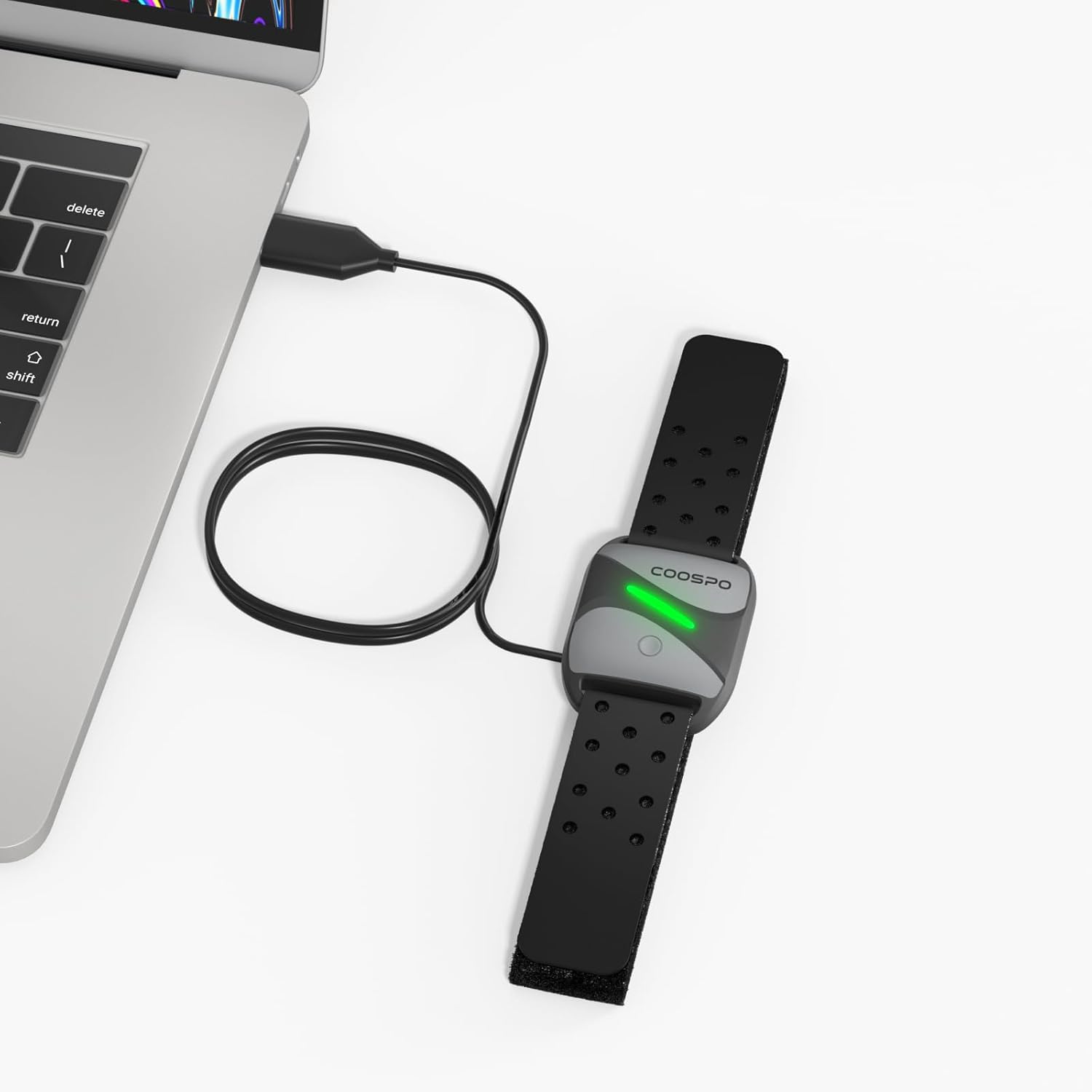
Image: CooSpo heart rate monitor armband being charged by connecting the USB cable to a laptop's USB port.
5. Коопсуздук маалыматы
To ensure safe operation and prolong the life of your charging cable and device, please observe the following:
- Always use a DC 5V power adapter or a computer USB port for charging. Using power sources with higher voltage may damage the cable or your device.
- The cable features built-in short circuit, over-voltage, and over-current protection. However, avoid exposing the cable to extreme conditions or physical damage.
- Do not attempt to disassemble or modify the charging cable.
- Keep the charging cable away from water, moisture, and high temperatures.
- Ensure the charging contacts on both the cable and your device are clean and dry before connecting.

Image: Visual representation of the charging cable's magnetic connector and USB-A plug, highlighting its safety features including device protection, over-voltagд, жана ашыкча ток коргоо.
6. Техникалык шарттар
| Бренд | CooSpo |
| Модель номери | КК-0310-62 |
| Туташтыргыч түрү | USB (Male-to-Male) |
| Кабель түрү | USB |
| Шайкеш түзмөктөр | Heart Rate Monitor Armbands (CooSpo HW706/HW702A/HW807, Schwinn IC4, DDP Yoga, Echelon) |
| Өзгөчө өзгөчөлүк | Tangle Free |
| Түс | Кара |
| Pins саны | 4 |
| Элемент Салмагы | 0.01 килограмм (0.317 унция) |
| Ички/тышкы колдонуу | Indoor |
| Кардар пакетинин түрү | Sealed anti-static bag |
| Максималдуу томtage | 5 вольт (ток) |
| Пакеттин өлчөмдөрү | 8.46 x 2.2 x 0.47 дюйм |
7. Техникалык тейлөө
To maintain the performance and longevity of your charging cable:
- Store the cable in a cool, dry place when not in use.
- Avoid bending or kinking the cable sharply, especially near the connectors.
- Clean the magnetic charging pins and USB connector periodically with a dry, soft cloth to remove any dust or debris.
- Тазалоо үчүн катуу химиялык заттарды же абразивдүү материалдарды колдонбоңуз.
8. Кыйынчылыктарды
If you encounter issues while charging, consider the following:
- Түзмөк кубатталбай жатат: Ensure the magnetic pins are correctly aligned and securely connected to your heart rate monitor. Verify that the USB-A end is fully inserted into a working 5V DC power adapter or computer USB port.
- Жай кубаттоо: Ensure you are using a reliable power source. Charging from a computer USB port might be slower than a dedicated wall adapter.
- Үзгүлтүксүз туташуу: Check for any visible damage to the cable or connectors. Ensure the charging contacts on both the cable and the device are clean.
- Шайкештик маселеси: Double-check that your heart rate monitor model is listed as compatible with this charging cable (refer to Section 3).
9. Расмий продукт Video
Video: An official product video demonstrating the features and usage of the CooSpo USB Charging Cable.
10. Кошумча продукт сүрөттөрү


11. Кепилдик жана колдоо
For warranty information, technical support, or any inquiries regarding your CooSpo Replacement USB Charger Cable, please refer to the official CooSpo webсайтына кириңиз же алардын кардарларды тейлөө кызматына түз кайрылыңыз. Чоо-жайы, адатта, продуктуңуздун таңгагында же өндүрүүчүнүн баракчасында берилет. webсайт.
кире аласыз CooSpo Store on Amazon көбүрөөк продукт маалымат алуу үчүн.