
1. Киришүү
Thank you for choosing the OSALO OS-5M Desktop Calculator. This manual provides essential information for the proper setup, operation, and maintenance of your calculator. Designed for ease of use with a large display and big buttons, this 12-digit calculator is suitable for various daily tasks in office, school, or home environments.

Image: The OSALO OS-5M desktop calculator positioned on a white desk, alongside a coffee cup and various documents, illustrating a typical usage scenario.
2. Продукт бүтүп калдыview
The OSALO OS-5M calculator features a user-friendly design with clear components for efficient operation.
Негизги өзгөчөлүктөрү:
- Large Angled Display: A 4.5-inch LCD screen, ergonomically angled for improved readability from various viewпозициялар.
- Big, Soft Keys: Keys are generously sized and designed for a soft touch, ensuring precise and comfortable input.
- Visualized Operator Symbols: Displays icons for addition, subtraction, multiplication, and division on the screen, providing clear visibility of calculation steps.
- Кош кубат булагы: Operates primarily on solar energy. For low-light conditions, it can be powered by one AAA battery.
- Туруктуу курулуш: Made from high-strength ABS plastic, offering lightweight portability and resistance to impacts.
- Автоматтык өчүрүү: The calculator automatically powers off after 8 minutes of inactivity to conserve energy.

Сүрөт: деталдуу view of the OSALO OS-5M calculator highlighting its clear LCD screen, the soft, ergonomically shaped keys, and the tactile '5' key designed for easy finger placement.
3. Орнотуу
3.1 Батареяны орнотуу
- Калькулятордун артындагы батарея бөлүкчөсүн табыңыз.
- Батареянын капкагын жылдырыңыз.
- Insert one AAA battery, ensuring the polarity (+/-) matches the diagram inside the compartment.
- Батареянын капкагын бекем жабыңыз.
The calculator is designed for dual power. It will primarily use solar power when sufficient light is available. The AAA battery provides power in low-light conditions or when solar power is insufficient.

Image: A comparison showing the front and back of the OSALO OS-5M calculator. The back view clearly indicates the location of the battery compartment.
4. Иштөө нускамалары
Familiarize yourself with the calculator's key functions for efficient use.
4.1 Негизги арифметикалык амалдар
- Кошумча (+): Биринчи санды киргизиңиз, басыңыз +, экинчи санды киргизип, анан басыңыз =.
- Кемитүү (-): Биринчи санды киргизиңиз, басыңыз -, экинчи санды киргизип, анан басыңыз =.
- Көбөйтүү (×): Биринчи санды киргизиңиз, басыңыз ×, экинчи санды киргизип, анан басыңыз =.
- Бөлүм (÷): Биринчи санды киргизиңиз, басыңыз ÷, экинчи санды киргизип, анан басыңыз =.
4.2 Clear Functions
- AC (баары ачык): Эстутумду кошо алганда, бардык жазууларды жана эсептөөлөрдү тазалайт.
- C/CE (Clear Entry/Clear): Press once to clear the last entered number. Press twice to clear the current calculation.
4.3 Эстутум функциялары
- M+ (Memory Plus): Көрсөтүлгөн маанини эс тутумга кошот.
- M- (эс тутум минус): Көрсөтүлгөн маанини эстутумдан чыгарат.
- MRC (эстутумду кайра чакыруу/тазалоо): Эстутум маанисин кайра чакыруу үчүн бир жолу басыңыз. Эстутумду тазалоо үчүн эки жолу басыңыз.
4.4 Башка функциялар
- % (Процентtagд): Пайыз үчүн колдонулатtagе эсептөөлөр. Мисалы үчүнample, 200дүн 10%ын эсептөө үчүн, 200 киргизиңиз × 10 %.
- GT (жалпы жалпы): Бир нече эсептөөлөрдүн жыйынтыктарын топтойт. Баскыч GT жалпы сумманы көрсөтүү үчүн.
- √ (Чарчы тамыр): Көрсөтүлгөн сандын квадрат тамырын эсептейт.

Сүрөт: ачык view of the OSALO OS-5M calculator, emphasizing its large, easy-to-press buttons and the 12-digit display which shows arithmetic symbols during calculations for enhanced clarity.
5. Техникалык тейлөө
5.1 Тазалоо
To maintain the calculator's appearance and functionality, wipe the surface with a soft, dry cloth. For stubborn dirt, slightly dampen the cloth with water. Avoid using harsh chemicals, abrasive cleaners, or solvents, as these can damage the plastic and display.
5.2 Батареяны алмаштыруу
If the display becomes dim or the calculator functions erratically in sufficient light, the AAA battery may need replacement. Follow the battery installation steps in Section 3.1.
5.3 Сактоо
Store the calculator in a cool, dry place away from direct sunlight and extreme temperatures. Prolonged exposure to heat or cold can affect battery life and display performance.
6. Кыйынчылыктарды
- Калькулятор күйбөйт: Ensure there is sufficient light for solar power or check if the AAA battery is correctly installed and not depleted. Replace the battery if necessary.
- Туура эмес эсептөө натыйжалары: басыңыз AC key to clear all previous entries and memory, then re-enter your calculation.
- Дисплей күңүрт же бош: Move the calculator to a brighter area for solar charging, or replace the AAA battery.
- Ачкычтар жооп бербейт: Ensure no debris is lodged under the keys. Gently press the keys to ensure proper contact.
7. Техникалык шарттар
| Өзгөчөлүк | Деталь |
|---|---|
| Модель номери | OS-5M |
| Сандарды көрсөтүү | 12 Сан |
| Дисплей түрү | LCD |
| Screen Size | 4.5 дюйм |
| Power Source | Solar Power, 1 x AAA Battery |
| Материал | Жогорку күчтүү ABS пластик |
| Продукциянын өлчөмдөрү | 19L x 14.8W см |
| Салмагы | 170 грамм |
| Калькулятор түрү | Business/Basic |
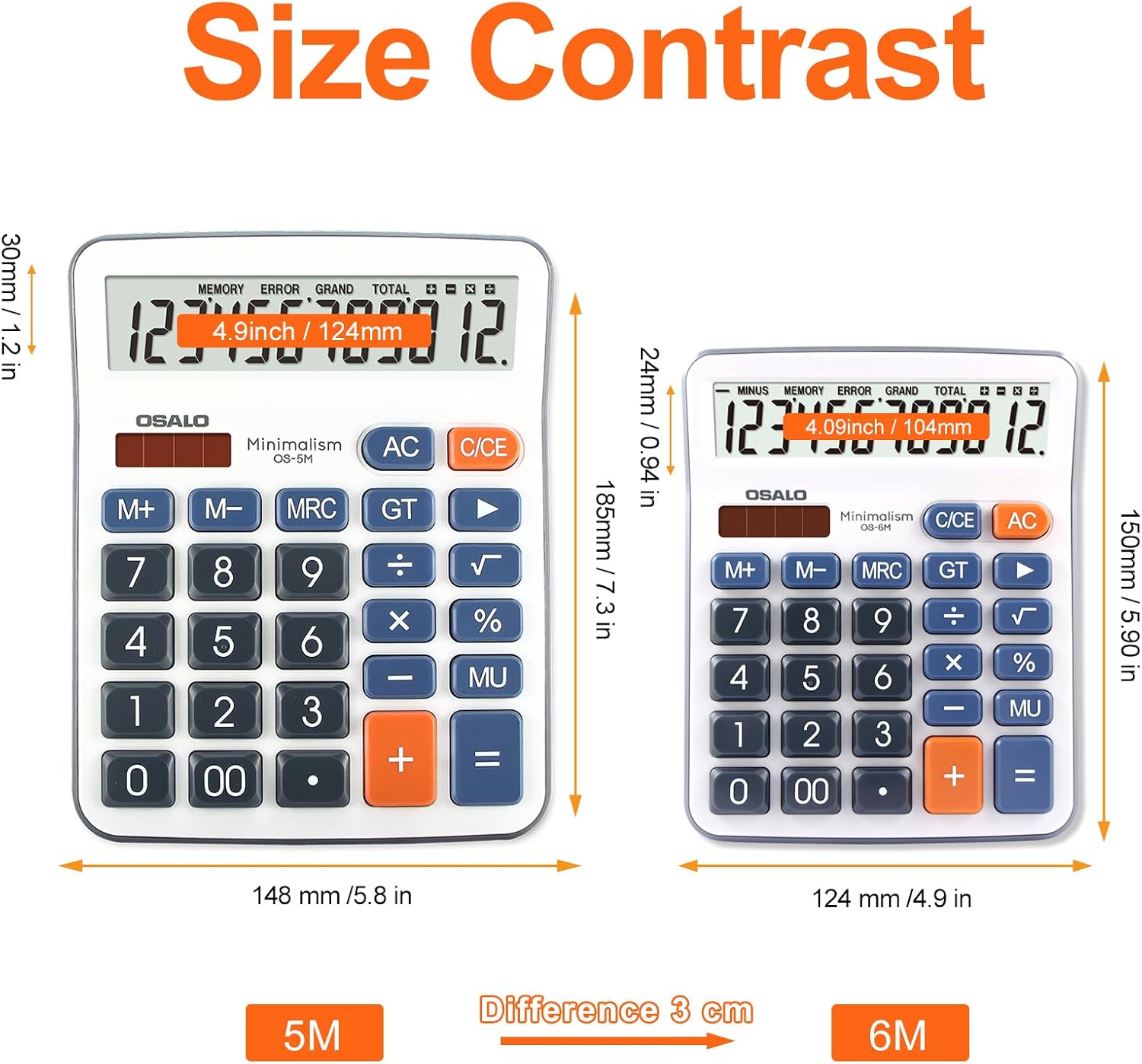
Image: A visual comparison of the OSALO 5M and OSALO 6M calculators, detailing their respective dimensions in both inches and millimeters to illustrate size differences.
8. Кепилдик жана колдоо
For warranty information or technical support, please refer to the product packaging or contact OSALO customer service through the retailer where the product was purchased. Keep your purchase receipt for warranty claims.