
1. Киришүү
This manual provides detailed instructions for the proper use and maintenance of your OSALO OS-6815 Desk Calculator. Please read this manual thoroughly before using the calculator to ensure optimal performance and longevity.
2. Продукт бүтүп калдыview
The OSALO OS-6815 is a 12-digit desktop calculator designed for accounting, business, and general use. It features an extra-large LCD display, large buttons for easy input, and dual power sources (solar and battery) for reliable operation.

2.1-сүрөт: Бүттүview of the OSALO OS-6815 Desk Calculator with key components labeled. This image highlights the extra-large LCD display, solar panel, and various function keys including Grand Total (GT), Memory Clear (MC), Memory Recall (MR), Memory Plus (M+), Memory Minus (M-), and Mark-up/Mark-down (MU) key.

2.2-сүрөт: The calculator features a 30-degree angled display, designed to be directly in the user's field of vision for enhanced clarity and readability.
Негизги өзгөчөлүктөрү:
- 12-Digit Extra Large LCD Display: Provides clear visibility of numbers and operation symbols.
- Бурчтуу дисплей: The screen is inclined at a 30-degree angle for improved readability.
- Large, Responsive Buttons: Designed for comfortable and accurate data entry.
- Кош кубат булагы: Operates on both solar energy and a single AA battery.
- Автоматтык түрдө өчүрүү: Conserves battery life by shutting down after 8 minutes of inactivity.
- Туруктуу курулуш: Made from high-strength ABS engineering plastic.
3. Орнотуу
Батарея орнотуу:
The OSALO OS-6815 calculator requires one (1) AA battery for operation when solar power is insufficient. A battery is included with the product.
- Turn the calculator over to access the battery compartment on the back.
- Gently slide the battery compartment cover in the direction indicated by the arrow.
- Оң (+) жана терс (-) терминалдары бөлүмдүн ичиндеги белгилер менен туура дал келишин камсыз кылып, бир AA батарейкасын салыңыз.
- Батарея бөлүкчөсүнүн капкагын бекем чыккыча ордуна коюңуз.

3.1-сүрөт: Арткы view of the calculator, illustrating the battery compartment and anti-skid rubber feet.
Күйгүзүү:
The calculator will automatically power on when sufficient light is available for the solar panel or when a key is pressed after battery installation. Press the AC/ON button to clear the display and begin calculations.
4. Иштөө нускамалары
The OSALO OS-6815 calculator features standard arithmetic functions and memory operations.
Негизги арифметикалык амалдар:
- Кошумча (+): Биринчи санды киргизиңиз, басыңыз +, экинчи санды киргизип, анан басыңыз =.
- Кемитүү (-): Биринчи санды киргизиңиз, басыңыз -, экинчи санды киргизип, анан басыңыз =.
- Көбөйтүү (×): Биринчи санды киргизиңиз, басыңыз ×, экинчи санды киргизип, анан басыңыз =.
- Бөлүм (÷): Биринчи санды киргизиңиз, басыңыз ÷, экинчи санды киргизип, анан басыңыз =.
- Персенtage (%): Enter the number, press %. For percentage calculations (e.g., 100 + 10%), enter 100, press +, 10 киргизиңиз, басыңыз %.
Эстутум функциялары:
- M+ (Memory Plus): Көрсөтүлгөн санды эс тутумга кошот.
- M- (эс тутум минус): Көрсөтүлгөн санды эс тутумдан кемитип салат.
- MR (эстутумду кайра чакыруу): Эстутумда сакталган учурдагы маанини көрсөтөт.
- MC (эстутумду тазалоо): Эстутумда сакталган маанини тазалайт.
Башка функциялар:
- AC/ON (All Clear/On): Clears all entries and calculations, and turns the calculator on.
- C (Кирүүнү тазалоо): Clears the last entered number or calculation, allowing correction without clearing the entire operation.
- GT (жалпы жалпы): Sums up the results of all previous calculations.
- +/- (Change Sign): Көрсөтүлгөн сандын белгисин өзгөртөт (оңдан терске, же терсден оңго).
- MU (Mark-up/Mark-down): Used for profit margin calculations.
- √ (Чарчы тамыр): Көрсөтүлгөн сандын квадрат тамырын эсептейт.
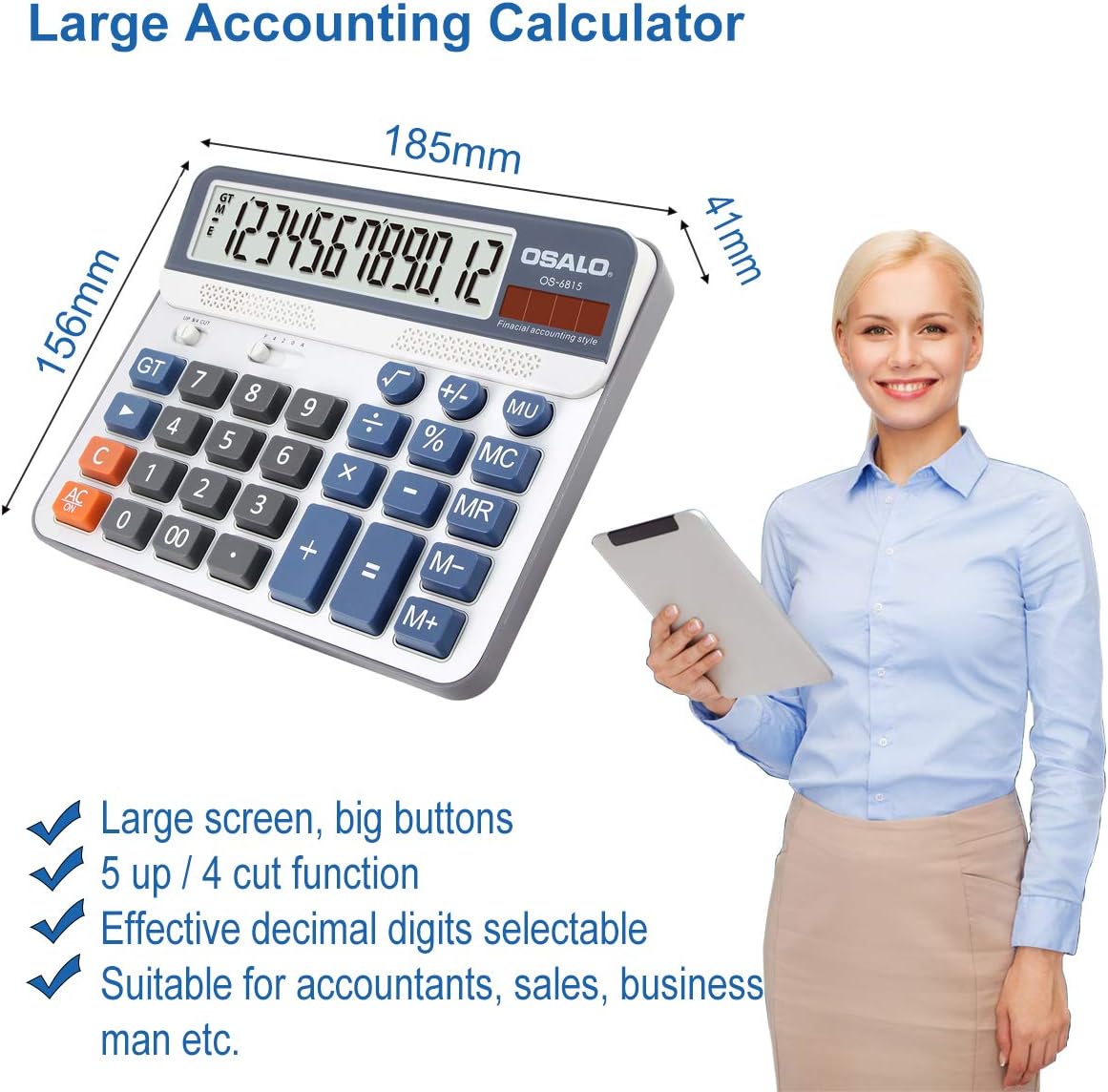
4.1-сүрөт: Деталдаштырылган view of the calculator's large display and responsive buttons, designed for efficient data entry.
5. Электр энергиясын башкаруу
The OSALO OS-6815 calculator utilizes a dual power system for continuous operation.
Күн энергиясы:
The calculator is equipped with a solar panel that powers the device in well-lit environments. This feature extends battery life and reduces the need for frequent battery replacement.
Батарея кубаттуулугу:
In low-light conditions or when solar power is insufficient, the calculator automatically switches to battery power. Ensure a fresh AA battery is installed for uninterrupted use.
Авто өчүрүү:
To conserve energy, the calculator will automatically power off after approximately 8 minutes of inactivity. Press any key (e.g., AC/ON) to reactivate the device.

5.1-сүрөт: Illustration of the calculator's dual power system, combining solar energy and a single AA battery for reliable operation.
6. Техникалык тейлөө
- Тазалоо: Калькулятордун бетин тазалоо үчүн жумшак, кургак чүпүрөктү колдонуңуз. өжөр кир үчүн, бир аз гampen the cloth with water. Avoid using abrasive cleaners, solvents, or alcohol, as these can damage the display or casing.
- Сактагыч: Калькуляторду күн нурунан жана экстремалдык температурадан алыс салкын, кургак жерде сактаңыз.
- Батареяны алмаштыруу: If the display becomes dim or unresponsive in adequate lighting, replace the AA battery. Remove the battery if the calculator will not be used for an extended period to prevent leakage.
- Таасирден качуу: Do not drop the calculator or subject it to strong impacts, as this may damage internal components or the display.
7. Кыйынчылыктарды
| Көйгөй | Мүмкүн себеп | Чечим |
|---|---|---|
| Calculator does not turn on or display is blank. |
|
|
| Туура эмес эсептөө натыйжалары. |
|
|
| Баскычтар жооп бербей жатат же жабышчаак болуп калат. |
|
|
8. Техникалык шарттар
| Өзгөчөлүк | Деталь |
|---|---|
| Модель номери | OS-6815 |
| Дисплей түрү | LCD |
| Сандардын саны | 12 |
| Power Source | Solar & 1 AA Battery (included) |
| Материал | Акрилонитрил бутадиен стирол (ABS) |
| Түс | Silver |
| Продукциянын өлчөмдөрү | 18.5L x 15.6W cm (approx. 16 x 19 x 4.5 cm) |
| Элемент Салмагы | 330 г |
| Screen Size | 5 дюйм |
| Авто өчүрүү | 8 мүнөт аракетсиздиктен кийин |
9. Кепилдик жана колдоо
For warranty information or technical support, please refer to the contact details provided with your purchase or visit the official OSALO webсайт. Сатып алганыңыздын далили катары сатып алуу дүмүрчөгүңүздү сактаңыз.