
Introduction
Thank you for choosing the Remax PR1 Portable Digital Voice Recorder. This device is designed for high-quality audio recording with 8GB of internal storage, offering up to 120 hours of digital recording time. This manual provides essential information for setting up, operating, maintaining, and troubleshooting your device to ensure optimal performance.
Продукт бүттүview
The Remax PR1 is a compact and lightweight digital voice recorder featuring a built-in stereo microphone and a 2-inch screen for easy navigation. It is equipped with a 3.5mm headphone jack for private listening and a USB interface for connecting to compatible devices like smartphones for data transfer.

This image displays the Remax PR1 Digital Voice Recorder from various angles, including its front, back, and side profiles with detailed dimensions. It highlights the device's compact design and button layout.
Жайгашуу
1. Аппаратты заряддоо
- Connect the voice recorder to a USB power source (e.g., computer USB port, USB wall adapter) using the provided USB cable.
- The charging indicator will illuminate. Allow sufficient time for a full charge before first use.
2. Күйгүзүү / Өчүрүү
- Күйгүзүү үчүн, экран күйгөнгө чейин кубат баскычын басып, кармап туруңуз.
- Өчүрүү үчүн, экран өчкөнгө чейин кубат баскычын басып, кармап туруңуз.
3. Компьютерге туташуу
- Use the USB cable to connect the recorder to your computer.
- The device will appear as a removable disk, allowing you to transfer recorded files.
Иштөө нускамалары
1. Аудио жаздыруу
- Түзмөк күйгүзүлгөнүн текшериңиз.
- басыңыз REC button to start recording. The recording indicator will light up.
- Жазууну тындыруу үчүн басыңыз REC кайра баскычын. Улантуу үчүн аны дагы бир жолу басыңыз.
- Жаздырууну токтотуу жана сактоо үчүн file, басыңыз ТОКТОТ баскычы.
2. Playing Back Recordings
- Navigate through your saved fileнавигация баскычтарын колдонуу менен.
- басыңыз ОЙНОО/ТЫНЫТТЫРУ button to start playback of a selected file.
- Ойнотуу деңгээлин тууралоо үчүн үн баскычтарын колдонуңуз.
- Connect 3.5mm headphones to the headphone jack for private listening.
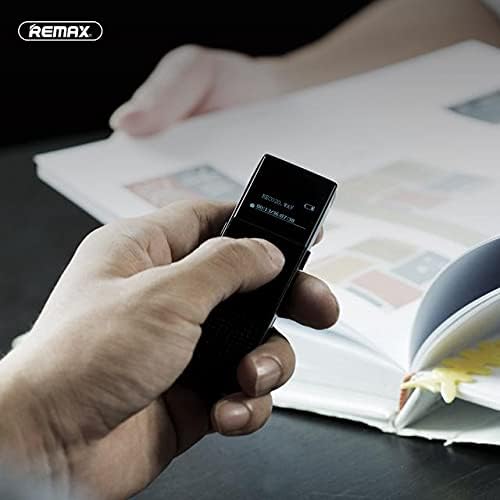
This image shows a hand holding the Remax PR1 Digital Voice Recorder, with the screen displaying recording information. It illustrates the device's portability and ease of use during operation.
3. File Башкаруу
- кирүү file menu to delete, rename, or move recordings. Refer to the on-screen prompts for specific actions.
- Connect to a computer via USB to easily manage files on a larger screen.
Техникалык тейлөө
- Тазалоо: Аппаратты тазалоо үчүн жумшак, кургак чүпүрөктү колдонуңуз. Суюк тазалагычтардан же абразивдүү материалдардан алыс болуңуз.
- Сактагыч: Диктофонду күн нуру жана экстремалдык температурадан алыс салкын, кургак жерде сактаңыз.
- Батареяга кам көрүү: Батареянын иштөө мөөнөтүн узартуу үчүн, бат-баттан батарейканы толук зарядсыздандырбаңыз. Аппаратты узак убакыт бою колдонбосо дагы, үзгүлтүксүз заряддаңыз.
Проблемаларды чечүү
Түзмөк күйбөй жатат
- Ensure the battery is charged. Connect the device to a power source and allow it to charge for at least 30 minutes.
- Try resetting the device (if a reset button is available, or by holding the power button for an extended period).
Жаздырууга болбойт
- Check if the device has sufficient storage space. Delete unnecessary fileэгерде сактагыч толуп калса.
- Микрофондун тоскоол болбогонун текшериңиз.
Начар аудио сапаты
- Ensure you are recording in a quiet environment.
- Check microphone settings (if adjustable) for sensitivity.
- Keep the device close to the audio source.
Device Not Recognized by Computer
- Компьютериңиздеги башка USB портун колдонуп көрүңүз.
- Башка USB кабелин колдонуңуз.
- Restart both the recorder and the computer.
Техникалык шарттар
| Өзгөчөлүк | Деталь |
|---|---|
| Бренд аты | Ремакс |
| Модел | PR1 |
| Эстутум сактоо сыйымдуулугу | 8 ГБ |
| Санарип жазуу убактысы | 120 саат |
| Screen Size | 2 дюйм |
| Микрофон форма фактору | Камтылган |
| Микрофондун иштөө режими | Стерео |
| Наушник уясы | 3.5 мм |
| Аппараттык интерфейс | USB |
| Шайкеш түзмөктөр | Смартфон |
| Өндүрүүчү | Ремакс |
| ASIN | B0924WP65K |
Кепилдик жана колдоо
For warranty information and technical support, please refer to the documentation included with your purchase or visit the official Remax webсайт. Жардам алуу үчүн сатуучуга да кайрылсаңыз болот.