
1. Киришүү
This manual provides detailed instructions for the safe and effective operation of your MASINGO Soprano X1 Portable Karaoke Machine. Please read this manual thoroughly before using the product and retain it for future reference. The Soprano X1 is a versatile portable PA speaker system designed for karaoke and audio playback, featuring wireless microphones, various input options, and integrated lighting effects.
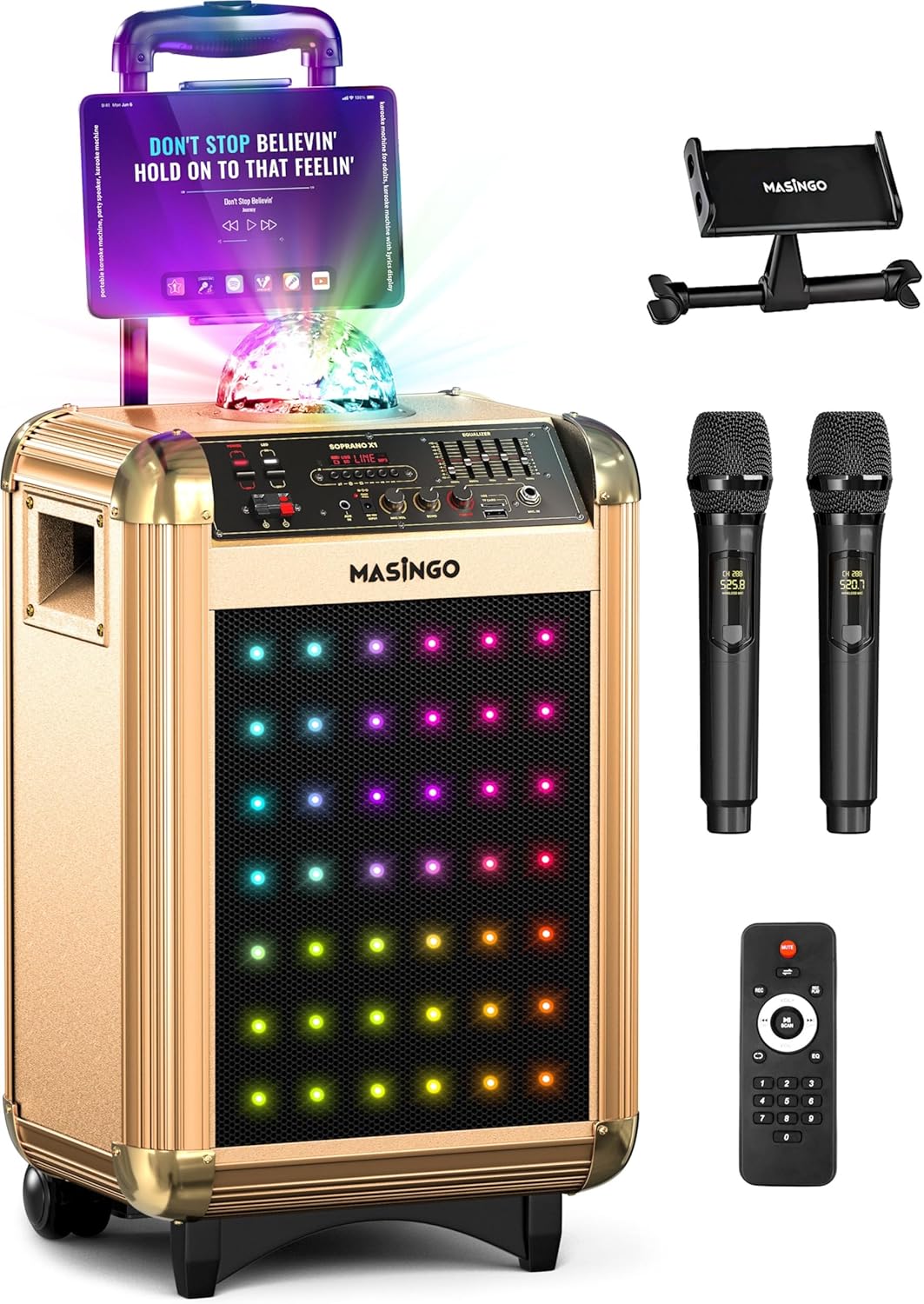
Image 1.1: The MASINGO Soprano X1 Portable Karaoke Machine, showcasing its main unit, tablet holder, two wireless microphones, and remote control.
2. Пакеттин мазмуну
Төмөндө тизмеленген нерселердин баары пакетиңизге камтылганын текшериңиз. Эгерде кандайдыр бир нерселер жок болсо же бузулса, кардарларды колдоо менен байланышыңыз.
- Soprano X1 Karaoke Machine (Main Unit)
- 2 Зымсыз микрофон
- Колдонуучунун Колдонмосу (бул документ)
- Планшеттин ээси
- Power Plug (AC adapter)
- Көмөкчү кабель (3.5 мм)
- TV Cable (AUX-RCA)
- Car Plug (for 12V car charging)
- Алыстан башкаруу

Image 2.1: Visual representation of the Soprano X1 main unit and all included accessories: two wireless microphones, 3.5mm AUX cable, AUX-RCA TV cable, 15V charging cable, device holder, and remote control.
3. Продукт бүтүп калдыview: Controls and Ports
Familiarize yourself with the various controls and connection ports on your Soprano X1 unit.

Image 3.1: Close-up of the Soprano X1 control panel, indicating the location of various inputs, controls, and switches.
- Кубат которгучу: Агрегатты күйгүзөт же өчүрөт.
- LED Lights Switch: Activates or deactivates the front LED lights.
- Disco Ball Switch: Turns the top disco ball light on or off.
- Режим баскычы: Cycles through input modes (Bluetooth, USB, Micro-SD, AUX, FM Radio).
- Микрофондун үнүнүн баскычы: Туташкан микрофондордун үнүн тууралайт.
- Микрофондун жаңырык баскычы: Controls the echo effect applied to microphone audio.
- Башкы үн баскычы: Системанын жалпы чыгаруу көлөмүн тууралайт.
- Equalizer (EQ) Sliders: Fine-tune audio frequencies (bass, mid, treble).
- USB порт: USB дискти ойнотуу үчүн.
- Micro-SD карта слоту: Micro-SD карталарын ойнотуу үчүн.
- AUX киргизүү (3.5 мм): For connecting external audio devices via auxiliary cable.
- TV Audio Input (RCA): For connecting to a TV for audio output.
- DC 15V киргизүү: AC кубат адаптерин туташтыруу үчүн.
- EXT DC 12V Input: Унаа кубаттагычты туташтыруу үчүн.

Image 3.2: The two wireless microphones included with the Soprano X1, highlighting their individual displays for settings like volume, echo, and EQ.
4. Орнотуу
4.1. Charging the Main Unit
- Connect the provided AC power adapter to the DC 15V input port on the Soprano X1.
- Адаптерди кадимки эле розеткага сайыңыз.
- The unit will begin charging. A full charge typically takes several hours. The battery indicator on the unit will show charging status.
- For car charging, use the provided car plug and connect it to the EXT DC 12V input.
4.2. Микрофонду орнотуу
- Unscrew the bottom cap of each wireless microphone.
- Ар бир микрофонго эки AA батарейкасын (кошулмада жок) туура полярдуулукту (+/-) сактап, салыңыз.
- Төмөнкү капкакты алмаштырыңыз.
- Press and hold the power button on each microphone to turn it on. The microphone will automatically connect to the Soprano X1 when the main unit is powered on.
4.3. Installing the Tablet Holder
- Locate the mounting slot on the top of the Soprano X1 unit.
- Insert the tablet holder into the slot until it is securely in place.
- Adjust the holder to accommodate your tablet or smartphone for lyrics display.
5. Иштөө нускамалары
5.1. Күйгүзүү/өчүрүү
- To power on the Soprano X1, toggle the main power switch to the 'ON' position.
- To power off, toggle the main power switch to the 'OFF' position.
5.2. Bluetooth Жупташтыруу
- Turn on the Soprano X1. The unit will automatically enter Bluetooth pairing mode, indicated by a flashing Bluetooth icon on the display.
- Смартфонуңузда, планшетиңизде же башка Bluetooth иштетилген түзмөгүңүздө Bluetooth жөндөөлөрүнө өтүңүз.
- Select "MASINGO Soprano X1" from the list of available devices.
- Once paired, the Bluetooth icon on the Soprano X1 display will become solid, and you can play audio wirelessly from your device.
5.3. Media Playback (USB, Micro-SD, AUX)
- USB/Micro-SD: Insert a USB drive or Micro-SD card containing audio files into the respective port/slot. Press the 'Mode' button until 'USB' or 'SD' is displayed. The unit will automatically begin playing compatible audio files.
- AUX киргизүү: Connect an external audio device (e.g., MP3 player, laptop) to the 3.5mm AUX input using the provided auxiliary cable. Press the 'Mode' button until 'AUX' is displayed.
- Телевидение аудиосу: Connect your TV's audio output to the RCA TV Audio input using the provided TV cable. Select the appropriate input mode on the Soprano X1.
5.4. Microphone Adjustments
- Микрофондун үнү: Use the 'Mic Volume' knob on the main unit to adjust the overall volume of both microphones.
- Микрофондун жаңырыгы: Use the 'Mic Echo' knob to add or reduce the echo effect on your vocals.
- Individual Microphone Settings: Each wireless microphone has its own controls for volume, echo, and EQ, accessible via its display. Adjust these settings directly on the microphone for personalized sound.
5.5. Жарык режимдери
- Алдыңкы LED жарыктары: Toggle the 'LED Lights' switch on the control panel to activate or deactivate the colorful LED lights on the front speaker grille.
- Disco Ball: Toggle the 'Disco Ball' switch to turn the top-mounted disco ball light on or off.
5.6. FM радиосу
- "FM" көрсөтүлгөнгө чейин "Режим" баскычын басыңыз.
- Use the playback control buttons (e.g., Play/Pause, Next/Previous) to scan for and select FM radio stations.
5.7. Көчүрүү
The Soprano X1 features a telescoping handle and wheels for easy transport. Extend the handle and tilt the unit to roll it to your desired location.

Image 5.1: The Soprano X1 being transported with its integrated wheels and extendable handle, highlighting its design for on-the-go use.
6. Техникалык тейлөө
- Тазалоо: Агрегаттын сыртын тазалоо үчүн жумшак, кургак чүпүрөктү колдонуңуз. Суюк тазалагычтарды же абразивдүү материалдарды колдонбоңуз.
- Сактагыч: Колдонулбаганда, аппаратты күн тийбеген жана өтө температурадан алыс, салкын, кургак жерде сактаңыз.
- Батареяга кам көрүү: If storing for extended periods, it is recommended to fully charge the unit every 3-6 months to maintain battery health. Remove batteries from microphones if not used for a long time.
7. Кыйынчылыктарды
| Көйгөй | Мүмкүн себеп | Чечим |
|---|---|---|
| Күч жок | Unit not charged; Power adapter not connected; Power switch off. | Ensure unit is charged or connected to power. Verify power switch is in 'ON' position. |
| Динамиктен үн жок | Master volume too low; Incorrect input mode selected; Audio source issue. | Increase Master Volume. Press 'Mode' button to select correct input. Check audio source device. |
| Микрофондор иштебейт | Microphone batteries low/dead; Microphones not powered on; Mic volume too low. | Replace microphone batteries. Ensure microphones are powered on. Increase 'Mic Volume' knob. |
| Bluetooth бат-баттан ажыратылат | Device too far from unit; Interference; Bluetooth device issue. | Keep Bluetooth device within 30 feet (10 meters) of the Soprano X1. Avoid obstacles. Re-pair the device. |
| Excessive echo | 'Mic Echo' knob set too high. | Adjust the 'Mic Echo' knob counter-clockwise to reduce the effect. |
8. Техникалык шарттар
- Модел: Soprano X1
- Элемент Салмагы: 24 фунт
- Продукциянын өлчөмдөрү: 13.2 x 15.4 x 24 дюйм
- Динамик күчү: 40 ватт
- Спикерлердин саны: 1 (three-way woofer)
- Батарея түрү: 12V коргошун кислотасы
- Батарея сыйымдуулугу: 7.4V 6000 mAh (approx. 2-3 hours run time)
- Кубат булагы: Battery Powered / 15V DC (AC adapter) / 12V DC (Car plug)
- Байланыш: Bluetooth, USB, Micro-SD, 3.5mm AUX, RCA (TV Audio)
- Өзгөчөлүктөр: Portable, Rechargeable, Wireless Microphones, Disco Ball, LED Lights, FM Radio
9. Кепилдик жана колдоо
МASINGO Soprano X1 Karaoke Machine comes with a 60-day warranty from the date of purchase. This warranty covers manufacturing defects and malfunctions under normal use. It does not cover damage caused by misuse, accidents, unauthorized modifications, or normal wear and tear.
For technical support, warranty claims, or any questions regarding your product, please refer to the contact information provided on the MASINGO official website or your purchase documentation. Please have your model number (Soprano X1) and proof of purchase ready when contacting support.