
SIMOLIO SM-824D1
SIMOLIO SM824D1 санарип зымсыз сыналгы кулакчындары үчүн колдонуучу колдонмосу
Model: SM-824D1
Introduction
This manual provides detailed instructions for the setup, operation, and maintenance of your SIMOLIO SM824D1 Digital Wireless TV Headphones. Please read this manual thoroughly before using the product to ensure proper functionality and to maximize your listening experience.
The SIMOLIO SM824D1 system includes a wireless headset and a transmitter. It is designed to provide clear audio from your TV or other audio sources directly to your ears, featuring balance and tone controls for personalized sound, and a long-range 2.4GHz wireless connection.
Пакеттин мазмуну
Пакетиңизде бардык буюмдар бар экенин текшериңиз:
- SIMOLIO SM824D1 Wireless Headset
- SIMOLIO SM824D1 Transmitter
- Audio Cables (Optical, RCA, 3.5mm)
- Кубаттуу адаптер
- USB заряддоо кабели
- Extra Soft Ear Tips
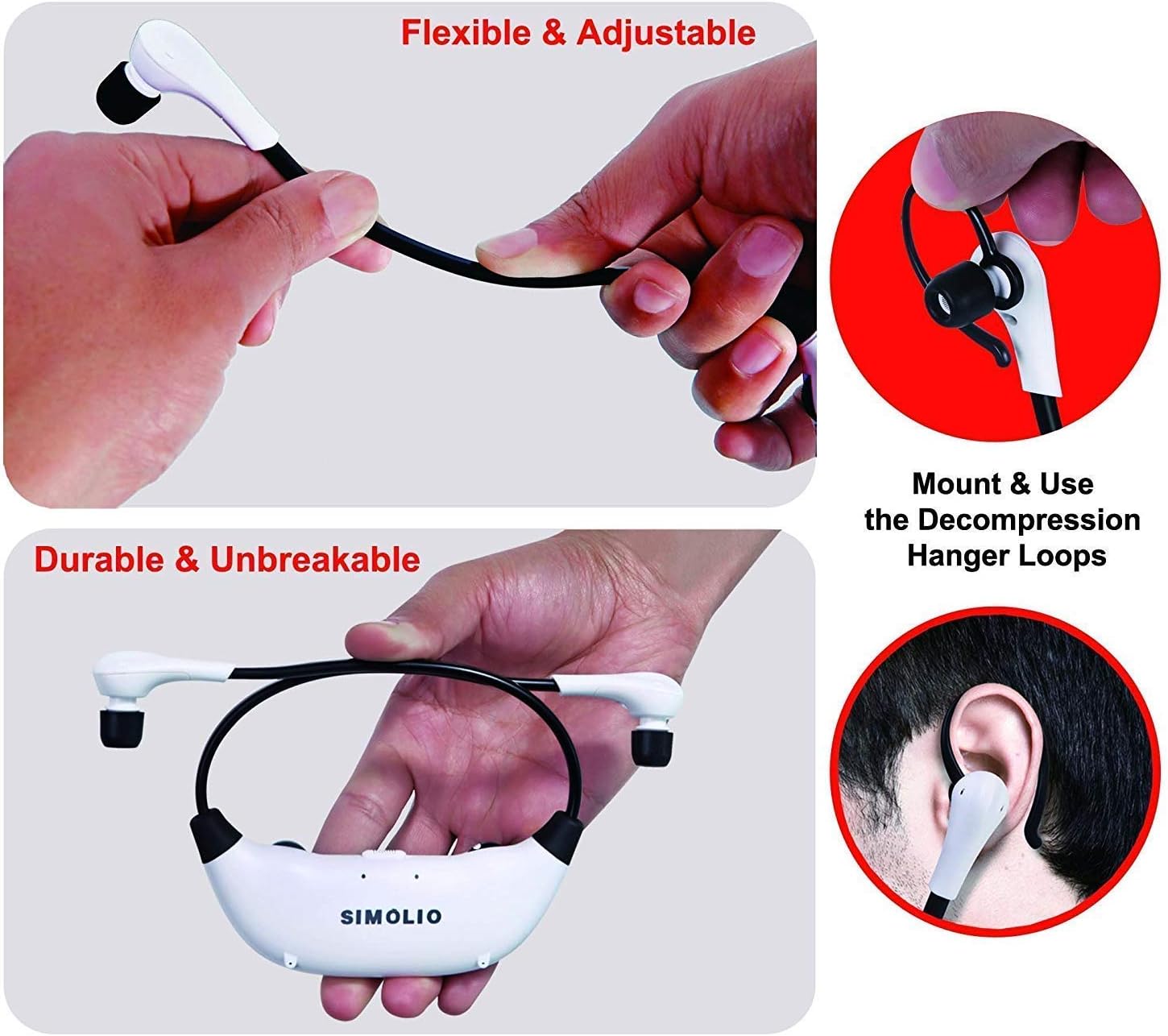
- Decompression Hanger Loops
- Англисче колдонуучу колдонмосу (бул документ)
- Spare Lithium-Ion Battery

Image: Contents of the SIMOLIO SM824D1 package, showing the headset, transmitter, audio cables, power adapter, USB cable, extra ear tips, and hanger loops.
Жайгашуу
1. Өткөргүчтү кубаттоо
- Connect the power adapter to the transmitter's 'Power In' port.
- Кубат адаптерин розеткага сайыңыз.
2. Connecting to Your TV/Audio Source
The SIMOLIO SM824D1 supports Digital Optical, RCA, and 3.5mm audio outputs. Choose the appropriate cable based on your TV or audio source's available ports.

Image: Compatibility chart for TV audio outputs (Digital Optical, 3.5mm, RCA) with SIMOLIO models.
- Санариптик оптикалык туташуу: Use the optical cable. Connect one end to your TV's 'Digital Optical Audio Out' port and the other end to the 'OPTICAL IN' port on the transmitter. Маанилүү: For optical connections, you MUST set your TV's audio output format to PCM. Refer to your TV's settings menu.
- RCA туташуу: Use the RCA audio cable (red and white plugs). Connect the red plug to the TV's 'Audio Out R' and the white plug to 'Audio Out L'. Connect the other end to the 'AUDIO IN' port on the transmitter.
- 3.5 мм аудио туташуу: Use the 3.5mm audio cable. Connect one end to your TV's headphone jack or 'Audio Out' port and the other end to the 'AUDIO IN' port on the transmitter.
Only one audio cable connection is required. For TVs with only coaxial or HDMI ARC ports, an additional audio converter/extractor may be needed (not included).

Сүрөт: Арткы view of the transmitter, highlighting the input ports and audio mode switches.
3. Гарнитураны заряддоо
The headset uses a rechargeable Lithium-Ion battery. A spare battery is also included and can be charged in the transmitter.
- Өткөргүч күйгүзүлгөнүн текшериңиз.
- To charge the headset, place it into the charging slots on the transmitter. Ensure the front of the headset faces the front of the transmitter.
- To charge the spare battery, open the charging compartment on the transmitter and insert the battery.
- Charging typically takes about 3 hours. The indicator light on the headset will show charging status.

Image: Instructions for charging the headset and spare battery using the transmitter.
Иштөө нускамалары
Гарнитураны башкаруу
Сүрөт: бүттүview of the headset's controls and features.
- Күйгүзүү/өчүрүү: Slide the switch to turn the headset on or off.
- Үндү көзөмөлдөө: Use the 'VOL' dial to adjust the listening volume.
- Баланс көзөмөлдөө: Use the 'BAL' dial to adjust the volume balance between the left and right ears. This is useful for individuals with different hearing sensitivities in each ear.
- Жеке үн Amplifier Button: Press this button to activate the ambient sound listener function, allowing you to hear nearby conversations without removing the headset. The indicator light will turn red when active.
Transmitter Controls
- OFF/MONO/STEREO Switch: Select 'STEREO' for Hi-Fi sound quality or 'MONO' for clearer TV dialogue, especially beneficial for speech clarity.
- TONE Selector (TREBLE/NORMAL/BASS): Adjust the audio tone to your preference. 'TREBLE' enhances high frequencies, 'BASS' enhances low frequencies, and 'NORMAL' provides a balanced sound.
Гарнитураны тагынуу
The headset features flexible and adjustable arms with memory stainless steel strips for a comfortable fit. Super-soft memory foam eartips and decompression hanger loops are included for enhanced comfort.

Image: Visual guide on adjusting the headset for comfort and using the hanger loops.
Техникалык тейлөө
Батареяга кам көрүү
- Always fully charge the battery before first use.
- When not in use, store the headset on the transmitter to keep it charged.
- The included spare battery can be swapped out for continuous use.
Тазалоо
- Гарнитураны жана өткөргүчтү жумшак, кургак чүпүрөк менен сүртүңүз.
- The ear-tips feature an anti-dust mesh. Clean gently if dust accumulates.
- Катуу химиялык заттарды же абразивдүү тазалагычтарды колдонуудан алыс болуңуз.
Сактагыч
- Аппаратты түз күн нурунан жана экстремалдык температурадан алыс салкын, кургак жерде сактаңыз.
Проблемаларды чечүү
| Көйгөй | Мүмкүн себеп | Чечим |
|---|---|---|
| Үн жок же үнү төмөн |
|
|
| Үндүн бурмаланышы же статикалык |
|
|
| Гарнитура заряддалбай жатат |
|
|

Image: Recommended TV audio settings for optimal performance.

Image: Guidance on optimizing audio signal strength from TV and cable box.
Техникалык шарттар
- Модель аты: SM-824D1
- Байланыш технологиясы: Зымсыз (RF)
- Зымсыз байланыш технологиясы: RF (2.4 ГГц)
- Наушник уячасы: 3.5 mm Jack (for input to transmitter)
- Шайкеш түзмөктөр: TVs with Digital Optical, RCA, or 3.5mm Audio Outputs
- Башкаруу түрү: Button Control, Push Button, Dial
- Заряддоо убактысы: Болжол менен 3 саат
- Батареянын иштөө мөөнөтү: Up to 6 Hours (depending on usage)
- Элемент Салмагы: 0.54 Kilograms (headset and transmitter)
- Материал: Пластик
- Noise Control Features: Noise Cancellation
- Өзгөчө өзгөчөлүгү: Microphone Included (for ambient sound ampбекитүү)
- Өндүрүүчү: Симолио
Коопсуздук маалыматы
Эскертүү:
- These RF products are not recommended for individuals with pacemakers. Please consult your physician before use if you have a pacemaker.
- Угуу жөндөмүнө зыян келтирбөө үчүн катуу үн менен көпкө угуудан алыс болуңуз.
Кепилдик жана колдоо
For warranty information or technical assistance, please refer to the warranty card included with your product or visit the official SIMOLIO website. You may also contact SIMOLIO customer support directly via the contact information provided on their webсайтында же продукт документациясында.
For connectivity questions, you can send a picture of your TV's jack panel to support@simolio.com for confirmation.
Ask a question about this manual
Ask about setup, troubleshooting, compatibility, parts, safety, or missing instructions. Manuals+ will review the question and use this page’s manual context to help answer it.