
Introduction
The ABBREE AR-780 Remote Shoulder Microphone is designed to enhance communication for two-way radio users. This accessory provides clear audio transmission and reception, featuring a durable design and a convenient 360-degree rotating clip for secure attachment. This manual provides essential information for the proper setup, operation, and maintenance of your AR-780 microphone.
Жайгашуу
Follow these steps to properly set up your ABBREE AR-780 Remote Shoulder Microphone with your compatible two-way radio.
- Микрофонду туташтыруу: Locate the 2-pin K-type connector on your AR-780 microphone cable. Align the pins with the corresponding ports on your two-way radio and firmly insert the connector. Ensure a secure connection for optimal performance.
- Шайкештикти текшерүү: The AR-780 is compatible with various two-way radio models, including but not limited to: Baofeng UV-5R, BF-F8HP, GM-15PRO, TP-8Plus, BF-888S, UV-S9Plus, BF-H6, UV-5RE, UV-5X3, UV-5RX3, UV-5R+, UV-82, UV-82HP, BF-F8+, UV-9S UV82HP, GM-15PRO, BF-ile F9 V2+, GT-3TP, TIDRADIO TD-H3, TD-H8, Quansheng UV-K5.
- Клипти тиркеңиз: Utilize the 360-degree rotating clip on the back of the microphone to securely attach it to your uniform, vest, or other clothing. Adjust the clip's orientation for comfortable and convenient access.

Image: The ABBREE AR-780 microphone connected to a compatible two-way radio via its 2-pin K-type connector.

Image: A visual representation of the ABBREE AR-780 microphone and its compatibility with various two-way radio models.
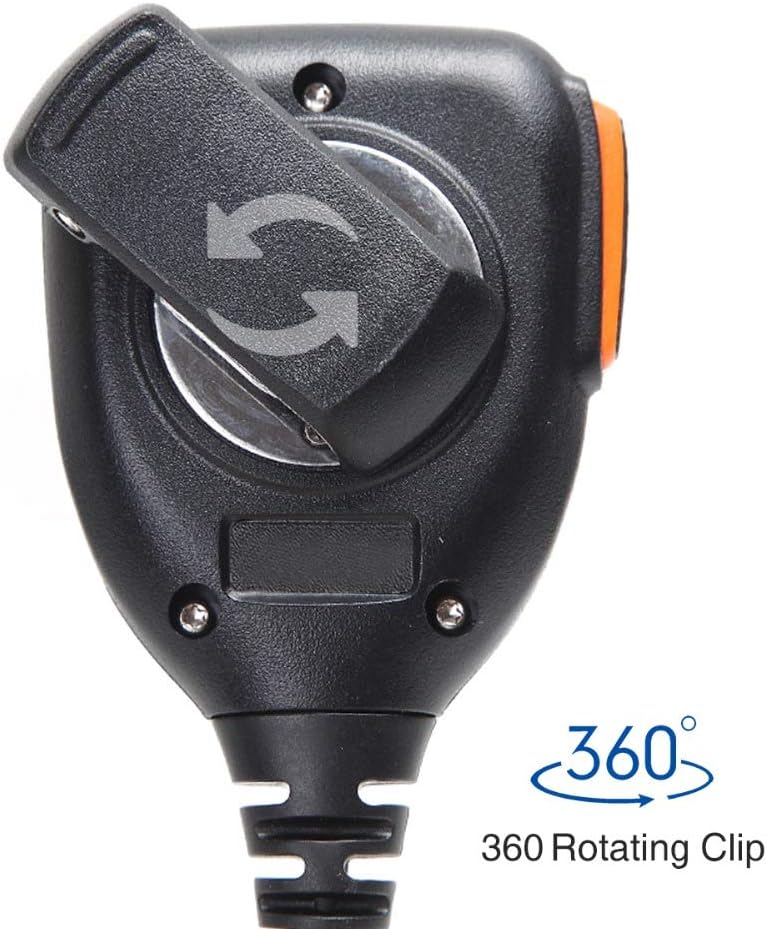
Сүрөт: Жакын план view of the 360-degree rotating clip located on the rear of the microphone, allowing for flexible attachment.
Иштөө нускамалары
The ABBREE AR-780 is designed for straightforward operation, allowing for efficient communication.
- Push-to-Talk (PTT) баскычы: To transmit, press and hold the large Push-to-Talk (PTT) button located on the side of the microphone. Speak clearly into the microphone grille. Release the PTT button to stop transmitting and return to receive mode.
- Динамик функциясы: Incoming audio from your radio will be routed through the integrated speaker on the front of the microphone. Adjust your radio's volume control to achieve the desired listening level.
- Мониторинг: When the PTT button is not pressed, the microphone acts as a speaker, allowing you to monitor incoming transmissions.

Image: The ABBREE AR-780 microphone, highlighting the speaker grille and the side-mounted Push-to-Talk (PTT) button.
Техникалык тейлөө
Proper care and maintenance will extend the lifespan and ensure reliable performance of your AR-780 microphone.
- Тазалоо: Wipe the microphone's exterior with a soft, damp cloth. Avoid using harsh chemicals or abrasive cleaners. Ensure the microphone is dry before storage or use.
- Кабельге кам көрүү: The coiled cable is made of durable PU material. Avoid excessive stretching or sharp bends to prevent damage. The cable is designed to extend from approximately 23.62 to 82.67 inches.
- Суу каршылык: The microphone features a waterproof sealing ring to protect internal components from moisture. While designed for durability in various conditions, avoid submerging the device in water.
- Сактагыч: Микрофонду колдонбогон учурда салкын, кургак жерде, күн нуру түз тийбеген жана өтө жогорку температурадан алыс сактаңыз.

Сүрөт: ички view highlighting the waterproof sealing ring, which protects the microphone's components from moisture.
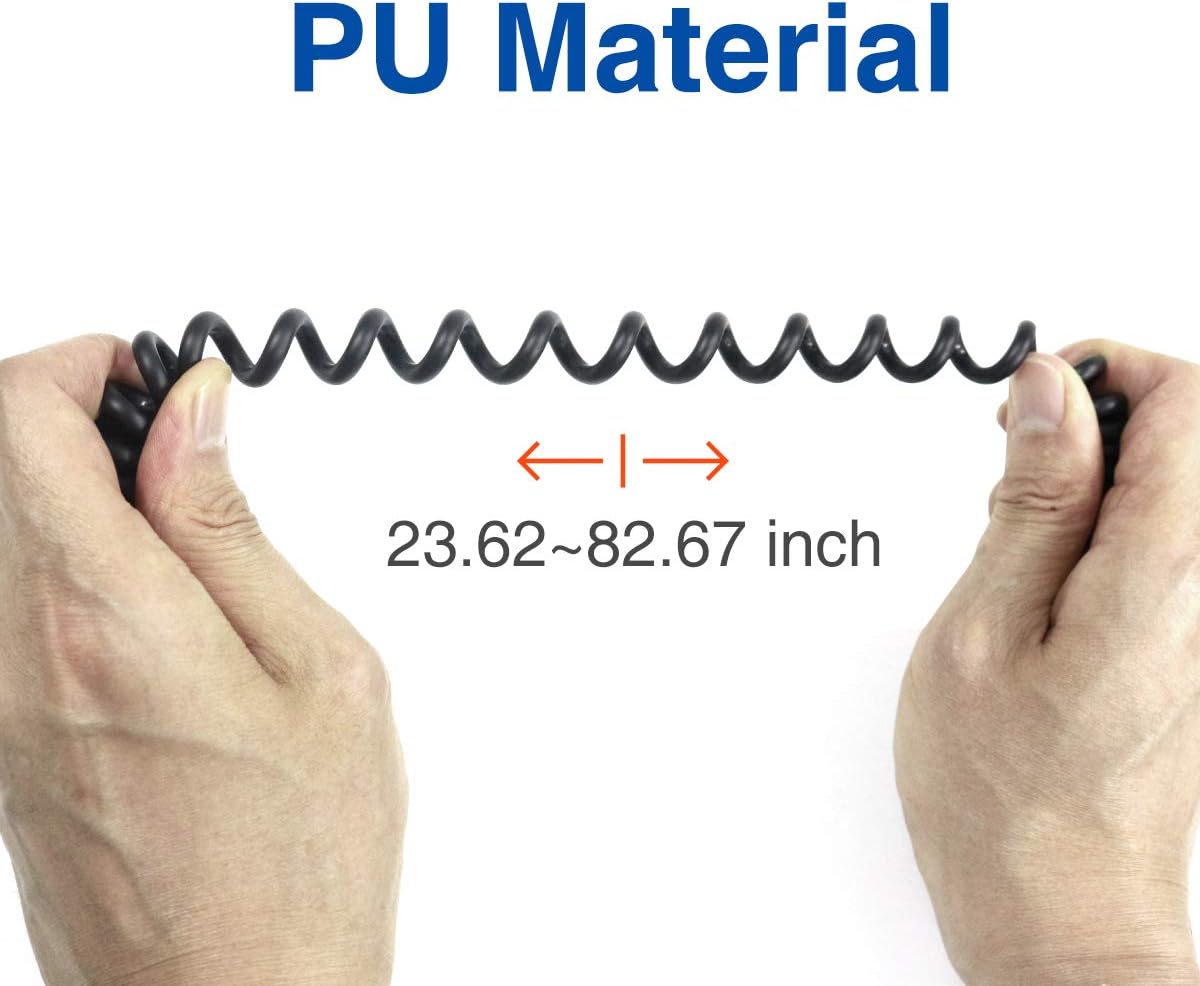
Image: Demonstrates the flexibility and stretch range of the PU material coiled cable, extending from 23.62 to 82.67 inches.
Проблемаларды чечүү
If you encounter issues with your ABBREE AR-780 microphone, refer to the following common troubleshooting steps:
- Динамиктен аудио жок:
- Ensure the microphone's 2-pin connector is fully inserted into the radio.
- Check the radio's volume level and increase it if necessary.
- Confirm the radio is powered on and functioning correctly.
- Poor Transmission Audio Quality:
- Speak clearly and directly into the microphone grille, maintaining a consistent distance.
- Ensure there are no obstructions covering the microphone grille.
- Verify the radio's settings for microphone gain or sensitivity, if applicable.
- Үзгүлтүксүз туташуу:
- Inspect the 2-pin connector and radio ports for any signs of damage or debris.
- Ensure the cable is not excessively strained or kinked.
Техникалык шарттар
Key technical specifications for the ABBREE AR-780 Remote Shoulder Microphone:
| Өзгөчөлүк | Спецификация |
|---|---|
| Модель номери | AR 770 |
| Power Source | Электр зымдары |
| Материал | Plastic (PU for cable) |
| Ызы-чуунун катышы | 78 дБ |
| Каналдардын саны | 2 |
| Frequency Response | 16000 Гц |
| Элемент Салмагы | 7.8 унция |
| Пакеттин өлчөмдөрү | 5 x 4.84 x 2.09 дюйм |
| Байланыш технологиясы | Зымдуу |
| Туташтыргыч түрү | 2-pin K-type (3.5 mm Jack equivalent) |
| Өзгөчө өзгөчөлүк | 360-degree Rotating Clip |
| Шайкеш түзмөктөр | Two-Way Radios (Baofeng, TIDRADIO, Quansheng, etc.) |
| Түс | Кара, Боз |
| Полярдык үлгү | Бир багыттуу |
| Микрофон форма фактору | Gooseneck (integrated into shoulder mic design) |

Сүрөт: А view of the internal speaker component, measuring 4.5cm (1.77 inches), designed for clear sound output.
Кепилдик жана колдоо
ABBREE provides the following support for your AR-780 Remote Shoulder Microphone:
- Кепилдик: This product includes a 3-month warranty from the date of purchase.
- Кайтаруулар: 30 күндүк кыйынчылыксыз кайтаруу саясаты сунушталат.
- Кардарларды колдоо: For further assistance, technical support, or warranty claims, please refer to the contact information provided with your purchase or visit the official ABBREE webсайт.