
1. Киришүү
The Avidsen HomeCam Battery is a 100% wireless outdoor surveillance camera designed for easy installation and robust home protection. Featuring 1080P Full HD resolution, a solar panel for continuous power, night vision, and two-way audio, this camera allows you to monitor your property remotely via a smartphone application without any subscription fees. This manual provides detailed instructions for setting up, operating, and maintaining your camera.
2. Кутуда эмне бар
Пакетте бардык компоненттер бар экенин текшериңиз:
- 1 x Avidsen HomeCam Battery IP WiFi Camera
- 1 x Solar Panel (PV module)
- 2 x 18650 Батареялар
- 1 x Camera Sealing Gasket
- Монтаждоо бурамалар жана дубал сайгычтар

Image: The Avidsen HomeCam Battery camera and its accompanying solar panel, unmounted, showing the main components included in the box.
3. Орнотуу колдонмосу
3.1. Батареяны орнотуу
- Камерадагы батарея бөлүкчөсүн табыңыз.
- Insert the two 18650 batteries, ensuring correct polarity (+/-).
- Батарея отсегин бекем жабыңыз.
3.2. Камераны жана күн панелин орнотуу
The camera and solar panel are designed for outdoor use and can be mounted separately or together. Choose a location that provides optimal sunlight exposure for the solar panel and a clear view камера үчүн.
- Камерага орнотуу: The camera features an innovative magnetic mount for precise orientation. Secure the base of the mount to a wall using the provided screws and wall plugs. Attach the camera to the magnetic base and adjust its angle.
- Күн панелин орнотуу: Mount the solar panel in a location that receives direct sunlight for several hours a day. Connect the solar panel cable to the camera's charging port.
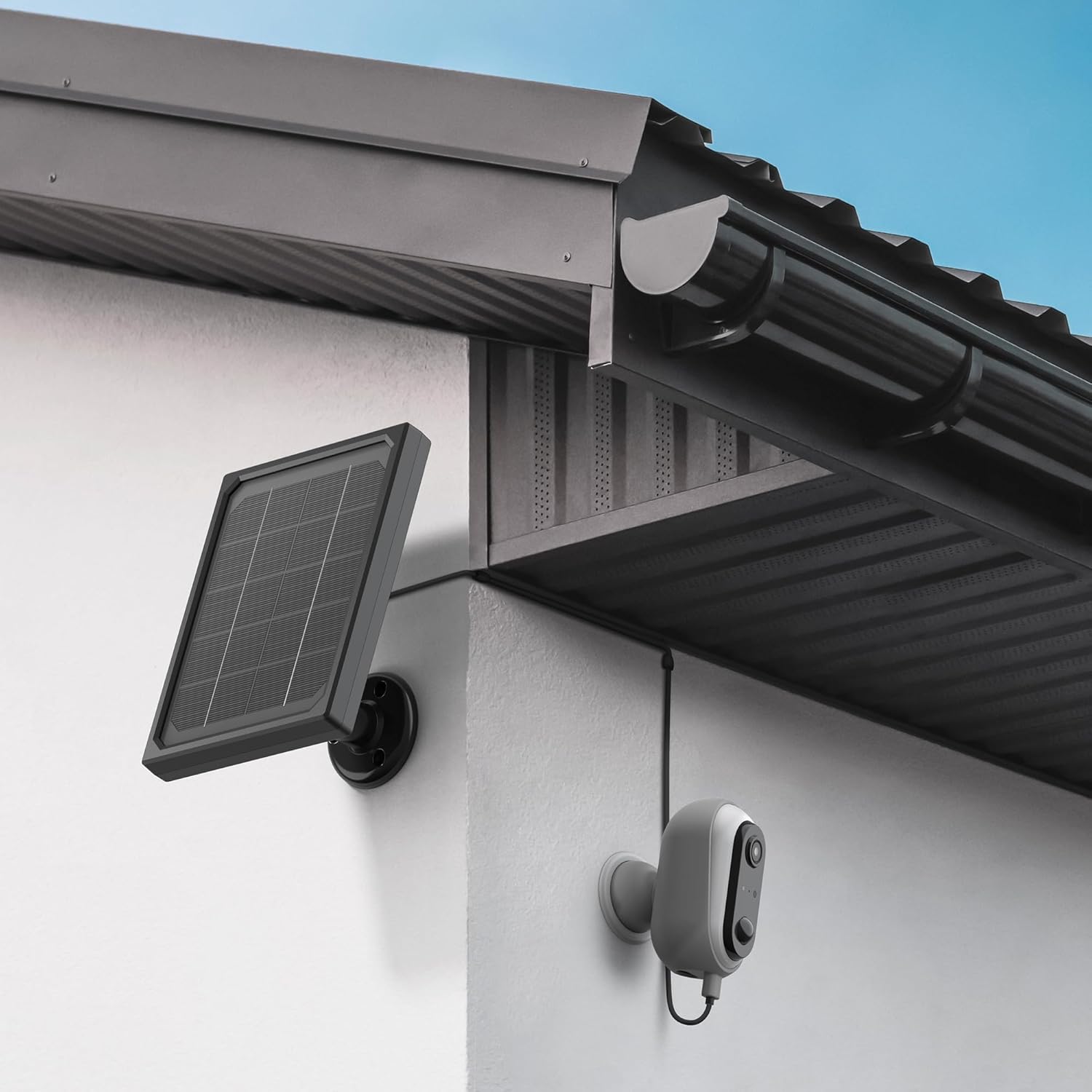
Image: The Avidsen HomeCam Battery camera and its solar panel are shown securely mounted on an exterior wall, positioned to capture sunlight and monitor the area.

Сүрөт: жакын план view of the Avidsen HomeCam Battery camera, highlighting its adjustable magnetic mount which allows for flexible positioning and angle adjustments.
3.3. Колдонмону жүктөп алуу жана баштапкы жупташтыруу
- Download the "Avidsen Home" application from your smartphone's app store (available on Google Play and Apple App Store).
- Колдонмону ачып, каттоо эсебин түзүңүз же сизде мурунтан эле бар болсо, кириңиз.
- Follow the in-app instructions to add a new device. This typically involves scanning a QR code on the camera or manually selecting the device type.
- Жупташтыруу процессинде смартфонуңуз 2.4 ГГц Wi-Fi тармагына туташкандыгын текшериңиз.
3.4. Wi-Fi туташуусу
During the app pairing process, you will be prompted to connect the camera to your home Wi-Fi network.
- Enter your Wi-Fi network name (SSID) and password when requested by the app.
- The camera supports 2.4GHz Wi-Fi networks only. Ensure your router is configured accordingly.
- Туташкандан кийин, камеранын индикатор жарыгы өзгөрөт жана колдонмо ийгиликтүү жупташууну ырастайт.
4. Камераны иштетүү
4.1. Түз эфир View жана Controls
Once connected, open the Avidsen Home app to access the live feed from your camera.
- Live Video: Колдонмодогу камераны басыңыз view реалдуу убакыттагы видео агым.
- Эки тараптуу аудио: Use the microphone icon in the app to speak through the camera's speaker and the speaker icon to listen to audio from the camera's microphone.
- Жаздыруу: Manually record video or capture screenshots directly from the live view интерфейс.
- Ойнотуу: Жазылган footage stored on the MicroSD card (not included) via the app's playback feature.

Image: A smartphone screen showing the Avidsen Home app, with options for live view, screenshot, two-way talk, recording, playback, and photo album.
4.2. Кыймылды аныктоо жана эскертмелер
The camera features motion detection to alert you to activity.
- Иштетүү/Өчүрүү: In the app settings for your camera, you can enable or disable motion detection.
- Сезимталдуулук: Жалган коңгуроолорду азайтуу үчүн кыймылды аныктоо сезгичтигин тууралаңыз.
- Эскертмелер: Кыймыл аныкталганда, смартфонуңузга эскертме келет.
- Жаздыруу: Motion-triggered events are automatically recorded to the MicroSD card (if installed).
4.3. Түнкү көрүнүш
The integrated infrared LEDs provide clear visibility up to 8 meters in total darkness.
- Түнкү көрүнүш аз жарыкта автоматтык түрдө иштетилет.
- The camera provides a clear black and white image in night vision mode.
4.4. Жергиликтүү сактагыч (MicroSD карта)
The camera supports local storage via a MicroSD card (up to 128GB, not included).
- Insert the MicroSD card into the designated slot on the camera.
- Ensure the card is formatted correctly (FAT32 recommended).
- All recordings, including motion-triggered events, will be saved to this card.
4.5. Smart Home интеграциясы
The Avidsen HomeCam Battery is compatible with Amazon Alexa and Google Assistant.
- Link your Avidsen Home account with your Alexa or Google Assistant app.
- Бул үчүн үн буйруктарын колдонуңуз view камераңыз шайкеш келген акылдуу дисплейлерден иштейт.
5. Техникалык тейлөө
5.1. Тазалоо
- Regularly clean the camera lens and the surface of the solar panel with a soft, damp оптималдуу аткарууну камсыз кылуу үчүн кездеме.
- Беттерге зыян келтириши мүмкүн болгон катуу химиялык заттарды же абразивдүү материалдарды колдонуудан алыс болуңуз.
5.2. Батареяга кам көрүү
- The solar panel is designed to keep the batteries charged. Ensure the panel is free from obstructions and receives adequate sunlight.
- If the camera's battery level drops significantly, consider repositioning the solar panel or manually charging the batteries if possible (refer to specific battery charging instructions if applicable).
5.3. Туташууну текшерүү
- Periodically check the physical connection between the solar panel and the camera to ensure it is secure and free from corrosion.
- Verify the camera's Wi-Fi connection status in the Avidsen Home app.
6. Кыйынчылыктарды
6.1. Кубат жок / Камера күйбөй жатат
- Ensure the 18650 batteries are correctly inserted with the right polarity.
- Check if the batteries are charged. If not, ensure the solar panel is connected and receiving sunlight, or try charging the batteries externally if possible.
- Verify the power button (if any) is pressed.
6.2. Cannot Connect to Wi-Fi
- Confirm your Wi-Fi network is 2.4GHz. The camera does not support 5GHz networks.
- Ensure the Wi-Fi password entered in the app is correct.
- Сигналдын күчүн жакшыртуу үчүн камераны Wi-Fi роутериңизге жакыныраак жылдырыңыз.
- Роутериңизди жана камераңызды өчүрүп күйгүзүңүз.
- If issues persist, try resetting the camera to factory settings (refer to the reset procedure in the app or device manual) and re-pairing.
6.3. Сүрөттүн сапаты начар
- Камера линзасын кирди же тактарды кетирүү үчүн тазалаңыз.
- Линзанын алдында эч кандай тоскоолдуктар жок экенин текшериңиз.
- Wi-Fi сигналыңыздын күчүн текшериңиз; алсыз сигнал видео агымынын сапатына таасир этиши мүмкүн.
6.4. Кыймылды аныктоо иштебей жатат же жалган сигналдар өтө көп
- Verify motion detection is enabled in the Avidsen Home app.
- Adjust the motion detection sensitivity settings in the app. Lower sensitivity for fewer false alarms, higher for more sensitive detection.
- Камеранын талаасын камсыз кылыңыз view is clear and not obstructed by moving objects like tree branches.
7. Техникалык шарттар
| Модель аты | HOME CAM BATTERY (127070) |
| Резолюция | 1080p толук HD |
| Байланыш | Зымсыз (Wi-Fi 2.4 ГГц) |
| Power Source | Solar Panel (5V 3W), 2x 18650 Batteries |
| Түнкү көрүү диапазону | 8 метрге чейин |
| талаасы View | 130° |
| IP рейтинги | IP65 (Outdoor use) |
| Сактагыч | MicroSD картасы (128 ГБ чейин, кошулган эмес) |
| Өзгөчөлүктөр | Motion Detection, Two-Way Audio, Smart Home Compatibility (Alexa, Google Assistant) |
| Өлчөмдөр | 31.5 x 21 x 8.5 см |
| Салмагы | 1100 грамм |
8. Кепилдик жана колдоо
8.1. Өндүрүүчүнүн Кепилдиги
Бул Avidsen продуктусу төмөнкүлөр менен камтылган: 2 жылдык өндүрүүчүнүн кепилдиги сатып алынган күндөн тартып. Кепилдик дооматтары үчүн сатып алганыңыздын далилин сактап коюңуз. Кепилдик нормалдуу колдонуудагы материалдардагы жана жасалгадагы кемчиликтерди камтыйт.
8.2. Техникалык колдоо
For technical assistance, troubleshooting, or further inquiries, please visit the official Avidsen website or contact their customer support. You can find contact information and FAQs on their webсайт: