
PIX-LINK LV-AC28
PIX-LINK WiFi Extender колдонуучусунун колдонмосу
Model: LV-AC28
Introduction
The PIX-LINK WiFi Extender is designed to expand the coverage of your existing wireless network, eliminating Wi-Fi dead zones and providing a stable internet connection throughout your home or office. With a 300Mbps wireless expansion rate, it enhances signal strength and ensures seamless connectivity for multiple devices.

Фронт view of the PIX-LINK WiFi Extender, a compact white device with a WPS button and LED indicators on top, showing wireless signals emanating from it.
Пакеттин мазмуну
Сураныч, пакетте төмөнкү нерселерди текшериңиз:
- PIX-LINK WiFi Extender Unit
- Ыкчам орнотуу колдонмосу
Орнотуу колдонмосу
The PIX-LINK WiFi Extender can be easily configured using a web browser on your smartphone, tablet, or computer. Follow these steps for a quick and simple installation:
- Connect to the Extender's Wi-Fi: Plug in the WiFi Extender. On your device, search for available Wi-Fi networks and connect to the network named "PIX-LINK-2.4G".
- Access the Setup Page: ачуу а web browser (e.g., Chrome, Safari) and enter the default IP address
http://192.168.7.234in the address bar. You will be prompted to log in. The default password is "admin". - Кайталоочу режимин тандаңыз: Once logged in, navigate to the setup wizard and select "Repeater Mode" to extend your existing Wi-Fi network.
- Тармагыңызды тандаңыз: The extender will scan for available Wi-Fi networks. Select your target network's SSID (your home Wi-Fi name) from the list and enter its security key (Wi-Fi password).
- Толук орнотуу: Confirm your settings. The extender will then apply the configuration and restart.
- Connect to the New SSID: After the extender restarts, connect your devices to the new extended Wi-Fi network. The new network name will typically be your original network name followed by "_EXT" or similar.
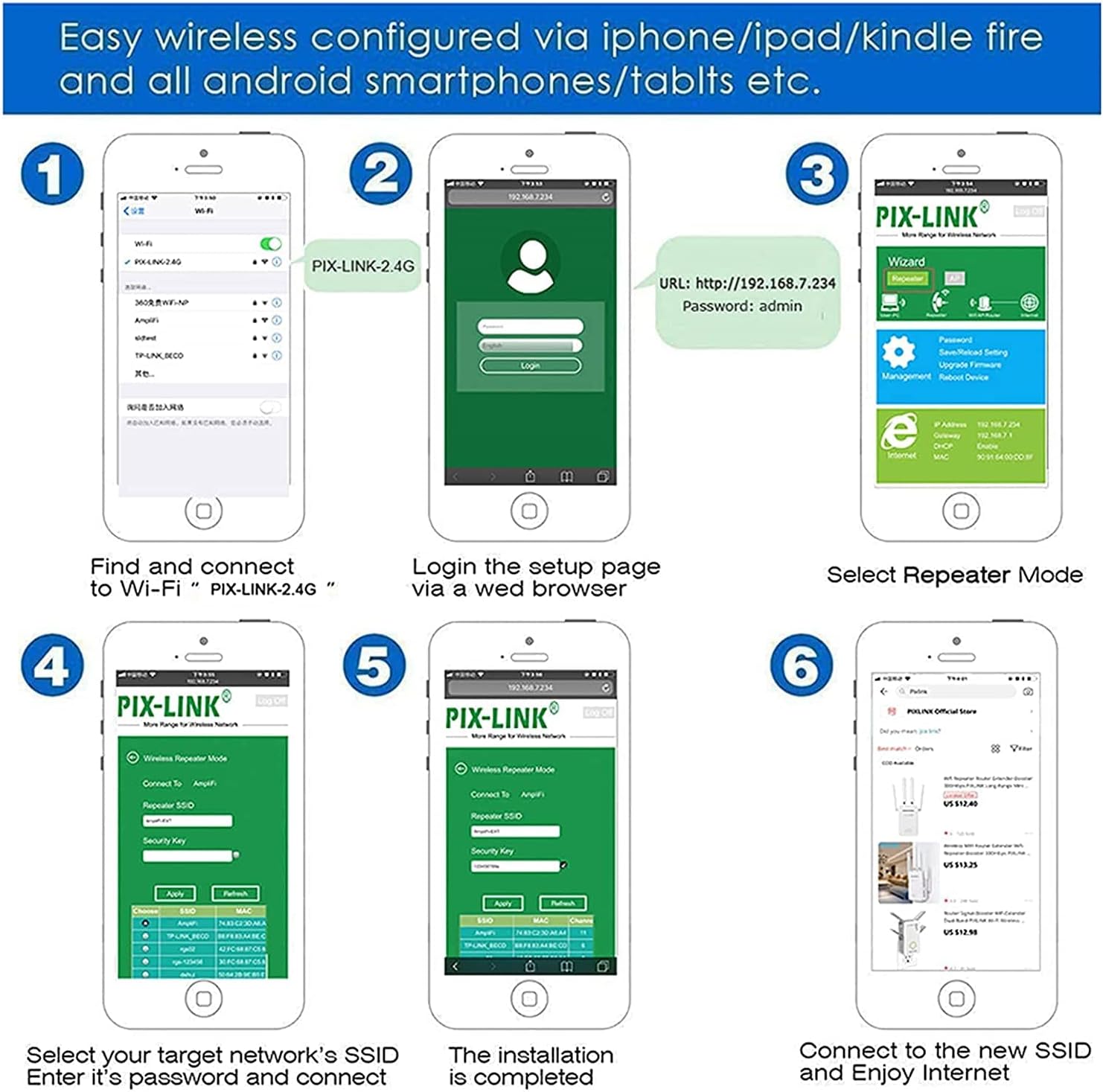
A series of six smartphone screens illustrating the step-by-step process of setting up the PIX-LINK WiFi Extender via a web browser, from connecting to its default network to selecting the repeater mode and entering the main Wi-Fi password.
Иштөө режимдери жана өзгөчөлүктөрү
The PIX-LINK WiFi Extender offers robust features to enhance your wireless experience:
- Зымсыз Кайталап Режим: Extends the range of your existing Wi-Fi network, eliminating dead zones.
- Тез шифрлөө: One-touch wireless security encryption using the WPS button for quick and secure connections.
- Интуитивдик Web UI: Колдонуучуга ыңгайлуу web interface for hassle-free setup and management.
- Жалпы шайкештик: Works seamlessly with most standard Wi-Fi routers.
- Жогорку ылдамдыктагы маалыматтарды өткөрүп берүү: Supports up to 300 Megabits Per Second for smooth streaming and browsing.
- Ethernet порту: Includes an RJ45 port to connect wired devices, acting as a wireless adapter.

Three panels illustrating key features: a person using a smartphone with 'Intuitive Web UI' text, two people looking at a laptop with 'Ultimate Wireless Speed' text, and a person using a laptop with 'Reliable Connection' text.

Diagram showing the PIX-LINK WiFi Extender boosting Wi-Fi signals to various devices including smartphones, gaming consoles, laptops, and smart TVs, illustrating its multi-device support.
LED көрсөткүчтөрү
The LED lights on your PIX-LINK WiFi Extender provide important status information:
| Индикатор | Статус | Description |
|---|---|---|
| Power LED | On | Түзмөк күйгүзүлгөн. |
| Wi-Fi LED | On | Wi-Fi signal is active. |
| LAN LED | Күйүк/Жылкыруу | Ethernet port is connected/active. |
| WPS/Repeater LED | On | Repeater function is successfully established. |
| WPS/Repeater LED | Жылтылдап | Repeater function failed or WPS pairing in progress. |

A combined image showing a floor plan illustrating how the wireless repeater extends Wi-Fi signal coverage from a router to previously weak areas, alongside a close-up of the extender's LEDs explaining 'Repeater Mode' status (On: Relay Successful, Blinking: Relay Failure).
Проблемаларды чечүү
If you encounter issues with your WiFi Extender, consider the following common solutions:
- Кубат жок: Ensure the extender is properly plugged into a working power outlet.
- Cannot Access Setup Page: Double-check that you are connected to the extender's Wi-Fi network (e.g., "PIX-LINK-2.4G") and that you have entered the correct IP address (
http://192.168.7.234) and password ("admin"). Try clearing your browser's cache or using a different browser. - Орнотуудан кийин сигналдын алсыздыгы: Try repositioning the extender closer to your main router but still within the range of a strong signal. Obstacles like thick walls can interfere with the signal.
- Repeater Mode Failure (Blinking WPS/Repeater LED): This often indicates an incorrect Wi-Fi password for your main router or an issue connecting to it. Re-enter the password carefully during setup.
- Интернетке кирүү жок: Verify that your main router has an active internet connection. Restart both your main router and the extender.
- Заводдун баштапкы абалга келтирүү: If problems persist, you may need to perform a factory reset. Locate the Reset/WPS button (often a small pinhole) and press and hold it for about 5-10 seconds until the LEDs flash. This will revert the extender to its default settings, and you will need to set it up again.
Техникалык шарттар
Detailed technical specifications for the PIX-LINK WiFi Extender (Model LV-AC28):
| Категория | Спецификация |
|---|---|
| Модель номери | LV-AC28 |
| Бренд | PIX-LINK |
| Зымсыз стандарт | 802.11bgn |
| Маалыматтарды өткөрүү ылдамдыгы | 300 Мбит/сек |
| Frequency Band | Бир тилкелүү (2.4 ГГц) |
| Ethernet порту | 1x 10/100Mbps RJ45 Port |
| Антенна | 2 Ички антенналар |
| Buttons | WPS / RESET баскычы |
| Өлчөмдөрү (L x W x Y) | 80 x 70 x 77 мм (болжол менен 3.15 x 2.76 x 3.03 дюйм) |
| Элемент Салмагы | 4.1 унция |
| ASIN | B092YS82J1 |
| Биринчи жеткиликтүү | 9-май, 2021-жыл |

An image displaying detailed specifications of the PIX-LINK WiFi Extender, categorized into Hardware, Wireless, and Others, including Ethernet port type, button details, antenna type, dimensions, wireless standards, signal rate, frequency, transmit power, reception sensitivity, wireless security protocols, and package contents.
Кепилдик жана колдоо
PIX-LINK offers a 1 жылдык кепилдик covering any defects caused during product production and delivery. If you are not satisfied with your purchase, you may return or replace it without any problem.
For customer service and technical support, PIX-LINK provides 7*24 dedicated customer service to assist you with any issues or questions you may have regarding your WiFi Extender.
Please refer to the contact information provided in your product packaging or on the official PIX-LINK webтүздөн-түз колдоо үчүн сайт.
Ask a question about this manual
Ask about setup, troubleshooting, compatibility, parts, safety, or missing instructions. Manuals+ will review the question and use this page’s manual context to help answer it.