
1. Продукт бүтүп калдыview
The RUIZHI Digital Temperature Controller with Sensor and Timer is designed for intelligent temperature and time management across various environments. It is suitable for applications such as greenhouses, aquariums, terrariums, aquaculture, and general home use. This device features an external temperature probe for accurate detection and offers multiple operational modes including cycle timing, time-based output, and temperature-controlled switching.
Негизги өзгөчөлүктөр төмөнкүлөрдү камтыйт:
- Көп шайкештик: Provides intelligent temperature and time control for diverse settings.
- Smart Timing Functions: Offers cycle timer, timer ON, timer OFF, and timer switch capabilities. Time range: 0-99 hours 59 minutes, with a maximum time accuracy of 10 minutes.
- Автоматтык режимди которуу: Automatically transitions between heating and cooling modes based on user-defined start and stop temperatures.
- Кең температура диапазону: Operates within a temperature range of -40°C to 120°C, with a control accuracy of ±1%.
- Бир нече иштөө режимдери: Select from Temperature Control Mode, F01 Cycle Timer Mode, F02 Countdown ON Mode, F03 Countdown OFF Mode, and F04 Countdown ON/OFF Mode. Note that timing and temperature control functions cannot be used simultaneously.
- Маалыматтарды сактоо: LCD display, temperature calibration, and all parameter settings are saved even after power loss.

Figure 1: RUIZHI Digital Temperature Controller, showcasing its application in a reptile terrarium environment.
2. Коопсуздук маалыматы
Please read all safety instructions before operating this device. Failure to follow these instructions may result in electric shock, fire, or serious injury.
- электр менен жабдууну камсыз кылуу voltage matches the device's specifications (100-250V AC).
- Do not exceed the maximum load capacity of 16A (3680W).
- Keep the device and its probe away from water or excessive moisture unless specifically designed for submersible use.
- Аппаратты ажыратпаңыз же өзгөртпөңүз. Бардык тейлөөлөрдү квалификациялуу кызматкерлерге тапшырыңыз.
- Always unplug the device from the power outlet before cleaning or performing maintenance.
- Use a 3-prong adapter if necessary, as recommended for proper grounding.
3. Пакеттин мазмуну
Пакетте бардык буюмдар бар экенин текшериңиз:
- 1 x RUIZHI Digital Temperature Controller
- 1 x Temperature Probe (Detector)
- 1 x User Manual
4. Орнотуу
4.1 Аппаратты туташтыруу
- Unpack the temperature controller and all accessories.
- Insert the temperature probe into the designated port on the side of the controller. Ensure it is securely connected.
- Plug the temperature controller into a standard 100-250V AC power outlet.
- Connect your heating or cooling appliance (e.g., heater, fan) to the appropriate outlet on the temperature controller. The controller typically has separate outlets for heating and cooling, or a single outlet that switches function based on mode.

Figure 2: The temperature controller connected to a power source, with the sensor probe ready for placement.
4.2 Зондду жайгаштыруу
Place the temperature probe in the area where you want to monitor and control the temperature. Ensure the probe is not directly exposed to heat sources or drafts, which could lead to inaccurate readings.

Figure 3: Dimensions of the controller and the length of the temperature probe cable.
5. Иштөө нускамалары
5.1 Understanding the Display and Buttons
The device features an LCD display showing measured temperature, start temperature, and stop temperature. Buttons include MODE, SET, UP, and DOWN.
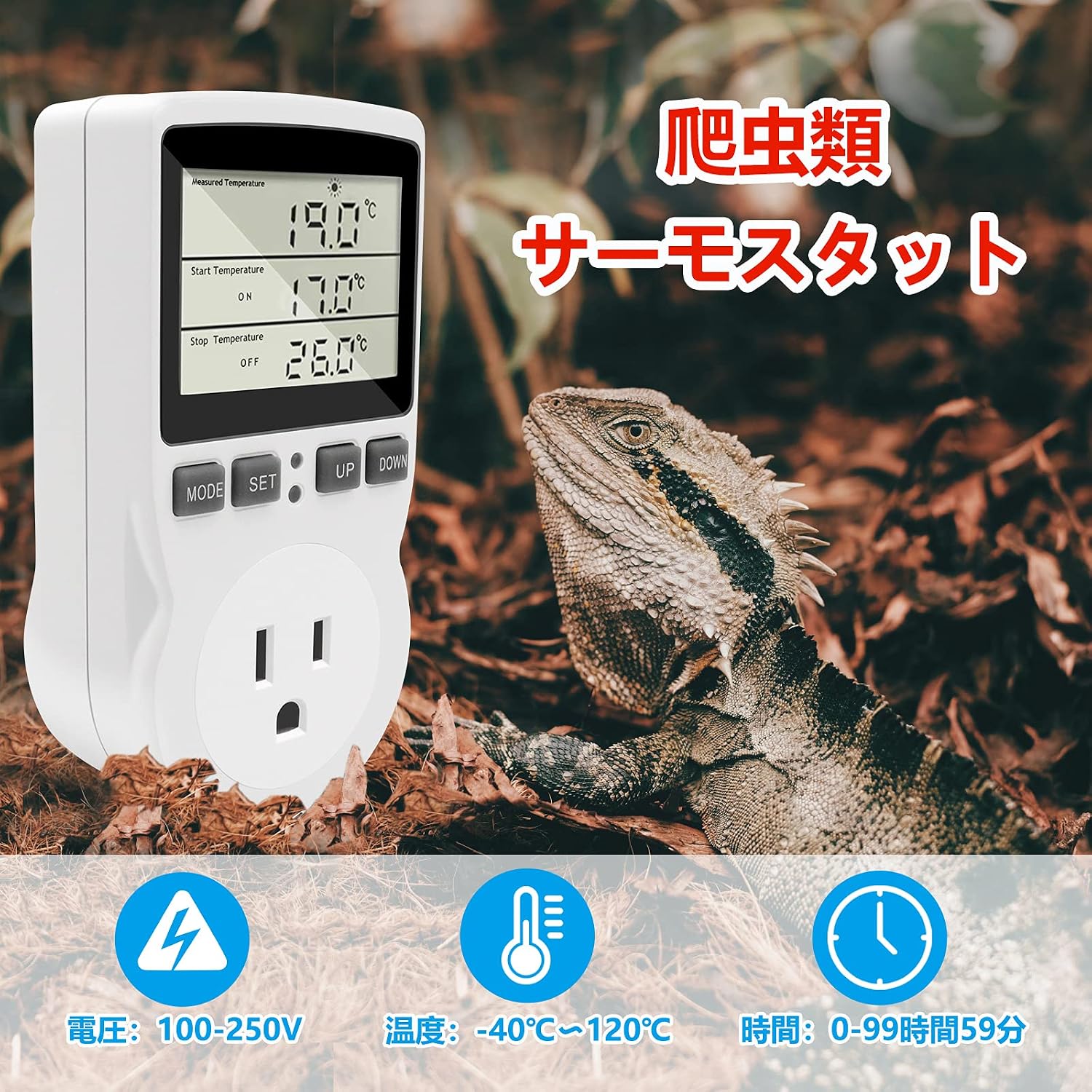
Figure 4: ашыкview of the LCD display and control buttons.
5.2 Температураны көзөмөлдөө режими
In this mode, the device controls the temperature by switching connected appliances ON or OFF based on your set start and stop temperatures.
- басыңыз РЕЖИМ button until the display shows the temperature control interface (typically showing Measured Temperature, Start Temperature, Stop Temperature).
- басыңыз SET button once. The 'Start Temperature' value will flash. Use the UP жана ылдый buttons to adjust the desired start temperature.
- Басыңыз SET again. The 'Stop Temperature' value will flash. Use the UP жана ылдый buttons to adjust the desired stop temperature.
- Басыңыз SET a third time to confirm and save the settings.
Жылытуу режими: If the start temperature is set lower than the stop temperature, the device will operate in heating mode. For example, if Start Temp = 17°C and Stop Temp = 26°C, the heater will turn ON when the temperature drops to 17°C and turn OFF when it reaches 26°C.
Муздатуу режими: If the start temperature is set higher than the stop temperature, the device will operate in cooling mode. For example, if Start Temp = 26°C and Stop Temp = 17°C, the cooler will turn ON when the temperature rises to 26°C and turn OFF when it drops to 17°C.

5-сүрөт: Мисample of Temperature Control Mode settings for heating.
5.3 Timer Modes
The device offers several timing modes for various applications. Press the РЕЖИМ button repeatedly to cycle through the available modes (F01, F02, F03, F04).
- F01 Cycle Timer Mode: Allows setting an ON duration and an OFF duration for a repeating cycle.
- F02 Countdown ON Mode: The device will turn ON after a set countdown period.
- F03 Countdown OFF Mode: The device will turn OFF after a set countdown period.
- F04 Countdown ON/OFF Mode: Combines countdown ON and OFF functionalities.
To set parameters in any timer mode:
- Select the desired timer mode using the РЕЖИМ баскычы.
- басыңыз SET button. The relevant time parameter (e.g., ON hours, ON minutes) will flash.
- колдонуу UP жана ылдый убакытты тууралоо үчүн баскычтар.
- Басыңыз SET to move to the next parameter or to confirm and save the settings.

Figure 6: Different timer modes displayed on the LCD screen.

7-сүрөт: Мисample of F01 Cycle Timer Mode settings.
5.4 Температураны калибрлөө
If you suspect the temperature readings are inaccurate, you can calibrate the sensor. Consult the detailed instructions in the included user manual for the specific calibration procedure.
5.5 Video Guide: Temperature Controller Settings
Video 1: This video demonstrates how to set up and adjust the temperature on a similar temperature controller. It shows how to switch between Fahrenheit and Celsius, and how to set heating and cooling modes. While the interface may vary slightly, the core principles of setting temperature parameters are applicable.
6. Техникалык тейлөө
Температураны жөнгө салгычыңыздын узак мөөнөттүү иштешин жана тактыгын камсыз кылуу үчүн аны туура тейлөө керек.
- Тазалоо: Disconnect the device from power before cleaning. Wipe the unit with a soft, dry cloth. Do not use abrasive cleaners or immerse the device in water.
- Пробка кам көрүү: Keep the temperature probe clean and free from debris. Avoid bending or damaging the probe cable.
- Сактагыч: Узак мөөнөткө колдонулбаганда, аспапты кургак, салкын жерде, тике күндүн нурунан жана өтө температурадан алыс сактаңыз.
7. Кыйынчылыктарды
If you encounter issues with your RUIZHI Digital Temperature Controller, refer to the following common problems and solutions:
| Көйгөй | Мүмкүн себеп | Чечим |
|---|---|---|
| Түзмөк күйбөйт. | Электр энергиясы жок; бош байланыш. | Check power outlet and ensure the controller is securely plugged in. Verify power to the outlet. |
| Температураны туура эмес окуу. | Probe improperly placed or damaged; needs calibration. | Ensure probe is correctly positioned and not near direct heat/cold sources. Perform temperature calibration as per manual. Inspect probe for damage. |
| Шайман күйбөй/өчпөй жатат. | Incorrect temperature settings; appliance not plugged into controller; appliance malfunction. | Verify start/stop temperature settings. Ensure appliance is correctly plugged into the controller. Test the appliance independently. |
| Таймер функциясы иштебей жатат. | Incorrect timer mode selected; timer parameters not set. | Ensure the correct timer mode (F01-F04) is selected. Set the ON/OFF durations or countdown times. Remember timing and temperature control cannot run simultaneously. |
8. Техникалык шарттар
Detailed technical specifications for the RUIZHI Digital Temperature Controller:
| Параметр | Нарк |
|---|---|
| Бренд | РУИЗИ |
| Материал | ABS, PC |
| Түс | Ак |
| Тtage | 100-250V AC, 50/60Hz |
| Максималдуу жүк | 16А (3680W) |
| Температура диапазону | -40 градустан 120 градуска чейин |
| Температураны көзөмөлдөө тактыгы | ±1% |
| Убакыттын тактыгы | Макс 10 мүнөт |
| Продукт өлчөмү | 12 x 5.8 x 3.2 см |
| Продукт Салмагы | 200 г |
| Сенсор түрү | NTC10K / B3950 |
| Чыгуу | Max 16A/230V |
9. Кепилдик жана колдоо
For warranty information and technical support, please refer to the contact details provided with your purchase documentation or visit the official RUIZHI webсайт. Кепилдик дооматтар үчүн сатып алганыңыздын далилин сактаңыз.