
1. Коопсуздук боюнча маанилүү маалымат
Please read this manual carefully before operating the appliance and keep it for future reference. Failure to follow these instructions may result in electric shock, fire, or injury.
- кубат менен камсыз кылуу Voltage рейтинг белгисинде көрсөтүлгөн.
- Аппаратты бузулган шнур же сайгыч менен иштетпеңиз.
- Шайманды жылуулук булактарынан жана түз күн нурунан алыс кармаңыз.
- Аба кирүүчү же чыгуучу жерлерди жаап албаңыз.
- This appliance contains R290 refrigerant. Handle with care and ensure proper ventilation during installation and maintenance.
- Тазалоодон же тейлөөдөн мурун дайыма розеткадан ажыратыңыз.
- Тазалоо үчүн химиялык эриткичтерди колдонбоңуз.
- Бул шайман физикалык, сезүү же акыл-эс жөндөмү начар же тажрыйбасы жана билими жок адамдар (анын ичинде балдар) үчүн, эгерде алардын коопсуздугуна жооптуу адам тарабынан көзөмөлсүз же шайманды колдонуу боюнча көрсөтмө болбосо, колдонууга арналбайт.
2. Пакеттин мазмуну
Таңгактан чыгарганда бардык буюмдардын бар экенин жана бузулбаганын текшериңиз.
- 1 x Klarstein Kraftwerk Smart Portable Air Conditioner
- 1 x Алыстан башкаруу
- 1 x Window Sealing Kit (for tilt windows)
- 1 x Exhaust Hose with Connectors
- 1 x Water Drainage Hose
- 1 x Колдонуучунун колдонмосу (англисче)

Image: Contents of the delivery, including the air conditioner unit, remote control, window sealing kit, exhaust hose, and drainage hose.
3. Орнотуу жана орнотуу
3.1 Агрегатты жайгаштыруу
Place the air conditioner on a flat, stable surface. Ensure there is at least 30 cm (12 inches) of space around the unit for proper airflow. The integrated castors allow for easy movement between rooms.

Image: The portable air conditioner with integrated wheels for easy transport.
3.2 Чыгаруучу түтүктү орнотуу
- Чыгаруу түтүгүн түзмөктүн арткы жагындагы аба чыгаруучу тешикке бекитиңиз.
- Түтүктү эң жакын терезеге же тешигине чейин созуңуз.
- Use the provided window sealing kit to secure the exhaust hose in the window opening, preventing hot air from re-entering the room.

Image: Quick installation with the window kit, showing the exhaust hose and window seal.
3.3 Drainage Hose (Dehumidifier Mode)
For continuous dehumidification, connect the drainage hose to the designated outlet and route it to a suitable drain or container. In cooling mode, water typically evaporates, but manual drainage may be required if the internal tank fills.
4. Иштөө нускамалары
4.1 Башкаруу панели жана алыстан башкаруу
The unit can be controlled via the touch control panel on top of the unit or the included remote control. The remote control requires 2x AAA batteries (not included).
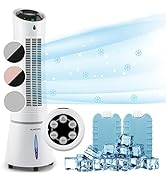
Image: Digital display and remote control for the air conditioner.
4.2 Иштөө режимдери
- Муздатуу режими: Reduces room temperature. Set desired temperature and fan speed.
- Кургаткыч режими: Абадагы ашыкча нымдуулукту кетирет.
- Күйөрман режими: Circulates air without cooling. Select desired fan speed.
- Уйку режими: Operates quietly with reduced fan speed and gradually increases temperature for comfortable sleep.
4.3 Smart Control (App & Alexa)
The Klarstein Kraftwerk Smart can be controlled via the Klarstein app on your smartphone and is compatible with Amazon Alexa and Google Home. Follow the app's instructions for pairing the device.

Image: Simple and practical use with the Klarstein app, compatible with Amazon Alexa and Google Home.
4.4 Таймер функциясы
Use the timer function to set the unit to turn on or off automatically after a specified period.
5. Техникалык тейлөө
Үзгүлтүксүз техникалык тейлөө кондиционериңиздин оптималдуу иштешин камсыздайт жана иштөө мөөнөтүн узартат. Ар кандай техникалык тейлөө иштерин жүргүзүүдөн мурун, ар дайым түзмөктү розеткадан сууруп коюңуз.
5.1 Аба чыпкасын тазалоо
Аба чыпкасын колдонуу ыкмасына жараша эки жумада бир же андан да тез-тез тазалап туруу керек. Кир чыпка натыйжалуулукту төмөндөтөт.
- Агрегатты өчүрүп, розеткадан ажыратыңыз.
- Аба чыпкасын түзмөктүн арткы же каптал жагынан таап, алып салыңыз.
- Фильтрди чаң соргуч менен тазалаңыз же жылуу суу жана жумшак жуугуч каражат менен жууңуз.
- Фильтрди кайра салуудан мурун аны толугу менен кургатып алыңыз.
5.2 Агрегаттын сыртын тазалоо
Агрегаттын сыртын жумшак менен сүртүңүз, гamp кездеме. Катуу химиялык заттарды, абразивдерди же эриткичтерди колдонбоңуз.
5.3 Сезондук сактоо
Агрегатты узак мөөнөткө сактасаңыз:
- Drain any accumulated water from the unit.
- Аба чыпкасын тазалаңыз.
- Чаңдан коргоо үчүн блокту жаап коюңуз.
- Кургак, салкын жерде сактаңыз.
6. Кыйынчылыктарды
Кардарларды колдоо кызматына кайрылуудан мурун, жалпы маселелер жана чечимдер үчүн төмөнкү таблицага кайрылыңыз.
| Көйгөй | Мүмкүн себеп | Чечим |
|---|---|---|
| Түзмөк күйбөйт. | No power, power cord unplugged, fuse blown. | Электр туташуусун, розетканы жана автоматтык өчүргүчтү текшериңиз. |
| Жетишсиз муздатуу. | Dirty air filter, blocked air intake/outlet, room too large, windows/doors open, exhaust hose not properly installed. | Clean filter, clear obstructions, ensure proper room size for unit capacity, close windows/doors, check exhaust hose installation. |
| Агрегат ызы-чуу. | Түзмөк жалпак бетте эмес, ички бөлүктөрү дирилдеп жатат. | Ensure unit is on a level surface. Some operational noise is normal for portable AC units. |
| Суунун агып чыгышы. | Drainage plug not properly sealed, drainage hose blocked or improperly connected. | Check drainage plug and hose connections. Clear any blockages in the drainage hose. |
| Wi-Fi туташуу маселелери. | Incorrect Wi-Fi settings, 5GHz network used, temporary glitch. | Ensure you are connecting to a 2.4GHz Wi-Fi network. Try unplugging the unit for 10 seconds, then reconnecting. Refer to the app's pairing instructions. |
7. Техникалык шарттар
| Өзгөчөлүк | Деталь |
|---|---|
| Бренд | КЛАРШТЕЙН |
| Модель аты | Kraftwerk Smart |
| Муздатуу кубаттуулугу | 10,000 2.9 BTU (XNUMX кВт) |
| нымдуулуктун күч жөндөмдүүлүгү | 23 литр |
| Аба агымынын көлөмү | 440 м³/саат |
| Сунушталган бөлмө өлчөмү | 29-49 м² |
| Ызы-чуу деңгээли | 50 dB (Min) / 65 dB (Max) |
| Энергия эффективдүүлүгү классы | A |
| Муздаткыч | R-290 |
| Энергияны керектөө | 1150 Ватт |
| Тtage | 220 вольт |
| Өлчөмдөр (D x W x H) | 38P x 35.5l x 82.2H см |
| Салмагы | 26 килограмм |
| Башкаруу ыкмасы | Алыстан башкаруу, Колдонмо башкаруу |
| Чыпка түрү | Көмүр |

Image: Energy efficiency label for the product.
Image: Technical drawing with product dimensions.
8. Кепилдик жана Кардарларды колдоо
8.1 Кепилдик маалыматы
This product comes with a limited warranty. Please refer to the warranty card included in your package or contact customer support for detailed terms and conditions. The warranty covers manufacturing defects under normal use.
8.2 Кардарларды колдоо
For technical assistance, spare parts, or any questions regarding your Klarstein Kraftwerk Smart air conditioner, please contact Klarstein customer support. Contact details can typically be found on the official Klarstein webсайтында же сатып алуу документтеринде.
Before contacting support, please have your model number (Kraftwerk Smart) and purchase date available.