
Introduction
The Audizio RP310 is a high-quality belt-driven turntable designed for playing vinyl records. It features an integrated preamplifier, automatic return function, and a high-performance Audio Technica cartridge. This manual provides detailed instructions for setting up, operating, and maintaining your RP310 turntable to ensure optimal performance and longevity.
Маанилүү коопсуздук нускамалары
- Аппаратты иштетүүдөн мурун бардык нускамаларды кылдат окуп чыгыңыз.
- Бул колдонмону келечекте маалымат алуу үчүн сактаңыз.
- Өрт же электр тогуна урунуп калбаш үчүн аппаратты жамгырга же нымга тийгизбеңиз.
- туура желдетүүнү камсыз кылуу; вентиляция тешиктерин жаап салбаңыз.
- Агрегатты туруктуу, түз бетке коюңуз.
- Өндүрүүчү белгилеген тиркемелерди/аксессуарларды гана колдонуңуз.
- Чагылган бороондо же узак убакыт бою колдонбогондо, розеткадан ажыратыңыз.
- Бардык тейлөөлөрдү квалификациялуу тейлөө кызматкерлерине тапшырыңыз.
Пакеттин мазмуну
Төмөндө көрсөтүлгөн бардык буюмдар таңгактын ичинде бар экенин текшериңиз:
- Audizio RP310 Turntable Unit
- Instruction Manual
- Резина Айлануучу мат
- RCA кабели
- 12V кубаттуу адаптер
- Чаң капкагы
Продукт бүттүview
The Audizio RP310 turntable is designed for high-fidelity vinyl playback with user-friendly features.
- Automatic Return Function: The tonearm automatically returns to its rest position after playback.
- Audio Technica Cartridge: Equipped with a high-performance Audio Technica AT-3600L MM cartridge and diamond stylus for superior sound reproduction.
- Туруктуу курулуш: Features a solid wooden housing with a high-gloss black finish for enhanced stability and aesthetics.
- Removable Dust Cover: Колдонулбаган учурда айланма табакчаны чаңдан жана таштандылардан коргойт.
- USB туташуу: Allows for direct connection to a computer for converting vinyl records to MP3 digital files.
- Dual Speed Playback: 33 1/3 жана 45 RPM жазууларын колдойт.
- Auto-Lift Tonearm: The tonearm features an auto-lift function for gentle record handling.
- Shock-Absorbing Feet: Minimizes vibrations for stable playback.
- Adjustable Tracking System: Allows for fine-tuning the tracking force between 1.5 and 3 grams for optimal stylus-to-groove contact.
- Камтылган Preampөмүр берүүчү: Enables direct connection to any standard line-level input on an ampкөтөргүч же кубаттуу динамиктер.
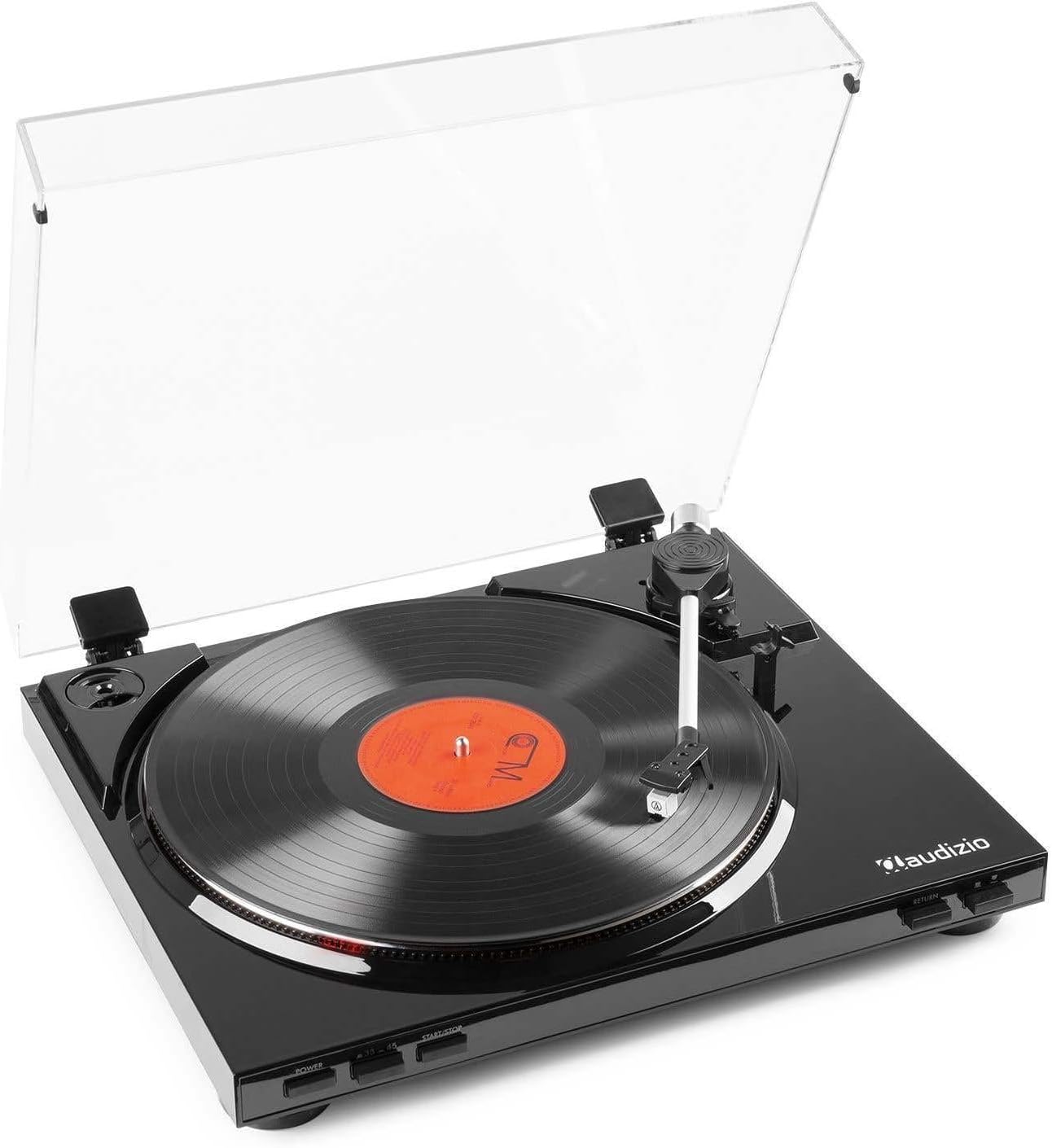
1-сүрөт: The Audizio RP310 turntable with its dust cover open, showcasing a vinyl record on the platter and the tonearm in position.

2-сүрөт: Жогорку view of the Audizio RP310 turntable with the protective dust cover closed, highlighting its sleek black finish.
Орнотуу колдонмосу
- Пакеттен чыгаруу: Carefully remove the turntable from its packaging. Retain all packaging materials for future transport or storage.
- Жайгашкан жери: Place the turntable on a stable, level surface away from direct sunlight, heat sources, and excessive vibration. Ensure adequate space for the dust cover to open fully.
- Чаң капкагын орнотуу: Insert the hinges of the dust cover into the corresponding slots at the rear of the turntable unit.
- Platter and Mat: Place the platter onto the spindle. Then, place the rubber turntable mat on top of the platter.
- Тонеарм балансы жана көзөмөлдөө күчү:
- Стилус коргоочуну акырын алып салыңыз.
- Carefully balance the tonearm by adjusting the counterweight until it floats horizontally.
- Once balanced, set the tracking force to the recommended range of 1.5 to 3 grams by rotating the counterweight. Refer to the cartridge manufacturer's specifications for the precise recommended force.

3-сүрөт: Detail of the tonearm and counterweight, illustrating the adjustable tracking system.
- Аудио туташуусу: Connect the supplied RCA cable from the "AUDIO OUT" ports on the rear of the turntable to a standard line-level input (e.g., "AUX," "CD," or "LINE IN") on your ampкөтөргүч же кубаттуу динамиктер. Do not connect to a "PHONO" input, as the RP310 has a built-in preampөмүрлүү.
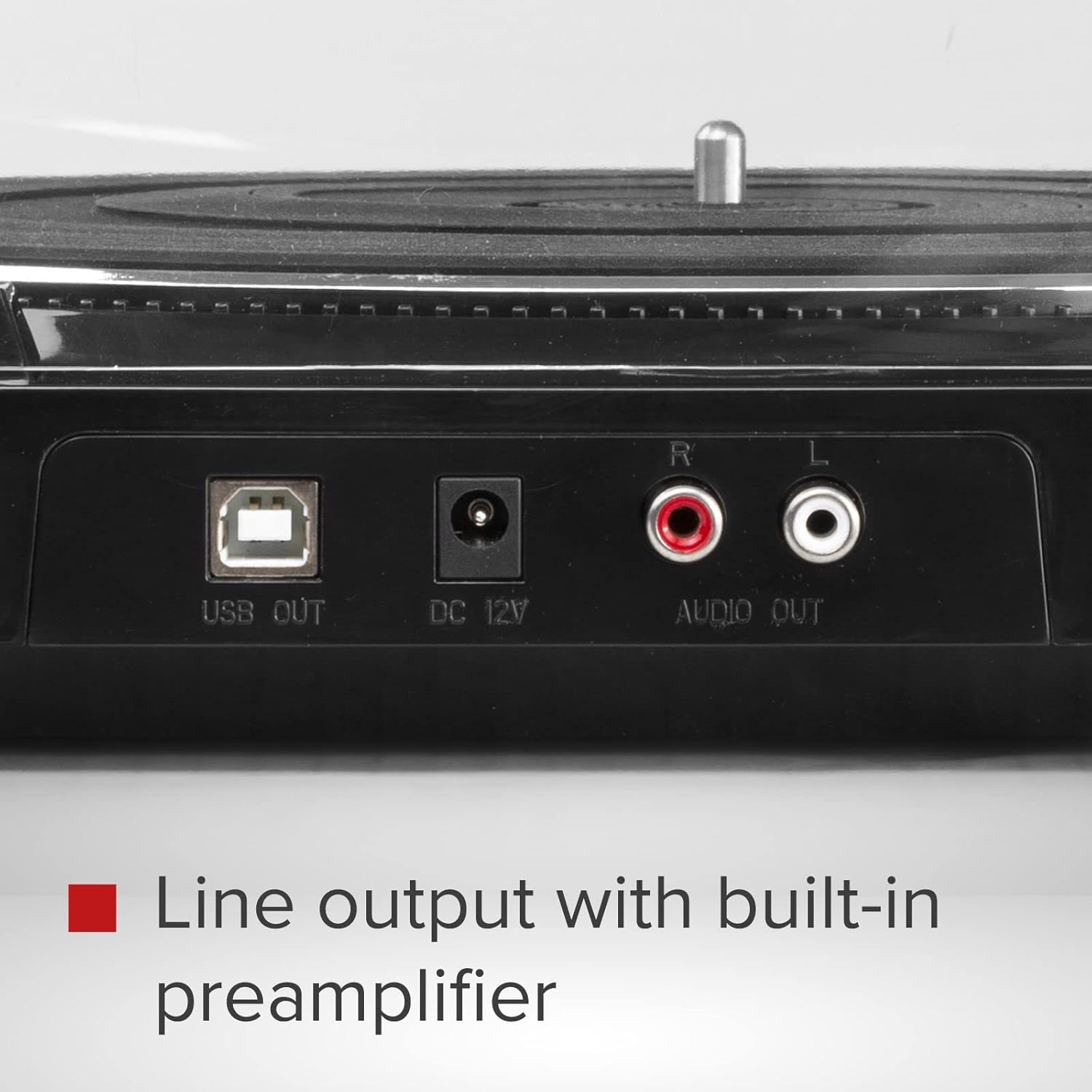
4-сүрөт: Rear panel connections including USB Out, DC 12V power input, and RCA Audio Out ports.
- Кубат туташуу: Connect the 12V power adapter to the "DC 12V" input on the rear of the turntable, then plug the adapter into a suitable wall outlet.
Иштөө нускамалары
- Күйгүзүү: басыңыз КҮЧ button located on the front panel to turn on the turntable.
- Ылдамдыкты тандоо: басыңыз 33/45 button to select the appropriate playback speed (33 1/3 RPM or 45 RPM) for your record. The selected speed will be indicated by an LED.
- Рекорд: Carefully place a vinyl record on the turntable platter. If playing a 45 RPM single, use the included adapter if necessary.
- Ойнотуп баштоо:
- басыңыз START/STOP button. The platter will begin to rotate.
- Manually lift the tonearm using the cueing lever and position it over the desired track on the record.
- Lower the cueing lever to gently place the stylus onto the record.
- Alternatively, for automatic start, simply move the tonearm over the record, and it will automatically lower.
- Автоматтык кайтаруу: At the end of the record, the tonearm will automatically lift, return to its rest position, and the platter will stop rotating.
- Ойнотууну токтотуу: To stop playback manually at any time, lift the tonearm using the cueing lever, return it to its rest, and press the START/STOP button to stop the platter.

5-сүрөт: Front panel controls for power, speed selection, and start/stop functions.
USB жаздыруу (винилден MP3кө чейин)
The Audizio RP310 allows you to convert your vinyl records into digital MP3 files using a computer. This feature is ideal for archiving your collection or listening to your records on portable devices.
- Компьютерге туташуу: Use a USB cable (not always included, but mentioned in feature bullets as "supplied cable") to connect the "USB OUT" port on the turntable to an available USB port on your PC or Mac computer.
- Программаны орнотуу: Install the provided recording software on your computer. If no software CD is included, check the Audizio website for compatible software downloads. Audacity is a commonly used free audio recording software that is compatible with most USB turntables.
- Программаны конфигурациялоо: Open the recording software and select the Audizio RP310 as the audio input device. Adjust recording levels as needed to prevent clipping or distortion.
- Жаздырууну баштоо: Begin playing your vinyl record on the turntable as described in the "Operating Instructions" section. Simultaneously, initiate recording within the software.
- Сактоо Files: Once the record side is finished, stop the recording in the software and save the audio as an MP3 file. You may need to edit the track breaks and metadata within the software.
Техникалык тейлөө
- Стилусту тазалоо: Regularly clean the stylus using a soft brush designed for stylus cleaning, brushing gently from back to front. A dirty stylus can degrade sound quality and damage records.
- Агрегатты тазалоо: Wipe the turntable's surface and dust cover with a soft, dry, or slightly damp кездеме. Абразивдүү тазалагычтарды же эриткичтерди колдонуудан алыс болуңуз.
- Жазуу кам көрүү: Жазууларыңызды таза жана чаңсыз кармаңыз. Аларды жеңдеринин ичинде тигинен салып, кыйшайып кетпеши үчүн сактаңыз.
- Стилус алмаштыруу: The stylus has a limited lifespan (typically 300-1000 hours of playback). Replace it when you notice a decrease in sound quality or visible wear. Consult your dealer for a replacement Audio Technica AT-3600L stylus.
Проблемаларды чечүү
| Көйгөй | Мүмкүн себеп | Чечим |
|---|---|---|
| Күч жок | Кубат адаптери туташкан эмес же туура эмес розетка. | Ensure the power adapter is securely connected to the turntable and a working power outlet. Check the power button. |
| Үн жок же үнү төмөн | Туура эмес аудио туташуусу; ampкөтөргүч киргизүү тандалган эмес; үн деңгээли өтө төмөн. | Verify RCA cables are correctly connected to a LINE IN input on your amplifier. Select the correct input source on your amplifier and increase volume. |
| Үндү өткөрүп жиберүү же бурмалоо | Dirty record or stylus; incorrect tracking force; turntable not level. | Clean the record and stylus. Re-adjust the tracking force. Ensure the turntable is on a stable, level surface. |
| Ойнотуу ылдамдыгы туура эмес | Wrong speed selected; belt issue. | Ensure the correct speed (33 or 45 RPM) is selected. Check if the drive belt is properly seated around the motor pulley and platter. |
| Tonearm does not return automatically | Механизмдин бузулушу же бузулушу. | Ensure no obstructions are preventing the tonearm's movement. If the issue persists, contact customer support. |
Техникалык мүнөздөмөлөр
| Модел | Аудизио RP310 |
| Ылдамдыктар | 33 1/3, 45 RPM |
| Drive Type | Belt Drive |
| Картридж | Audio Technica AT-3600L MM |
| Tracking Force Range | 1.5 - 3 grams |
| Output Connection | RCA Line Out |
| USB чыгышы | Yes (for MP3 conversion) |
| Электр камсыздоо | 12V DC Adapter (230 VAC/50 Hz input) |
| Өлчөмдөрү (L x W x Y) | 40 x 36 x 9 см |
| Салмагы | 2.7 кг |
Кепилдик жана колдоо
For warranty information, technical support, or service inquiries, please refer to the warranty card included with your product or contact your retailer or the Audizio customer service department. Please have your model number (RP310) and purchase date available when contacting support.