
1. Киришүү
Сатып алганыңыз үчүн рахматasing the Samsung SWA-9100S/ZA Wireless Rear Speaker Kit. This kit is designed to enhance your audio experience by adding wireless surround sound capabilities to compatible Samsung soundbars. Please read this manual carefully before using the product to ensure proper setup, operation, and maintenance. Keep this manual for future reference.
2. Коопсуздук маалыматы
Электр шок, өрт же жаракат алуу коркунучун азайтуу үчүн, ар дайым төмөнкү коопсуздук чараларын аткарыңыз:
- Бул аппаратты жамгырга же нымга калтырбаңыз.
- Do not open the cabinet. There are no user-serviceable parts inside. Refer all servicing to qualified service personnel.
- Туура желдетүүнү камсыз кылыңыз. Эч кандай желдетүүчү тешиктерди жаап албаңыз.
- Агрегатты туруктуу, түз бетке коюңуз.
- Электр шнурунун басылып кетүүсүнөн же кысып калуудан сактаңыз, өзгөчө сайгычтарда, розеткаларда жана алар аппараттан чыга турган жеринде.
- Бул аппаратты чагылгандуу бороондордо же узак убакыт бою колдонбогондо электр розеткасынан ажыратыңыз.
- Өндүрүүчү тарабынан көрсөтүлгөн тиркемелерди/аксессуарларды гана колдонуңуз.
3. Пакеттин мазмуну
Сиздин пакетте бардык компоненттер бар экенин текшериңиз:
- Samsung SWA-9100S Wireless Receiver Module
- 2x Rear Speakers
- Power Cable for Wireless Receiver Module
- 2x Динамик кабельдер
- Көрсөтмө (бул документ)

Сүрөт: Арткы view of the wireless receiver module and two rear speakers, illustrating the connection points for the speaker cables.
4. Орнотуу
Follow these steps to set up your wireless rear speaker kit:
- Connect the Rear Speakers to the Wireless Receiver Module:
Connect the speaker cables to the corresponding color-coded terminals on the back of the wireless receiver module and the rear speakers. Ensure positive (+) and negative (-) terminals are matched correctly. - Connect Power to the Wireless Receiver Module:
Plug the power cable into the wireless receiver module and then into a wall outlet. The STANDBY indicator on the module will blink blue. - Connect to your Samsung Soundbar:
With your Samsung soundbar powered off, press and hold the 'ID SET' button on the back of the wireless receiver module for at least 5 seconds until the STANDBY indicator blinks blue and red alternately. Then, power on your Samsung soundbar. The soundbar will automatically search for the wireless receiver module. Once connected, the LINK indicator on the wireless receiver module will turn solid blue. - Жайгашкан жери:
Position the rear speakers behind your listening area, ideally at ear level. The speakers are keyhole wall-mountable for flexible placement.

Сүрөт: алдыңкы view of one of the rear speakers.
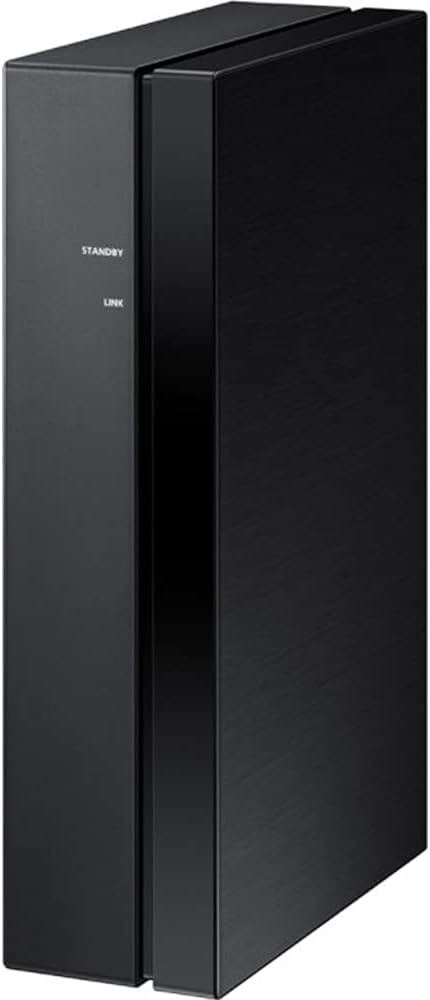
Сүрөт: каптал view of the wireless receiver module, showing the STANDBY and LINK indicators.
5. Иштөө
Once successfully paired, the wireless rear speakers will automatically connect to your soundbar when both devices are powered on. The LINK indicator on the wireless receiver module will illuminate solid blue, indicating an active connection.
- Күйгүзүү/өчүрүү: The wireless receiver module powers on and off automatically with your connected Samsung soundbar.
- Статус көрсөткүчтөрү:
- STANDBY (Blinking Blue): Module is powered on and ready to connect.
- LINK (Solid Blue): Module is successfully connected to the soundbar.
- STANDBY (Blinking Blue/Red): Module is in ID SET mode, searching for a soundbar.
- STANDBY (Solid Red): Connection failed or module is in error state.
6. Техникалык тейлөө
Proper care ensures the longevity and performance of your speaker kit.
- Тазалоо: Use a soft, dry cloth to clean the surfaces of the speakers and wireless receiver module. Do not use liquid cleaners, aerosols, or solvents, as they may damage the finish.
- Вентиляция: Ensure the wireless receiver module has adequate ventilation. Do not cover its vents.
- Сактагыч: If storing the kit for an extended period, disconnect it from power and store it in a cool, dry place away from direct sunlight and extreme temperatures.
7. Кыйынчылыктарды
Эгер көйгөйлөргө туш болсоңуз, жалпы көйгөйлөр жана аларды чечүү жолдору үчүн төмөнкү таблицага кайрылыңыз:
| Көйгөй | Мүмкүн себеп | Чечим |
|---|---|---|
| Арткы динамиктерден үн чыкпайт. | Wireless connection lost or not established. Speaker cables incorrectly connected. | Check the LINK indicator on the wireless receiver module (should be solid blue). Re-establish connection if necessary (refer to Setup section). Verify speaker cable connections. |
| LINK indicator is solid red. | Connection failed or error. | Unplug the power cord from the wireless receiver module and plug it back in. Repeat the ID SET process. Ensure the soundbar is compatible. |
| Үн бурмаланган же үзгүлтүктүү угулат. | Interference from other wireless devices. Wireless receiver module too far from soundbar. | Move the wireless receiver module closer to the soundbar. Ensure no large metal objects are between them. Minimize interference from other 2.4 GHz wireless devices. |
| Wireless receiver module does not power on. | Электр кабели туташкан эмес же розетка маселеси. | Check if the power cable is securely connected to the module and the wall outlet. Test the outlet with another device. |
8. Техникалык шарттар
| Өзгөчөлүк | Спецификация |
|---|---|
| Модель номери | CRTSAMSWA9100S |
| Бренд | Samsung |
| Аудио чыгаруу режими | Курчап |
| Монтаж түрү | Wall Mount (Keyhole) |
| Динамик түрү | Rear Surround Sound |
| Кошумча функциялар | Two-Channel Wireless Amplifier; Compact Design |
| Аудио каналдардын саны | 2.0 |
| Импеданс | 3 Ом |
| Элемент Салмагы | 6.5 фунт (болжол менен) |
| Power Source | AC |
| Сабвуфердин туташуу технологиясы | Wireless (for connection to soundbar) |
9. Кепилдик жана колдоо
This Certified Refurbished product includes a 90-day warranty. For warranty claims or technical support, please refer to the documentation provided with your purchase or visit the official Samsung support website for your region. Ensure you have your product model number (CRTSAMSWA9100S) and proof of purchase available when contacting support.