
UNITOPSCI Q3508 9-Inch Single DIN Car Stereo User Manual
Модели: Q3508
1. Киришүү
This manual provides detailed instructions for the installation, operation, and maintenance of your UNITOPSCI Q3508 9-inch Single DIN Car Stereo. This unit features a high-definition touchscreen, Apple CarPlay, Android Auto, Bluetooth connectivity, FM/AM radio, Mirror Link, USB playback, backup camera input, and steering wheel control compatibility. Please read this manual thoroughly before use to ensure proper functionality and safety.
2. Коопсуздук маалыматы
- Унааны ар дайым коопсуз айдаңыз. Алаксыган айдоо кырсыктарга алып келиши мүмкүн.
- Эгерде сиз унаанын электроникасы менен тажрыйбаңыз жок болсо, түзмөктү орнотууга же тейлөөгө аракет кылбаңыз. Кесипкөй орнотуу сунушталат.
- Кыска туташуулардын же агрегаттын жана унаанын бузулушунун алдын алуу үчүн бардык зымдар туура туташтырылганын текшериңиз.
- Үндүн катуулугун сырттагы жол кыймылынын үндөрүн угууга мүмкүндүк берген деңгээлде кармаңыз.
- Аппаратты экстремалдык температурага, түз күн нуруна узак убакытка же ашыкча нымдуулукка дуушар кылуудан алыс болуңуз.
3. Пакеттин мазмуну
Пакетте бардык буюмдар бар экенин текшериңиз:
- 1 x UNITOPSCI Q3508 Car Stereo Unit
- 1 x Backup Camera (12 LEDs)
- 1 x Кубат кабели
- 1 x Horn Cable
- 1 x User Manual
- 1 х тышкы микрофон
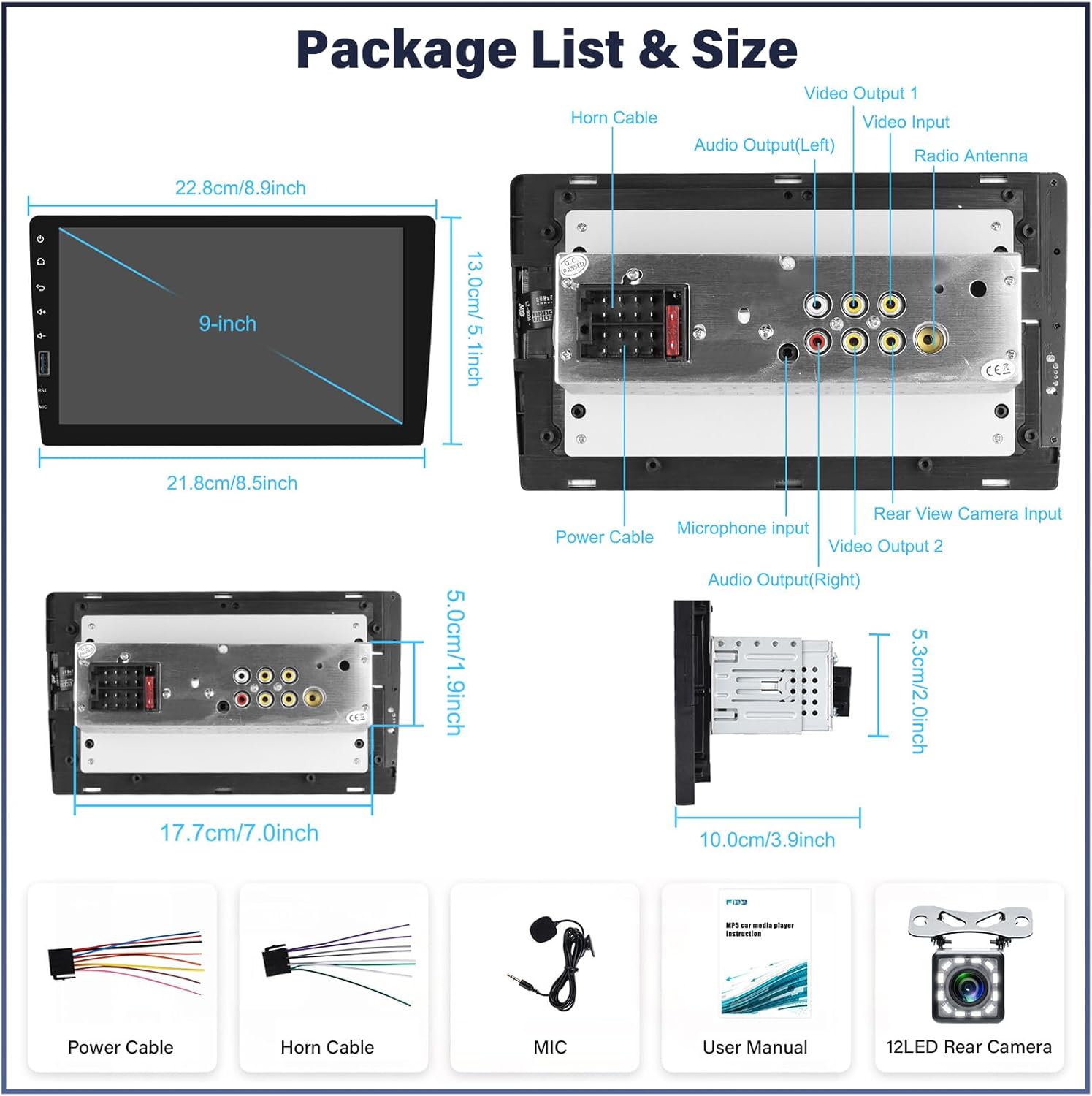
Figure 3.1: Package contents and unit dimensions.
4. Продукт бүтүп калдыview
The UNITOPSCI Q3508 is a versatile car stereo designed to enhance your driving experience with modern connectivity and entertainment features.

Сүрөт 4.1: Алдыңкы view of the UNITOPSCI Q3508 car stereo with key features highlighted.
Негизги өзгөчөлүктөрү:
- 9-Inch High-Definition Touch Screen: Provides a clear and responsive interface.
- Apple CarPlay жана Android Auto: Seamless smartphone integration via USB for navigation, music, calls, and messages.
- Bluetooth байланышы: Hands-free calling and wireless audio streaming.
- FM/AM радиосу: Access to local radio stations with preset memory.
- Mirror шилтемеси: Display your smartphone screen directly on the stereo.
- USB киргизүү: For media playback and smartphone charging.
- Камдык камера киргизүү: Арткы беттин автоматтык дисплейи view артка кайтканда.
- Руль башкаруусу (SWC): Compatible with existing vehicle SWC for safe operation.
- Аудио эквалайзер (эквалайзер): Customizable sound settings with various presets.
- 7 түстүү арткы жарык: Ыңгайлаштырылуучу баскыч жарыктандыруу.
5. Орнотуу
5.1 Физикалык орнотуу
The Q3508 is a single DIN unit. Ensure your vehicle's dashboard opening is compatible with single DIN dimensions. Professional installation is highly recommended to avoid damage to the unit or vehicle's electrical system.
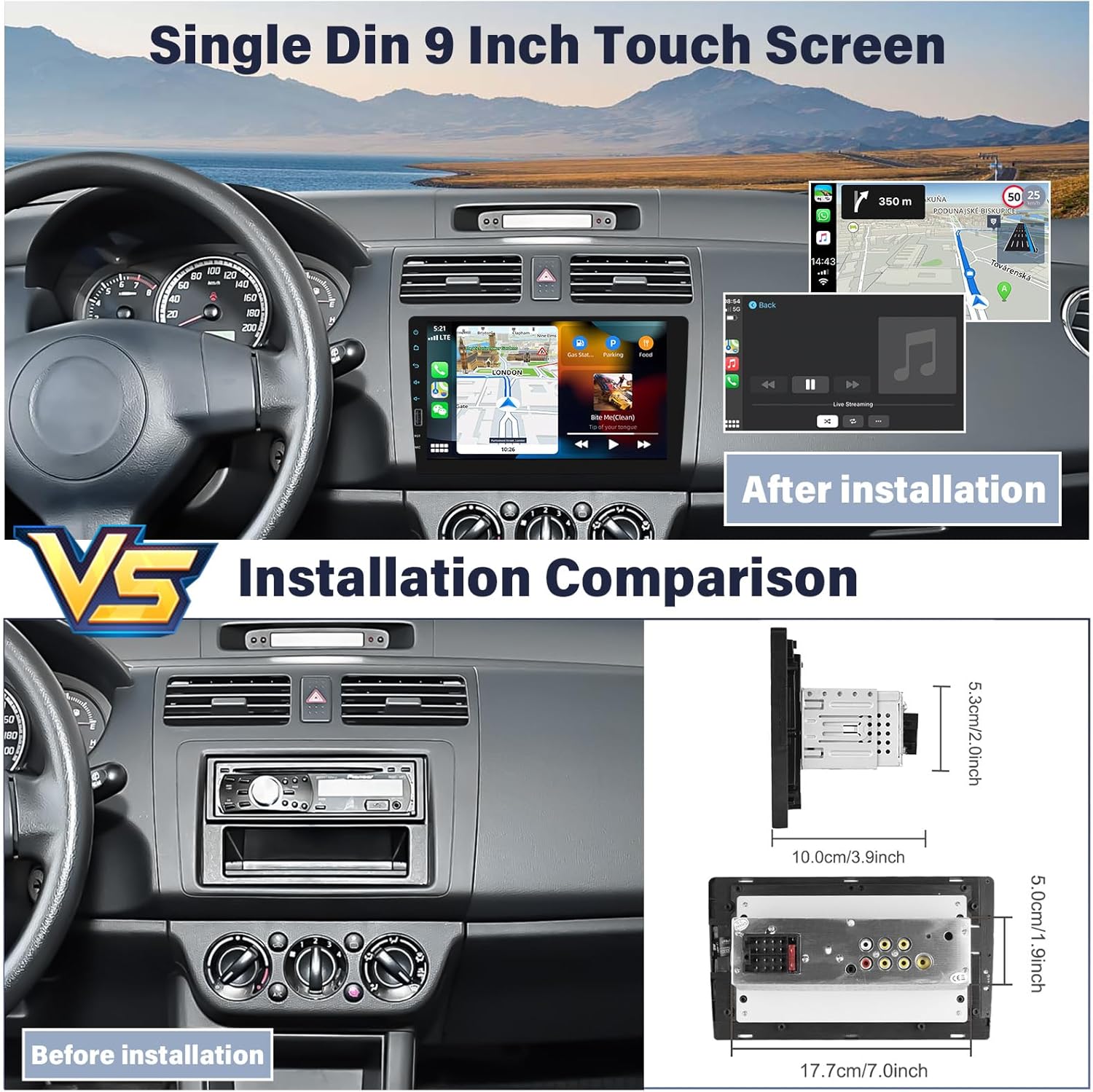
Figure 5.1: Installation comparison and unit dimensions.
5.2 Электр өткөргүч схемасы
Refer to the following diagram for proper wiring connections. Incorrect wiring can cause damage.

Figure 5.2: Camera wiring instruction and general unit connections.
- Кубат кабели: Connect to vehicle's power supply (constant 12V, accessory 12V, and ground).
- Horn кабели: Connect as per vehicle specifications.
- Микрофон киргизүү: Plug in the external microphone for clear hands-free calls.
- Видео киргизүү/чыгарма: Тышкы видео булактары же мониторлор үчүн.
- Аудио чыгаруу (RCA): Тышкы туташуу үчүн ampаман калгандар.
- Арткы View Камера киргизүү: Connect the included backup camera. The pink wire labeled "BACK" should be connected to the vehicle's reverse light positive (+) for automatic switching.
- Радио антенна: Унааңыздын FM/AM антеннасын туташтырыңыз.
6. Операция
6.1 Негизги башкаруу каражаттары
The unit is primarily controlled via its 9-inch capacitive touch screen. Physical buttons on the side provide quick access to essential functions like volume, home, and power.
6.2 Apple CarPlay жана Android Auto
Connect your iPhone or Android smartphone to the stereo via a USB cable. The system will automatically launch Apple CarPlay or Android Auto, allowing you to access navigation, music, messages, and make calls using the stereo's interface or voice commands.

Figure 6.1: Apple CarPlay and Android Auto voice control functionality.
6.3 Bluetooth байланышы
Түзмөгүңүздү жупташтыруу үчүн:
- Стереодо Bluetooth менюсуна өтүңүз.
- Смартфонуңузда Bluetooth'ду иштетип, жеткиликтүү түзмөктөрдү издеңиз.
- Select "UNITOPSCI" (or similar name) from the list on your phone.
- Эгер суралса, жупташтыруу кодун ырастаңыз.
Жупташтырылгандан кийин, сиз колсуз чалууларды жасап, зымсыз аудио агымын жасай аласыз.

6.2-сүрөт: Bluetooth үнсүз чалуу интерфейси.
6.4 FM/AM радиосу
Access the Radio application from the main menu. You can manually tune to stations or use the auto-scan function to find and save available stations. Up to 30 preset stations can be stored.
6.5 Mirror Link
Connect your smartphone via USB to use the Mirror Link function. This feature duplicates your phone's screen onto the stereo display, allowing you to interact with your phone's apps directly from the stereo. Compatibility may vary by phone model and operating system.
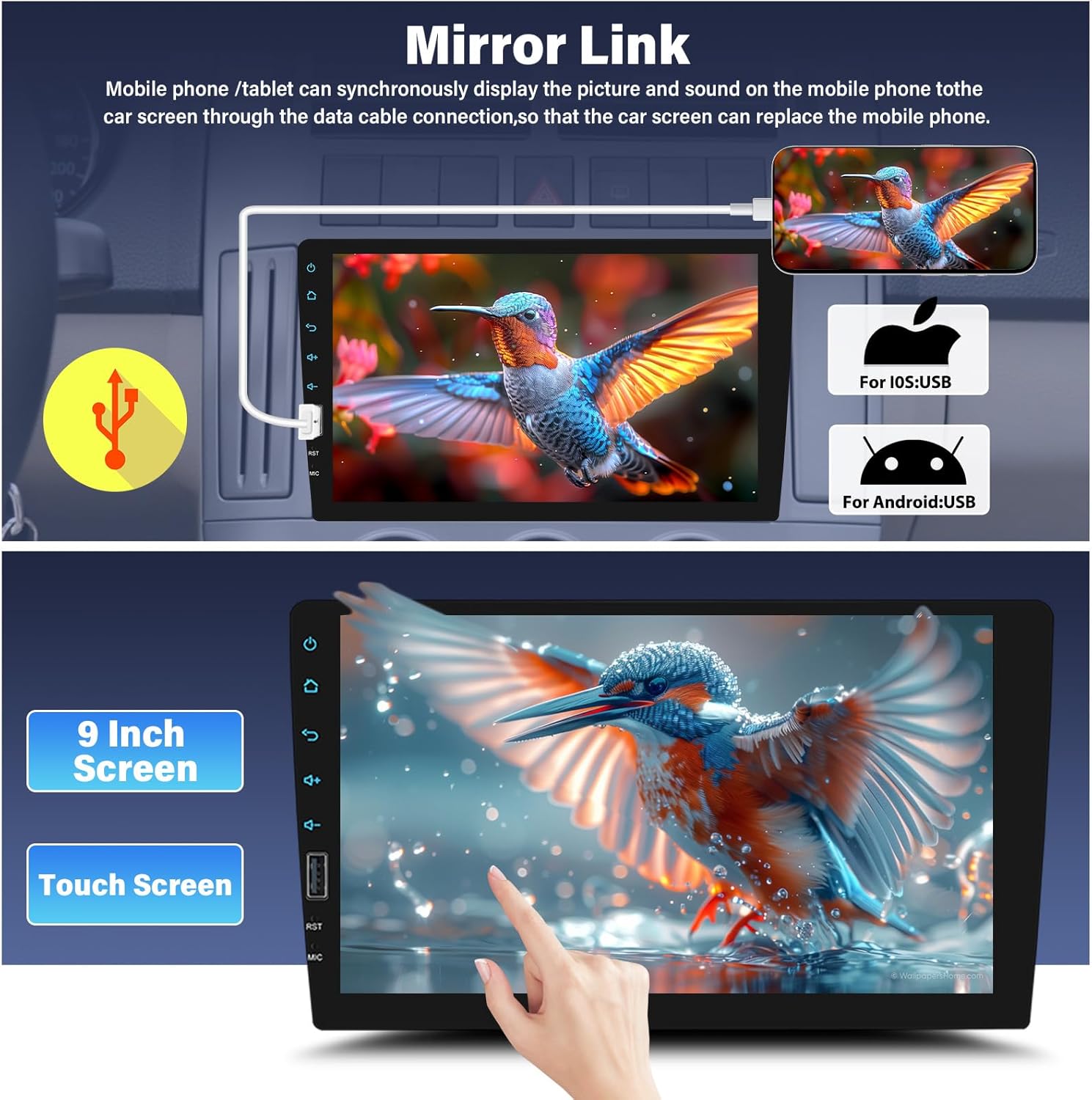
6.3-сүрөт: iOS жана Android түзмөктөрү үчүн Mirror Link функциясы.
6.6 USB ойнотуу жана кубаттоо
Аудио же видео ойнотуу үчүн USB портуна USB дискти салыңыз files. The USB port also supports charging for compatible smartphones.

Figure 6.4: USB input for media and charging.
6.7 Камера
When the vehicle is shifted into reverse gear, the stereo will automatically display the feed from the connected backup camera, providing a clear view of the area behind your vehicle. This feature includes parking guidelines for assistance.
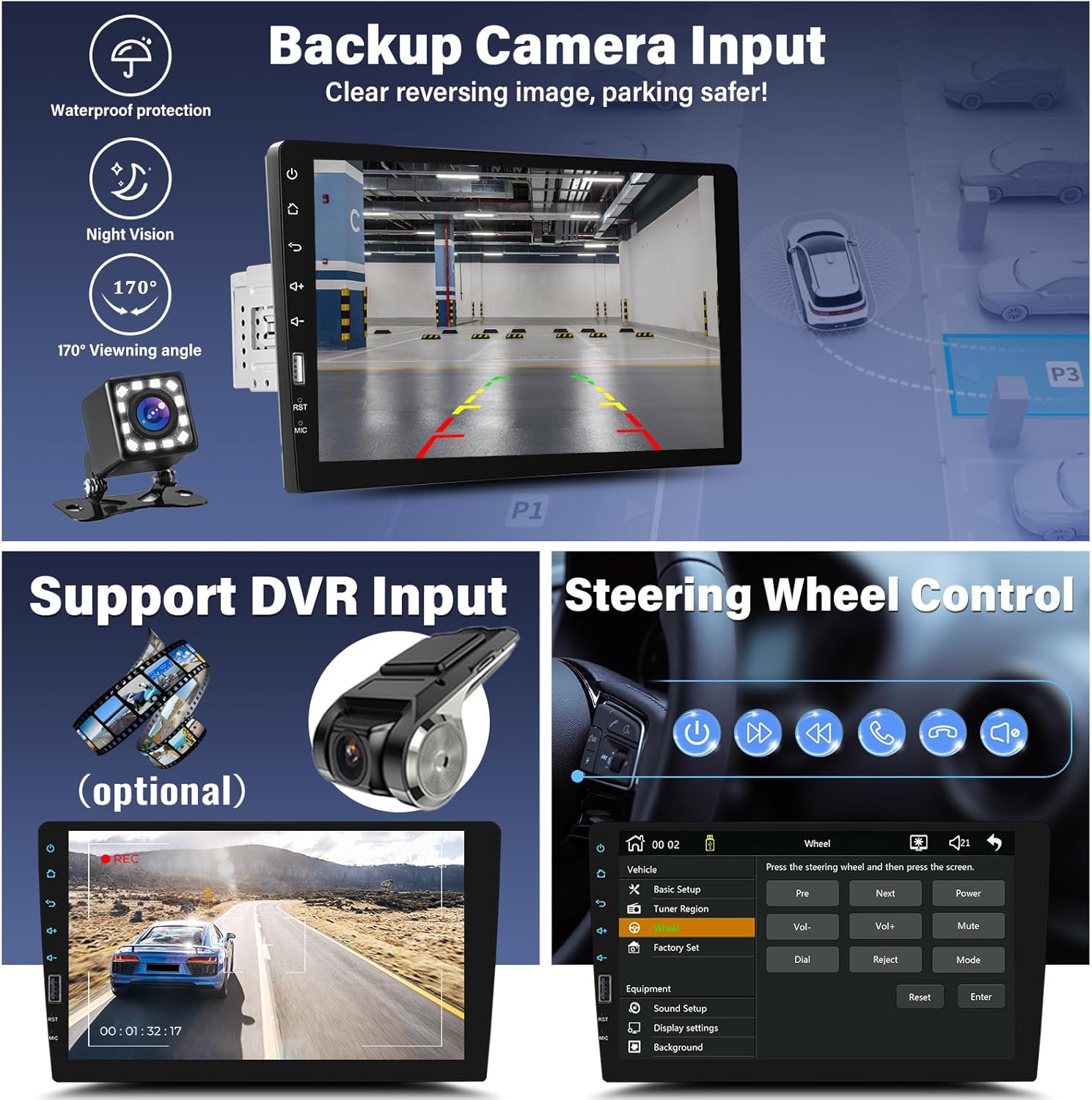
Figure 6.5: Backup camera display with parking assistance.
6.8 Рулду башкаруу (SWC)
If your vehicle has existing steering wheel controls, you can configure them to operate the stereo's functions (e.g., volume, track skip, mode). Access the SWC settings in the system menu and follow the on-screen instructions to map the buttons.
6.9 Аудио жөндөөлөрү (эквалайзер)
The built-in 16-band equalizer allows you to customize the audio output. Choose from preset modes (Pop, Jazz, Rock, Classic) or create a custom profile. Adjust bass, treble, and other frequency bands to suit your preferences.
6.10 Display Settings (Backlight)
Customize the backlight color of the physical buttons. The unit supports 7 colorful backlight options, which can be set to cycle automatically or remain a single color.
7. Техникалык тейлөө
- Экранды тазалоо: Сенсордук экранды акырын сүртүү үчүн жумшак, түксүз чүпүрөктү колдонуңуз. өжөр тактар үчүн, бир аз гampчүпүрөккө суу же электроника үчүн арналган экран тазалагыч. Катуу химиялык заттардан алыс болуңуз.
- Жалпы тазалоо: Keep the unit free from dust and debris. Use a soft brush or compressed air to clean crevices.
- Программалык камсыздоо жаңыртуулары: Өндүрүүчүнү текшериңиз webОптималдуу иштөөнү жана жаңы функцияларды камсыз кылуу үчүн мезгил-мезгили менен сайттагы программалык камсыздоонун бардык жеткиликтүү жаңыртуулары үчүн маалымат алып туруңуз.
8. Кыйынчылыктарды
Эгер көйгөйлөргө туш болсоңуз, төмөнкү жалпы көйгөйлөрдү жана чечимдерди караңыз:
| Көйгөй | Мүмкүн себеп | Чечим |
|---|---|---|
| Күч жок | Туура эмес зымдар, күйгүзүлгөн сактагыч, унаанын аккумулятору маселеси. | Электр кабелинин туташууларын текшериңиз, унаанын сактагычтарын текшериңиз, батареянын заряддалганын текшериңиз. |
| Үн жок | Динамиктин зымдары ажыратылды, үн өтө төмөн, аудио булагы туура эмес. | Динамиктердин туташуусун текшериңиз, үнүн катуулатыңыз, туура аудио булагын тандаңыз. |
| Bluetooth туташпай жатат | Device not in pairing mode, incorrect pairing process, interference. | Ensure both devices are in pairing mode, retry pairing, move closer to the unit. |
| Mirror Link иштебей жатат | Incorrect USB cable, phone not compatible, app issues. | Use original USB cable, check phone compatibility, restart phone and stereo. |
| Камдык камера дисплейи жок | Камера туташкан эмес, тескери триггер зымы туташкан эмес, бузук камера. | Check camera video input and reverse trigger wire connection. |
9. Техникалык шарттар
| Өзгөчөлүк | Спецификация |
|---|---|
| Модель номери | Q3508 |
| Screen Size | 9 дюйм |
| Продукциянын өлчөмдөрү | 2.68 x 8.5 x 1.97 дюйм |
| Элемент Салмагы | 2.4 фунт |
| Байланыш технологиясы | Bluetooth, USB |
| Controller Type | Hand Control (Touch Screen, Steering Wheel Control) |
| Өзгөчөлүктөр | Backup Camera, Steering Wheel Control, Bluetooth, FM/AM Radio, CarPlay and Android Auto, Mirror Link, EQ System, Touchscreen |
| Шайкеш түзмөктөр | Смартфон |
| Туташтыргыч түрү | USB түрү А |
| Аудио коддоо | Стерео |
| Аудио чыгаруу режими | Стерео |
| Көлөмдүү үн каналынын конфигурациясы | 2.1 |
| Видеону коддоону колдоо | AVI, MP4, MOV, MPG, MKV, VOB, RMVB, RM |
10. Кепилдик жана колдоо
UNITOPSCI offers customer support and warranty services for its products.
- Алмаштыруу: Available within 24 months of purchase.
- Кайтаруулар: 60 күндүк кайтаруу саясаты.
- Техникалык колдоо: Өмүр бою сатуудан кийинки консультация жана техникалык колдоо.
- Жооп убактысы: Quick response to inquiries within 16 hours.
For support, please contact UNITOPSCI via email at: UNITOPSCI@126.com