
1. Киришүү
Thank you for choosing the Hoco W27 Cat Ear Bluetooth Headphones. These headphones combine advanced Bluetooth 5.0 technology with a unique glowing cat ear design, offering a versatile audio experience. They support Bluetooth, TF card, and AUX playback modes, making them compatible with a wide range of mobile phones and tablets. This manual provides detailed instructions for setup, operation, maintenance, and troubleshooting to ensure you get the most out of your device.
2. Продукт бүтүп калдыview
Familiarize yourself with the components of your Hoco W27 headphones.
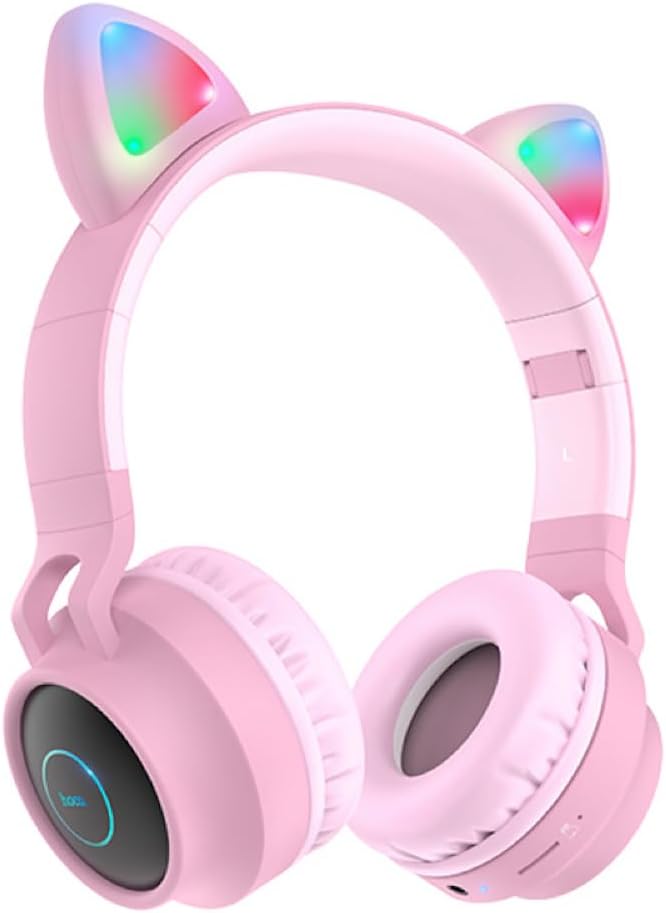
2.1-сүрөт: Фронт view of the Hoco W27 Cat Ear Bluetooth Headphones in pink, showcasing the glowing cat ears and over-ear design.

2.2-сүрөт: Side view of the Hoco W27 headphones, highlighting the control buttons on the left earcup, including volume, track control, and mode switch.

2.3-сүрөт: Жогорудан төмөн view of the Hoco W27 headphones, showing the adjustable headband and the placement of the control panel on the earcup.
3. Орнотуу
3.1 Наушниктерди заряддоо
Before first use, fully charge the headphones. The built-in 300mAh battery requires approximately 2 hours for a full charge.
- Connect the charging cable (usually USB-C or Micro-USB, depending on model) to the charging port on the headphones.
- Кабелдин экинчи учун USB кубат булагына туташтырыңыз (мисалы, компьютердин USB порту, дубал адаптери).
- The indicator light will show charging status (e.g., red light while charging, off or blue when fully charged).
3.2 Bluetooth жупташтыруу
The Hoco W27 headphones feature Bluetooth 5.0 for stable and efficient wireless connection.
- Наушниктердин өчүрүлгөнүн текшериңиз.
- Press and hold the Power button until the indicator light flashes blue and red alternately, indicating pairing mode.
- Түзмөгүңүздө (смартфон, планшет, компьютер) Bluetooth иштетип, жеткиликтүү түзмөктөрдү издеңиз.
- Select "Hoco W27" or a similar name from the list of found devices.
- Once connected, the indicator light will typically flash blue slowly or turn off, and you will hear a confirmation tone.
3.3 TF карта режими
The headphones support TF (MicroSD) card playback.
- Insert a TF card with your desired audio files into the TF card slot on the headphones.
- The headphones should automatically switch to TF card playback mode. If not, press the Mode button to cycle through modes until TF card mode is active.
3.4 AUX режими
For wired connection, use the AUX mode.
- Connect one end of a 3.5mm audio cable (not always included) to the AUX port on the headphones.
- Экинчи учун түзмөгүңүздүн аудио чыгаруу уячасына туташтырыңыз.
- The headphones will automatically switch to AUX mode. Note that controls on the headphones may be limited in this mode, and playback is controlled by the connected device.
4. Иштөө нускамалары
4.1 Күйгүзүү/өчүрүү
- Күйгүзүү: Press and hold the Power button for approximately 3 seconds until the indicator light turns on and you hear a power-on prompt.
- Өчүрүү: Press and hold the Power button for approximately 3-5 seconds until the indicator light turns off and you hear a power-off prompt.
4.2 Музыканы ойнотуу
- Ойнотуу/тындыруу: Көп функциялуу баскычты (көбүнчө Кубат баскычын же атайын Ойнотуу/Тыным баскычын) бир жолу басыңыз.
- Кийинки трек: Press and hold the Volume Up (+) button or a dedicated Next Track button.
- Мурунку трек: Press and hold the Volume Down (-) button or a dedicated Previous Track button.
- Көлөмү: Үндү жогорулатуу (+) баскычын кыска басыңыз.
- Үнүн азайтуу: Үндү азайтуу (-) баскычын кыска басыңыз.
The headphones offer up to 5 hours of continuous music playback on a full charge.
4.3 Чакыруу функциялары
- Чалууга жооп берүү/аяктоо: Кирүүчү чалуу учурунда Көп функциялуу баскычты бир жолу басыңыз.
- Чакырууну четке кагуу: Кирүүчү чалуу учурунда Көп функциялуу баскычты болжол менен 2 секунд басып туруңуз.
- Акыркы номерди кайра терүү: Чалуу учурунда эмес кезде Көп функциялуу баскычты эки жолу басыңыз.
4.4 Режимди алмаштыруу
Press the 'M' (Mode) button to cycle between Bluetooth, TF Card, and AUX playback modes.
4.5 Cat Ear Lights
The glowing cat ear design adds a unique aesthetic. The lights typically activate automatically when the headphones are powered on. Refer to the product packaging or specific model features for details on controlling the lights, if a dedicated button exists.
4.6 Voice Prompt Switch
To switch the voice prompt language or disable prompts:
- When the headphones are туташкан эмес to a device, double-click the 'M' (Mode) button. You will hear a beep, indicating a change in the voice prompt setting.
5. Техникалык тейлөө
Тийиштүү кам көрүү кулакчындарыңыздын узакка кызмат кылуусун камсыздайт.
- Тазалоо: Use a soft, dry, lint-free cloth to clean the surfaces of the headphones. Do not use abrasive cleaners, solvents, or spray directly onto the headphones.
- Сактагыч: Store the headphones in a cool, dry place away from direct sunlight and extreme temperatures. If storing for an extended period, ensure they are partially charged.
- Батареяга кам көрүү: To preserve battery life, avoid fully discharging the headphones frequently. Charge them regularly, even if not in use for a long time.
- Нымдуулуктан качыңыз: Наушниктерди сууга же ашыкча нымдуулукка дуушар кылбаңыз.
6. Кыйынчылыктарды
If you encounter issues with your Hoco W27 headphones, try the following solutions:
| Көйгөй | Мүмкүн себеп | Чечим |
|---|---|---|
| Кулакчындар күйбөйт. | Батарея аз. | Кулакчындарды кеминде 30 мүнөт кубаттаңыз. |
| Bluetooth аркылуу жупташтыруу мүмкүн эмес. | Кулакчындар жупташтыруу режиминде эмес; түзмөк Bluetooth өчүк; аппараттан өтө алыс. | Ensure headphones are in pairing mode (flashing red/blue). Turn device Bluetooth off and on. Move headphones closer to device. |
| Наушниктен үн чыкпайт. | Volume too low; incorrect mode; loose AUX cable; corrupted TF card files. | Increase volume on headphones and device. Ensure correct mode (Bluetooth, TF, AUX). Re-insert AUX cable. Check TF card files. |
| Үн сапаты начар. | Interference; low battery; distance from device. | Move away from sources of interference. Charge headphones. Reduce distance between headphones and device. |
| Cat ear lights not working. | Headphones off; specific light control setting. | Ensure headphones are powered on. Check if there's a dedicated button for lights (refer to product specifics). |
7. Техникалык шарттар
Key technical specifications for the Hoco W27 Cat Ear Bluetooth Headphones:
| Өзгөчөлүк | Спецификация |
|---|---|
| Bluetooth версиясы | 5.0 (JL AC6925F chip) |
| Батарея сыйымдуулугу | 300mAh |
| Заряддоо убактысы | Болжол менен 2 саат |
| Call / Music Time | 5 саатка чейин |
| Күтүү убактысы | 200 саатка чейин |
| Диаметри | 40мм |
| Өлчөмдөрү (L*W*H) | 203 x 175 x 80 мм (8 x 6.9 x 3.1 дюйм) |
| Салмагы | 182 г (6.4 унция) |
| Колдоого алынган режимдер | Bluetooth, TF карта, AUX |
| Дизайн өзгөчөлүгү | Glowing cat ear shape |
| Кулак жайгаштыруу | Кулак үстүндө |
| Noise Control | Жок |
8. Коопсуздук маалыматы
Please read and follow these safety guidelines for safe operation:
- Буюмду демонтаждабаңыз, оңдобоңуз же өзгөртпөңүз. Бул өрт, электр шок же буюмдун толук бузулушуна алып келиши мүмкүн.
- Наушниктерди экстремалдык температурадан, тике күн нурунан жана жогорку нымдуулуктан алыс кармаңыз.
- Avoid exposing the headphones to water or other liquids.
- Do not use the headphones at excessively high volumes for prolonged periods, as this may cause hearing damage.
- Балдар жетпеген жерде сактаңыз.
9. Кепилдик жана колдоо
For warranty information and customer support, please refer to the documentation provided with your purchase or contact the retailer where you purchased the Hoco W27 headphones. Keep your proof of purchase for any warranty claims.