
1. Киришүү
SKYZONE Cobra X V4 FPV көз айнектери – бул биринчи адам үчүн иштелип чыккан өркүндөтүлгөн видео көз айнектер. View (FPV) жарыш дрондору менен тажрыйба. Жогорку чечилиштеги 1280x720 дисплей, 5.8 ГГц 48CH RapidMix кабыл алгычы жана интеграцияланган DVR мүмкүнчүлүктөрү менен бул көз айнектер талаптуу FPV учкучтары үчүн так визуалдык маалыматтарды жана ишенимдүү сигнал кабыл алууну камсыз кылат. Орнотулган 3 октуу акселерометр жана 3 октуу гироскоп башты так көзөмөлдөөгө, башкарууну жана чөмүлүүнү жакшыртууга мүмкүндүк берет.
Бул колдонмо сиздин SKYZONE Cobra X V4 FPV көз айнектериңизди туура орнотуу, иштетүү жана техникалык тейлөө боюнча маанилүү маалыматтарды берет. Түзмөгүңүздүн оптималдуу иштешин жана узак мөөнөттүү иштешин камсыз кылуу үчүн колдонуудан мурун аны кылдаттык менен окуп чыгыңыз.
2. Пакеттин мазмуну
Төмөндө тизмеленген нерселердин баары пакетиңизге камтылганын текшериңиз:
- Cobra FPV көз айнек (Cobra X V4)
- Алуучу модулу
- Баш боо
- Электр кабели
- Башкы трекер кабели
- Эки 5.8 ГГц 2dD антеннасы
- Видео/Аудио кабели
- USB-C Cable
- Колдонуучунун Колдонмосу (бул документ)
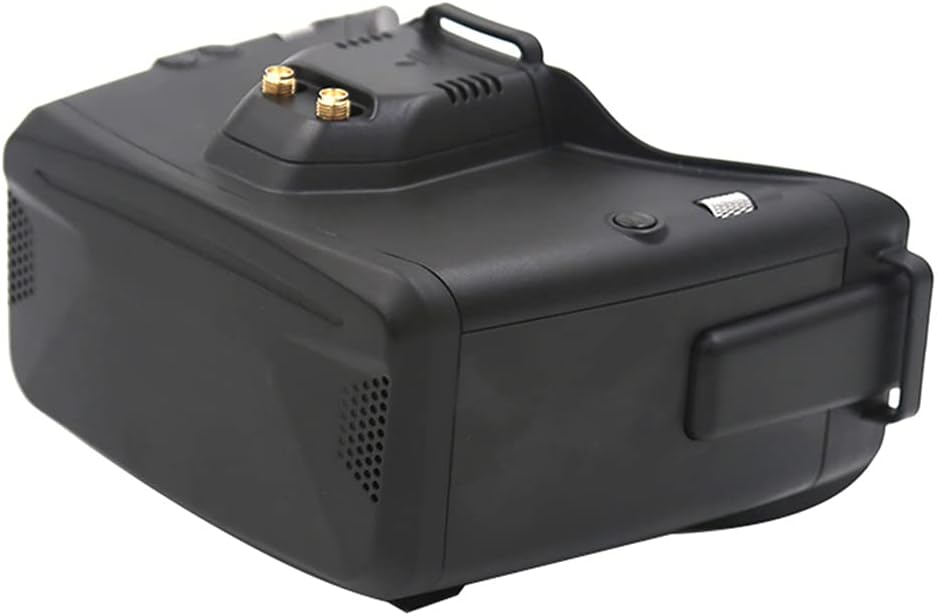
Figure 2.1: ашыкview SKYZONE Cobra X V4 FPV көз айнектери.
3. Негизги өзгөчөлүктөрү
- Жогорку чечим дисплей: Cobra X V4 модели үчүн 4.1 дюймдук экранда 1280x720 чечилиши, так жана деталдуу визуалдык маалыматтарды берет. (Cobra S модели 800x480 чечилишине ээ).
- RapidMix кабыл алгычы: Интеграцияланган 5.8 ГГц 48CH RapidMix кабыл алгычы сигналдын туруктуу жана күчтүү кабыл алынышын камсыз кылат, видеонун үзүлүшүн минималдаштырат.
- Санариптик видео жазгыч (DVR): H264 форматында 30 кадр/секунда жыштыкта жаздыруу, MOV форматында, 6 Мбит/сек бит ылдамдыгы. Учууларыңызды жаздыруу үчүн 128 ГБ чейинки SD карталарды колдойт.
- Башкы трекер: Башты так көзөмөлдөө үчүн орнотулган 3 октуу акселерометр жана 3 октуу гироскоп камераны интуитивдик башкарууга мүмкүндүк берет.
- Көп тилдүү колдоо: Cobra X V4 меню навигациясы үчүн 10 башка тилди колдойт.
- Көп функциялуу кубаттуулук киргизүү: 2-6S литий батареялары менен шайкеш келет жана 18650 батарея бөлүмүнө ээ.
- USB туташуу: Микропрограммалык камсыздоону жаңыртуу жана маалыматтарды өткөрүп берүү үчүн USB-C порту.
- Көз айнек тагынууга ыңгайлуу дизайн: Эргономикалык жактан ыңгайлуу колдонуу үчүн иштелип чыккан, ал тургай көз айнек тагынган колдонуучулар үчүн да.
4. Орнотуу колдонмосу
4.1 Көз айнекти күйгүзүү
Cobra X V4 көз айнеги DC IN порту аркылуу тышкы 2-6S LiPo батареясы же ички 18650 батареясы (кошулмага кирбейт) менен кубатталышы мүмкүн. 18650 батареясын салганда батареянын полярдуулугу туура экенин текшериңиз.

4.1-сүрөт: Батарея бөлүмүнүн жана USB портунун жайгашкан жери.
4.2 Антенналарды туташтыруу
Көз айнектин үстүндө жайгашкан SMA туташтыргычтарына эки 5.8 ГГц 2dD антеннасын бурап бекитиңиз. Сигналдын оптималдуу кабыл алынышы үчүн алардын бекем бекитилгенин текшериңиз.
4.3 Баш боону орнотуу
Баш боону көз айнектин капталдарындагы жана үстүнкү жагындагы атайын уячаларга бекитиңиз. Боону башыңызга ыңгайлуу жана бекем отурушу үчүн тууралаңыз.
4.4 Тышкы байланыштар
Көз айнектер тышкы туташуулар үчүн ар кандай портторго ээ:
- DC IN: Кубат киргизүү.
- ЧЫГУУ: Headtracker чыгаруусу.
- USB: Микропрограммалык камсыздоону жаңыртуу жана маалыматтарды өткөрүп берүү үчүн.
- Аудио киргизүү: Аудио/Видео киргизүү.
- HDMI IN: Жогорку сапаттагы видео киргизүү.
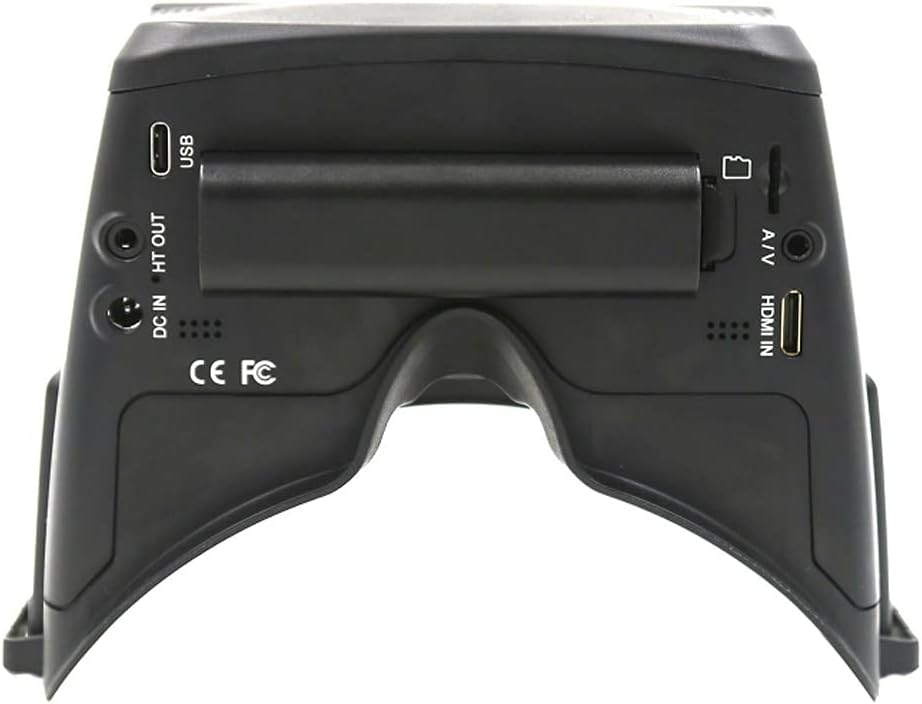
4.2-сүрөт: Арткы view киргизүү/чыгаруу порттору менен.
5. Иштөө нускамалары
5.1 Күйгүзүү/өчүрүү
Күйгүзүү үчүн, көз айнектин капталында жайгашкан кубат баскычын экран күйгөнчө басып туруңуз. Өчүрүү үчүн, экран өчкөнчө кубат баскычын кайра басып туруңуз.
5.2 Меню Навигациясы
Көз айнектер менюну оңой карап чыгуу жана тандоо үчүн циферблат дөңгөлөгү менен жабдылган. Параметрлерди карап чыгуу үчүн дөңгөлөктү айландырып, тандоолорду ырастоо үчүн басыңыз.
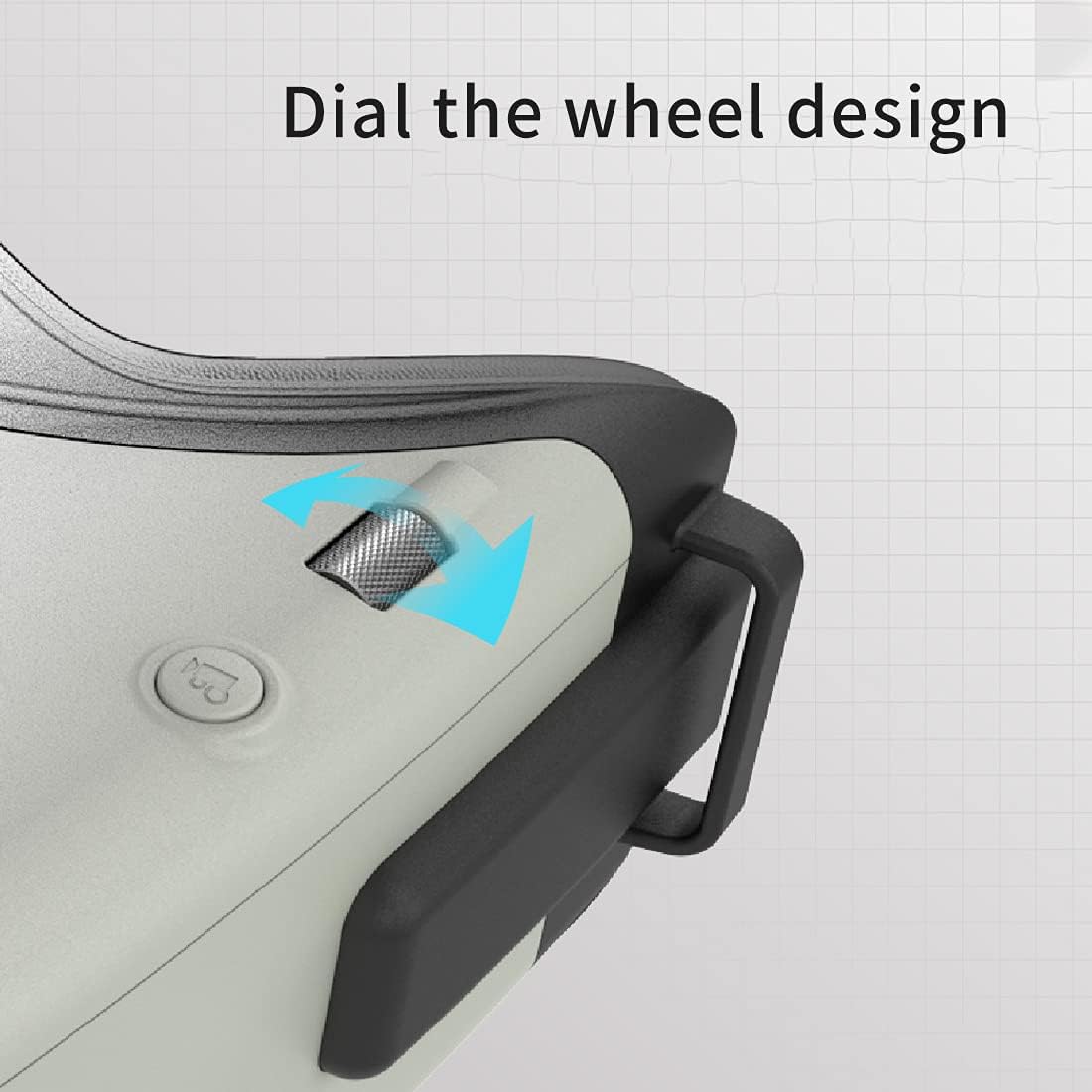
5.1-сүрөт: Менюну башкаруу үчүн терүүчү дөңгөлөк.
5.3 Каналды тандоо жана сканерлөө
Каалаган 5.8 ГГц каналды тандоо үчүн менюну колдонуңуз. RapidMix кабыл алгычы сигналдарды мүмкүн болушунча эң жакшы кабыл алуу үчүн автоматтык түрдө бириктирет. Активдүү FPV каналдарын тез табуу үчүн автоматтык түрдө сканерлөө функциясы жеткиликтүү.
5.4 DVR жаздыруу
SD картанын уячасына шайкеш келген SD картаны (128 ГБ чейин) салыңыз. Жаздырууну баштоо жана токтотуу үчүн DVR менюсуна өтүңүз. Жаздырылган видеолор MOV форматында сакталат.
5.5 Башты көзөмөлдөө
Баш трекеринин кабели шайкеш келген алыстан башкаруу пультуна туташтырылганын текшериңиз. Зарыл болсо, көз айнектин менюсу аркылуу баш трекерин калибрлеңиз. Бул камеранын башыңыздын багытына жараша кыймылдашына мүмкүндүк берет.

5.2-сүрөт: Сүрөттүн сапатын жакшыртуу үчүн ички кабыл алгыч модуль.
6. Техникалык тейлөө
- Тазалоо: Көз айнектин сыртын тазалоо үчүн жумшак, кургак чүпүрөктү колдонуңуз. Линзалар үчүн чийилип калбашы үчүн атайын линза тазалоочу чүпүрөктү жана эритмени колдонуңуз.
- Сактагыч: Көз айнекти салкын, кургак жерде, түз күн нурунан жана өтө жогорку температурадан алыс сактаңыз. Ташуу учурунда аларды коргоо үчүн берилген көтөрүүчү сумканы (эгер бар болсо) колдонуңуз.
- Батареяга кам көрүү: Эгерде тышкы LiPo батареясын колдонсоңуз, кубаттоо жана сактоо үчүн LiPo батареясынын стандарттуу коопсуздук көрсөтмөлөрүн аткарыңыз. Эгерде ички 18650 батареясын колдонсоңуз, анын үзгүлтүксүз заряддалганын жана узак убакыт бою толук зарядсыздандырылбаганын текшериңиз.
- Программалык камсыздоонун жаңыртуулары: SKYZONE кызматкерин мезгил-мезгили менен текшерип туруңуз webмикропрограммалык камсыздоону жаңыртуу сайты. Жаңыртуулар үчүн көз айнекти компьютерге туташтыруу үчүн USB-C кабелин колдонуңуз.
7. Кыйынчылыктарды
| Көйгөй | Мүмкүн себеп | Чечим |
|---|---|---|
| Экранда сүрөт жок | Көз айнектер күйгөн эмес; Батареянын заряды аз; Туура эмес видео киргизүү тандалган; Дрондон сигнал жок. | Көз айнектин күйгүзүлгөнүн текшериңиз; Батареяны заряддаңыз же алмаштырыңыз; Видео киргизүү жөндөөлөрүн текшериңиз; Дрондун видео өткөргүчү активдүү жана туура каналда экенин текшериңиз. |
| Видео кабыл алуу начар / Статикалык | Антенналар бошоп калган же бузулган; Туура эмес канал тандалган; Тоскоолдук; Дрон өтө алыс же тоскоолдукта. | Антенналарды бекемдеңиз же алмаштырыңыз; Каналдарды сканерлеңиз; Интерференция азыраак болгон аймакка жылыңыз; Дронго чейинки аралыкты азайтыңыз же тоскоолдуктарды тазалаңыз. |
| DVR жаздырбай жатат | SD карта толуп калган же салынган эмес; SD карта бузулган; DVR жөндөөлөрү туура эмес. | SD картаны салыңыз же алмаштырыңыз; SD картаны форматтаңыз (алдын ала маалыматтардын камдык көчүрмөсүн сактаңыз); DVR жаздыруу жөндөөлөрүн текшериңиз. |
| Баш трекер иштебей жатат | Headtracker кабели туташкан эмес; Калибрленген эмес; Алыстан башкаруу пульту конфигурацияланган эмес. | Баш трекердин кабели бекем туташтырылганын текшериңиз; Баш трекерди калибрлөөнү аткарыңыз; Баш трекерди орнотуу үчүн алыстан башкаруу пультунун колдонмосун караңыз. |
8. Техникалык шарттар
| Өзгөчөлүк | Деталь |
|---|---|
| Модель аты | Cobra X V4 |
| Display Resolution | 1280x720 (Cobra X V4), 800x480 (Cobra S) |
| Screen Size | 4.1 дюйм (Cobra X V4), 4.3 дюйм (Cobra S) |
| Алуучу | 5.8GHz 48CH RapidMix кабыл алгычы |
| DVR жаздыруу | H264, 30 кадр/сек, MOV 6Mbps (Cobra X V4); MJPEG (Cobra S) |
| SD картаны колдоо | 128 ГБ чейин |
| Head Tracker | 3-октуу акселерометр, 3-октуу гироскоп |
| Байланыш технологиясы | USB, A/V, HDMI |
| Power Input | 2-6S LiPo, 18650 Батарея (кошулмада жок) |
| Өлчөмдөр | 122 x 165 x 100 мм |
| Салмагы | 332г |
| Түс | Кара |
| Материал | Пластик |
| UPC | 030391995340 |
| Өндүрүүчү бөлүгүнүн номери | F42931 F42932 |
9. Кепилдик жана колдоо
SKYZONE продукциялары жогорку сапаттагы стандарттарга ылайык өндүрүлөт. Кепилдик жөнүндө так маалымат жана шарттар үчүн, өнүмүңүзгө тиркелген кепилдик картасын караңыз же расмий SKYZONE веб-сайтына кириңиз. webсайт. Ар кандай кепилдик дооматтары үчүн сатып алганыңыздын далилин сактаңыз.
Техникалык колдоо, ушул колдонмодон тышкары мүчүлүштүктөрдү оңдоо же тейлөө боюнча суроолор боюнча SKYZONE кардарларды колдоо кызматына алардын расмий каналдары аркылуу кайрылыңыз.