
Introduction
Thank you for choosing the Mahli Smart Robotic 3-in-1 Vacuum Cleaner. This manual provides important information on the safe use, operation, and maintenance of your device. Please read it thoroughly before first use and keep it for future reference.

Figure 1: Mahli Smart Robotic 3-in-1 Vacuum Cleaner and Remote Control
This image displays the Mahli Smart Robotic 3-in-1 Vacuum Cleaner in white, accompanied by its remote control. The vacuum cleaner is round with a power button on top, and the remote control is rectangular with navigation and function buttons.
Коопсуздук нускамалары
- Шайманды колдонуудан мурун бардык нускамаларды окуп чыгыңыз.
- Do not operate the vacuum cleaner in wet environments or near water.
- Чачты, кенен кийимдерди, манжаларды жана дененин бардык бөлүктөрүн тешиктерден жана кыймылдуу бөлүктөрдөн алыс кармаңыз.
- Бул колдонмодо сүрөттөлгөндөй гана колдонуңуз. Өндүрүүчү сунуштаган тиркемелерди гана колдонуңуз.
- Бузулган шнур же сайгыч менен колдонбоңуз. Эгерде шайман керектелип иштебесе, кулап, бузулуп, сыртта калып же сууга түшүп кетсе, аны тейлөө борборуна кайтарыңыз.
- Тартпаңыз же шнур менен көтөрүп жүрбөңүз, шнурду тутка катары колдонбоңуз, шнурга эшикти жаппаңыз же шнурду курч четтеринен же бурчтарынан тартпаңыз. Шайманды шнурдун үстүнөн иштетпеңиз. Шнурды ысытылган беттерден алыс кармаңыз.
- шнурду тартып сууруп албаңыз. Электр розеткасынан сууруп алуу үчүн шнурдан эмес, сайгычтан кармаңыз.
- Штепсель же шайманды нымдуу кол менен кармабаңыз.
- Тешиктерге эч кандай нерсени салбаңыз. Бөгөттөлгөн ачуу менен колдонбоңуз; чаңдан, түктөн, чачтан жана аба агымын азайта турган нерселерден алыс болуңуз.
- Электр розеткасынан ажыратуудан мурун бардык башкаруу элементтерин өчүрүңүз.
- Тепкичтерде тазалоодо өзгөчө этият болуңуз.
- Бензин сыяктуу күйүүчү же күйүүчү суюктуктарды алуу үчүн колдонбоңуз же алар болушу мүмкүн болгон жерлерде колдонбоңуз.
- Тамеки, ширеңке, ысык күл сыяктуу күйүп жаткан же чылым чеккен нерселерди албаңыз.
- Чаң баштыкчасы жана/же чыпкалары жок колдонбоңуз.
- Кокусунан баштоону алдын алуу. Батарея пакетине туташтыруудан, шайманды көтөрүүдөн же алып жүрүүдөн мурун өчүргүч өчүк абалда экенин текшериңиз.
- Өндүрүүчү көрсөткөн заряддагыч менен гана заряддаңыз.
- Шайманды же батарея топтомун өзгөртпөңүз же оңдоого аракет кылбаңыз.
Продукт компоненттери
The Mahli Smart Robotic 3-in-1 Vacuum Cleaner comes with the following components:
- Main Robotic Vacuum Unit
- Алыстан башкаруу
- USB заряддоо кабели
- Каптал щеткалар (2x)
- Моп чүпүрөк (1x)
- Тазалоочу щетка (1x)
2-сүрөт: Камтылган компоненттер
This image shows the Mahli Smart Robotic 3-in-1 Vacuum Cleaner along with its accessories: two side brushes, a mop cloth, a USB charging cable, and a small cleaning brush.
Жайгашуу
1. Чаң соргучту заряддоо
- Connect the USB charging cable to the charging port on the vacuum cleaner.
- USB кабелинин экинчи учун туура келген USB кубат адаптерине (кошумча эмес) же компьютердин USB портуна сайыңыз.
- Кубаттоо көрсөткүчү күйөт. Толук кубаттоо болжол менен 3 саатты талап кылат.
- Once fully charged, the indicator light may change or turn off. Disconnect the vacuum cleaner from the power source.
2. Attaching Side Brushes
Gently press the side brushes onto the designated posts on the underside of the vacuum cleaner until they click into place.
3. Attaching the Mop Cloth (Optional)
If using the mopping function, attach the mop cloth to the designated area on the bottom of the vacuum cleaner. Ensure it is securely fastened.
Иштөө нускамалары
1. Күйгүзүү / Өчүрүү
- To power on, press the power switch on the side or bottom of the vacuum cleaner. Alternatively, for some models, simply touch the power button on the top surface after ensuring the main power switch is on.
- To power off, press the power switch again or hold the power button on the top surface.
2. Тазалоо режимдери
The vacuum cleaner features intelligent omni-directional and auto-route technology for efficient cleaning.
- Автоматтык тазалоо: Once powered on, the vacuum cleaner will automatically begin cleaning, navigating around obstacles and covering the floor area.
- Алыстан башкаруу операциясы: Use the provided remote control for manual direction changes or to start/stop cleaning.
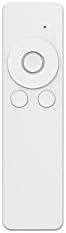
3-сүрөт: Алыстан башкаруу
This image shows the white remote control for the Mahli Smart Robotic 3-in-1 Vacuum Cleaner. It features a circular directional pad at the top, with two smaller circular buttons below it.
3. Чыпкалоо функциясы
If the mop cloth is attached, the vacuum cleaner will perform mopping simultaneously with sweeping and vacuuming. Ensure the mop cloth is clean and slightly damp мыкты натыйжалар үчүн.
Техникалык тейлөө
1. Таштанды кутусун бошотуу
Regularly empty the dustbin to maintain optimal cleaning performance. Locate the dustbin compartment, open it, and dispose of collected debris. Clean the dustbin with the provided cleaning brush or a soft cloth.
2. Тазалоочу каптал щеткалары
Check the side brushes for tangled hair or debris. Remove any obstructions carefully. If brushes are worn, they may need replacement.
3. Cleaning the Mop Cloth
After each use, remove the mop cloth and wash it thoroughly. Allow it to air dry completely before reattaching.
4. Сенсорлорду тазалоо
Wipe the anti-fall sensors and other optical sensors on the bottom and front of the vacuum cleaner with a clean, dry cloth to ensure proper navigation.
Проблемаларды чечүү
| Көйгөй | Мүмкүн себеп | Чечим |
|---|---|---|
| Чаң соргуч күйбөйт. | Battery is low or depleted. Main power switch is off. | Charge the vacuum cleaner. Ensure the main power switch is in the ON position. |
| Vacuum cleaner stops unexpectedly. | Dustbin is full. Obstruction detected. Battery is low. | Empty the dustbin. Remove any obstructions. Recharge the vacuum cleaner. |
| Начар тазалоо көрсөткүчү. | Dustbin is full. Side brushes are tangled or worn. Sensors are dirty. | Empty the dustbin. Clean or replace side brushes. Clean all sensors. |
| Vacuum cleaner gets stuck frequently. | Too many obstacles in the cleaning area. Sensors are dirty. | Clear the cleaning area of excessive clutter. Clean all sensors. |
Техникалык шарттар
| Өзгөчөлүк | Деталь |
|---|---|
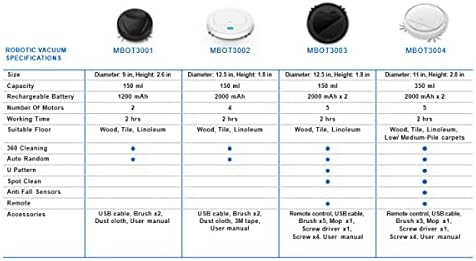
| Модел | MBOT3002 |
| Функция | Sweeping, Vacuuming, Mopping (3-in-1) |
| Батарея сыйымдуулугу | 2000mAh |
| Заряддоо убактысы | Болжол менен 3 саат |
| Жумуш убактысы | Болжол менен 2 саат |
| Rated Voltage | 3.7V |
| Working Noise | 55дБ |
| Өлчөмдөр | Диаметри: 12.5 дюйм, Бийиктиги: 1.8 дюйм |
| Suitable Floor Types | Wood, Tile, Linoleum |
| Өзгөчөлүктөр | Intelligent Omni-Directional, Auto Route Technology, Smart Navigation, 360 Motion, Advanced Sensors, Anti-Fall Sensors |
| Камтылган компоненттер | Sweeper, 2x Brush, 1x Mop, 1x USB Charging Cable, 1x Cleaning Brush, Remote Control |
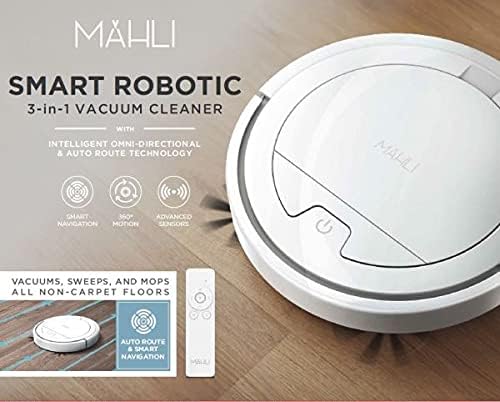
Figure 4: Robotic Vacuum Specifications Overview
This image displays a table comparing specifications for various Mahli robotic vacuum models (MBOT3001, MBOT3002, MBOT3003, MBOT3004). Key specifications include size, capacity, battery, motors, working time, suitable floor, cleaning patterns, sensors, remote, and accessories.
Кепилдик жана колдоо
For warranty information and customer support, please refer to the contact details provided on the product packaging or the official Mahli webсайт. Сатып алганыңыздын далили катары сатып алуу дүмүрчөгүңүздү сактаңыз.
For technical assistance or troubleshooting beyond this manual, please contact Mahli customer service.