
Introduction
Thank you for choosing the Newskill Manticore Gaming PC Case. This manual provides essential information for the proper installation, operation, and maintenance of your new PC chassis. Please read these instructions carefully before beginning the assembly process to ensure optimal performance and longevity of your components.
Продукт бүттүview
The Newskill Manticore is an ATX mid-tower gaming PC case designed for high-performance builds. It features a mesh front panel for superior airflow, a tempered glass side panel to showcase your components, and four pre-installed 120mm ARGB fans for effective cooling and customizable aesthetics.
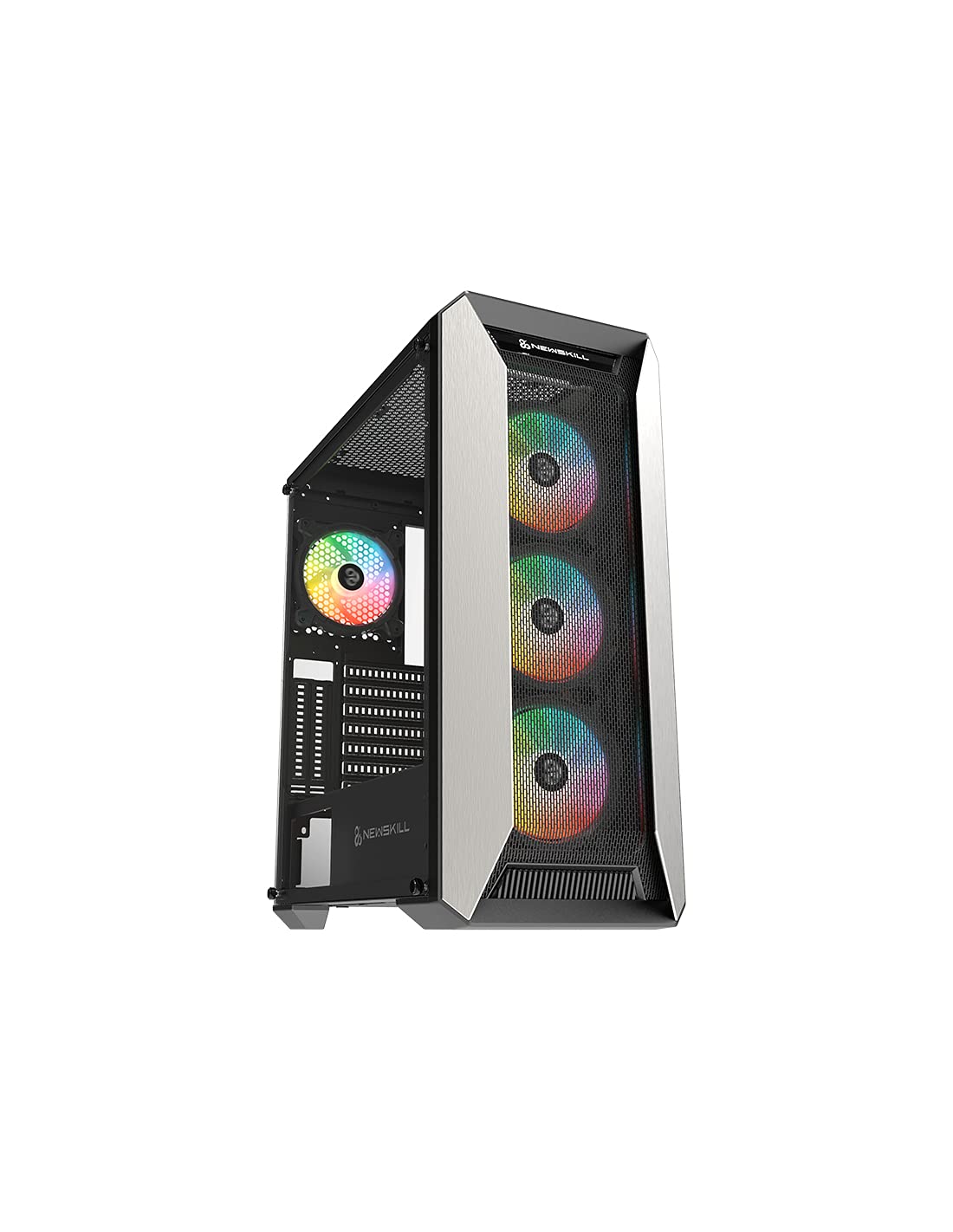
Сүрөт 1: Алдыңкы view of the Newskill Manticore Gaming PC Case, highlighting the mesh front and tempered glass side panel.
Негизги өзгөчөлүктөрү:
- ATX Mid-Tower compatibility
- Mesh front panel for optimized airflow
- Температуралуу айнек каптал панели
- Four pre-installed 120mm ARGB fans
- Two removable dust filters
- USB 3.0 connectivity on the front panel
Орнотуу жана орнотуу
1. таңгактан чыгаруу
Carefully remove the PC case from its packaging. Inspect for any damage that may have occurred during shipping. Retain the packaging for future transport or warranty claims.
2. Компонентти идентификациялоо
Before installation, familiarize yourself with the case components and included accessories:
- Newskill Manticore PC Case
- Accessory box (screws, cable ties, standoffs)
- Колдонуучунун Колдонмосу (бул документ)
3. Motherboard орнотуу
- Баш бармактын бурамаларын бурап алуу менен чыңалган айнек каптал панелин алып салыңыз.
- Install the necessary motherboard standoffs into the motherboard tray.
- Carefully place your ATX motherboard onto the standoffs, aligning the screw holes.
- Берилген бурамалар менен энелик тактаны бекитиңиз.
4. Электр менен камсыздоо блогун (PSU) орнотуу
- Корпустун ылдыйкы артындагы PSU монтаждоо аймагын табыңыз.
- Slide your PSU into position from the rear of the case.
- Secure the PSU with screws from the exterior rear of the case.
5. Сактоочу дискти орнотуу
The case supports various storage configurations. Refer to your specific drive type for mounting instructions (e.g., 2.5" SSDs, 3.5" HDDs).
6. Видеокартаны жана кеңейтүү картасын орнотуу
Remove the necessary PCIe slot covers and install your graphics card or other expansion cards, securing them with screws.
7. Front Panel Connections
Connect the front panel cables (USB 3.0, HD Audio, Power Switch, Reset Switch, Power LED, HDD LED) to the corresponding headers on your motherboard. Consult your motherboard manual for exact pin layouts.
8. Кабелдик башкаруу
Кабелдерди башкаруу үчүн энелик плата лотогунун артындагы кабелдерди өткөрүү кесиктерин жана байлоочу чекиттерди колдонуңуз. Бул аба агымын жана эстетиканы жакшыртат.
Иштөө нускамалары
Күйгүзүү/өчүрүү
Press the power button located on the top panel of the case to turn on your system. To shut down, use the operating system's power-off function or press and hold the power button for several seconds for a forced shutdown (not recommended for regular use).
ARGB жарыкты башкаруу
The pre-installed ARGB fans can be controlled via your motherboard's ARGB software (if compatible) or a dedicated ARGB controller (if included or purchased separately). Refer to your motherboard or controller manual for specific instructions on changing lighting effects and colors.
Техникалык тейлөө
Чаң чыпкасын тазалоо
The Newskill Manticore includes two removable dust filters (typically located on the top and bottom/front). Regularly clean these filters to maintain optimal airflow and prevent dust buildup inside your PC. Gently slide them out, clean with water and mild soap, or use a vacuum cleaner, and ensure they are completely dry before re-inserting.
Сырткы тазалоо
Сырткы беттерин жумшак менен сүртүңүз, гamp кездеме. Каптамага же чыңалган айнекке зыян келтириши мүмкүн болгон абразивдүү тазалоочу каражаттардан же эриткичтерден алыс болуңуз.
Проблемаларды чечүү
Күч жок
- PSU розеткага туура туташтырылганын жана күйгүзүлгөнүн текшериңиз.
- Бардык кубат кабелдери энелик платага жана анын компоненттерине туура туташкандыгын текшериңиз.
- Check front panel power switch connections to the motherboard.
Вентиляторлор айланбай жатат / ARGB күйбөй жатат
- Желдетүүчү кубат кабельдери энелик платага же желдеткич контроллерине бекем туташтырылганын ырастаңыз.
- Check ARGB connections to the motherboard's ARGB header or dedicated controller.
- Ensure ARGB software or controller settings are correctly configured.
Poor Airflow / Overheating
- Чаң чыпкаларын дайыма тазалаңыз.
- Ensure no obstructions are blocking air intake or exhaust vents.
- Verify all fans are spinning correctly and oriented for optimal airflow.
For further assistance, please contact Newskill support.
Техникалык шарттар
| Өзгөчөлүк | Деталь |
|---|---|
| Модель аты | Мантикора |
| Модель номери | 1102 |
| Иштин түрү | Ара Tower |
| Motherboard шайкештиги | ATX |
| Өлчөмдөрү (L x W x Y) | 60 x 60 x 85 см |
| Салмагы | 1 кг |
| Материал | Чыңалган айнек, металл |
| Муздатуу ыкмасы | Air (4x 120mm ARGB fans included) |
| Алдыңкы I / O порттору | USB 3.0, Audio Jacks, Power, Reset |
| Чаң чыпкалары | 2 (алынуучу) |
| Сунушталган колдонуу | Оюндар |
Кепилдик маалымат
The Newskill Manticore PC Case comes with a 2 жылдык өндүрүүчүнүн кепилдиги. This warranty covers defects in materials and workmanship under normal use. It does not cover damage caused by misuse, accident, modification, or unauthorized repair. Please retain your proof of purchase for warranty claims.
Колдоо жана Байланыш
For technical support, troubleshooting assistance, or warranty inquiries, please visit the official Newskill website or contact their customer service department. You can find contact information on the Newskill webсайт: www.newskillgaming.com