
1. Киришүү
This manual provides essential instructions for the safe and efficient operation, setup, and maintenance of your GBC AutoFeed+ 300M Micro-Cut Paper Shredder. Please read this manual thoroughly before using the shredder to ensure proper function and to prevent damage or injury. This shredder is designed for office use to securely dispose of confidential documents.

Сүрөт 1.1: Алдыңкы view of the GBC AutoFeed+ 300M Micro-Cut Paper Shredder.
2. Коопсуздук нускамалары
Өрт чыгуу, электр тогуна урунуу же жаракат алуу коркунучун азайтуу үчүн төмөнкү коопсуздук чараларын сактаңыз:
- Колдорду, чачты жана кенен кийимдерди кагаз киргизүү тешигинен алыс кармаңыз.
- Do not allow children or pets near the shredder.
- Майдалагычты колдонбогондо же тазалоодон мурун розеткадан сууруп коюңуз.
- Do not shred wet or adhesive materials, as this can cause jams or damage.
- Do not spray aerosols or flammable products into or near the shredder.
- Майдалагыч туруктуу, тегиз жерге коюлганын текшериңиз.
- Do not attempt to service the shredder yourself. Refer to qualified service personnel.
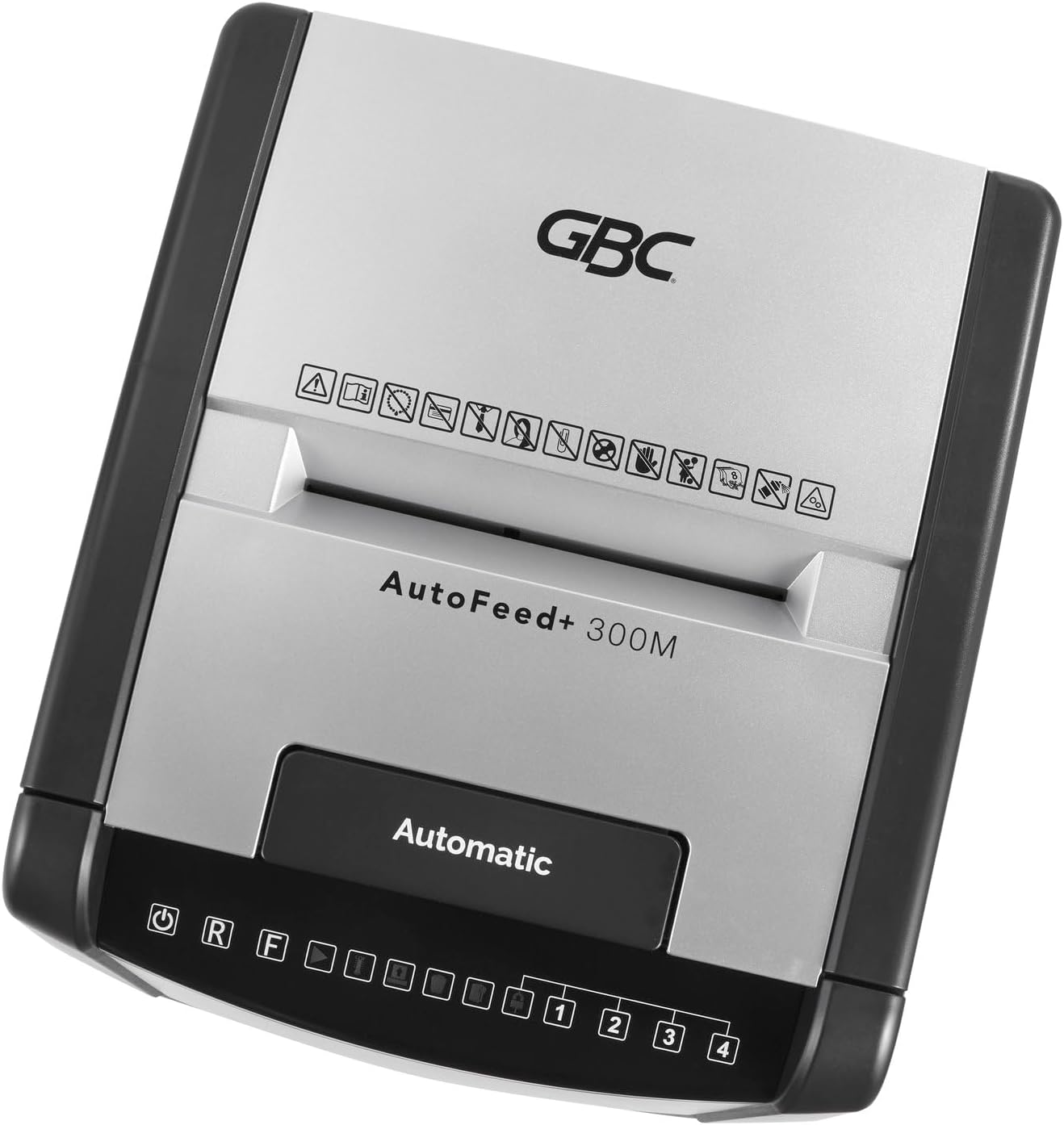
Сүрөт 2.1: Жогорку view of the shredder control panel, showing safety warning icons.
3. Пакеттин мазмуну
Пакетте бардык буюмдар бар экенин текшериңиз:
- GBC AutoFeed+ 300M Shredder Unit
- Waste Bin (16 Gallon Capacity)
- Көрсөтмө (бул документ)
4. Орнотуу
- Unpack the shredder and remove all packaging materials.
- Place the shredder on a flat, stable surface. Ensure adequate space around the unit for ventilation.
- Insert the waste bin securely into the shredder cabinet. The shredder will not operate if the bin is not correctly seated.
- Электр шнурын жерге туташтырылган электр розеткасына туташтырыңыз.
- Turn on the main power switch, usually located on the back or side of the unit.
5. Иштөө нускамалары
5.1. Auto-Feed Operation
The auto-feed feature allows for hands-free shredding of multiple sheets.
- Автоматтык түрдө берүүчү лотоктун капкагын ачыңыз.
- Stack up to 300 sheets of paper neatly into the auto-feed chamber. Ensure papers are free of folds or creases.
- Автоматтык түрдө берүүчү лотоктун капкагын жабыңыз. Майдалагыч документтерди автоматтык түрдө иштете баштайт.
- The shredder can process documents containing paper clips and staples in the auto-feed.

Image 5.1: Illustration of the auto-feed process: stacking papers, closing the lid, and the shredder operating.

Image 5.2: User placing a stack of documents into the auto-feed tray.
5.2. Manual Feed Operation
For smaller quantities of paper or credit cards, use the manual feed slot.
- Ensure the shredder is powered on.
- Кол менен берүү уячасына 8го чейин кагаз барагын салыңыз.
- For credit cards, insert one card at a time into the designated manual feed slot.
- The shredder will automatically detect the paper or card and begin shredding.

Image 5.3: Visual comparison of auto-feed (left) and manual feed (right) shredding options.
5.3. Security Level
This shredder produces micro-cut particles, offering P-5 level security. This ensures highly confidential information is securely destroyed.

Image 5.4: Illustration of micro-cut particle size (3/32" x 5/8") compared to a US quarter for P-5 security level.
6. Техникалык тейлөө
6.1. Emptying the Waste Bin
The shredder features a 16-gallon waste bin. Empty the bin regularly to prevent jams and ensure optimal performance. The shredder has a bin full sensor that will indicate when emptying is required.
- Turn off and unplug the shredder.
- Pull out the waste bin from the front of the unit.
- Майдаланган материалды жок кылыңыз.
- Reinsert the waste bin firmly until it clicks into place.

Image 6.1: The shredder with its 16-gallon waste bin pulled out, illustrating its capacity and dimensions.
6.2. Oiling the Shredder
Regular oiling of the shredder blades is crucial for maintaining performance and extending the life of the unit. Use GBC shredder oil or a compatible vegetable-based shredder oil.
- Кагаз киргизүү тешигине майдалагыч майынын жука сызыгын сүйкөңүз.
- Run a few sheets of paper through the manual feed to distribute the oil.
- Perform this maintenance after every 30 minutes of continuous shredding or when emptying the waste bin.
7. Кыйынчылыктарды
| Көйгөй | Мүмкүн себеп | Чечим |
|---|---|---|
| Шредер иштебей жатат. | No power; waste bin not properly inserted; overheating. | Check power connection; ensure bin is fully inserted; allow shredder to cool down for 30-60 minutes. |
| Кагаз тыгылышы. | Too many sheets; paper folded or creased; non-shreddable material. | Use the reverse function (R button on control panel) to clear the jam. Reduce sheet count for future shredding. |
| Майдалагыч иштөө учурунда токтоп калат. | Overheating; waste bin full. | Allow shredder to cool down; empty the waste bin. |
8. Техникалык шарттар
- Модел: WSM1757609
- Чач түрү: Micro-Cut
- Коопсуздук деңгээли: P-5
- Автоматтык түрдө берүү кубаттуулугу: 300 баракка чейин
- Кол менен берүү кубаттуулугу: 8 баракка чейин
- Таштанды урнасынын сыйымдуулугу: 16 галлон
- Үзгүлтүксүз иштөө убактысы: 60 мүнөт
- Бөлүктөр: Paper, paper clips, staples, credit cards (manual feed only)
- Өлчөмдөрү (L x W x Y): 19 x 17 x 29 дюйм
- Элемент Салмагы: 55.9 фунт
- Өндүрүүчү: ACCO бренддери
9. Кепилдик жана колдоо
For warranty information and customer support, please refer to the official GBC webсайтына кириңиз же сатуучуңузга кайрылыңыз. Кепилдик талаптары үчүн сатып алуунун далили катары сатып алуу дүмүрчөгүңүздү сактап коюңуз.
GBC Official Webсайт: www.gbc.com