
Easytry123 N2QAYB000752
Easytry123 Replacement Remote Control User Manual
Модел: N2QAYB000752
For Panasonic Viera LCD HDTV TVs
1. Киришүү
This manual provides instructions for the Easytry123 Replacement Remote Control, model N2QAYB000752. This remote is designed to function as a replacement for various Panasonic Viera LCD HDTV models, including TX-L42E5E, TX-L42E5Y, TX-L42EW5, TX-L47E5B, TX-L47E5E, TX-L47E5Y, TX-L47EW5, TX-LR32E5, TX-LR42E5, TX-L42ETW5, TX-L47ET5, and TX-P42UT50. Please note that as a replacement unit, some advanced or specific functions of your original remote may not be fully supported.
For optimal performance, ensure your TV model is listed as compatible. This remote does not require programming and is ready for use once batteries are installed.
2. Орнотуу
2.1 Батареяны орнотуу
- Пульттун артындагы батарея отсегин табыңыз.
- Батарея бөлүмүнүн капкагын ачуу үчүн ылдый же жебе менен көрсөтүлгөн багытта жылдырыңыз.
- Insert two (2) AA-size batteries, ensuring the positive (+) and negative (-) terminals align correctly with the markings inside the compartment.
- Батарея бөлүмүнүн капкагын бекем чыкылдаган үн чыкканга чейин кайра ордуна жылдырып, кайра ордуна коюңуз.

Figure 1: Back of the remote control with the battery compartment open, illustrating the correct orientation for inserting two AA batteries.

Figure 2: Back of the remote control with the battery compartment securely closed after battery installation.
2.2 Алгачкы колдонуу
Once batteries are installed, the remote control is ready for immediate use with compatible Panasonic Viera TVs. Point the remote directly at the TV's infrared receiver.
3. Пультту иштетүү
This section details the primary functions of the buttons on your replacement remote control. Refer to the image below for button layout.
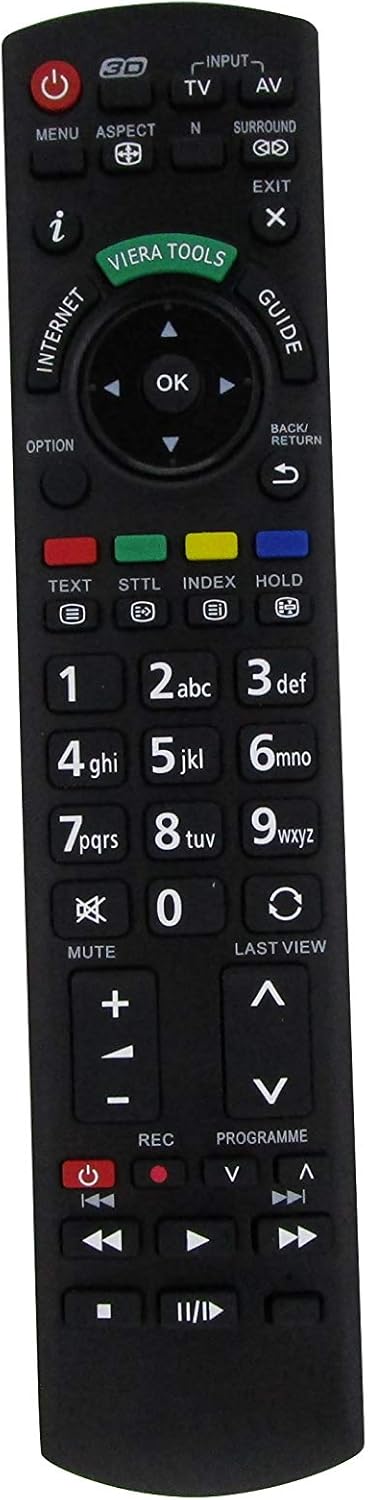
Сүрөт 3: Алдыңкы view of the Easytry123 Replacement Remote Control, highlighting the various function buttons.
3.1 Негизги функциялар
- Күч (●): Телевизорду күйгүзөт же өчүрөт.
- Input/AV: Selects the video input source (e.g., HDMI 1, AV, Component).
- TV: Switches to TV broadcast mode.
- Меню: Opens the TV's main menu for settings and adjustments.
- Аспект: Changes the screen aspect ratio (e.g., 16:9, 4:3).
- N: (Function may vary) Often used for picture modes or specific TV features.
- Курчап: Activates or deactivates surround sound modes.
- Чыгыңыз: Closes menus or returns to the previous screen.
- мен (Маалымат): Displays program information or current status.
- Viera куралдары: Accesses Panasonic's Viera Tools menu for smart features.
- Интернет: Direct access to internet features (if supported by TV).
- Гид: Opens the electronic program guide (EPG).
- Навигация панели (Жогору, Төмөн, Сол, Оң, ОК): Менюларды карап чыгуу жана тандоолорду ырастоо үчүн колдонулат.
- Опция: Accesses context-sensitive options within menus.
- Артка/кайтуу: Returns to the previous menu or channel.
- Текст: Activates teletext (if available).
- STTL (Subtitle): Субтитрлерди күйгүзөт/өчүрөт.
- Индекс: Accesses index pages in teletext or other features.
- кармап туруңуз: Holds teletext page.
- Numeric Pad (0-9): Enters channel numbers or numerical data.
- Үнсүз: Silences the TV audio.
- Акыркы View: Returns to the previously viewed channel or input.
- Көлөмү (+/-): Телевизордун үнүн тууралайт.
- Channel (▲/▼): Changes TV channels up or down.
- REC (жазуу): Initiates recording (if TV supports PVR function).
- Programme (▲/▼): Similar to Channel Up/Down, for program selection.
- Ойнотууну башкаруу элементтери (ойнотуу, тындыруу, токтотуу, артка түрүү, алдыга тез түрүү, өткөрүп жиберүү): Controls media playback for connected devices or TV's internal media player.
Note: The functionality of certain buttons may depend on your specific Panasonic TV model and its features.
4. Техникалык тейлөө
4.1 Батареяны алмаштыруу
Replace batteries when the remote's response becomes sluggish or it stops functioning. Always replace both batteries simultaneously with new AA-size batteries. Do not mix old and new batteries, or different types of batteries.
4.2 Тазалоо
Пультту тазалоо үчүн жумшак, кургак чүпүрөктү колдонуңуз. өжөр кир үчүн, бир аз гampen the cloth with water. Avoid using harsh chemicals, abrasive cleaners, or solvents, as these can damage the remote's surface or internal components.
4.3 Сактоо
When storing the remote for extended periods, remove the batteries to prevent leakage, which can cause damage. Store in a cool, dry place away from direct sunlight and extreme temperatures.
5. Кыйынчылыктарды
- Пульт жооп бербей жатат:
- Батареялар туура полярдуулук менен туура салынганын текшериңиз.
- Эски батарейкаларды жаңысына алмаштырыңыз.
- Пульт менен телевизордун инфракызыл сенсорунун ортосунда эч кандай тоскоолдуктар жок экенин текшериңиз.
- Confirm that the remote is pointed directly at the TV.
- Айрым баскычтар иштебейт:
- As a replacement remote, some specific functions might not be supported by this unit or your TV model.
- Ensure the TV is in the correct mode (e.g., TV mode for channel buttons, AV mode for playback controls).
- Үзгүлтүксүз иштөө:
- Алсыз батареялар үзгүлтүккө учурап иштешине алып келиши мүмкүн. Аларды алмаштырыңыз.
- Күчтүү жарык булактарынын (мисалы, түз күн нуру же жаркыраган флуоресценттик чырактар) инфракызыл сигналга тоскоол болбой турганын текшериңиз.
6. Техникалык шарттар
| Модель номери | N2QAYB000752 |
| Бренд | Easytry123 |
| Шайкештик | Panasonic Viera LCD HDTVs (e.g., TX-L42E5E, TX-L47E5B, TX-P42UT50) |
| Power Source | 2 x AA батарейкалар |
| Байланыш | Инфракызыл (IR) |
7. Кепилдик жана колдоо
For information regarding warranty coverage or technical support, please refer to the purchase documentation or contact the seller, Easytry123, directly. As this is a replacement product, warranty terms may vary from original manufacturer warranties.
For further assistance, please visit the seller's support page or contact their customer service.
Ask a question about this manual
Ask about setup, troubleshooting, compatibility, parts, safety, or missing instructions. Manuals+ will review the question and use this page’s manual context to help answer it.