
Introduction
Thank you for choosing the Renkforce RF-SBS-500 2D Wired Barcode Scanner. This device is designed for efficient and reliable scanning of both 1D and 2D barcodes from various surfaces, including paper and smartphone screens. Its omnidirectional scanning capability and hands-free operation make it suitable for a wide range of applications. This manual provides essential information for the proper setup, operation, and maintenance of your scanner.
Коопсуздук нускамалары
- Сканерди экстремалдык температурага, нымдуулукка же тике күн нуруна калтырбаңыз.
- Сканерди түшүрүүдөн же катуу таасирлерге дуушар кылуудан качыңыз.
- Сканерди ажыратууга же өзгөртүүгө аракет кылбаңыз. Бул кепилдикти жокко чыгарат.
- Keep the scanning window clean to ensure optimal performance. Use a soft, dry cloth.
- Ensure the USB cable is connected securely to prevent accidental disconnection.
Пакеттин мазмуну
- Renkforce RF-SBS-500 2D Wired Barcode Scanner
- Интеграцияланган USB-A кабели
- Колдонуучунун Колдонмосу (бул документ)
Жайгашуу
Follow these steps to set up your Renkforce RF-SBS-500 barcode scanner:
- Сканерди таңгактан чыгаруу: Сканерди таңгагынан кылдаттык менен чыгарып алыңыз.
- Компьютерге туташуу: Plug the integrated USB-A cable from the scanner into an available USB port on your desktop or laptop computer.
- Драйверди орнотуу: The scanner is typically plug-and-play. Your operating system (Windows, macOS, Linux) should automatically detect and install the necessary drivers. Wait for the installation to complete.
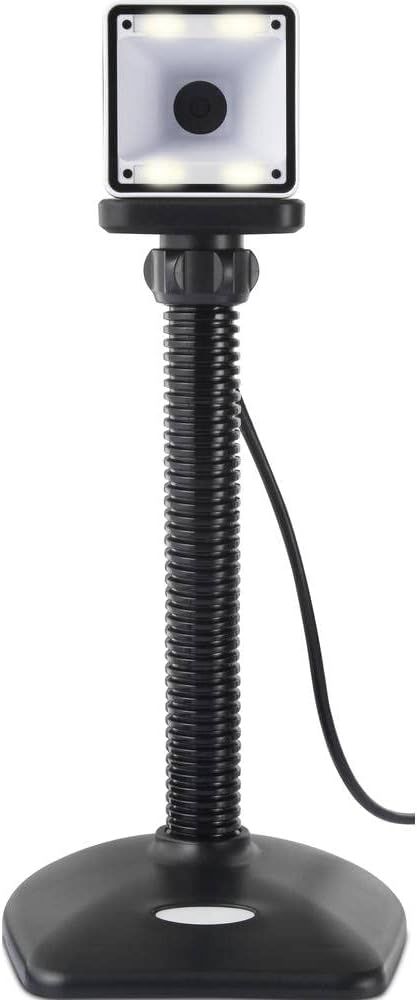
- Жайгашкан жери: Place the scanner on a stable, flat surface. The flexible neck allows for adjustment of the scanning head angle for optimal positioning.

Сканерди иштетүү
The Renkforce RF-SBS-500 is designed for ease of use with its omnidirectional and hands-free capabilities.
- Күйгүзүү: Once connected via USB, the scanner will power on automatically. The LED indicators on the scanner head may illuminate briefly.
- Штрих-кодду сканерлөө: Position the barcode within the scanning area of the scanner head. The scanner will automatically detect and read the barcode.
- Визуалдык жана уккулуктуу пикир: Upon successful scanning, the integrated buzzer will emit a short beep, and the LED display on the scanner will flash or change color, indicating a successful read.
- Omnidirectional Reading: The scanner can read barcodes regardless of their orientation, eliminating the need to align the barcode precisely.
- Hands-Free Mode (Presentation Mode): The scanner operates continuously in a presentation mode, allowing you to simply pass items with barcodes in front of the scanning window without pressing any buttons. This saves time and improves workflow efficiency.
- Колдоого алынган штрихкоддор: The scanner supports both 1D (e.g., EAN, UPC, Code 39) and 2D (e.g., QR Code, Data Matrix, PDF417) barcode types.
Техникалык тейлөө
Тийиштүү техникалык тейлөө сканериңиздин узак мөөнөттүү иштешин жана оптималдуу иштешин камсыз кылат.
- Сканерлөө терезесин тазалоо: Сканерлөө терезесин жумшак, мамыксыз чүпүрөк менен үзгүлтүксүз тазалап туруңуз. Өжөр кир үчүн, бир азampкездемени суу же жумшак, абразивдүү эмес тазалоочу каражат менен сүртүңүз. Тазалоочу каражатты түз эле сканерге чачпаңыз.
- Жалпы тазалоо: Сканердин сыртын кургак же бир аз кургак чүпүрөк менен сүртүңүзamp кездеме. Катуу химиялык заттарды же абразивдүү материалдарды колдонуудан алыс болуңуз.
- Сактагыч: Колдонулбай турган учурда, сканерди таза, кургак жерде, күндүн түз нурунан жана өтө жогорку температурадан алыс сактаңыз.
Проблемаларды чечүү
Сканериңизде көйгөйлөргө туш болсоңуз, төмөнкү жалпы көйгөйлөрдү жана чечимдерди караңыз:
| Көйгөй | Мүмкүн себеп | Чечим |
|---|---|---|
| Сканер күйбөйт. | USB cable not connected properly or faulty USB port. | Ensure the USB cable is firmly connected to both the scanner and the computer. Try a different USB port. |
| Сканер штрих-коддорду окубайт. | Barcode damaged, scanning window dirty, or incorrect barcode type. | Check the barcode for damage. Clean the scanning window. Ensure the barcode type is supported (1D/2D). Adjust the distance and angle of the barcode to the scanner. |
| No beep or LED feedback after scanning. | Barcode not read successfully. | Refer to the "Scanner does not read barcodes" solution. If the issue persists, contact support. |
| Сканерленген маалыматтар туура эмес көрсөтүлөт. | Keyboard layout mismatch or software issue. | Ensure your computer's keyboard layout matches the expected output. Test with a simple text editor. |
If the problem persists after trying these solutions, please contact Renkforce customer support.
Техникалык шарттар
| Өзгөчөлүк | Спецификация |
|---|---|
| Модель номери | RF-4679568 |
| Скандоо мүмкүнчүлүгү | 1D жана 2D штрих-коддор |
| Байланыш технологиясы | USB-A (Зымдуу) |
| Скандоо ылдамдыгы | секундасына 60 сүрөт |
| Скандоо режими | Omnidirectional, Hands-free (Presentation Mode) |
| Пикир | Integrated Buzzer, LED Display |
| Шайкеш түзмөктөр | Desktop Computer, Laptop, Smartphone (via appropriate adapter if needed) |
| Өлчөмдөрү (L x W x Y) | 150 x 5.2 x 5.2 см |
| Элемент Салмагы | 102 грамм |
| Power Source | USB менен иштейт |
| Келип чыккан өлкө | Германия |
Кепилдик жана колдоо
Renkforce products are manufactured to high-quality standards and come with a standard warranty. Please refer to your purchase documentation or the Renkforce official webАймагыңызга тиешелүү кепилдик шарттары жана шарттары үчүн сайт.
For technical support, troubleshooting assistance, or warranty claims, please contact Renkforce customer service. Contact details can typically be found on the Renkforce webсайтында же продуктунун таңгагында.