
Vonets VAP11AC
Vonets VAP11AC Dual-Band WiFi Bridge User Manual
Model: VAP11AC
1. Продукт бүтүп калдыview
The Vonets VAP11AC is a versatile mini dual-band AC1200 WiFi Bridge, Wireless Repeater, and WiFi to Ethernet Converter. It is designed to enable wired devices to connect to a wireless network or to extend the range of an existing WiFi network. This device supports both 2.4GHz and 5GHz bands, offering high-speed data transmission and stable connectivity for various applications.

Figure 1: Vonets VAP11AC Dual-Band WiFi Bridge with included USB and Ethernet cables.
Негизги функцияларга төмөнкүлөр кирет:
- WiFi көпүрөсү: Allows wired devices (e.g., IP cameras, DVRs, smart TVs, desktop computers) to connect to the internet wirelessly via an Ethernet port.
- Зымсыз кайталоочу: Extends the coverage and signal strength of an existing WiFi network, eliminating dead zones.
- WiFi AP Hotspot: Can function as an Access Point, suitable for creating a wireless network in environments like hotel rooms.

Figure 2: The VAP11AC supports a combined transmission rate of 1200Mbps, with 300Mbps on the 2.4GHz band and 900Mbps on the 5GHz band, ensuring faster and more stable wireless connections.
2. Пакеттин мазмуну
Пакетиңизде бардык буюмдар бар экенин текшериңиз:
- Vonets VAP11AC Dual-Band WiFi Bridge
- USB/DC Power Cable
- Ethernet Cable (RJ45, 30cm)
- Колдонуучунун Колдонмосу (бул документ)
3. Аппараттык сүрөттөлүш
Familiarize yourself with the ports and indicators on your VAP11AC device:

Figure 3: ашыкview of VAP11AC ports and LED indicators.
- LAN порту: 10/100Mbps adaptive Ethernet port for wired connections.
- USB порт: Used for power supply (typical 5V/2A).
- DC Порт: Alternative power supply input (DC5V-15V).
- Калыбына келтирүү баскычы: Заводдук жөндөөлөрдү калыбына келтирүү үчүн колдонулат.
- LED көрсөткүчтөрү:
- Жашыл жарык: 5G WiFi connection status.
- Көк жарык: 2.4G WiFi connection status.
- Сары жарык: Ethernet cable connection status.
The VAP11AC features a built-in cooling fan for efficient heat dissipation, ensuring stable operation even under high load. The fan automatically starts and stops after 5-10 minutes of normal operation.
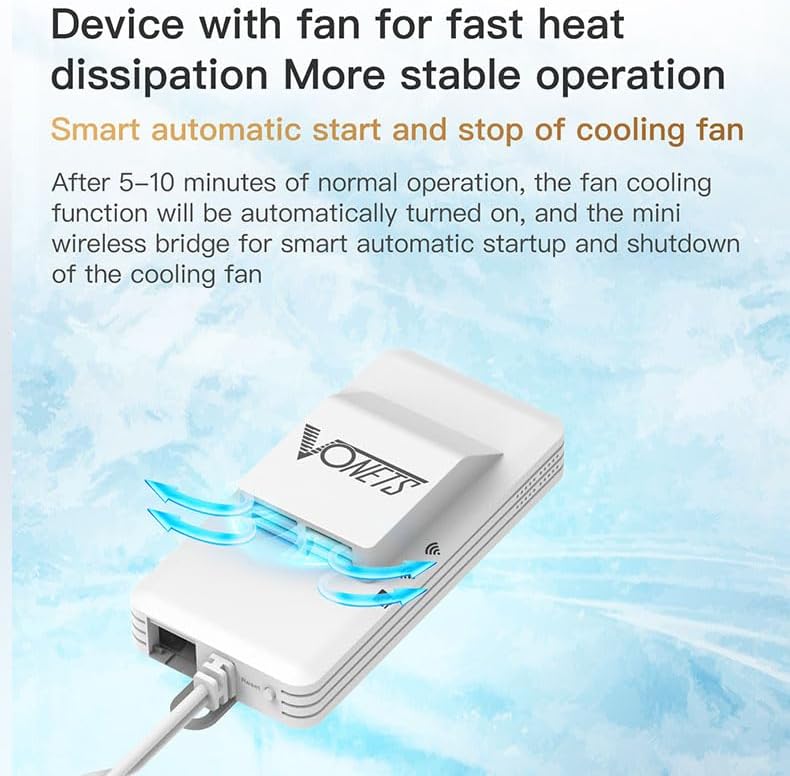
Figure 4: The VAP11AC includes a smart cooling fan for enhanced stability and heat management.
4. Орнотуу жана конфигурациялоо
Follow these steps to set up your Vonets VAP11AC:
- Күйгүзүү: Connect the VAP11AC to a power source using the provided USB/DC power cable. You can use a USB port (e.g., from a computer or USB power adapter) or a DC5V-15V power supply. Ensure the power supply meets the specifications (e.g., 5V/2A for USB).
- Initial Connection for Configuration:
- Connect your computer directly to the VAP11AC's LAN port using the Ethernet cable.
- Temporarily disable DHCP on your computer's network adapter settings.
- Manually set your computer's IP address to an address in the same subnet as the VAP11AC, for exampле,
192.168.254.2. The VAP11AC's default IP address is192.168.254.254. - ачуу а web браузер жана багыттоо
http://192.168.254.254. - Log in using the default credentials (usually админ колдонуучу аты үчүн жана админ for password).
- Иштөө режимин тандоо: Once logged in, you can choose between Repeater/Bridge mode or AP mode based on your needs.
- Зымсыз тармак жөндөөлөрүн конфигурациялоо:
- For Repeater/Bridge Mode: Scan for available WiFi networks and select the one you wish to extend or connect to. Enter the WiFi password if required. Ensure that any hotspot functions are disabled if you are using it purely as a client bridge to avoid IP conflicts.
- AP режими үчүн: Configure the SSID (network name) and password for the new wireless network that the VAP11AC will broadcast.
- Жөндөөлөрдү сактап, кайра жүктөө: After configuring, save your settings and reboot the device for changes to take effect. Remember to revert your computer's network settings to DHCP or its original configuration after the VAP11AC is set up.
5. Иштөө режимдери
5.1. Repeater/Bridge Application
In this mode, the VAP11AC expands your existing WiFi network or allows wired devices to connect to it wirelessly. It acts as a client to an existing WiFi network and provides an Ethernet connection for devices that lack wireless capabilities.

Figure 5: Repeater/Bridge Application setup, showing the VAP11AC extending WiFi or connecting wired devices.
Common uses include connecting desktop computers, printers, surveillance cameras, DVRs, or other IP devices to your wireless network without needing long Ethernet cables.
5.2. AP Application
In Access Point (AP) mode, the VAP11AC converts a wired internet connection into a wireless hotspot. This is ideal for situations where you have an Ethernet connection but need to provide WiFi access to multiple devices.

Figure 6: AP Application setup, showing the VAP11AC creating a WiFi hotspot from a wired connection.
This mode is particularly useful in hotel rooms or offices where only wired internet is available, allowing you to connect smartphones, tablets, and laptops wirelessly.
6. Техникалык тейлөө
To ensure optimal performance and longevity of your VAP11AC:
- Keep the device in a well-ventilated area to allow for proper heat dissipation.
- Аппаратты экстремалдык температурага, нымдуулукка же тике күн нуруна тийгизүүдөн сактаңыз.
- Clean the device periodically with a soft, dry cloth. Do not use liquid cleaners.
- The internal cooling fan operates automatically. Ensure its vents are not obstructed.
- Өндүрүүчүнүн микропрограммалык камсыздоосунун жаңыртууларын үзгүлтүксүз текшерип туруңуз webсайттын иштешин жакшыртуу жана каталарды оңдоо мүмкүнчүлүктөрүнөн пайдалануу мүмкүнчүлүгү.
7. Кыйынчылыктарды
If you encounter issues with your VAP11AC, refer to the following common problems and solutions:
| Көйгөй | Мүмкүн болгон себеп / Чечим |
|---|---|
| Түзмөк күйбөй жатат. | Ensure the power cable is securely connected and the power source (USB port or DC adapter) is functional and provides sufficient power (5V/2A for USB). |
| Cannot access configuration page (192.168.254.254). |
|
| No internet connection after setup. |
|
| Intermittent signal loss or unstable connection. |
|
| Forgot login password or configuration issues. | басып, кармап туруңуз Калыбына келтирүү баскычы for approximately 5-10 seconds until the lights flash. This will restore the device to factory default settings. You will then need to reconfigure it. |
If you continue to experience issues, please contact customer support at htxeu2021@163.com.
8. Техникалык шарттар
| Өзгөчөлүк | Description |
|---|---|
| Модель номери | VAP11AC |
| Бренд | Vonets |
| Зымсыз стандарт | 802.11a/b/g/n/ac |
| Frequency Band | Кош диапазондуу (2.4 ГГц жана 5 ГГц) |
| Маалыматтарды өткөрүү ылдамдыгы | Up to 1200 Mbps (300Mbps 2.4GHz + 900Mbps 5GHz) |
| Тармак порттору | 1 x RJ45 Ethernet (10/100Mbps adaptive) |
| Электр камсыздоо | USB (5V/2A recommended) or DC (5V-15V) |
| Өзгөчөлүктөр | LED Indicator, Built-in Cooling Fan, Automatic Overvoltage Коргоо |
| Өлчөмдөр | (Information not explicitly provided, but implied compact size) |
| Салмагы | 72 грамм |
9. Кепилдик жана колдоо
For technical support, troubleshooting assistance, or any inquiries regarding your Vonets VAP11AC, please contact our support team:
- Электрондук почта: htxeu2021@163.com
Please refer to your purchase documentation for specific warranty terms and conditions. Keep your proof of purchase for warranty claims.
Ask a question about this manual
Ask about setup, troubleshooting, compatibility, parts, safety, or missing instructions. Manuals+ will review the question and use this page’s manual context to help answer it.