
Introduction
This manual provides comprehensive instructions for the installation, operation, and maintenance of your new FLYLINKTECH V8 6000mAh 21.6V Li-ion Replacement Battery. This battery is designed to be a direct replacement for Dyson V8 and SV10 series cordless vacuum cleaners, offering extended runtime and reliable performance. Please read this manual carefully before use to ensure proper handling and maximize battery life.

Image: The FLYLINKTECH V8 6000mAh 21.6V Li-ion Replacement Battery.
Коопсуздук маалыматы
Your FLYLINKTECH V8 replacement battery incorporates advanced safety features to protect against common electrical issues. Adherence to these guidelines is crucial for safe operation and longevity of the battery.
- Over-charging Protection: Prevents the battery from being charged beyond its capacity.
- Кыска туташуулардан коргоо: Кыска туташууда электр энергиясын автоматтык түрдө өчүрөт.
- High-temperature Protection: Monitors and regulates battery temperature to prevent overheating.
- Ашыкча ток коргоо: Ашыкча токтун тартылышынан коргойт.
- Ашыкча разряддан коргоо: Protects the battery from being fully depleted, which can reduce its lifespan.
- Көлөмүtage Коргоо: Vol зыянынын алдын алатtage шиптер.
- Эстутум эффектиси жок: Allows charging at any time without reducing battery capacity.
- Fire-resistant Construction: Designed with materials to minimize fire risk.
Always use the original Dyson charger or a compatible charger designed for V8/SV10 batteries. Do not expose the battery to water, extreme temperatures, or direct sunlight. If the battery shows signs of damage, discontinue use immediately and contact support.

Image: Diagram illustrating the multi-protection features of the battery, including over-current, over-discharge, short-circuit, over-charge, over-voltagд, жана ашыкча температурадан коргоо.

Image: Detailed illustration of the 9-layer smart protection system and anti-explosion layers within the battery cells.
Пакеттин мазмуну
Upon opening your package, please verify that all items are present and undamaged:
- 1 x FLYLINKTECH V8 6000mAh 21.6V Li-ion Replacement Battery
- 2 x Replacement Filters (Pre-filter & Post-filter)
- 1 x тазалоочу щетка
- 1 x Screwdriver (for installation)
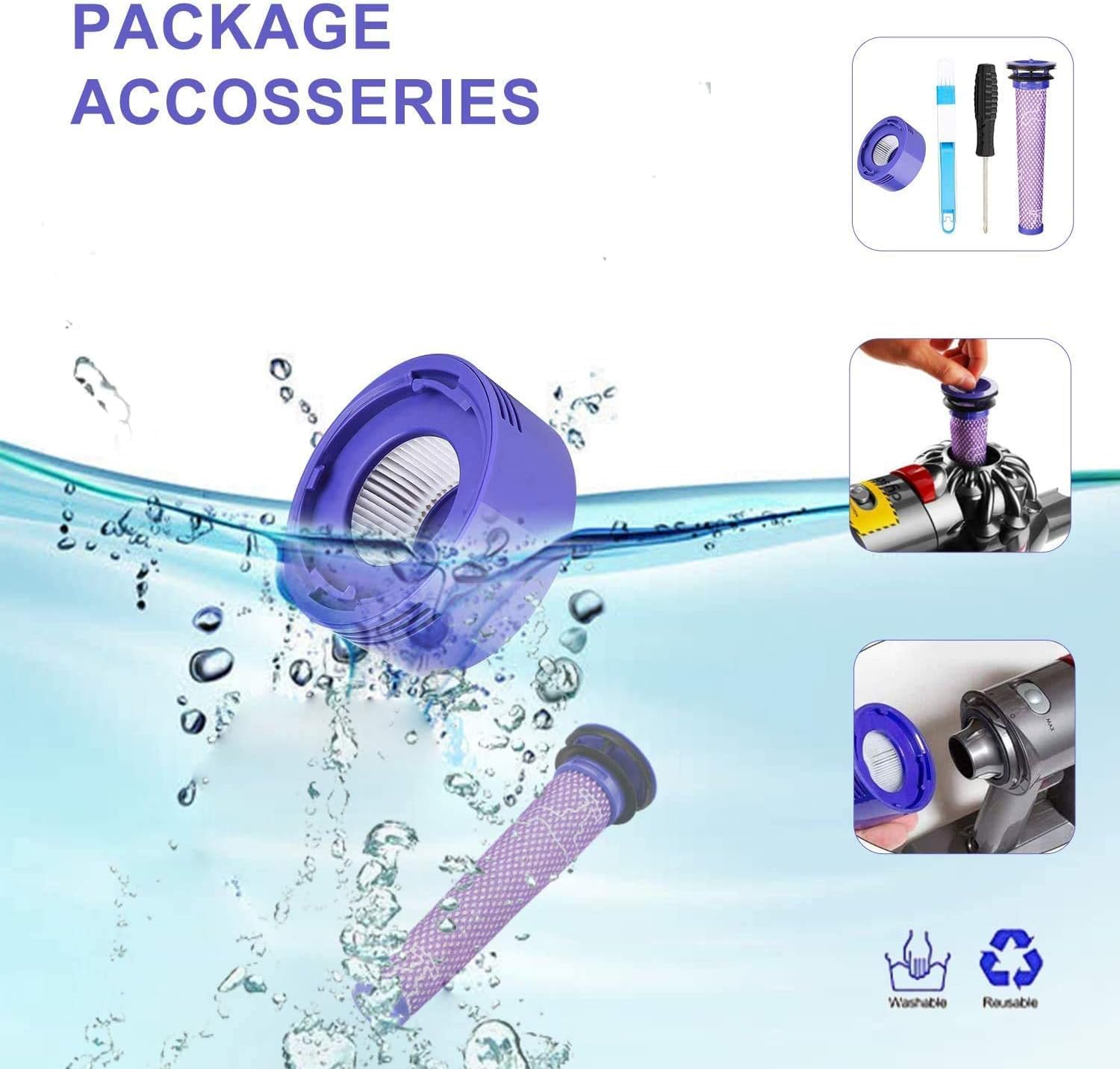
Image: Contents of the package, including the battery, two filters, a cleaning brush, and a screwdriver.
Шайкештик
This FLYLINKTECH V8 replacement battery is specifically designed to be compatible with the following Dyson V8 and SV10 series cordless vacuum cleaner models:
- Dyson V8 Animal
- Dyson V8 Fluffy
- Dyson V8 абсолюттук
- Dyson V8 Carbon Fiber
- Dyson V8 Absolute Pro
- Dyson V8 Motorhead
- Дайсон SV10
- All V8 series models
The battery design is compatible with both older models (before September 2017) and newer models (after September 2017) of the V8 series.

Image: Visual representation of various Dyson V8 series vacuum models compatible with the replacement battery.

Image: Comparison showing the battery's fit for Dyson V8 models manufactured before and after September 2017.
Орнотуу
Follow these steps to safely replace the battery in your Dyson V8 series vacuum cleaner. A screwdriver is included in the package for your convenience.
- Step 1: Switch Power Off. Ensure the vacuum cleaner is unplugged from any power source and completely powered off before beginning the installation.
- Step 2: Remove Screw from Rear of Handle. Locate the screw at the rear of the vacuum's handle and remove it using the provided screwdriver.
- Step 3: Remove Screw from Underside of Battery. Find the two screws on the underside of the battery pack and remove them.
- Step 4: Pull Out the Old Battery. Carefully slide the old battery pack out of its housing.
- Step 5: Install a New Battery and Tighten Screws. Insert the new FLYLINKTECH battery into the housing, ensuring it clicks securely into place. Reinsert and tighten all three screws (one at the handle, two at the bottom) to secure the new battery.
Note: The new battery has only a small amount of remaining power. Please fully charge it before the first use.

Image: Visual step-by-step instructions for replacing the Dyson V8 battery, showing screw removal and battery insertion.
Орнотуу боюнча видео көрсөтмө
Video: A detailed guide on how to replace the battery on a Dyson V8 vacuum cleaner. This video demonstrates the process of removing the old battery and installing the new one.
Операция
Батареяны заряддоо
The FLYLINKTECH V8 battery can be charged using your existing Dyson V8 charger. Ensure the vacuum is securely docked or the charger is properly connected to the battery port. The indicator lights will show the charging status.

Image: Illustration of three different charging methods for the Dyson V8 battery: directly on the vacuum, on a charging dock, and wall-mounted.
Индикатор жарыгынын сүрөттөлүшү
The battery features indicator lights to communicate its status during charging and use. Refer to the table below for a detailed explanation:
| Индикатор үлгүсү | Status (When Charging) | Status (When Using) |
|---|---|---|
| Blue lights blinking sequentially | Заряддоо, аз батарея | Жок |
| Two blue lights blinking, one solid | Charging, medium charge | Жок |
| Three blue lights blinking, one solid | Заряддоо, дээрлик толгон | Жок |
| All blue lights solid | Charged, on standby | Заряддын жогорку деңгээли |
| Two blue lights solid | Жок | Заряддын орточо деңгээли |
| One blue light solid | Жок | Заряддын деңгээли төмөн |
| Жарыктар жок | Жок | Empty, needs recharging |
| Red lights blinking | Battery fault - Reinstallation and check DC contacts. If persists, contact us for a replacement. | Battery fault - Reinstallation and check DC contacts. If persists, contact us for a replacement. |
| Катуу кызыл жарык | Charger fault - Please contact Dyson Helpline. | Main body fault - Please contact Dyson Helpline. |
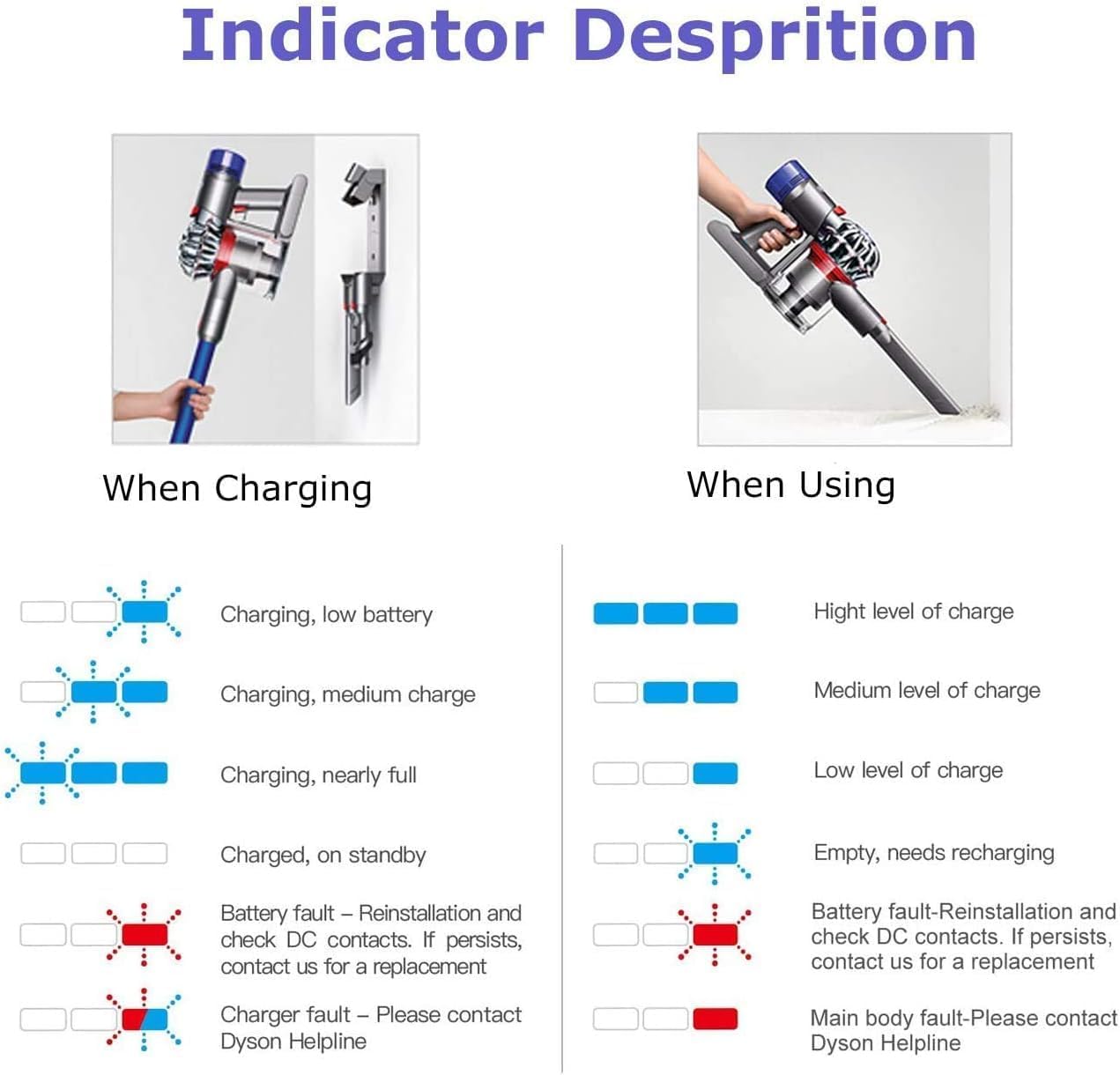
Image: Visual guide to the battery indicator lights, showing different patterns for charging status and battery level during use, as well as fault indicators.
Техникалык тейлөө
Proper maintenance of your battery and associated components will ensure optimal performance and extend the lifespan of your vacuum cleaner.
Фильтрди тазалоо
The included replacement filters (pre-filter and post-filter) are washable and reusable. Regular cleaning of these filters is essential for maintaining strong suction and preventing strain on the vacuum's motor and battery.
- Remove the filters from your vacuum cleaner according to your Dyson vacuum's user manual.
- Wash the filters under cold running water until the water runs clear.
- Allow the filters to air dry completely for at least 24 hours before reinserting them into the vacuum. Do not use a dryer or heat source.
- Replace filters if they are damaged or if suction power remains low after cleaning.

Image: Illustration showing the two types of Dyson V8 filters (pre-filter and post-filter) and their washable, reusable nature.
Проблемаларды чечүү
If you encounter issues with your FLYLINKTECH V8 replacement battery, refer to the following common problems and solutions:
- Батарея заряддалбай жатат:
- Ensure the charger is properly connected and the power outlet is functional.
- Check the battery indicator lights for a 'Charger fault' (solid red light). If so, the charger may be faulty.
- Reinstall the battery to ensure proper contact.
- Vacuum Not Turning On or Intermittent Power:
- Батарея толук заряддалганын текшериңиз.
- Verify the battery is securely installed and all screws are tightened.
- Look for 'Battery fault' (blinking red lights) on the indicator. Reinstall the battery and check contacts.
- If the issue persists, the main body of the vacuum or the battery itself might be faulty.
- Reduced Run Time or Suction Power:
- Колдонуудан мурун батареянын толук заряддалганын текшериңиз.
- Clean the vacuum's filters as described in the Maintenance section. Clogged filters significantly reduce suction and battery efficiency.
- Check for blockages in the vacuum's wand, head, or dustbin.
- Эгерде батарея эски болсо, анын кубаттуулугу убакыттын өтүшү менен табигый түрдө төмөндөшү мүмкүн.
- Battery Does Not Fit Well:
- Double-check that your vacuum model is a Dyson V8 or SV10 series. Refer to the Compatibility section.
- Ensure the battery is aligned correctly during installation. Do not force it.
For issues not covered here or if troubleshooting steps do not resolve the problem, please contact FLYLINKTECH customer support.
Техникалык шарттар
| Өзгөчөлүк | Деталь |
|---|---|
| Бренд | FLYLINKTECH |
| Модель номери | V8 |
| Батарея клеткасынын курамы | Литий ион |
| Батарея сыйымдуулугу | 6000 мАч (6.0Ач) |
| Тtage | 21.6 вольт (AC) |
| Ampөчүрүү | 6 Amps |
| Батарея клеткаларынын саны | 6 Клеткалар |
| Кайра колдонууга жарамдуу | Зарядкалуу |
| Элемент Салмагы | 460 грамм |
| Элементтин өлчөмдөрү | 3.23 x 5.98 x 4.8 дюйм |
| Шайкеш моделдер | Dyson V8, SV10 series |
| Камтылган медиа | 2 Filters, Cleaning Brush |

Image: Graphic displaying key specifications of the FLYLINKTECH V8 battery, including 6000mAh capacity, 21.6V voltage, Lithium-ion type, and 6 cells.
Кепилдик жана колдоо
FLYLINKTECH stands behind the quality of its products. Your V8 replacement battery comes with the following warranty and support:
- 30 күндүк төлөмдү кайтаруу саясаты: Full refund available within 30 days of purchase.
- 100-Day Return & Exchange Policy: Returns and exchanges accepted within 100 days of purchase.
- 12 айлык кепилдик: Covers manufacturing defects and performance issues for one year from the date of purchase.
- Кардарларды колдоо: 7*24 hours after-sale service is available.
For any warranty claims, technical assistance, or support inquiries, please contact us at: support@flylinktech.hk