
1. Киришүү
The NETVIP WiFi Repeater Model WN531 is designed to extend the coverage of your existing wireless network. It eliminates Wi-Fi dead zones by boosting your current Wi-Fi signal, providing a strong and reliable connection in areas where your router's signal is weak or non-existent. This device supports wireless speeds of up to 300Mbps on the 2.4GHz band and is compatible with IEEE 802.11 b/g/n standards, working with most standard wireless routers.

Image 1.1: The NETVIP WiFi Repeater extending wireless coverage in a home environment.
2. Пакеттин мазмуну
Сураныч, бардык буюмдар бар экенине ынануу үчүн ачканда пакеттин мазмунун текшериңиз:
- 1 x NETVIP WiFi Repeater (Model WN531)
- 1 х Ethernet кабели
- 1 x User Manual

Image 2.1: Contents of the NETVIP WiFi Repeater package, including the device, Ethernet cable, and user manual.
3. Продукциянын өзгөчөлүктөрү
- Enhanced Wi-Fi Coverage: Extends wireless signal to previously unreachable areas, providing a strong and reliable Wi-Fi connection with up to 300Mbps wireless speed.
- Жалпы шайкештик: Complies with IEEE 802.11 b/g/n standards, ensuring compatibility with virtually any wireless router.
- Dual Functionality (2-in-1): Supports both Repeater Mode and Access Point (AP) Mode, allowing flexible deployment based on your network needs. Works with various wireless devices including smart home devices, computers, mobile phones, and IP cameras.
- Компакт дизайн: Plugs directly into a standard wall outlet, featuring a discreet and space-saving design.
- Оңой орнотуу: Installation can be completed quickly and easily via your smartphone, tablet, or laptop.

Image 3.1: Illustration of the 2.4G wireless signal support and enhanced wall penetration for wider coverage.
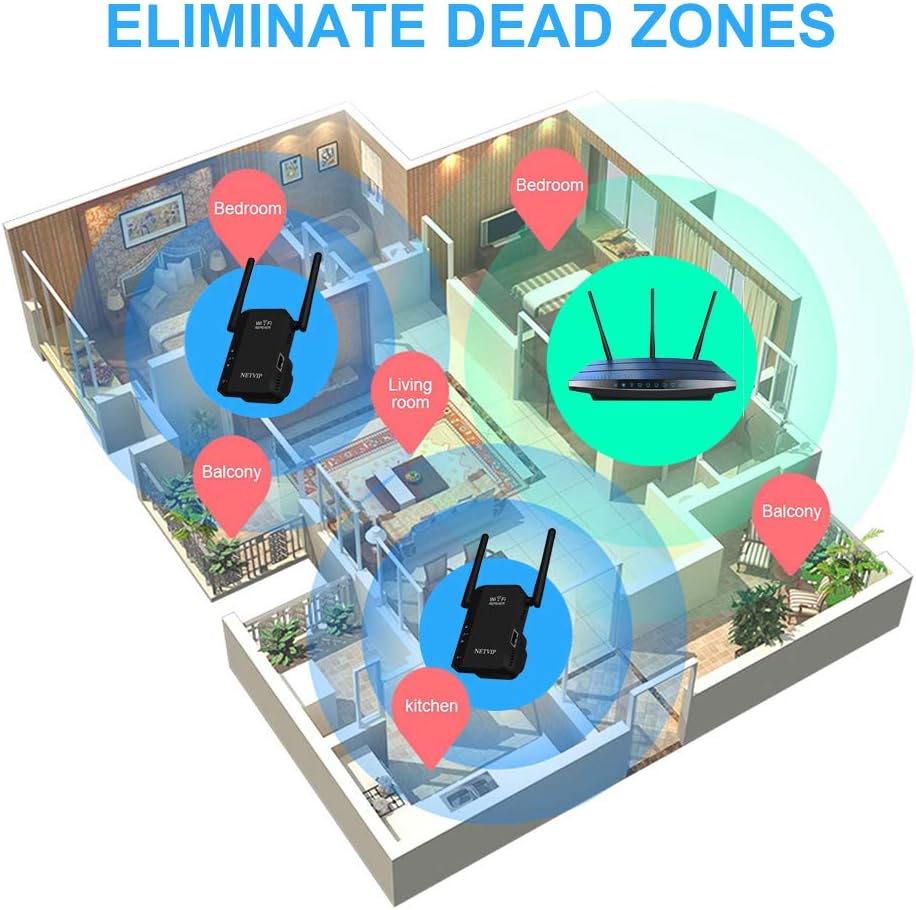
Image 3.2: Diagram showing how the WiFi Repeater helps eliminate dead zones in a multi-room environment.
4. Продукт бүтүп калдыview (Physical Components)
Familiarize yourself with the physical components of your NETVIP WiFi Repeater:
- LED жарыктары: Indicate power, Wi-Fi signal status, and Ethernet connection.
- Калыбына келтирүү баскычы: Аппаратты демейки жөндөөлөргө кайтаруу үчүн колдонулат.
- LAN порту: An Ethernet port for wired connections in AP Mode or for connecting a wired device in Repeater Mode.

Сүрөт 4.1: Детальдуу view of the NETVIP WiFi Repeater highlighting the LED lights, Reset Button, and LAN Port.
5. Орнотуу колдонмосу
Follow these steps to set up your NETVIP WiFi Repeater:
- Күйгүзүү: Plug the repeater into a standard wall outlet near your main router. Wait for the power LED to light up.
- Репитердин Wi-Fi тармагына туташыңыз: On your smartphone, tablet, or laptop, search for available Wi-Fi networks. Connect to the network named 'Wireless-N' or similar (check the label on the device for the exact default SSID). No password is required for the initial connection.
- Мүмкүнчүлүк Web Интерфейс: ачуу а web browser (e.g., Chrome, Firefox) and enter the default IP address (usually 192.168.10.1 or 192.168.1.254) into the address bar. You may be prompted to enter a default username and password (often 'admin' for both).
- Иштөө режимин тандоо: Once logged in, you will see the setup wizard. Choose your desired operating mode:
- Кайталоо режими: To extend an existing Wi-Fi network.
- AP режими: To create a new Wi-Fi network from a wired Ethernet connection.
- Тармак орнотууларын конфигурациялоо:
- Кайталоочу режим үчүн: Select your main Wi-Fi network from the list, enter its password, and choose a new SSID (network name) for your extended network or keep the original.
- AP режими үчүн: Set a new SSID and password for the new Wi-Fi network that the repeater will create. Connect an Ethernet cable from your main router to the repeater's LAN port.
- Apply Settings and Relocate: Apply the settings. The repeater will restart. Once restarted, you can unplug it and move it to a suitable location between your router and the Wi-Fi dead zone. Ensure the signal LED indicates a good connection to your main router.
6. Иштөө режимдери
The NETVIP WiFi Repeater supports two primary operating modes:
6.1. Repeater Mode
In Repeater Mode, the device wirelessly connects to your existing router's Wi-Fi network and re-transmits the signal, effectively extending its range. This is ideal for eliminating Wi-Fi dead zones in your home or office.

Image 6.1: Diagram illustrating the Repeater Mode, where the device extends the signal from a wireless router to WLAN clients.
6.2. Кирүү чекити (AP) режими
In AP Mode, the device connects to your wired router via an Ethernet cable and transforms the wired internet connection into a new wireless network. This is useful for adding Wi-Fi capability to a wired-only network or creating a separate Wi-Fi network.
Image 6.2: Diagram illustrating the AP Mode, where the device creates a wireless network from a wired router connection for WLAN clients.
7. Техникалык тейлөө
To ensure optimal performance and longevity of your NETVIP WiFi Repeater, consider the following maintenance tips:
- Жайгашкан жери: Place the repeater in an open area, away from obstructions like large metal objects, concrete walls, and other electronic devices that may cause interference.
- Тазалоо: Keep the device clean and free from dust. Use a soft, dry cloth to wipe the exterior. Do not use liquid cleaners.
- Программалык камсыздоонун жаңыртуулары: Periodically check the NETVIP official website for any available firmware updates. Updating the firmware can improve performance, add new features, and fix bugs.
- Вентиляция: Ensure the device has adequate ventilation to prevent overheating. Do not cover the ventilation holes.
8. Кыйынчылыктарды
If you encounter issues with your NETVIP WiFi Repeater, refer to the following common problems and solutions:
- Cannot connect to the repeater's default Wi-Fi (Wireless-N):
- Ensure the repeater is powered on and the power LED is lit.
- Try resetting the repeater to factory defaults by pressing and holding the Reset button for 5-10 seconds.
- Ensure your device's Wi-Fi is enabled and scanning for networks.
- кирүү мүмкүн эмес web management page (192.168.10.1):
- Verify that your device is connected to the repeater's Wi-Fi network (e.g., 'Wireless-N').
- Ensure you are typing the correct IP address into the browser's address bar.
- Башкасын байкап көрүңүз web браузер же браузериңиздин кэшин тазалаңыз.
- Temporarily disable any VPN or firewall software on your device.
- Repeater is not extending the Wi-Fi signal or signal is weak:
- Relocate the repeater to a position halfway between your router and the desired coverage area. The signal LED should indicate a good connection to your main router.
- Ensure the password for your main Wi-Fi network was entered correctly during setup.
- Башка электрондук шаймандардын кийлигишүүсүн текшериңиз.
- Эгер мүмкүн болсо, ретранслятордун микропрограммасын жаңыртыңыз.
- Slow internet speed through the repeater:
- Ensure the repeater is placed in an optimal location with a strong signal from the main router.
- Reduce the number of devices connected to the repeater.
- Check your main internet connection speed.
9. Техникалык шарттар
| Өзгөчөлүк | Спецификация |
|---|---|
| Модел | WN531 |
| Бренд | NETVIP |
| Зымсыз байланыш стандарты | 802.11b, 802.11n |
| Маалыматтарды өткөрүү ылдамдыгы | 300 Мегабит секундасына |
| Түс | Кара |
| Шайкеш түзмөктөр | Маршрутизатор |
| Пакеттин өлчөмдөрү | 10.4 x 10.2 x 10 см |
| Элемент Салмагы | 180 г |
10. Кепилдик жана колдоо
The NETVIP WiFi Repeater Model WN531 comes with a Продукцияга 1 жылдык кепилдик сатып алынган күндөн тартып. Бул кепилдик өндүрүштүк кемчиликтерди жана нормалдуу колдонуудагы бузулууларды камтыйт.
For technical support, warranty claims, or any questions regarding your device, please contact NETVIP customer service through the retailer's platform or the official NETVIP website. Please have your purchase receipt and product model number (WN531) ready when contacting support.