
1. Киришүү
Ledlenser TFX Arcturus 6500 – бул оор кырдаалдар үчүн иштелип чыккан жогорку өндүрүмдүү тактикалык фонарь. Ал өтө жаркыраган ак жарыкты берет жана кызыл, жашыл же көк жарыкка түз жетүүнү камсыз кылат. Укук коргоо органдары, коопсуздук, куткаруу, аман калуу жана сыртта колдонуу үчүн иштелип чыккан бул фонарь бекем конструкцияны көп түстүү стробоскопиялык жарык жана өтө суудан коргоо сыяктуу өнүккөн функциялар менен айкалыштырат.
2. Пакеттин мазмуну
Төмөнкү нерселердин баары пакетиңизге камтылганын текшериңиз:
- TFX Arcturus 6500 фонариги
- баштык
- Lanyard
- USB кабели
- Батарея (3 x 18650 Li-ion)
3. Продукт бүтүп калдыview
TFX Arcturus 6500 фонарыңыздын компоненттери менен таанышып алыңыз.
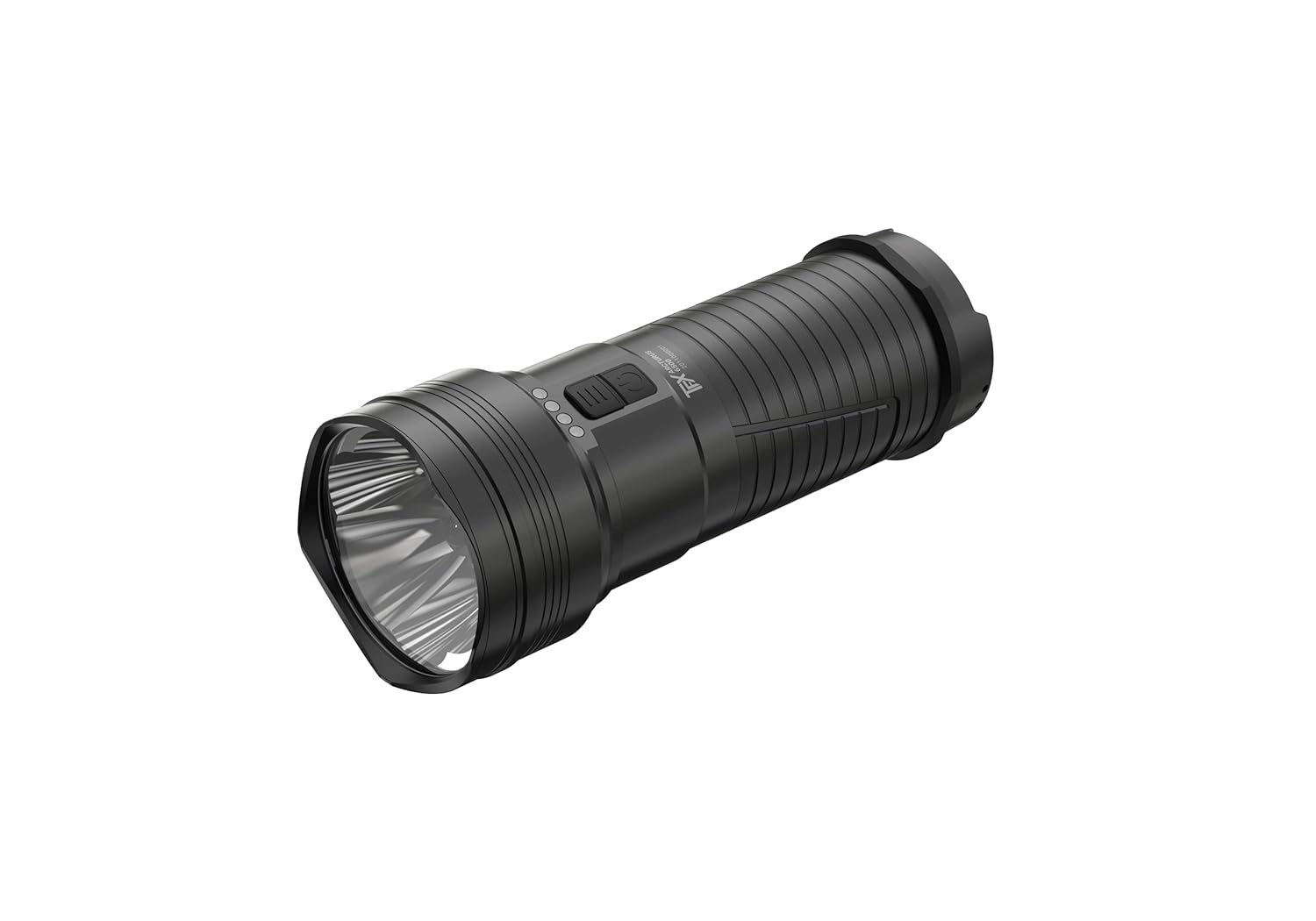
1-сүрөт: Толук view TFX Arcturus 6500 тактикалык фонарынын, көрсөтүүчүasinанын бекем алюминий корпусу жана чагылдыргыч башы.

2-сүрөт: Кол чырактын башкаруу панелинин жакындан тартылган көрүнүшү, анда үнсүз кош алдыңкы которгуч жана төрт LED батарея жана кубаттоо абалынын индикатору көрсөтүлгөн.
4. Орнотуу
4.1 Батареяны орнотуу
- Кол чырактын куйрук капкагын сааттын жебесине каршы буруп чечиңиз.
- Үч 18650 литий-иондук батарейканы батарея бөлүмүнө салып, полярдуулуктун тууралыгын (оң (+) учу фонарь башына карай) текшериңиз.
- Куйруктун капкагын сааттын жебеси боюнча кайра бекем орнотулганга чейин бураңыз.
4.2 Алгачкы заряддоо
Биринчи жолу колдонуудан мурун, фонарьдын батареяларын толугу менен заряддаңыз.
- Адатта резина капкак менен корголгон USB кубаттоо портун табыңыз.
- Берилген USB кабелин фонарьга жана ылайыктуу USB кубат булагына (мисалы, дубал адаптери, компьютердин USB порту) туташтырыңыз.
- Башкаруу панелиндеги төрт LED кубаттоо абалын көрсөтөт. Төрт LEDдин баары туруктуу күйүп турса, толук кубатталганын көрсөтөт.
- Толук заряддалгандан кийин, USB кабелин сууруп, суу өткөрбөө үчүн резина капкактын туура жабылганын текшериңиз.
4.3 Боо байлоочу шнур
Ишенимдүү кармоо жана кокусунан түшүп кетүүнүн алдын алуу үчүн боону куйруктун капкагындагы атайын илмекчеге бекитиңиз.
5. Иштөө нускамалары
5.1 Күйгүзүү/өчүрүү жана жарыктык режимдери
TFX Arcturus 6500 интуитивдик башкаруу үчүн үнсүз кош алдыңкы которгучка ээ.
- Күйгүзүү/өчүрүү үчүн: Негизги кубат баскычын (чоңураак баскыч) болжол менен 1 секунд басып туруңуз.
- Жарыктыкты (Ак жарык) айкалыштыруу үчүн: Фонарь күйүп турганда, үч жарыктык деңгээлин (Жогорку, Орточо, Төмөн) өзгөртүү үчүн негизги кубат баскычын кыска басыңыз.
- Жарылуу функциясы: Каалаган режимден максималдуу кубаттуулукту көз ирмемге алуу үчүн негизги кубат баскычын эки жолу басыңыз. Мурунку режимге кайтуу үчүн коё бериңиз.
5.2 Түстүү жарык режимдери (кызыл, жашыл, көк)
Башкаруу панелиндеги кичирээк, экинчи баскыч түстүү жарык режимдерине түз жетүүгө мүмкүндүк берет.
- Түстүү жарыкты иштетүү үчүн: Фонарь өчүк турганда, кошумча баскычты басып, кармап туруңуз. Фонарь акыркы колдонулган түс режиминде күйөт.
- Түстөрдү айкалыштыруу үчүн: Түстүү жарык күйүп турганда, кызыл, жашыл жана көк түстөрдү алмаштыруу үчүн экинчи баскычты кыска басыңыз.
- Түстүү жарыкты өчүрүү үчүн: Экинчи баскычты кайра басып, кармап туруңуз же негизги кубат баскычын басыңыз.
5.3 Көп түстүү стробоскоп
Көп түстүү стробоскоп функциясы фонарьга бардык төрт түстө (ак, кызыл, жашыл, көк) жаркылдоого мүмкүндүк берет.
- Көп түстүү стробоскопту иштетүү үчүн: Фонарь күйүп турганда (каалаган ак же түстүү режимде), кошумча баскычты эки жолу басыңыз.
- Көп түстүү стробоскопту өчүрүү үчүн: Негизги кубат баскычын же кошумча баскычты кыскача басыңыз.
5.4 Акылдуу эс тутум функциясы
Фонарь акыркы жолу колдонулган ак жарыктын жарыктык деңгээлин жана түстүү жарык режимин эстеп калат. Күйгүзүлгөндө, ал мурда тандалган жөндөөлөргө кайтып келет.
5.5 Кулпу функциясы
Ташуу же сактоо учурунда кокустан күйүп кетүүнүн алдын алуу үчүн, фонарь кулпу функциясына ээ.
- Кулпуну иштетүү үчүн: Фонарь өчүк турганда, негизги кубат баскычын жана кошумча баскычты бир убакта болжол менен 3 секунд басып, индикатордун LED индикаторлору күйүп-өчкөнгө чейин кармап туруңуз.
- Кулпуну өчүрүү үчүн: Активдештирүү процессин кайталаңыз. Кулпусун ачуу үчүн индикатордун жарыктары күйүп-өчөт.
5.6 Батареянын жана кубаттоонун абалын көрсөтүү
Башкаруу панелиндеги төрт LED жарыктары батареянын абалын жана кубаттоонун жүрүшүн реалдуу убакыт режиминде көрсөтөт.
- Батареянын абалы: Фонарь күйүп турганда, светодиоддор батареянын калган кубаттуулугун көрсөтөт. Төрт светодиод батареянын кубаттуулугу толук экенин, ал эми бир светодиод батареянын аз калганын билдирет.
- Кубаттоо абалы: Заряддоо учурунда, светодиоддор заряддоонун жүрүшүн көрсөтүү үчүн акырындык менен күйүп турат.
6. Техникалык тейлөө
6.1 Тазалоо
- Кол чырактын корпусун жумшак менен сүртүңүз, гamp кездеме. Абразивдүү тазалагычтардан алыс болуңуз.
- Оптималдуу жарык чыгышын сактоо үчүн линзаны линза тазалоочу чүпүрөк менен сүртүңүз.
- Суу өткөрбөй тургандыгын жана жылмакай иштешин камсыз кылуу үчүн куйрук капкагынын жиптерин мезгил-мезгили менен тазалап, жука катмар силикон майын сүйкөңүз.
6.2 Батареяга кам көрүү
- Ар дайым сунушталган 18650 литий-иондук батарейкаларды колдонуңуз.
- Батареянын иштөө мөөнөтүн узартуу үчүн, фонарь көп колдонулбаса дагы, батареяларды үзгүлтүксүз кубаттап туруңуз.
- Фонарьды салкын, кургак жерде сактаңыз. Узак мөөнөткө сактоо үчүн батарейкаларын алып салыңыз.
6.3 Сууга туруктуулук (IPX8)
TFX Arcturus 6500 IPX8 рейтингине ээ, башкача айтканда, ал өндүрүүчү тарабынан көрсөтүлгөн шарттарда сууга тынымсыз чөмүлүүдөн корголгон. Фонарьды сууга тийгизүүдөн мурун, бардык капкактар жана капкактар бекем жабылганын текшериңиз.
7. Кыйынчылыктарды
Эгерде сиз фонарь менен көйгөйлөргө туш болсоңуз, кеңири таралган көйгөйлөр жана аларды чечүү жолдору үчүн төмөндөгү таблицаны караңыз.
| Көйгөй | Мүмкүн себеп | Чечим |
|---|---|---|
| Кол чырак күйбөйт. | Батареянын заряды аз же түгөндү. Батарея туура эмес орнотулган. Кулпу функциясы иштетилген. | Батареяны кубаттаңыз. Батареянын полярдуулугун текшериңиз. Кулпу функциясын өчүрүңүз. |
| Жарыктын чыгышы күңүрт. | Батарея аз калды. Линза кирдеди. | Батареяны кубаттаңыз. Линзаны тазалаңыз. |
| Кол чырак жылтылдайт. | Арткы капкагы бошоп калган. Батареянын контакттары кирдеп калган. | Арткы капкакты бекем жабыңыз. Батареянын контакттарын таза чүпүрөк менен сүртүңүз. |
| Кубаттоо башталбайт. | USB кабели же кубат булагы бузулган. Кубаттоо порту бүтөлүп калган. | Башка USB кабелин же кубат булагын колдонуп көрүңүз. Кубаттоо портунун бузулганын текшериңиз. |
8. Техникалык шарттар
TFX Arcturus 6500 тактикалык фонарынын деталдуу техникалык мүнөздөмөлөрү.
| Өзгөчөлүк | Деталь |
|---|---|
| Модель номери | 502559 |
| Жарыктык | 6500 люменге чейин |
| Жарык булагы түрү | LED (Ак, Кызыл, Жашыл, Көк) |
| Power Source | Батарея менен иштейт |
| Батарея түрү | 3 x 18650 Литий-ион (кошулган) |
| Тtage | 3.6 вольт |
| Материал | Алюминий |
| Сууга туруктуулук деңгээли | IPX8 |
| Элемент Салмагы | 512 грамм |
| Элементтин өлчөмдөрү (LxWxH) | 15.1 x 4.7 x 6 сантиметр |
| Өзгөчөлүктөр | Зымсыз, RGB үч түстүү жарык функциясы, Үч сегменттүү жарыктык + жаркыроо функциясы, Үнсүз кош алдыңкы которгуч, Көп түстүү стробоскоп, Акылдуу эс тутум, Кулпу функциясы, Рулондон коргоо, Айнек панел |
9. Кепилдик жана колдоо
Кепилдик маалыматы, техникалык колдоо же тейлөө боюнча суроолор үчүн, сатып алууңуз менен кошо берилген документтерди караңыз же Ledlenserдин расмий веб-сайтына кириңиз. webсайт. Кепилдик дооматтар үчүн сатып алганыңыздын далилин сактаңыз.