
Easytry123 RC-970R, HT-R398, HT-S3910, TX-SR494, TX-SR393
Instruction Manual for Easytry123 Replacement Remote Control
Model Compatibility: Onkyo RC-970R, HT-R398, HT-S3910, TX-SR494, TX-SR393
Продукт бүттүview
This document provides essential information for the Easytry123 replacement infrared (IR) remote control, designed for specific Onkyo AV receivers. This remote is an aftermarket replacement and may not offer all functions of your original remote. It is crucial to verify that your original remote matches the appearance of this replacement for proper compatibility.
- This is an infrared replacement remote control.
- Ensure your current remote is identical to the one pictured for full compatibility.
- No detailed instruction manual is included with the product itself; this document serves as a general guide.
- Compatibility is primarily based on visual match and listed models.
- Functionality may vary slightly compared to the original equipment manufacturer (OEM) remote.
Орнотуу жана баштапкы колдонуу
1. Батареяны орнотуу
Алыстан башкаруу пульту эки (2) AAA батарейкасын талап кылат (кошулмага кирбейт). Аларды орнотуу үчүн төмөнкү кадамдарды аткарыңыз:
- Пульттун артындагы батарея отсегин табыңыз.
- Батарея бөлүмүнүн капкагын ачуу үчүн ылдый же жебе менен көрсөтүлгөн багытта жылдырыңыз.
- Оң (+) жана терс (-) терминалдары бөлүмдүн ичиндеги белгилер менен туура дал келишин камсыз кылып, эки AAA батарейкасын салыңыз.
- Батарея бөлүкчөсүнүн капкагын бекем чыккыча ордуна жылдырыңыз.
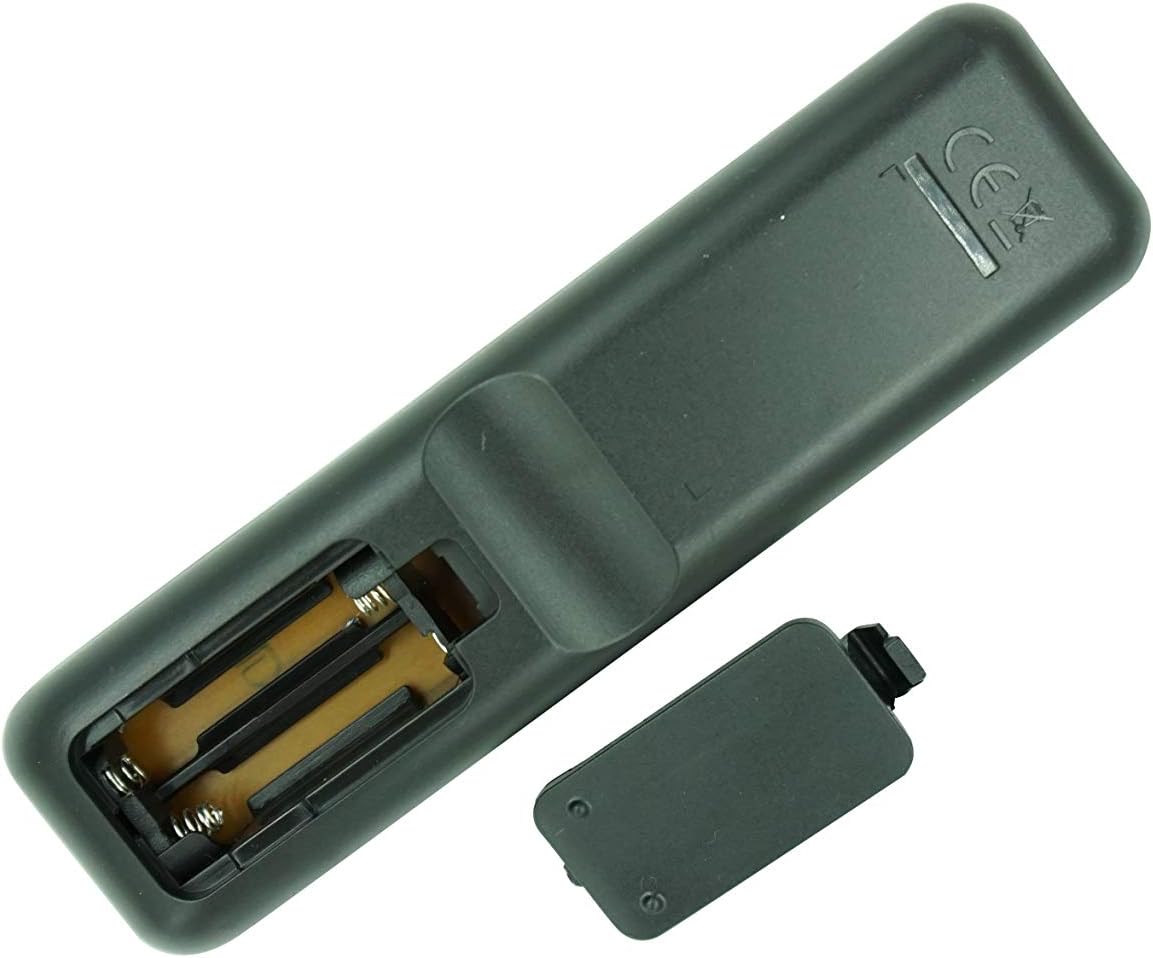
1-сүрөт: Арткы view of the remote control with the battery cover removed, illustrating the battery insertion process. Ensure correct polarity when inserting AAA batteries.
2. Initial Use and Compatibility Check
This remote is an infrared (IR) replacement. No pairing or complex setup is typically required. Simply point the remote at your Onkyo receiver and press a button to test its functionality.
- Ensure there is a clear line of sight between the remote's IR emitter and the receiver's IR sensor.
- Confirm that your Onkyo receiver model (RC-970R, HT-R398, HT-S3910, TX-SR494, TX-SR393) is listed as compatible. If your model is not listed or your original remote looks different, full functionality is not guaranteed.
Иштөө нускамалары
Бул бөлүмдө жалпы маалымат берилетview of the remote control's buttons and their typical functions. For detailed operation of your Onkyo receiver, please refer to your receiver's original instruction manual.

Сүрөт 2: Алдыңкы view of the Easytry123 replacement remote control, showing the layout of all buttons.

3-сүрөт: Бурчтуу view of the remote control, providing a different perspective of the button arrangement.
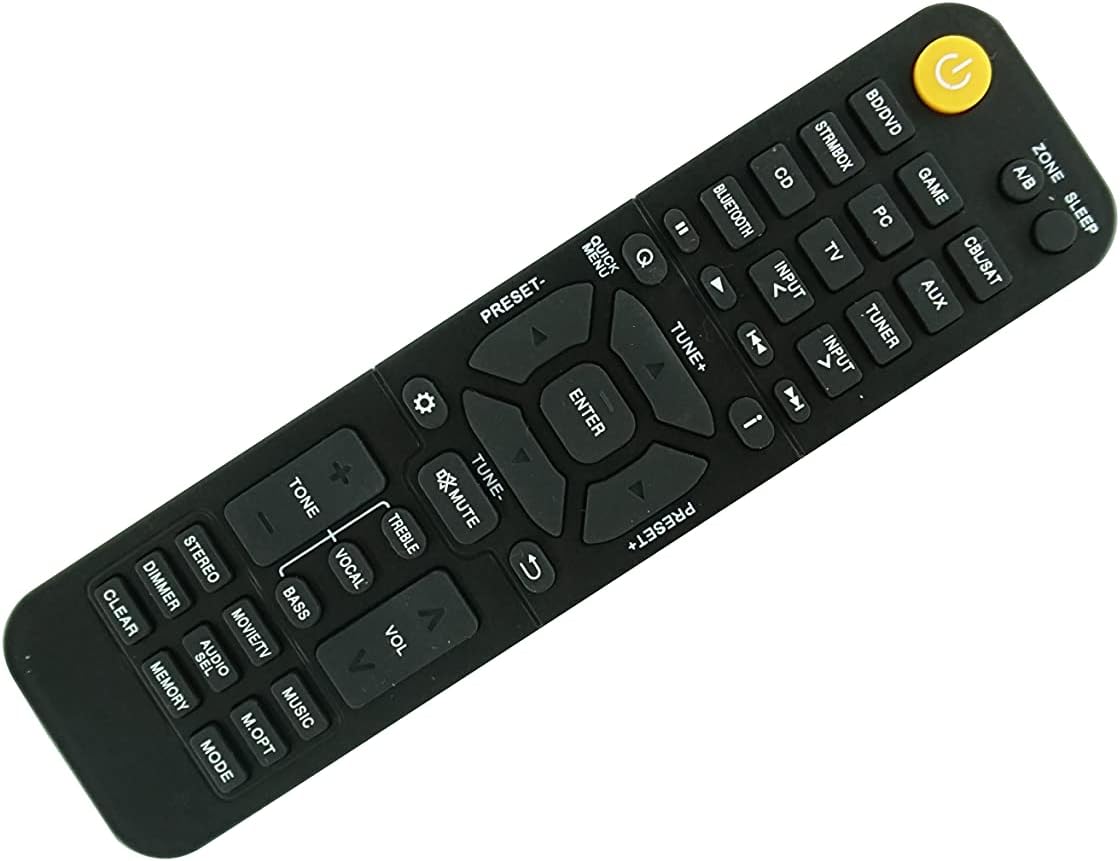
Figure 4: Second angled view of the remote control, further illustrating its design.
Баскычтар бүттүview:
| Баскычтын аты | Типикалык функция |
|---|---|
| КҮЧ (Yellow button) | Turns the receiver On/Off. |
| ZONE A/B | Selects audio output zone (if supported by receiver). |
| УЙКУ | Activates sleep timer function. |
| BD/DVD, GAME, STRMBOX, PC, CD, BLUETOOTH, CBL/SAT, AUX, TV, TUNER | Input source selection buttons. |
| INPUT < / > | Жеткиликтүү киргизүү булактары аркылуу айлануу. |
| Ойнотуу башкаруулары (Play, Pause, Stop, Skip) | Туташкан медиа түзмөктөрдүн ойнотулушун көзөмөлдөйт. |
| QUICK MENU, TUNE+, TUNE-, ENTER, PRESET+, PRESET-, Navigation Arrows | Menu navigation and tuning controls. |
| БАСУУ | Аудио чыгышынын үнүн өчүрөт же ачат. |
| VOL +/- | Башкы үн деңгээлин тууралайт. |
| TONE, TREBLE, VOCAL, BASS | Audio tone and equalization adjustments. |
| STEREO, MOVIE/TV, MUSIC | Үн режимин тандоо. |
| DIMMER, AUDIO SEL, M.OPT, CLEAR, MEMORY, MODE | Various utility and setting buttons. |
Эскертүү: The exact functionality of each button depends on your specific Onkyo receiver model and its features. Some buttons may not be active or may perform different functions than expected if your receiver does not support them or if this replacement remote has slight variations from the original.
Техникалык тейлөө
Батареяны алмаштыруу:
When the remote control's range decreases or it becomes unresponsive, it is likely time to replace the batteries. Follow the battery installation steps outlined in the "Setup and Initial Use" section.
- Always replace both AAA batteries at the same time.
- Эски жана жаңы батарейкаларды же ар кандай типтеги батареяларды аралаштырбаңыз.
- Эгерде пульт көпкө чейин колдонулбаса, агып кетүүнүн алдын алуу үчүн батарейкаларды алып салыңыз.
- Колдонулган батарейкаларды жергиликтүү эрежелерге ылайык жок кылыңыз.
Тазалоо:
Пультту тазалоо үчүн жумшак, кургак чүпүрөктү колдонуңуз. өжөр кир үчүн, бир аз гampкездемени суу же жумшак, абразивдүү эмес тазалоочу каражат менен сүртүңүз. Катуу химиялык заттарды колдонбоңуз же пультту сууга салбаңыз.
Проблемаларды чечүү
| Көйгөй | Мүмкүн себеп | Чечим |
|---|---|---|
| Пульт иштебей жатат же жооп бербей жатат. | Өлүк же туура эмес орнотулган батарейкалар. | Туура полярдуулукту камсыз кылуу менен батарейкаларды жаңы AAA батарейкалары менен алмаштырыңыз. |
| Пульттун жооп берүү аралыгы чектелген же үзгүлтүктүү. | Weak batteries; Obstruction between remote and receiver; Remote's IR emitter or receiver's IR sensor is dirty. | Replace batteries; Ensure clear line of sight; Clean the IR emitter on the remote and the IR sensor on the receiver. |
| Айрым баскычтар иштебейт. | Button not supported by your specific receiver model; Remote is not fully compatible with your receiver's original functions. | Refer to your receiver's original manual; Accept that some advanced or specific functions may not be replicated by a replacement remote. Ensure your original remote looked identical to this replacement. |
| Remote does not control the receiver at all. | Incorrect remote for your receiver model; Receiver's IR sensor is faulty. | Double-check the compatibility list and compare the remote's appearance to your original. If the remote is correct, consult your receiver's manual for troubleshooting its IR sensor. |
Продукт спецификациялары
- Бренд: Easytry123
- Моделдин шайкештиги: Onkyo RC-970R, HT-R398, HT-S3910, TX-SR494, TX-SR393 4K Network AV A/V Receiver
- Байланыш технологиясы: Инфракызыл (IR)
- Контроллердин түрү: Control Button
- Шайкеш түзмөктөр: Home Theater (Onkyo AV Receivers)
- Кубат булагы: 2 x AAA Батареялар (киргизилген эмес)
- Өзгөчө өзгөчөлүгү: Replacement remote, ergonomic design.
- Өндүрүүчү: Easytry123
- Келип чыккан өлкө: Кытай
- ASIN: B095GVQL6Q
- Биринчи жеткиликтүү болгон күнү: 20-май, 2021-жыл
Кепилдик маалымат
As a replacement product, specific warranty details are typically handled by the seller or the platform where the purchase was made. Please refer to the return and refund policies of the retailer (e.g., Amazon.com) for information regarding product defects or returns. The product description indicates a replacement policy is available.
For this specific product, the buybox winner indicates a return policy with a duration of 30 days for refund/replacement.
Кардарларды колдоо
For any questions, concerns, or issues not covered in this manual, please contact the seller directly through the platform where you purchased the remote control. The manufacturer and seller for this product is Easytry123.
When contacting support, please provide your order number and a clear description of the issue.
Ask a question about this manual
Ask about setup, troubleshooting, compatibility, parts, safety, or missing instructions. Manuals+ will review the question and use this page’s manual context to help answer it.