
Introduction
This user manual provides instructions for the Easytry123 replacement remote control, designed for use with various Pioneer Micro Hi-Fi Receiver Systems. Please read this manual carefully before using the remote control to ensure proper operation and to maximize its functionality.
This replacement remote control may not support all advanced functions of the original remote. Refer to your Pioneer system's original manual for specific features not covered here.
Продукт бүттүview
The Easytry123 replacement remote control is an infrared device designed for intuitive control of your compatible Pioneer Micro Hi-Fi Receiver System. It features an ergonomic design for comfortable handling.

Сүрөт 1: Фронт view of the Easytry123 replacement remote control. This image displays the full layout of buttons, including power, source selection (DISC, USB, TUNER, iPod, AUX), navigation, volume, playback controls, and numeric keypad.
Жайгашуу
Батарея орнотуу
Алыстан башкаруу пульту үчүн эки (2) AAA батарейкасы керек (кошулмага кирбейт). Батарейкаларды орнотуу үчүн төмөнкү кадамдарды аткарыңыз:
- Пульттун артындагы батарея бөлүкчөсүнүн капкагын табыңыз.
- Бөлүмдү ачуу үчүн өтмөктү басып, капкакты ылдый жылдырыңыз.
- Оң (+) жана терс (-) терминалдары бөлүмдүн ичиндеги белгилер менен туура дал келишин камсыз кылып, эки AAA батарейкасын салыңыз.
- Батарея бөлүкчөсүнүн капкагын бекем чыккыча ордуна жылдырыңыз.
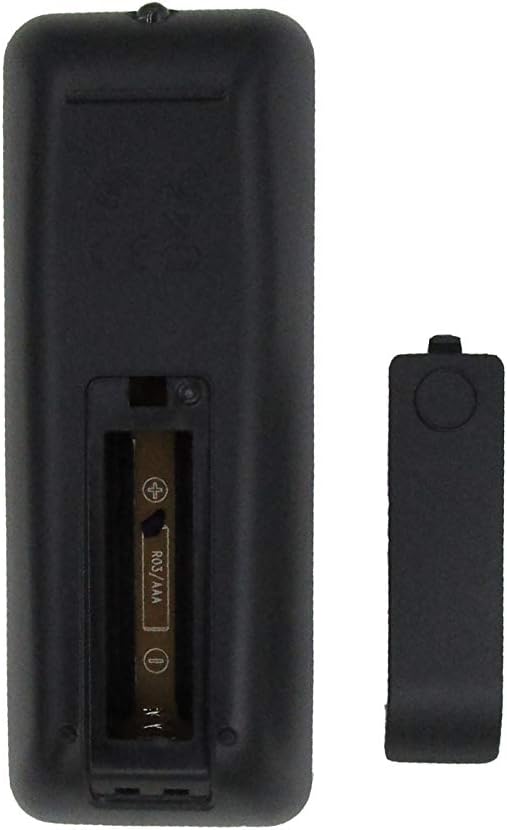
Сүрөт 2: Артка view of the remote control with the battery compartment open, showing the slot for two AAA batteries.
Маанилүү: Эгерде алыстан башкаруу пульту көпкө чейин колдонулбаса, агып кетүүнүн жана бузулуунун алдын алуу үчүн батарейкаларды алып салыңыз.
Иштөө нускамалары
Point the remote control directly at the infrared sensor on your Pioneer Micro Hi-Fi Receiver System. Ensure there are no obstructions between the remote and the receiver.
Баскыч функциялары
| баскыч | Функция |
|---|---|
| STANDBY/ON | Powers the system on or off (standby mode). |
| ДИСК | Selects the CD/Disc player as the audio source. |
| USB | Selects the USB input as the audio source. |
| тюнер | Selects the FM/AM tuner as the audio source. |
| АЧУУ/ЖАБУУ | CD лотокту ачат же жабат. |
| iPod | Selects the iPod/iPhone dock as the audio source. |
| РЕЖИМ | Cycles through various playback modes (e.g., repeat, shuffle). |
| ПРОГРАММА | Used to program tracks for CD playback or tuner presets. |
| AUX | Selects the auxiliary input as the audio source. |
| DOCK MENU | Accesses the menu for a docked iPod/iPhone. |
| SLEEP/TIMER | Sets the sleep timer or accesses timer functions. |
| Navigation (Up/Down/Left/Right/ENTER) | Менюларды багыттоо жана тандоолорду ырастоо. |
| PLAY/PAUSE (►/❚❚) | Ойнотууну баштайт же тындырат. |
| STOP (■) | Ойноону токтотот. |
| ӨТКӨРҮП ЖИБЕРҮҮ (◀◀ / ►►) | Мурунку же кийинки трекке/станцияга өткөрөт. |
| P.BASS | Activates or adjusts the P.BASS (Powerful Bass) feature. |
| DISPLAY/CLOCK | Changes display information or accesses clock settings. |
| EQ | Эквалайзер алдын ала орнотуулары аркылуу айланышат. |
| БАСУУ | Аудио чыгышынын үнүн өчүрөт же ачат. |
| VOL + / - | Үн деңгээлин жогорулатат же азайтат. |
| Сандык баскычтоп (0-9) | Direct selection of tracks, radio presets, or inputting numbers. |
| RDS | Activates or cycles through Radio Data System information (for compatible tuners). |
| PTY | Selects program type for RDS (e.g., News, Pop, Rock). |
| ASPM | Auto Station Preset Memory (for tuner). |
Шайкештик
This Easytry123 replacement remote control is designed to be compatible with the following Pioneer Micro Hi-Fi Receiver Systems and original remote models:
- Pioneer AXD7737
- Pioneer AXD7738
- Pioneer RC-953S (original remote model)
- Pioneer X-EM26
- Pioneer X-EM22
- Pioneer X-EM12
- Pioneer X-EM21
- Pioneer X-EM11
- Pioneer X-EM16
- Pioneer X-PM12
- Pioneer X-PM32
- And other compatible CD/FM Micro Hi-Fi Receiver Systems.
Please verify your system's model number to ensure compatibility. While designed for broad compatibility, some specific functions may vary or not be supported depending on your exact Pioneer system model.
Проблемаларды чечүү
- Пульт жооп бербей жатат:
- Батареялар туура полярдуулук менен (+/-) туура салынганын текшериңиз.
- Эски батареяларды жаңы AAA батареялары менен алмаштырыңыз.
- Check for any obstructions between the remote control and the receiver's infrared sensor.
- Ensure you are within the effective range and pointing the remote directly at the receiver.
- Айрым функциялар иштебейт:
- This is a replacement remote; some advanced or model-specific functions of your original Pioneer remote may not be supported.
- Refer to your Pioneer system's original manual to confirm if the function is supported by your unit.
Техникалык шарттар
- Бренд: Easytry123
- Модел: Replacement for Pioneer AXD7737, AXD7738, RC-953S
- Байланыш технологиясы: Инфракызыл (IR)
- Кубат булагы: 2 x AAA батарейкалар (киргизилген эмес)
- Колдоого алынган түзмөктөрдүн максималдуу саны: 1 (controls one Pioneer system)
- Өзгөчө өзгөчөлүгү: Эргономикалык дизайн
Техникалык тейлөө
- Тазалоо: Пультту жумшак, кургак чүпүрөк менен сүртүңүз. Суюк тазалагычтарды же абразивдүү материалдарды колдонбоңуз.
- Сактагыч: Пультту күн нурунан жана өтө температурадан алыс салкын, кургак жерде сактаңыз.
- Батареяга кам көрүү: Remove batteries if the remote is not used for extended periods to prevent corrosion. Dispose of used batteries responsibly according to local regulations.
Кепилдик жана колдоо
For information regarding warranty coverage or technical support for your Easytry123 replacement remote control, please refer to the retailer or manufacturer's official website where the product was purchased. Keep your proof of purchase for warranty claims.
As this is a replacement product, specific support for the Pioneer Micro Hi-Fi Receiver System itself should be directed to Pioneer customer service or their authorized service centers.